Windows 7 Forums Search
Welcome to Windows 7 Forums. Our forum is dedicated to helping you find solutions with any problems, errors or issues you are experiencing with Windows 7. The Windows 7 forum also covers news and updates and has an extensive Windows 7 tutorial section that covers a wide range of tips and tricks.


Windows 7 - Cant Update.

 
04-06-2010   #1


Windows 7 Ultimate


Cant Update.

hey guys,

im having problems updating windows. im running windows 7 x64 home premium. when i go to the control panel/windows update, it tells me that i cant update because the windows update service isn't running. ive restarted and rebooted my computer and its not working. any ideas on how i can fix this? a point in the right direction would be extremely helpful.

p.s i have Bitdefender 2010 and Norton as my AV's.

Thanks in Advanced.

p.s.s(?) before posting i tried to get a screenshot of what it looks like and it was unresponsive and it restarted my windows explorer

My System SpecsSystem Spec
04-06-2010   #2


Windows 7 Pro 64 SP1


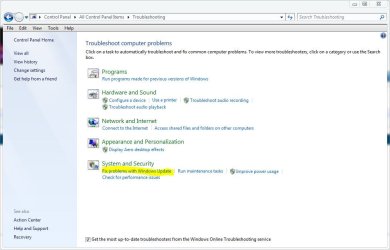
Try the troubleshooter in control panel.
Attached Thumbnails
Cant Update.-update.jpg  
My System SpecsSystem Spec
04-06-2010   #3


Windows 7 Ultimate


Heres what i got.
Attached Thumbnails
Cant Update.-capture.jpg  
My System SpecsSystem Spec
.


04-06-2010   #4


Windows 7 Pro 64 SP1


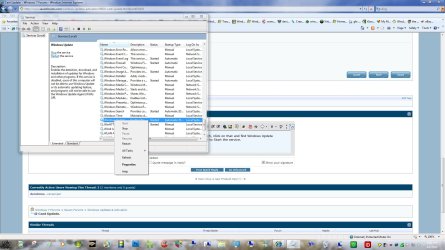
OK Type services in start menu search, Click on that and find Windows Update towards the bottom, Right Click on it to Start the service.

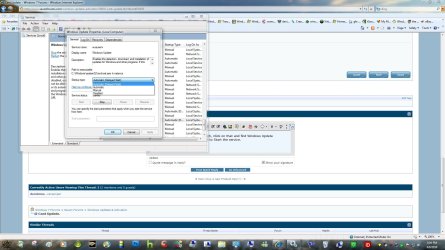
You can go to properties and set it run at startup or whatever you want.
Attached Thumbnails
Cant Update.-service.jpg   Cant Update.-service-properties.jpg  
My System SpecsSystem Spec
04-06-2010   #5


Windows 7 Ultimate


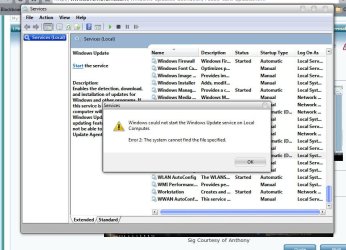
No dice.... i tried to start it and set it to automatic.
Attached Thumbnails
Cant Update.-2.jpg  
My System SpecsSystem Spec
04-06-2010   #6


Windows 7 Pro 64 SP1


See if going here and accepting the terms will get it going,
Microsoft Update

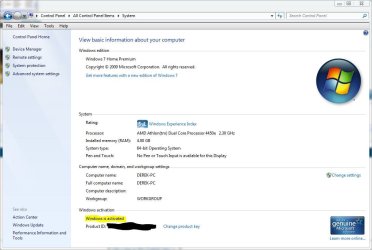
Windows is activated isn't it?
Attached Thumbnails
Cant Update.-activated.jpg  
My System SpecsSystem Spec
04-06-2010   #7


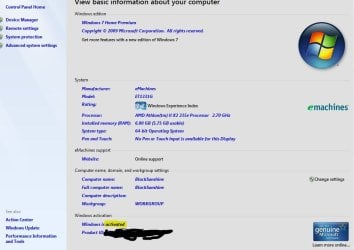
Windows 7 Ultimate


Yup.
Attached Thumbnails
Cant Update.-3.jpg  
My System SpecsSystem Spec
04-06-2010   #8


Windows 7 Pro 64 SP1


Did this just start or has it been like this for a while?

You could try this to see if fixes any corrupt files,
SFC /SCANNOW Command - System File Checker (If your using a theme patcher you will have to repatch after this, If it's the UxStyle core then you won't, I'm just saying because it looks like you are using a custom theme.)


Also here's a link to see if you can find something there, http://windows.microsoft.com/en-us/w...indows-updates


What happened when you went here, http://www.update.microsoft.com/micr....aspx?ln=en-us


Edit: See if this will help also, http://www.microsoft.com/downloads/d...3-d2c47c6fcffc

Last edited by derekimo; 04-06-2010 at 08:47 PM.. Reason: added info
My System SpecsSystem Spec
04-06-2010   #9


Windows 7 Professional x64 PL


If Windows Update service not working you can forget about running Readiness Tool as well

First you have to fix WU service

Try below:

1.Run cmd.exe with administrative previlliges (right click on cmd.exe as admin) and type:

sfc /scannow

2.Reinstall WU Agent http://download.windowsupdate.com/wi...gent30-x64.exe
3.Try reset WU components in aggressive mode How do I reset Windows Update components?
4.Import this fix wuauserv.zip to registry and restart computer

If nothing help find CBS.log in C:\Windows\Logs\CBS folder and attache to post,if file will be too big to attache then upload it on RapidShare: 1-CLICK Web hosting - Easy Filehosting
My System SpecsSystem Spec
04-07-2010   #10


Windows 7 Ultimate


Quote   Quote: Originally Posted by derekimo View Post
Did this just start or has it been like this for a while?

You could try this to see if fixes any corrupt files,
SFC /SCANNOW Command - System File Checker (If your using a theme patcher you will have to repatch after this, If it's the UxStyle core then you won't, I'm just saying because it looks like you are using a custom theme.)


Also here's a link to see if you can find something there, Install Windows updates


What happened when you went here, Microsoft Update


Edit: See if this will help also, Download details: System Update Readiness Tool for Windows 7 for x64-based Systems (KB947821) [January 2010]
@Derekimo

i just got up, went to my computer and i saw there were some issues. i clicked to little flag icon and noticed i couldn't update. i am using a custom theme, and i am using the UxStyle patcher. when i went here Microsoft Update all i saw was a picture on how to check for updates from the start menu.
My System SpecsSystem Spec
Reply

 Cant Update. problems?


Thread Tools


Similar Threads for: Cant Update.
Thread Forum
Windows 7 - Update KB976932 and KB982526 update failure- error 800b100 Windows Updates & Activation
Solved Multiple Update Failures / Win7 x64 - Unable to Update, Error 800b010 Windows Updates & Activation
Solved Update From Microsoft Update Site Crashes Video System Graphic Cards
Wont Update - Security Update for Micro Works 9 (KB2431831) Windows Updates & Activation
Windows Update INCLUDES Motherboard Drivers and BIOS Update on M2A-VM? Drivers


All times are GMT -5. The time now is 02:52 AM.


Windows 7 Forums is an independent web site and has not been authorized,
sponsored, or otherwise approved by Microsoft Corporation.
"Windows 7" and related materials are trademarks of Microsoft Corp.
© Designer Media Ltd
  

1 2 3 4 5 6 7 8 9 10 11 12 13 14 15 16 17 18 19 20 21 22 23 24 25 26 27 28 29 30