Windows 7 Forums


Windows 7: Optional Update

20 Apr 2010   #1

windows 7 Premium
 
 
Optional Update

I opened Windows Update and only listed was an optional update. I didn't update at that time and when I went back to update I could not find the optional update. Ihave Windows 7 Home premium 64 Bit. I looked for updates again but it said everything was up to date. How can I find that update.. I'm not really good with computers any help will be greatly appreciated. I have one other question if you don't mind.

I have to Unzip a ZIP-file with WinZip and save the content to my hard
drive. Then use the unzipped EXE-file to run a program. This sound simple enough, I guess, if you know what you are doing. Where can I get this WinZip program that will run on Windows 7 Home Premium 64 Bit.

One other question. A program that I want to install supports Windows 7 64 bit in 32-bit emulation mode. What does that mean and how do I run this program.

Thanks again for all your help and cooperation. Have a good evening.

My System SpecsSystem Spec

20 Apr 2010   #2

Windows 7 Pro 64 SP1
East Bay Area, CA


Welcome rottikid,

For the update it was probably for MSE if that's your Anti-Virus, You could just look at Installed updates and see if it is there.

As for WinZip you can get it here WinZip - Free software downloads and software reviews - CNET Download.com There might be something else you can use too, someone else might know more about that.

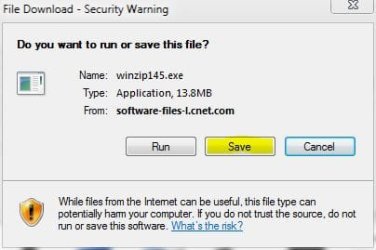
Usually people will download a zipped file to their desktop or downloads area by clicking save instead of run when prompted. (see Below)

And for the 32 bit emulation I don't know the technical answer but 64 bit windows has 2 sets of programs files, Program Files (64bit) and Program Filesx86 (32bit).

Hope that helps you out some.

Derek
Attached Thumbnails
Optional Update-save.jpg  
My System SpecsSystem Spec
20 Apr 2010   #3

Windows 7 HP 64bit, Windows 8 Pro w/Media Center 64bit
Covington, La


Win Zip is a trial version and then you have to buy it.
A free alternate is 7-Zip.

Windows 7 64bit will run 32bit programs also. So if you can't find a 64bit version of a program then you can use the 32bit version especially if it states it is compatible with 64bit OS (Win 7)

Jim
My System SpecsSystem Spec
.


21 Apr 2010   #4

XP Pro SP3 X86 / Win7 Pro X86
Southern Ontario Canada


Quote   Quote: Originally Posted by Phone Man View Post
Win Zip is a trial version and then you have to buy it.
A free alternate is 7-Zip.

Windows 7 64bit will run 32bit programs also. So if you can't find a 64bit version of a program then you can use the 32bit version especially if it states it is compatible with 64bit OS (Win 7)

Jim
I kinda like IZArc for myself.
My System SpecsSystem Spec
21 Apr 2010   #5

windows 7 Premium


Quote   Quote: Originally Posted by CommonTater View Post
Quote   Quote: Originally Posted by Phone Man View Post
Win Zip is a trial version and then you have to buy it.
A free alternate is 7-Zip.

Windows 7 64bit will run 32bit programs also. So if you can't find a 64bit version of a program then you can use the 32bit version especially if it states it is compatible with 64bit OS (Win 7)

Jim
I kinda like IZArc for myself.

Just so I understand. There is nothing I have to do to a 32 bit program being run on Windows 7 64bit. Just do the install. Thank you everyone for all your help and cooperation. Have a great night.
Rottikid
My System SpecsSystem Spec
21 Apr 2010   #6

Windows 7 Pro 64 SP1
East Bay Area, CA


Quote   Quote: Originally Posted by rottikid View Post
Quote   Quote: Originally Posted by CommonTater View Post
Quote   Quote: Originally Posted by Phone Man View Post
Win Zip is a trial version and then you have to buy it.
A free alternate is 7-Zip.

Windows 7 64bit will run 32bit programs also. So if you can't find a 64bit version of a program then you can use the 32bit version especially if it states it is compatible with 64bit OS (Win 7)

Jim
I kinda like IZArc for myself.

Just so I understand. There is nothing I have to do to a 32 bit program being run on Windows 7 64bit. Just do the install. Thank you everyone for all your help and cooperation. Have a great night.
Rottikid
Yes you understand right, It will install it in the correct programs folder on it's own.
You have a great night also.
Derek
My System SpecsSystem Spec
Reply

 Optional Update problems?


Thread Tools


Similar help and support threads for: Optional Update
Thread Forum
Optional update in windows update is giving me a blue screen. Windows Updates & Activation
Optional Update: How Make It Go Away? Windows Updates & Activation
Solved recent optional ATI update Graphic Cards
Optional update for ST2210 monitor Windows Updates & Activation
optional update Windows Updates & Activation


All times are GMT -5. The time now is 06:23 AM.


Seven Forums Android App Seven Forums IOS App Follow us on Facebook

Windows 7 Forums is an independent web site and has not been authorized,
sponsored, or otherwise approved by Microsoft Corporation.
"Windows 7" and related materials are trademarks of Microsoft Corp.
© Designer Media Ltd
  

1 2 3 4 5 6 7 8 9 10 11 12 13 14 15 16 17 18 19 20 21 22 23 24 25 26 27 28 29 30 31 32