Repartition When Upgrade From Vista?

Win7rap

New member
Member
VIP
Local time
4:38 PM
Messages
120
Wife has a preloaded Vista laptop which I'm about to upgrade to Win7 (purchased an upgrade DVD so it's legal). Her HDD was set up with 'system' and 'data' partitions ... the 'system' has 12Gb free and the 'data' has 94Gb free.

I'd like to repartition when upgrade is done (custom install?) ... is that possible?

I saw a post (http://www.sevenforums.com/windows-...stion.html?highlight=upgrade+custom+partition) that says something about using a 2nd upgrade of Win7 to clean install (after the initial upgrade from Vista to Win7) ? I don't mind doing that, if it's necessary, but can it be done at the first upgrade?
 
Last edited:

My Computer My Computer

At a glance

Win 7
OS
Win 7
Win7rap, I think you are confusing two things, let's try to clarify
- The thread you referenced is basically doing a clean install from an upgrade DVD. That is needed if, for example, you have a copy of Vista or XP (mandatory for y9ou to be able to use the upgrade key without violating the EULA) but want to clean install Windows 7 rather than upgrading. You do a clean install, do not enter the key then do an upgrade on top of the same Windows 7.
But I understand you just want to upgrade from Vista, correct? In that case, none of this is needed.

- Upgrading from Vista only requires running set up from Vista and following the instructions. While a clean install is usually better (to clean the junk we all accumulate over the years like those lost registry keys or the startup program that one has no idea what they do) you might want to upgrade in order not to have to install all your programs again.

- When you say "repartition" I understand you want to change the partition sizes, is that correct? I wouldn't try to do it while upgrading (I don't think it is possible either). Just upgrade and when done you can use windows 7 to shrink any partition you want: http://www.sevenforums.com/tutorials/2672-partition-volume-shrink.html or resize them: http://www.sevenforums.com/tutorials/2670-partition-volume-extend.html

If you need to move a partition to the left (e.g. shrink the first partition, move the second to its left then extend the second) you will need a third party software like Partition magic. I would avid trying to move the system partition, Windows usually doesn't like it. It is usually OK to extend it to the right.

Finally, a couple of recommendations (without making this tooo long):
- Please please please BACKUP YOUR PERSONAL FILES. Upgrading the OS is like performing brain surgery on yourself. Things can go very wrong and it is better not to find out you can't recover your files if you don't have backups
- Make a system recovery disk for your Vista or a system image in case things go very wrong and you need to revert to Vista.
- Be patient and ask for help if needed. We will be here!

God luck and let us know if it works or if still any doubt

Walter
 

My Computer My Computer

At a glance

Windows 7 x64 finally!AMD Athlon II X2 240OCZ Platinum 4GB DDR2 1066 (will not work pas...MSI R4670-MD1G Radeon HD 4670 1GB 128-bit GDDR3
Computer Manufacturer/Model Number
Wally, Innc.
OS
Windows 7 x64 finally!
CPU
AMD Athlon II X2 240
Motherboard
Biostar TA790GX XE
Memory
OCZ Platinum 4GB DDR2 1066 (will not work past 800MHz)
Graphics Card(s)
MSI R4670-MD1G Radeon HD 4670 1GB 128-bit GDDR3
Sound Card
ATI High Definition Audio Device Realtek ALC888
Monitor(s) Displays
HP w19e
Screen Resolution
1440x900
Hard Drives
Western Digital Caviar Green WD5000AADS 500GB SATA
Western Digital Caviar Blue WD5000AAKS 500GB SATA
PSU
Athena Power Micro ATX 400W
Case
HEC 6T 6T10BB Black MicroATX Mini Tower
Cooling
stock
Keyboard
wired, many keys
Mouse
HP wireless, 2 buttons, 1 wheel
Internet Speed
DSL 2Mb (recently getting 1.65M!)
First, thank you Walter!

...
But I understand you just want to upgrade from Vista, correct? In that case, none of this is needed.
I don't think I made myself clear - I DO want to do a clean install AND in the process, change the partition sizes.


Maybe the problem is my definition of 'clean install' ... I take that to mean a complete format of the C: disk.

Wouldn't that mean wiping out the partition info? Or does that mean only formatting the 'system' partition?

Several months ago (using a different Upgrade DVD - from Dell ... this one is from Amazon) I upgraded my desktop (a new PC with Vista but never used Vista - upgraded immediately) but now, on wife's laptop, I want to do more than just upgrade.

...
If you need to move a partition to the left (e.g. shrink the first partition, move the second to its left then extend the second) you will need a third party software ...
Actually I want to do the opposite (shrink second then extend the first) but I get the point. 3rd party!

...
- Please please please BACKUP YOUR PERSONAL FILES.
Have done that (actually very few files - but put them on CD).

Bottom line, still confused.
 

My Computer My Computer

At a glance

Win 7
OS
Win 7

My Computer My Computer

At a glance

Windows 8.1 Pro w/Media Center 64bit, Windows...Phenom II X6 1100TCrucial Balistic 8gb DDR3-1866 CL9MSI R6850 Cyclone IGD5 PE
Computer type
PC/Desktop
Computer Manufacturer/Model Number
Home Built
OS
Windows 8.1 Pro w/Media Center 64bit, Windows 7 HP 64bit
CPU
Phenom II X6 1100T
Motherboard
ASUS M5A99X EVO
Memory
Crucial Balistic 8gb DDR3-1866 CL9
Graphics Card(s)
MSI R6850 Cyclone IGD5 PE
Sound Card
On Board
Monitor(s) Displays
ASUS VE258Q 25" LED with DVI-HDMI-DisplayPort
Screen Resolution
1920 x 1080
Hard Drives
Two WD Cavier Black 2TB Sata III, WD My Book Essential 2TB USB 3.0
PSU
Seasonic X650 80 Plus GOLD Modular
Case
Corsair 400R
Cooling
Antec Kuhler H2O 620, Two 120mm and four 140mm
Keyboard
Logitech K120
Mouse
Logitech Marble Mouse USB, Logitech Precision Game Pad
Internet Speed
15MB
Antivirus
Norton IS 2013, Malwarebytes Pro Beta 2
Browser
IE-11, FF-27
Other Info
APC UPS ES 750, Netgear WNR3500L Gigabit & Wireless N Router with SamKnows Test Program, Motorola SB6120 Gigabit Cable Modem. Brother HL-2170W Laser Printer, Epson V300 Scanner
Am really confused now ... one reply says no - next reply says yes

Is a 'custom install' the same as the 'install now' in the link referenced in the last reply?
 

My Computer My Computer

At a glance

Win 7
OS
Win 7
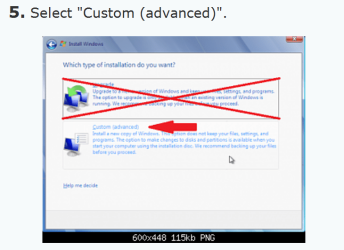
Continue to STEP 5 and select "Custom".

Jim :geek:
 

My Computer My Computer

At a glance

Windows 8.1 Pro w/Media Center 64bit, Windows...Phenom II X6 1100TCrucial Balistic 8gb DDR3-1866 CL9MSI R6850 Cyclone IGD5 PE
Computer type
PC/Desktop
Computer Manufacturer/Model Number
Home Built
OS
Windows 8.1 Pro w/Media Center 64bit, Windows 7 HP 64bit
CPU
Phenom II X6 1100T
Motherboard
ASUS M5A99X EVO
Memory
Crucial Balistic 8gb DDR3-1866 CL9
Graphics Card(s)
MSI R6850 Cyclone IGD5 PE
Sound Card
On Board
Monitor(s) Displays
ASUS VE258Q 25" LED with DVI-HDMI-DisplayPort
Screen Resolution
1920 x 1080
Hard Drives
Two WD Cavier Black 2TB Sata III, WD My Book Essential 2TB USB 3.0
PSU
Seasonic X650 80 Plus GOLD Modular
Case
Corsair 400R
Cooling
Antec Kuhler H2O 620, Two 120mm and four 140mm
Keyboard
Logitech K120
Mouse
Logitech Marble Mouse USB, Logitech Precision Game Pad
Internet Speed
15MB
Antivirus
Norton IS 2013, Malwarebytes Pro Beta 2
Browser
IE-11, FF-27
Other Info
APC UPS ES 750, Netgear WNR3500L Gigabit & Wireless N Router with SamKnows Test Program, Motorola SB6120 Gigabit Cable Modem. Brother HL-2170W Laser Printer, Epson V300 Scanner
I think I see now ... basically using an Upgrade disk and choosing 'custom install' is equivalent to using a full copy of win7.

Right?
 

My Computer My Computer

At a glance

Win 7
OS
Win 7
That is correct. The only difference is the "Upgrade" disk needs to see XP or Vista installed on the hard drive to be sure you are eligible for the upgrade.

Jim :geek:
 

My Computer My Computer

At a glance

Windows 8.1 Pro w/Media Center 64bit, Windows...Phenom II X6 1100TCrucial Balistic 8gb DDR3-1866 CL9MSI R6850 Cyclone IGD5 PE
Computer type
PC/Desktop
Computer Manufacturer/Model Number
Home Built
OS
Windows 8.1 Pro w/Media Center 64bit, Windows 7 HP 64bit
CPU
Phenom II X6 1100T
Motherboard
ASUS M5A99X EVO
Memory
Crucial Balistic 8gb DDR3-1866 CL9
Graphics Card(s)
MSI R6850 Cyclone IGD5 PE
Sound Card
On Board
Monitor(s) Displays
ASUS VE258Q 25" LED with DVI-HDMI-DisplayPort
Screen Resolution
1920 x 1080
Hard Drives
Two WD Cavier Black 2TB Sata III, WD My Book Essential 2TB USB 3.0
PSU
Seasonic X650 80 Plus GOLD Modular
Case
Corsair 400R
Cooling
Antec Kuhler H2O 620, Two 120mm and four 140mm
Keyboard
Logitech K120
Mouse
Logitech Marble Mouse USB, Logitech Precision Game Pad
Internet Speed
15MB
Antivirus
Norton IS 2013, Malwarebytes Pro Beta 2
Browser
IE-11, FF-27
Other Info
APC UPS ES 750, Netgear WNR3500L Gigabit & Wireless N Router with SamKnows Test Program, Motorola SB6120 Gigabit Cable Modem. Brother HL-2170W Laser Printer, Epson V300 Scanner
My assumption you wanted to upgrade was incorrect. So indeed you just need to follow the instructions for a clean install ("custom install" option) and go from there

That is actually the preferred method

Good luck!
 
Last edited:

My Computer My Computer

At a glance

Windows 7 x64 finally!AMD Athlon II X2 240OCZ Platinum 4GB DDR2 1066 (will not work pas...MSI R4670-MD1G Radeon HD 4670 1GB 128-bit GDDR3
Computer Manufacturer/Model Number
Wally, Innc.
OS
Windows 7 x64 finally!
CPU
AMD Athlon II X2 240
Motherboard
Biostar TA790GX XE
Memory
OCZ Platinum 4GB DDR2 1066 (will not work past 800MHz)
Graphics Card(s)
MSI R4670-MD1G Radeon HD 4670 1GB 128-bit GDDR3
Sound Card
ATI High Definition Audio Device Realtek ALC888
Monitor(s) Displays
HP w19e
Screen Resolution
1440x900
Hard Drives
Western Digital Caviar Green WD5000AADS 500GB SATA
Western Digital Caviar Blue WD5000AAKS 500GB SATA
PSU
Athena Power Micro ATX 400W
Case
HEC 6T 6T10BB Black MicroATX Mini Tower
Cooling
stock
Keyboard
wired, many keys
Mouse
HP wireless, 2 buttons, 1 wheel
Internet Speed
DSL 2Mb (recently getting 1.65M!)
Although doing a custom install, booting from the upgrade dvd, and reformatting your partitions will result in a faster running system, I think it's a good idea for most users to first do the upgrade install whenever possible just to ensure there are no important personal files lost, then once you are sure you have everything (moving the windows.old file to an external hdd is a good idea) go ahead and do a clean install, repartitioning your hdds however you choose. It sounds like a lot of unnecessary hassle but 6 months down the road, when you can't find an important document, you'll wish you had taken my advice
 
UPGRADE DOES NOT ALLOW FOR REPARTITIONING

http://www.sevenforums.com/tutorials...7-install.html , STEP 5 says to choose:
"Drive options (advanced)" ... BUT... that choice does not exist.

Trying a 'normal' upgrade (I say "trying" because the 'advisor' said there were only 12Gb of free space - but hoping that the space used by Vista will be available to Win7).

madtownidio - when you said "go ahead and do a clean install, repartitioning your hdds" after saving windows.old were you talking about starting from the upgrade DVD?
If so, wouldn't I run into the same problem ("Drive options (advanced)" not available)? Would it be possible to just format/repartition the C: then install from the upgrade DVD?

PS have been upgrading while entering this post and it seems to be doing it.
 

My Computer My Computer

At a glance

Win 7
OS
Win 7
It seems that all suggestions/links say that the original install DVD is needed to change partitions ... I DON"T HAVE AN ORIGINAL INSTALL DISK ... when purchased, the laptop only had Recovery DVDs. Can I now reinstall WIN7 (the upgrade from Vista worked) ... I have an old XP retail installation disk that I can use to repartition with, then use the WIN7 Upgrade DVD to install WIN7 as per Option 1 of
Clean Install with a Upgrade Windows 7 Version
 

My Computer My Computer

At a glance

Win 7
OS
Win 7

My Computer My Computer

At a glance

Windows 8.1 Pro w/Media Center 64bit, Windows...Phenom II X6 1100TCrucial Balistic 8gb DDR3-1866 CL9MSI R6850 Cyclone IGD5 PE
Computer type
PC/Desktop
Computer Manufacturer/Model Number
Home Built
OS
Windows 8.1 Pro w/Media Center 64bit, Windows 7 HP 64bit
CPU
Phenom II X6 1100T
Motherboard
ASUS M5A99X EVO
Memory
Crucial Balistic 8gb DDR3-1866 CL9
Graphics Card(s)
MSI R6850 Cyclone IGD5 PE
Sound Card
On Board
Monitor(s) Displays
ASUS VE258Q 25" LED with DVI-HDMI-DisplayPort
Screen Resolution
1920 x 1080
Hard Drives
Two WD Cavier Black 2TB Sata III, WD My Book Essential 2TB USB 3.0
PSU
Seasonic X650 80 Plus GOLD Modular
Case
Corsair 400R
Cooling
Antec Kuhler H2O 620, Two 120mm and four 140mm
Keyboard
Logitech K120
Mouse
Logitech Marble Mouse USB, Logitech Precision Game Pad
Internet Speed
15MB
Antivirus
Norton IS 2013, Malwarebytes Pro Beta 2
Browser
IE-11, FF-27
Other Info
APC UPS ES 750, Netgear WNR3500L Gigabit & Wireless N Router with SamKnows Test Program, Motorola SB6120 Gigabit Cable Modem. Brother HL-2170W Laser Printer, Epson V300 Scanner
Yes - followed Tutorial ... but ... Tutorial has a note about "Drive options (advanced)" : WARNING: You may not have the Drive options (advanced) option unless the installation is done at boot, and not running the installation from within your current OS.

The upgrade has installed successfully - but the partition containing the installation (specifically C:\Program Files and C:\Users) only has 7+Gb free (it also contains windows.old which can be deleted to recover more space).

At this point, all I need is info regarding format/repartitioning (maybe from an old retail full XP install DVD) and than I can use Option 1 of
Clean Install with a Upgrade Windows 7 Version
 

My Computer My Computer

At a glance

Win 7
OS
Win 7
Step 1 of that Tutorial said
1. Boot your computer to the Windows 7 DVD.

I assume you booted to Vista and then ran the install which is not the right procedure.

You may be able to boot from the Window 7 DVD and just follow this same tutorial.

You can also download http://www.partitionwizard.com/free-partition-manager.html and it does a great job. You can do a Move/Resize on each partition to get them like you want. Here is the proceedure.

http://www.partitionwizard.com/help/resize-partition.html

Jim :geek:
 

My Computer My Computer

At a glance

Windows 8.1 Pro w/Media Center 64bit, Windows...Phenom II X6 1100TCrucial Balistic 8gb DDR3-1866 CL9MSI R6850 Cyclone IGD5 PE
Computer type
PC/Desktop
Computer Manufacturer/Model Number
Home Built
OS
Windows 8.1 Pro w/Media Center 64bit, Windows 7 HP 64bit
CPU
Phenom II X6 1100T
Motherboard
ASUS M5A99X EVO
Memory
Crucial Balistic 8gb DDR3-1866 CL9
Graphics Card(s)
MSI R6850 Cyclone IGD5 PE
Sound Card
On Board
Monitor(s) Displays
ASUS VE258Q 25" LED with DVI-HDMI-DisplayPort
Screen Resolution
1920 x 1080
Hard Drives
Two WD Cavier Black 2TB Sata III, WD My Book Essential 2TB USB 3.0
PSU
Seasonic X650 80 Plus GOLD Modular
Case
Corsair 400R
Cooling
Antec Kuhler H2O 620, Two 120mm and four 140mm
Keyboard
Logitech K120
Mouse
Logitech Marble Mouse USB, Logitech Precision Game Pad
Internet Speed
15MB
Antivirus
Norton IS 2013, Malwarebytes Pro Beta 2
Browser
IE-11, FF-27
Other Info
APC UPS ES 750, Netgear WNR3500L Gigabit & Wireless N Router with SamKnows Test Program, Motorola SB6120 Gigabit Cable Modem. Brother HL-2170W Laser Printer, Epson V300 Scanner
oops - you're EXACTLY RIGHT ... missed the implication

I'll try again !!

Am sheepish - THANK YOU for putting up with me
 

My Computer My Computer

At a glance

Win 7
OS
Win 7
Back
Top