
Windows Update Error Code 80070643
I am trying to update 4 identical PC's. They are Win 7 x64 Home Premium.
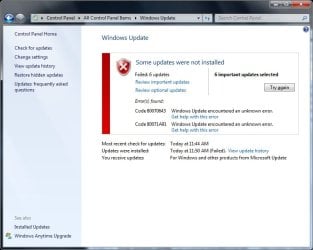
I am getting the following error on ALL the pc's -- they haven't been updated since February, 2010. Code 80070643. The second error in the pic is new, but the 0643 error occurs on them all.
Looking up the error, i found an MS support article saying its related to .net framework. I tried the few solutions on there and it didn't fix it.
I tried the Windows Update reset solutions on this forum as well as the MS Fix it tool. Neither fixed the issue.
Any further advice?
I am trying to update 4 identical PC's. They are Win 7 x64 Home Premium.
I am getting the following error on ALL the pc's -- they haven't been updated since February, 2010. Code 80070643. The second error in the pic is new, but the 0643 error occurs on them all.
Looking up the error, i found an MS support article saying its related to .net framework. I tried the few solutions on there and it didn't fix it.
I tried the Windows Update reset solutions on this forum as well as the MS Fix it tool. Neither fixed the issue.
Any further advice?
Attachments
Last edited:
My Computer
At a glance
Windows 7AMD Turion X2 RM-72 2.10 GHz Dual-Core Mobile...4GBATI Radeon HD 3200 Graphics RS780M
- Computer Manufacturer/Model Number
- Hewlett Packard dv4-1222nr
- OS
- Windows 7
- CPU
- AMD Turion X2 RM-72 2.10 GHz Dual-Core Mobile Processor
- Memory
- 4GB
- Graphics Card(s)
- ATI Radeon HD 3200 Graphics RS780M
- Monitor(s) Displays
- 14.1" LCD
- Hard Drives
- 250GB (5400RPM)
- Internet Speed
- 3.0 MBPS (down) / 1.0MBPS (up)


