

Why are media players so difficult to setup? 
Setting up Windows is "a piece of cake", compared to the codec nightmares involved in media players (also unlike Windows, Linux & Graphics programs, I haven't seen any decent websites on the subject).
Did MS Patches in May break rmvb support in MPC-HC?
Yesterday I tried to play some rmvb files using Media Player Classic - Home Cinema (MPC-HC).
I know that the files are good because I can play them using Real Player and via a network-linked "movie dock" (and until recently I could play them on my PC).
This problem is present on my XP SP3 and Windows 7 installs.
The video plays perfectly, but no sound is available.
I receive the following message:
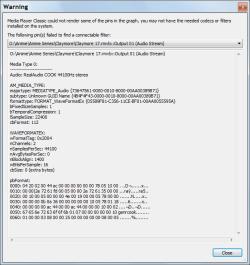
I tried the following, to no avail:
Did the patches in May delete/disable codecs that were on my PC?
Has anyone else experienced this?
Does anyone know how to fix this problem?
Does anyone know a good site, that explains how to set the 1000s of codec/media player options?
Thanks in advance.
Setting up Windows is "a piece of cake", compared to the codec nightmares involved in media players (also unlike Windows, Linux & Graphics programs, I haven't seen any decent websites on the subject).
Did MS Patches in May break rmvb support in MPC-HC?
Yesterday I tried to play some rmvb files using Media Player Classic - Home Cinema (MPC-HC).
I know that the files are good because I can play them using Real Player and via a network-linked "movie dock" (and until recently I could play them on my PC).
This problem is present on my XP SP3 and Windows 7 installs.
The video plays perfectly, but no sound is available.
I receive the following message:
I tried the following, to no avail:
- installing the latest version of K-Lite (604 full and 607 patch) and Real Player.
- installing Real Alternative (that wouldn't play sound or video on my PC - initially).
- Internet search solutions, including deleting some Reg Keys.
- re-imaged my HDD using my backup from after May's Patch Tuesday (I foolishly deleted my April OS backup files.
 ).
).
Did the patches in May delete/disable codecs that were on my PC?
Has anyone else experienced this?
Does anyone know how to fix this problem?
Does anyone know a good site, that explains how to set the 1000s of codec/media player options?
Thanks in advance.
Last edited:
My Computer
- Computer type
- PC/Desktop
- Computer Manufacturer/Model Number
- n/a
- OS
- W7 Ultimate SP1, LM19.2 MATE, W10 Home 1703, W10 Pro 1703 VM, #All 64 bit
- CPU
- AMD Phenom II x6 1100T, 3.3 GHz
- Motherboard
- ASUS M4A88T-M/USB3 (AM3)
- Memory
- 12GB DDR3 1333 G-Skill (4GB x 2), G-Skill (2GB x 2)
- Graphics Card(s)
- NVIDIA GeForce GTX 660
- Sound Card
- Realtek?
- Monitor(s) Displays
- Samsung S23B350
- Screen Resolution
- 1920x1080
- Hard Drives
- WD Green 2TB (SATA), WD Green 3TB (SATA), WD Blue 4TB (SATA), WD Blue 6TB (SATA)
- PSU
- Cooler Master
- Case
- Antec GX300 Tower
- Cooling
- 3x Antec TRICOOL 120mm Fans
- Mouse
- Wired Optical
- Internet Speed
- DSL
- Antivirus
- Avast
- Browser
- Pale Moon (64 bit)
- Other Info
- 2018-12-27 Upgraded HDDs
2015-12-10 Upgraded case, graphics card, storage
2015-08-15 Upgraded motherboard & RAM
2015-07-15 Upgraded LM17.1 to LM17.2


