XFX Radeon HD 6770 undetected

marshallars

New member
Local time
10:02 PM
Messages
7
Picked up the XFX Radeon HD 6770 today at best buy (6-29-11), physically installed it in the machine and started it up.

I put the CD provided with in to install driver software and it immediately responds "We were unable to detect an XFX product at this time. We recommend to click Cancel, restart your computer and try again. If the problem persists, click Ok to continue installing the drivers from the disk."

I've restarted the computer several times - so eventually I click ok.

Select english as host language, click to continue, 4 options on screen. Quick start, User guide, Tips and techniques, Install Drivers. It doesn't matter which one I click: the result is "Please check www.xfxforce.com for the optimized driver"

So, I did. I registered the product, ignored the combo packages from best buy, downloaded the very latest driver for the hd 6XXX series and installed. On information gathered from others; i also went -directly- to the AMD website, and downloaded the latest catalyst and installed.

Based on information gleamed from elsewhere: i went into my bios and made sure PCI-E was selected as my default display source, it is. In the drivers for display - it shows an ATI Radeon HD 4200 - which is the on board chipset.

Despite the fact I manually went into bios and made sure the PCI express was chosen as the default display, the display inside windows still shows the onboard chipset. I can hook the monitor to the graphics card all I like: black screen.

It would be very appreciated if someone could give me further input on what's going wrong: I'd like to actually *use* that $177 graphics card I just picked up. That would be advantageous.

Also: I -know- it's physically installed on the mobo correctly: there's only one PCI express slot, and it's not my first time installing a card in a PCI express slot to begin with. Also - the graphics card's fan runs when the computer is on, i can look inside and see it running when the panel is off the side of the tower.

It is running: it does have power, it is a 6 pin connector - it's physically installed correctly. All the drivers I can think of: are installed correctly. the latest catalyst, I also went in and updated the Realtek PCI Express controller driver, as well as the Plug and play driver. Just in case one of them was askew or outdated.

I hope this is as succinct as possible so I don't get twelve people telling me to do something: I've already done and explicitly stated as much.

Any help anyone could provide: would be very well received.
 

My Computer

Computer Manufacturer/Model Number
HP Pavilion p7-1054
OS
Windows 7 64 bit
CPU
AMD Athlon II 645
Memory
6 GB DDR3
Graphics Card(s)
XFX radeon HD 6770

My Computer

Computer type
PC/Desktop
Computer Manufacturer/Model Number
Me
OS
Win 7 Ultimate x64
CPU
FX-8350 @ 4.6 GHz so far
Motherboard
Asus M5A97 EVO
Memory
ADATA XPG V1 Series Black 8GB DDR3 1600
Graphics Card(s)
Sapphire R9 270x Dual-X
Sound Card
Xonar DGX w/ Corsair Vengence 1300
Monitor(s) Displays
Acer S232HL Abid
Screen Resolution
1920x1080
Hard Drives
120 GB OCZ Vertex 3
500 GB Seagate 7200.12
PSU
Antec Earthwatts 650W Green
Case
Antec Three Hundred
Cooling
Cooler Master 212 EVO
Keyboard
Logitech G510
Mouse
Logitech G500s
Internet Speed
35000/3000
Aha! I didn't know the power supply was so bad, I didn't even think about it! I have a 5 year old Acer Aspire that came with a 400w power supply. I will give that a try and report back shortly - Thank you very much for pointing out something I -didn't- think of.
 

My Computer

Computer Manufacturer/Model Number
HP Pavilion p7-1054
OS
Windows 7 64 bit
CPU
AMD Athlon II 645
Memory
6 GB DDR3
Graphics Card(s)
XFX radeon HD 6770
Good call on the power supply: XFX recommends 450+ for this card. I swapped out the original 250w power supply this HP came with: for an APower AGS 550W power supply. More than plenty of juice for the card. Unfortunately - that didn't fix the problem.

Restarted it a few times, computer works fine, new power supply works and everything functions; except the card. The card's fan is still working - but the computer doesn't register that the card is there.

I restarted the computer with the monitor's DVI hooked directly to the first dvi slot in the card, black screen. Second DVI, black screen. Onboard DVI - We get signal, main screen turn on.

So, drivers: all updated.
Power supply: 550W.
Bios PCI-E selected as default.

Driver software CD that came with the card still saying "We were unable to detect an XFX product at this time. We recommend to click Cancel, restart your computer and try again. If the problem persists, click Ok to continue installing the drivers from the disk."

The power supply -was- a good idea though: stormy. Just didn't fix the problem. Thanks anyway.
 

My Computer

Computer Manufacturer/Model Number
HP Pavilion p7-1054
OS
Windows 7 64 bit
CPU
AMD Athlon II 645
Memory
6 GB DDR3
Graphics Card(s)
XFX radeon HD 6770
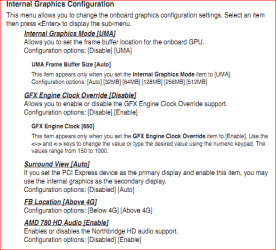
With it being an HP who knows how many things they may have hidden or changed from what the chipset is capable of, but have a look for any settings in the bios like this (from my similar spec'ed board).

videosettings.PNG

and make sure that anything that resembles the first 3 is set to disabled.
 

My Computer

Computer type
PC/Desktop
Computer Manufacturer/Model Number
Me
OS
Win 7 Ultimate x64
CPU
FX-8350 @ 4.6 GHz so far
Motherboard
Asus M5A97 EVO
Memory
ADATA XPG V1 Series Black 8GB DDR3 1600
Graphics Card(s)
Sapphire R9 270x Dual-X
Sound Card
Xonar DGX w/ Corsair Vengence 1300
Monitor(s) Displays
Acer S232HL Abid
Screen Resolution
1920x1080
Hard Drives
120 GB OCZ Vertex 3
500 GB Seagate 7200.12
PSU
Antec Earthwatts 650W Green
Case
Antec Three Hundred
Cooling
Cooler Master 212 EVO
Keyboard
Logitech G510
Mouse
Logitech G500s
Internet Speed
35000/3000
Where do you find those? in the bios?
 

My Computer

Computer Manufacturer/Model Number
HP Pavilion p7-1054
OS
Windows 7 64 bit
CPU
AMD Athlon II 645
Memory
6 GB DDR3
Graphics Card(s)
XFX radeon HD 6770
Sorry should have mentioned that, yes.
 

My Computer

Computer type
PC/Desktop
Computer Manufacturer/Model Number
Me
OS
Win 7 Ultimate x64
CPU
FX-8350 @ 4.6 GHz so far
Motherboard
Asus M5A97 EVO
Memory
ADATA XPG V1 Series Black 8GB DDR3 1600
Graphics Card(s)
Sapphire R9 270x Dual-X
Sound Card
Xonar DGX w/ Corsair Vengence 1300
Monitor(s) Displays
Acer S232HL Abid
Screen Resolution
1920x1080
Hard Drives
120 GB OCZ Vertex 3
500 GB Seagate 7200.12
PSU
Antec Earthwatts 650W Green
Case
Antec Three Hundred
Cooling
Cooler Master 212 EVO
Keyboard
Logitech G510
Mouse
Logitech G500s
Internet Speed
35000/3000
There's nothing even remotely like that in my BIOS. The only video related option is PCI-E or Onboard. I can't even deactivate the onboard through the BIOS. Those options aren't available on any of the tabs inside the BIOS. And i don't just mean the specific ones listed: I mean anything remotely similar. I had to deactivate the onboard graphics controller on my Acer when I installed the 8600GT on it. The bios on this computer doesn't have options listing the onboard aside from in the advanced section, it just has the two options PCI-E or onboard. PCI-E is already selected.
 

My Computer

Computer Manufacturer/Model Number
HP Pavilion p7-1054
OS
Windows 7 64 bit
CPU
AMD Athlon II 645
Memory
6 GB DDR3
Graphics Card(s)
XFX radeon HD 6770
I won't say what I think about HP hiding any of those options other than to say I am not the least bit surprised. Nothing like hiding options that might actually be needed not too mention one that can be very useful, the Surround View option which can be used in conjunction with an AMD card to run up to 4 monitors (or 5 when used with a 5xxx or 6xxx series card).

With that said with the motherboard not detecting that the card is there it is possible that it is a bios issue, which has happened on retail motherboards (those used by people that build their own) and requires a bios update for the card to be detected and work properly. The fun part is if that is the problem, is getting HP to do something about it. Unfortunately the only way to determine that is to try a different card and see iif it works.

It could also be that you got a card that is defective out of the box, but with it being a new model (really just an slightly update HD 5770, but the DevID will be different) I still wouldn't rule out a bios detection issue.
 

My Computer

Computer type
PC/Desktop
Computer Manufacturer/Model Number
Me
OS
Win 7 Ultimate x64
CPU
FX-8350 @ 4.6 GHz so far
Motherboard
Asus M5A97 EVO
Memory
ADATA XPG V1 Series Black 8GB DDR3 1600
Graphics Card(s)
Sapphire R9 270x Dual-X
Sound Card
Xonar DGX w/ Corsair Vengence 1300
Monitor(s) Displays
Acer S232HL Abid
Screen Resolution
1920x1080
Hard Drives
120 GB OCZ Vertex 3
500 GB Seagate 7200.12
PSU
Antec Earthwatts 650W Green
Case
Antec Three Hundred
Cooling
Cooler Master 212 EVO
Keyboard
Logitech G510
Mouse
Logitech G500s
Internet Speed
35000/3000
Actually, a technician at XFX may have found the problem. This card absolutely -requires- an extra power cord for the 6 pin connector. My PSU may be heavy duty enough to handle the card - but isn't *new* enough to have the cord necessary. So, I can either upgrade the PSU for another $60 or so, or downgrade the card to one that doesn't require a 6 pin connector. I'm a gamer - but I'm not a hardcore one; a downgraded card isn't going to hurt me. So I'm just going to take the card back, and get one that can run off the PCI-Express socket alone.

Newegg.com - MSI R5670 CYCLONE 1G Radeon HD 5670 1GB 128-bit GDDR5 PCI Express 2.1 x16 HDCP Ready CrossFireX Support Video Card

The core clock is only 75 mhz less.... From 850mhz down to 775mhz. Yeah - I'm not losing any sleep over it. But thanks again, Stormy, for trying to help. If you're ever in Denver: I owe you a beer.
 

My Computer

Computer Manufacturer/Model Number
HP Pavilion p7-1054
OS
Windows 7 64 bit
CPU
AMD Athlon II 645
Memory
6 GB DDR3
Graphics Card(s)
XFX radeon HD 6770
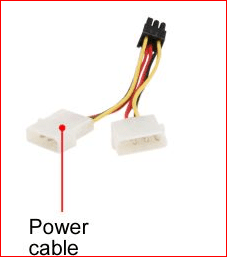
Card should have come with one of these in the box,

powercable.PNG

for just a situation like yours where the power supply doesn't have a 6 pin PCI-E connector. Unless XFX thinks they're special and don't need to provide one, from looking at Newegg XFX is the only manufacturer of that model card that doesn't show that it comes with the power cable.
 

My Computer

Computer type
PC/Desktop
Computer Manufacturer/Model Number
Me
OS
Win 7 Ultimate x64
CPU
FX-8350 @ 4.6 GHz so far
Motherboard
Asus M5A97 EVO
Memory
ADATA XPG V1 Series Black 8GB DDR3 1600
Graphics Card(s)
Sapphire R9 270x Dual-X
Sound Card
Xonar DGX w/ Corsair Vengence 1300
Monitor(s) Displays
Acer S232HL Abid
Screen Resolution
1920x1080
Hard Drives
120 GB OCZ Vertex 3
500 GB Seagate 7200.12
PSU
Antec Earthwatts 650W Green
Case
Antec Three Hundred
Cooling
Cooler Master 212 EVO
Keyboard
Logitech G510
Mouse
Logitech G500s
Internet Speed
35000/3000
lol, they must think they're special. I just checked under the cardboard inside the box to see if there were cords stuffed under it - nope. It came with the card, some pamplets, software CD and that be it. Oh well. The new card is less expensive anyway, and it's not much of a downgrade. I'll be able to play Rift on ultra - I'm not gonna dwell on it.
 

My Computer

Computer Manufacturer/Model Number
HP Pavilion p7-1054
OS
Windows 7 64 bit
CPU
AMD Athlon II 645
Memory
6 GB DDR3
Graphics Card(s)
XFX radeon HD 6770
when i installed my XFX Radeon HD 6770 it wont boot it's just giving me 6 beeps which means:

Code:
1 beep BIOS ROM checksum in progress or System board failure
2 beep No memory modules detected
3 beep System board failure. Power LED is blinking amber
Time-Of-Day Clock test failure
Gate A20 failure
Super I/O chip failure
Keyboard controller test failure
4 beep Memory failure
5 beep CMOS battery failure
[B][U][SIZE="3"]6 beep Video card failure[/SIZE][/U][/B]

my power supply is DELL J102N PS-5361-2 360 Watt Power Supply XPS 435MT can it handle this graphics card? if not, what if i buy Corsair - Gaming Series 600-Watt ATX CPU Power Supply Will it work without any problems?

my graphics card now is NVIDIA GeForce GT 220 and it's working fine, i just want to upgrade.
 

My Computer

Computer Manufacturer/Model Number
Studio XPS 435MT
OS
Windows 7 Ultimate x64
when i installed my XFX Radeon HD 6770 it wont boot it's just giving me 6 beeps which means:

Code:
1 beep BIOS ROM checksum in progress or System board failure
2 beep No memory modules detected
3 beep System board failure. Power LED is blinking amber
Time-Of-Day Clock test failure
Gate A20 failure
Super I/O chip failure
Keyboard controller test failure
4 beep Memory failure
5 beep CMOS battery failure
[B][U][SIZE=3]6 beep Video card failure[/SIZE][/U][/B]

my power supply is DELL J102N PS-5361-2 360 Watt Power Supply XPS 435MT can it handle this graphics card? if not, what if i buy Corsair - Gaming Series 600-Watt ATX CPU Power Supply Will it work without any problems?

my graphics card now is NVIDIA GeForce GT 220 and it's working fine, i just want to upgrade.

You should have started a new thread on this, rather than appending it to an old one.

Do you have the 6 pin PCI-E auxiliary power coonector attached to the card?

Is the card seated properly in the PCI-E slot?

A 360W power supply is below the recommended size for a 6770 (450 or 500W). I doubt that's your immediate problem, though. I expect that the PC would boot even if the power supply wouldne't be up to the job at full load.

A 600W Corsair would be adequate. I don't know whether it would be compatible with a Dell. Dell used nonstandard power wiring 15 years ago, but I believe they've gone standard in recent years.
 

My Computer

Computer Manufacturer/Model Number
homegrown
OS
Windows 7 Pro X64 SP1
CPU
Intel Core I7-3930k
Motherboard
Asus P9X79 Pro
Memory
16 GB Gskill DDR3-2133
Graphics Card(s)
eVGA GTX680
Sound Card
Creative X-Fi Titanium
Monitor(s) Displays
As PA246Q
Screen Resolution
1920 X 1200
Hard Drives
Corsair Force GT, 120 GB
WDC 1.5TB Caviar Black
PSU
PCP&C Silencer 750 Crossfire
Case
Silverstone FT02
Cooling
Noctua NH-D14
Keyboard
cheap Logitech USB
Mouse
Microsoft Intellimouse Explorer (old optical) USB
Internet Speed
6Mb cable
Other Info
Pioneer BDR-205
Samsung SH-203B
Monsoon 5.1 speakers
I'm having the same problem as the op, my system doesn't seem to register the graphics card, however I am not able to download the drivers off the xfx website, it keeps failing to load the drivers page. Would someone be able to download them and put them on an upload site that I could download from, also any help on how to get it to recognise the card would help as I'm a complete n00b when it comes to PCs.
 

My Computer

OS
windows 7 home premium 64bit

My Computer

Computer type
PC/Desktop
Computer Manufacturer/Model Number
custom build
OS
Windows 10 64bit
CPU
AMD Phenom II X4 925 (Deneb)(2.8GHz) OC 3.4GHz
Motherboard
M5A78L-MLX Plus
Memory
Corsair Vengeance DDR3 4GBX2 (8192MB)
Graphics Card(s)
XFX HD 6870 1GB (OC)- 940MHz core, mem 1150MHz
Monitor(s) Displays
Vizio 26' 1920x1080 / Acer 1336x768
Screen Resolution
1920x1080 60Hz /1336x768
Hard Drives
Kingston Digital 60GB SSDNow V300/500gb HDD Western Digital 7200rpm (/WD 160GB HDD 7200rpm
PSU
CORSAIR CX600 600w
Case
AZZA Orion 202 EVO
Cooling
cooler master hyper TX3 cpu cooler
Keyboard
Razer DeathStalker
Mouse
Logitech Optical Gaming Mouse G400
Antivirus
Defualt on win 10
Browser
Firefox
Other Info
cpu is overclocked in bios
Back
Top