
IE11 Appears not to support gadgets. What are the alternatives ?

Guess I won't be DLing IE11, I like my Death Star gadget alot. It's just a clock, but looks cool, especially at 20% opacity ;)

If you do you can edit the gadget.xml in C:\Users\YOUR USER NAME\AppData\Local\Microsoft\Windows Sidebar\Gadgets\CLOCK GADGET NAME\en-US folder with Notepad ++(see screenshot) and it should work with IE 11

Jerry
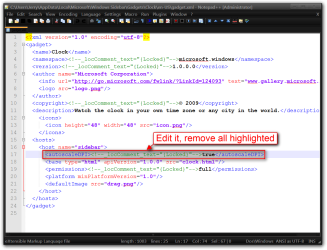
gadget.xml.png
 

My Computer My Computer

At a glance

Win 7 Pro x64 / Win 10 ProIntel(R) Core(TM) i7-3630QM CPU @ 2.40GHz12 GB(1) Intel(R) HD Graphics 4000 (2) NVIDIA GeFo...
Computer type
Laptop
Computer Manufacturer/Model Number
Sager NP9170
OS
Win 7 Pro x64 / Win 10 Pro
CPU
Intel(R) Core(TM) i7-3630QM CPU @ 2.40GHz
Motherboard
CLEVO P170EM
Memory
12 GB
Graphics Card(s)
(1) Intel(R) HD Graphics 4000 (2) NVIDIA GeForce GTX 675M
Sound Card
(1) Realtek High Definition Audio (2) Intel(R) Display Aud
Monitor(s) Displays
17.3
Screen Resolution
1920x1080
Hard Drives
(1) Samsung 860 EVO 500GB(OS) (1) Samsung 860 EVO 500GB(Data)
Keyboard
Backlite
Antivirus
MSE, Malwarebytes Pro
Browser
Firefox
Other Info
DESKTOP: Custom-built.
OS: Win 10 Pro x64.
CASE: Rosewill R5.
CPU: Intel I5 4670K CPU @ 3.40GHz.
CPU COOLER: Cool Master Hyper 212 EVO.
MOTHERBOARD: Asus Z87-A.
MEMORY: Kingston HyperX 2x4 GB.
GPU: Nvidia Geforce 650 TI.
PSU: Corsair TX750.
DRIVES: (1) Samsung 840 120 GB SSD (2) Western Digital blue 500 GB 7200 RPM.
Bongo:
I don't have ANY Gadgets in the C:\Users\MY USER NAME\AppData\Local\Microsoft\Windows Sidebar\Gadgets folder, ALL the Gadgets on my comfuser are in C:\Program Files\Windows Sidebar\Gadgets folder;
will this make a difference?

Looking at it, I don't see a problem just using the regular Notepad; correct?

Can I remove IE11 the normal way (Add/Remove Programs / Revo Uninstaller) if it doesn't work for me? If I do decide to do this, I'll post back how it went. Thank you.
 

My Computer My Computer

At a glance

10 Pro. 64BitAMD FX 4100, 4-Core Black Edition. Socket AM3...2x 4GB Kingston HyperX DDR3-1866 (PC3-14900) ...ASUS Radeon HD 6670-2GD3
Computer type
PC/Desktop
Computer Manufacturer/Model Number
Self built comfuser
OS
10 Pro. 64Bit
CPU
AMD FX 4100, 4-Core Black Edition. Socket AM3+ ~ 3.60GHz
Motherboard
ASUS M5A97 LE R2.0
Memory
2x 4GB Kingston HyperX DDR3-1866 (PC3-14900) - 8GB Total
Graphics Card(s)
ASUS Radeon HD 6670-2GD3
Sound Card
Onboard High Definition Audio Device
Monitor(s) Displays
HP 2009m LCD
Screen Resolution
1600x900, True Color (32bit), 60Hertz
Hard Drives
WD Blue - 1TB, 3D NAND - SATA SSD
PSU
XFX Pro 450W Core Edition - Fully Wired
Case
Antec Super Lanboy
Cooling
Stock CPU fan + 2 (1 front, 1 back) 120mm Antec fans
Keyboard
Logitech MK700/MK710
Mouse
Logitech M705
Internet Speed
Frontier FiOS 50/50
Antivirus
Windows Security
Browser
Vivaldi
Other Info
1x ASUS DRW-24B1ST Multi-DVD Rewriter
1x RocketFish AIO Media Card Reader
1x WD 1TB Passport USB External Drive
If you got IE11 via Windows Update I explain in Post 98 how to roll back to IE10 which doesn't deliberately ruin gadgets.
 
Bongo:
I don't have ANY Gadgets in the C:\Users\MY USER NAME\AppData\Local\Microsoft\Windows Sidebar\Gadgets folder, ALL the Gadgets on my comfuser are in C:\Program Files\Windows Sidebar\Gadgets folder;
will this make a difference?

Looking at it, I don't see a problem just using the regular Notepad; correct?

Can I remove IE11 the normal way (Add/Remove Programs / Revo Uninstaller) if it doesn't work for me? If I do decide to do this, I'll post back how it went. Thank you.

Where ever your gadget folder is at is OK, you can use regular notepad also.

Here for IE 11
http://www.sevenforums.com/tutorials/313358-internet-explorer-11-uninstall-windows-7-a.html

Jerry
 

My Computer My Computer

At a glance

Win 7 Pro x64 / Win 10 ProIntel(R) Core(TM) i7-3630QM CPU @ 2.40GHz12 GB(1) Intel(R) HD Graphics 4000 (2) NVIDIA GeFo...
Computer type
Laptop
Computer Manufacturer/Model Number
Sager NP9170
OS
Win 7 Pro x64 / Win 10 Pro
CPU
Intel(R) Core(TM) i7-3630QM CPU @ 2.40GHz
Motherboard
CLEVO P170EM
Memory
12 GB
Graphics Card(s)
(1) Intel(R) HD Graphics 4000 (2) NVIDIA GeForce GTX 675M
Sound Card
(1) Realtek High Definition Audio (2) Intel(R) Display Aud
Monitor(s) Displays
17.3
Screen Resolution
1920x1080
Hard Drives
(1) Samsung 860 EVO 500GB(OS) (1) Samsung 860 EVO 500GB(Data)
Keyboard
Backlite
Antivirus
MSE, Malwarebytes Pro
Browser
Firefox
Other Info
DESKTOP: Custom-built.
OS: Win 10 Pro x64.
CASE: Rosewill R5.
CPU: Intel I5 4670K CPU @ 3.40GHz.
CPU COOLER: Cool Master Hyper 212 EVO.
MOTHERBOARD: Asus Z87-A.
MEMORY: Kingston HyperX 2x4 GB.
GPU: Nvidia Geforce 650 TI.
PSU: Corsair TX750.
DRIVES: (1) Samsung 840 120 GB SSD (2) Western Digital blue 500 GB 7200 RPM.
I changed the XML in the Clock, CPU, Weather Gadgets and made the into gadget installers. Download the zip folder at the bottom of this post and extract it, then double click the gadget to install it.


The new gadgets will have a red # 2 on them.


Jerry

Like many others, I would just like to say thank you!!! 125% DPI Scaling is vastly preferable on my 24" display and I really missed having the weather on my desktop. :)
 

My Computer My Computer

At a glance

Windows 7 Home Premium X64Intel i7 4770K 3.5 Ghz Quad core16 GB GSkill DDR 3 1866 Mhz RAMSapphire AMD 7950 3GB
Computer type
PC/Desktop
Computer Manufacturer/Model Number
Custom
OS
Windows 7 Home Premium X64
CPU
Intel i7 4770K 3.5 Ghz Quad core
Motherboard
Asus Z87 Pro
Memory
16 GB GSkill DDR 3 1866 Mhz RAM
Graphics Card(s)
Sapphire AMD 7950 3GB
Hard Drives
Samsung 840 EVO 1TB SSD - Win 7
Western Digital 10,000 RPM 500GB Drive - Linux Mint
Antivirus
Microsoft Security Essentials
Browser
Chrome
Welcome to Seven Forums apower. Jerry is da man! ;)

A Guy
 

My Computer My Computer

At a glance

Windows 10 Home x64INTEL Core i5-750 Quad-Core 3.37GHzHyperX Fury Black Series 8GB (2 x 4GB) 1866MhzEVGA GeForce GTX 750 Superclocked 1GB 128-Bit...
Computer type
PC/Desktop
OS
Windows 10 Home x64
CPU
INTEL Core i5-750 Quad-Core 3.37GHz
Motherboard
ASUS P7P55D
Memory
HyperX Fury Black Series 8GB (2 x 4GB) 1866Mhz
Graphics Card(s)
EVGA GeForce GTX 750 Superclocked 1GB 128-Bit GDDR5
Monitor(s) Displays
LG 32MA68HY 32" IPS
Screen Resolution
1920 x 1080
Hard Drives
Samsung 840 Evo 120GB, SEAGATE 500GB Barracuda® 7200.12, SATA 3 Gb/s, 7200 RPM, 16MB cache
PSU
ANTEC TruePower New TP-550, 80 PLUS, 550W
Case
ANTEC Three Hundred Illusion
Cooling
COOLER MASTER Hyper 212 Plus, 4 x 120mm 1 x 140mm Noctua's
Internet Speed
85 + Mbps
Antivirus
Avast
Browser
Vivaldi
I installed the new version of gadget given in zip by Jerry mentioned as 2 even after installing the same I am getting the currency converter data before 14 days
 

My Computer My Computer

At a glance

Windows 7 Professional 64 bit
Computer type
Laptop
Computer Manufacturer/Model Number
HP
OS
Windows 7 Professional 64 bit
Please break that into two coherent sentences as it makes no sense.

The non-support of gadgets by MS for over a year is taking its toll. What I am doing now is installing v.12 or higher of 8GadgetPack - Gadgets for Windows 8 / 8.1 which support Win7 and is equal or better to the Win7 gadgets MS no longer supports.
 
The currency gadget (as per post #45
zip.gif
Gadget.zip) did not work anymore. It shows the data of "XX days ago".
Is there any solution/alternative for that?
 

My Computer My Computer

At a glance

Windows 7 Home Premium 32bitIntel Core i5-2500K4 GB (2x2) DDR3-1333 RamASUS nVidia GeForce GT630 2 GB DDR3 128 bit
Computer type
PC/Desktop
Computer Manufacturer/Model Number
custom build
OS
Windows 7 Home Premium 32bit
CPU
Intel Core i5-2500K
Motherboard
Asus P8Z68-V
Memory
4 GB (2x2) DDR3-1333 Ram
Graphics Card(s)
ASUS nVidia GeForce GT630 2 GB DDR3 128 bit
Hard Drives
300GB Seagate Barracuda 7200.9 16MB SATA-II NCQ
Antivirus
AVG free
Browser
Chrome
thank you
 

My Computer My Computer

At a glance

win 7na
Computer type
PC/Desktop
Computer Manufacturer/Model Number
custom bld
OS
win 7
CPU
na
Motherboard
gigabyte
Antivirus
mbytes
Back
Top