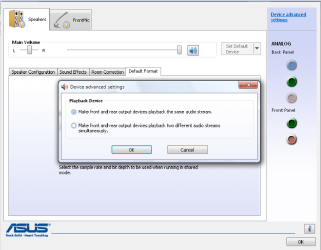
Front panel..

justyya

New member
Local time
3:05 PM
Messages
18
Location
Lithuania
Please Help me! I can't make play back and front :( Ihave plugged both and fron and back panel but still have a problem... And my Realtek HD audio manenger looks different...
Capture.PNG

How i have make that with this? there is no Folder option... What should i do on that? :eek:

EDITED: Oh ya then i press Ädvance Device Settings" It's look like this....
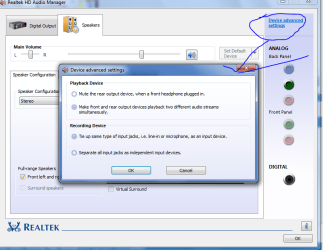
Capture1.PNG

p.s. Not justyya, but Justyys Sorry register in dark...
 

My Computer

OS
windows 7 Pro
CPU
2.20
Motherboard
Asus M2V-MX
Memory
1GB
Graphics Card(s)
512
Sound Card
Idk
Monitor(s) Displays
Samsung
Screen Resolution
1280 x 1024
Hard Drives
SAMSUNG SP2504C (232 GB)
#1 (Active) 38397MB
#2 200067 MB
Hello and welcome to the forums.

Have you set the front panel in the BIOS to AC'97?
 
Last edited:

My Computer

Computer Manufacturer/Model Number
Custom Build
OS
W7 RTM Ultimate x64
CPU
Intel Q8400 @ 2.66GHZ
Motherboard
Gigabyte GA-EG45M-UD2H
Memory
4GB DDR2-800
Graphics Card(s)
Gainward GTS 450 GLH 1GB Edition
Sound Card
Integrated 8 Channel
Monitor(s) Displays
AOC 23.6 Inch Widescreen LCD
Screen Resolution
1920x1080
Hard Drives
Seagate 500GB Internal
Western Digital 1TB Internal

Hitachi 1TB External
PSU
Apevia Java Power 500W
Case
Cooler Master HAF 922 Black
Cooling
Stock Intel CPU Fan
Keyboard
HP SK-2960 Multimedia Keyboard
Mouse
Logitech M350 Wireless Gaming Mouse
Internet Speed
1.5MB
OH thx... Cool. :shock:
 

My Computer

OS
windows 7 Pro
CPU
2.20
Motherboard
Asus M2V-MX
Memory
1GB
Graphics Card(s)
512
Sound Card
Idk
Monitor(s) Displays
Samsung
Screen Resolution
1280 x 1024
Hard Drives
SAMSUNG SP2504C (232 GB)
#1 (Active) 38397MB
#2 200067 MB
Worked for me too! But what I cant figure out is that where has the "mute rear panel when front panel plugged in" option gone??
 

My Computer

Computer type
PC/Desktop
Computer Manufacturer/Model Number
Self built
OS
Windows 10 Pro (x64)
CPU
AMD RYZEN 7 1700+Stock Wraith Spire
Motherboard
ASUS PRIME B350M-A
Memory
Corsair 8GB (1 x 8 GB) DDR4 Vengeance LPX 2400Mhz
Graphics Card(s)
SAPPHIRE RX 470 4GB (Platinum Edition)
Monitor(s) Displays
BenQ VZ2250H
Screen Resolution
1920x1080
Hard Drives
120GB Samsung 750 Evo (OS/Programs)+1TB ST Firecuda (Games/Creative Applications)+1TB WD Green (Storage)
PSU
Antec VP650PM
Case
Coolermaster K380 Mid-Tower
Cooling
Side:Antec F19 120mm+Rear:Tt ISGC Fan12
Keyboard
Logitech K200
Mouse
Dragonwar Ele-G9 Thor
Internet Speed
Slow by 21st Century Standards :(
Antivirus
Bitdefender Internet Security and MBAM
Browser
Firefox
Other Info
Creative Inspire T3130
Not sure mate, maybe specific to certain ASUS boards.
 

My Computer

Computer Manufacturer/Model Number
Custom Build
OS
W7 RTM Ultimate x64
CPU
Intel Q8400 @ 2.66GHZ
Motherboard
Gigabyte GA-EG45M-UD2H
Memory
4GB DDR2-800
Graphics Card(s)
Gainward GTS 450 GLH 1GB Edition
Sound Card
Integrated 8 Channel
Monitor(s) Displays
AOC 23.6 Inch Widescreen LCD
Screen Resolution
1920x1080
Hard Drives
Seagate 500GB Internal
Western Digital 1TB Internal

Hitachi 1TB External
PSU
Apevia Java Power 500W
Case
Cooler Master HAF 922 Black
Cooling
Stock Intel CPU Fan
Keyboard
HP SK-2960 Multimedia Keyboard
Mouse
Logitech M350 Wireless Gaming Mouse
Internet Speed
1.5MB
It used to be there in Xp, in this version it has dissappeared, or have I toyed with the wrong options?! I uninstalled and reinstalled, no dice. If i plug in front panel while back panel operative both headphone and speakers play!!:confused:

I have even tried disabling Digital output, as I dont have such a compatible device. My mobo is M2n-mx se +
 

Attachments

  • Sound.png
    Sound.png
    29.3 KB · Views: 638

My Computer

Computer type
PC/Desktop
Computer Manufacturer/Model Number
Self built
OS
Windows 10 Pro (x64)
CPU
AMD RYZEN 7 1700+Stock Wraith Spire
Motherboard
ASUS PRIME B350M-A
Memory
Corsair 8GB (1 x 8 GB) DDR4 Vengeance LPX 2400Mhz
Graphics Card(s)
SAPPHIRE RX 470 4GB (Platinum Edition)
Monitor(s) Displays
BenQ VZ2250H
Screen Resolution
1920x1080
Hard Drives
120GB Samsung 750 Evo (OS/Programs)+1TB ST Firecuda (Games/Creative Applications)+1TB WD Green (Storage)
PSU
Antec VP650PM
Case
Coolermaster K380 Mid-Tower
Cooling
Side:Antec F19 120mm+Rear:Tt ISGC Fan12
Keyboard
Logitech K200
Mouse
Dragonwar Ele-G9 Thor
Internet Speed
Slow by 21st Century Standards :(
Antivirus
Bitdefender Internet Security and MBAM
Browser
Firefox
Other Info
Creative Inspire T3130
Maybe that option was only applicable to XP, or driver version. Just unplug the back speakers and then you'll only have the front ones playing. :)
 

My Computer

Computer Manufacturer/Model Number
Custom Build
OS
W7 RTM Ultimate x64
CPU
Intel Q8400 @ 2.66GHZ
Motherboard
Gigabyte GA-EG45M-UD2H
Memory
4GB DDR2-800
Graphics Card(s)
Gainward GTS 450 GLH 1GB Edition
Sound Card
Integrated 8 Channel
Monitor(s) Displays
AOC 23.6 Inch Widescreen LCD
Screen Resolution
1920x1080
Hard Drives
Seagate 500GB Internal
Western Digital 1TB Internal

Hitachi 1TB External
PSU
Apevia Java Power 500W
Case
Cooler Master HAF 922 Black
Cooling
Stock Intel CPU Fan
Keyboard
HP SK-2960 Multimedia Keyboard
Mouse
Logitech M350 Wireless Gaming Mouse
Internet Speed
1.5MB
Back
Top