Unwanted Files on Desktop

qualister

New member
Local time
3:14 PM
Messages
8
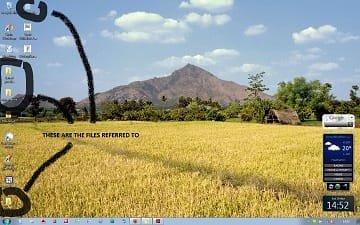
Weird, harmless, but irritating: Three files keep appearing on my [Win7 Ultimate] desktop, labeled "Appearance", Library" and "Saved Puzzles", none of which are used.

When the files are deleted, they reappear within minutes, without a reboot. Tried stopping "explorer" process in task manager, before deleting, but they still reappeared. Any suggestions would be greatly appreciated.
 

My Computer

OS
Windows 7

My Computer

Computer type
PC/Desktop
Computer Manufacturer/Model Number
Dell XPS 420
OS
Windows 10, Home Clean Install
CPU
Intel Core2 processsor Q8200(2.33Ghz 1333FSB) Quad Core Tech
Motherboard
Dell
Memory
6 gb
Graphics Card(s)
ATI Radeon 256MB HD3650
Sound Card
Intergrated 7.1 Channel Audio
Monitor(s) Displays
Dell SP2009W 20"
Hard Drives
640 GB Serial ATA Hard drive
Cooling
Fan
Keyboard
Dell USB Keyboard
Mouse
Dell Premium Optical USB
Internet Speed
DSL 2.85
Unwanted Files

Thanks for the suggestion. Unfortunately, the files remained, but became transparent.
 

My Computer

OS
Windows 7

My Computer

Computer Manufacturer/Model Number
Toshiba Satellite S875D-S7239 laptop
OS
MS Windows 7 Ultimate SP1 64-bit
CPU
AMD A10-4600M
Motherboard
AMD Pumori (Socket FT1)
Memory
6.00 GB Dual-Channel DDR3 @ 798MHz (11-11-12-28)
Graphics Card(s)
AMD Radeon HD 7660G
Sound Card
High Definition Audio Device
Monitor(s) Displays
Generic PnP Monitor (1600x900@60Hz)
Screen Resolution
1600x900@60Hz
Hard Drives
SSD 119GB Corsair CSSD-V128GB2 ATA Device
Keyboard
Standard PS/2 Keyboard
Mouse
HP Wireless Optical Mobile Mouse Model FHA-3410
Internet Speed
What the local pub, local coffee shop offers.
Other Info
Optical Drive:MATSHITA BD-CMB UJ160B ATA Device


Also have an Asus ha1002xp netbook with Win 7 Ultimate installed.
Unwanted Files

Here's the screenshot. Thanks for your interest.
 

Attachments

  • Untitled.jpg
    Untitled.jpg
    20.8 KB · Views: 61

My Computer

OS
Windows 7
Last edited by a moderator:

My Computer

Computer type
PC/Desktop
Computer Manufacturer/Model Number
Dell XPS 420
OS
Windows 10, Home Clean Install
CPU
Intel Core2 processsor Q8200(2.33Ghz 1333FSB) Quad Core Tech
Motherboard
Dell
Memory
6 gb
Graphics Card(s)
ATI Radeon 256MB HD3650
Sound Card
Intergrated 7.1 Channel Audio
Monitor(s) Displays
Dell SP2009W 20"
Hard Drives
640 GB Serial ATA Hard drive
Cooling
Fan
Keyboard
Dell USB Keyboard
Mouse
Dell Premium Optical USB
Internet Speed
DSL 2.85
I can't make out screenshot.

Let's see if they are actually on Desktop or not.
START | type cmd.exe | RIGHT-click on cmd.exe | "Run as Administrator" | paste -

Code:
[FONT=lucida console]dir /a /o:g /q /x "%userprofile%\desktop" > 0 & start notepad 0[/FONT]

A notepad will open with results. Paste results into next post.

Do you see the folder names in the listing?

Regards. . .

jcgriff2

.
 

My Computer

OS
Windows 7 - Vista
qualister,

I've the same problem as J.C. Griffith. I can't, even after enlarging with MS Paint, tell what they are.

Follow Griff's advice please so that we can see what's there.

What may help you in the meantime to get an idea of what those are is:
WIN + E
type %userprofile%\desktop in the Address bar (not the search bar)
Enter key

There you will see a "directory" listing of the Desktop's contents.

WIN is that key with the funny looking wavy flag on it.
 

My Computer

Computer Manufacturer/Model Number
Toshiba Satellite S875D-S7239 laptop
OS
MS Windows 7 Ultimate SP1 64-bit
CPU
AMD A10-4600M
Motherboard
AMD Pumori (Socket FT1)
Memory
6.00 GB Dual-Channel DDR3 @ 798MHz (11-11-12-28)
Graphics Card(s)
AMD Radeon HD 7660G
Sound Card
High Definition Audio Device
Monitor(s) Displays
Generic PnP Monitor (1600x900@60Hz)
Screen Resolution
1600x900@60Hz
Hard Drives
SSD 119GB Corsair CSSD-V128GB2 ATA Device
Keyboard
Standard PS/2 Keyboard
Mouse
HP Wireless Optical Mobile Mouse Model FHA-3410
Internet Speed
What the local pub, local coffee shop offers.
Other Info
Optical Drive:MATSHITA BD-CMB UJ160B ATA Device


Also have an Asus ha1002xp netbook with Win 7 Ultimate installed.
Thanks, guys. WIN + E showed the files in the listing and, as you can see in the attached txt file, they are definitely on the desktop. Sorry about the screenshot quality.
 

Attachments

My Computer

OS
Windows 7
The 3 folders in question are in the DIR listing -
Code:
[FONT=lucida console] Volume in drive C has no label.[/FONT]
[FONT=lucida console]Volume Serial Number is 2A10-939E[/FONT]
[FONT=lucida console]Directory of C:\Users\DFE\desktop[/FONT]
[FONT=lucida console]12/04/2010  23:41    <DIR>                       DFE-PC\DFE             .[/FONT]
[FONT=lucida console]12/04/2010  23:41    <DIR>                       NT AUTHORITY\SYSTEM    ..[/FONT]
[FONT=lucida console][COLOR=red]12/04/2010  22:59    <DIR>                       BUILTIN\Administrators Library[/COLOR][/FONT]
[FONT=lucida console][COLOR=red]12/04/2010  22:59    <DIR>          APPEAR~1     BUILTIN\Administrators Appearance[/COLOR][/FONT]
[FONT=lucida console]11/04/2010  23:25    <DIR>                       BUILTIN\Administrators House[/FONT]
[FONT=lucida console]05/04/2010  18:34    <DIR>          DOWNLO~1     BUILTIN\Administrators Downloads[/FONT]
[FONT=lucida console][COLOR=red]12/04/2010  22:59    <DIR>          SAVEDP~1     BUILTIN\Administrators Saved puzzles[/COLOR][/FONT]
[FONT=lucida console]09/04/2010  11:47           460,671 GETTIN~1.PDF BUILTIN\Administrators GettingStartedwithPMC.pdf[/FONT]
[FONT=lucida console]08/04/2010  16:43            60,718 BASICG~1.PDF BUILTIN\Administrators Basic Guidelines to Working with Metal Clay.pdf[/FONT]
[FONT=lucida console]12/04/2010  13:50            70,144 ANZ-IN~1.DOC BUILTIN\Administrators ANZ-Institutional-Proposal-V02.doc[/FONT]
[FONT=lucida console]11/04/2010  20:16         3,510,640              BUILTIN\Administrators PMC.pdf[/FONT]
[FONT=lucida console]07/04/2010  10:42            17,720 BREATH~1.DOC BUILTIN\Administrators Breathing Exercises.docx[/FONT]
[FONT=lucida console]05/04/2010  17:11               968 BRAINW~1.LNK BUILTIN\Administrators Brain Workshop.lnk[/FONT]
[FONT=lucida console]27/09/2007  23:20           839,680              BUILTIN\Administrators Sudoku.exe[/FONT]
[FONT=lucida console]13/04/2010  16:55               856              BUILTIN\Administrators Sudoku.whs[/FONT]
[FONT=lucida console]10/04/2010  15:12            48,983              BUILTIN\Administrators Untitled.jpg[/FONT]
[FONT=lucida console]           9 File(s)      5,010,380 bytes[/FONT]
[FONT=lucida console]           7 Dir(s)  107,021,217,792 bytes free[/FONT]

Interesting to note that the timestamps of all 3 are identical.

Let's see what, if anything is in them. This command differs slightly from the last -
START | type cmd.exe | RIGHT-click on cmd.exe | "Run as Administrator" | paste -
Code:
[FONT=lucida console]dir /a /s /o:g /q /x "%userprofile%\desktop" > 0 & start notepad 0[/FONT]

A notepad will open with results. Paste results into next post.

Regards. . .

jcgriff2

.
 

My Computer

OS
Windows 7 - Vista
Weird, harmless, but irritating: Three files keep appearing on my [Win7 Ultimate] desktop, labeled "Appearance", Library" and "Saved Puzzles", none of which are used.

When the files are deleted, they reappear within minutes, without a reboot. Tried stopping "explorer" process in task manager, before deleting, but they still reappeared. Any suggestions would be greatly appreciated.

If these files re-appear by themselves they have to be being created by something and that something has to be running to do it...

Shut down all applications... Just you and your desktop... Take a look in task manager and see what's in there that doesn't need to be. Once you identify the nasty culprit simply uninstal it.
 

My Computer

Computer Manufacturer/Model Number
Homebrew
OS
XP Pro SP3 X86 / Win7 Pro X86
CPU
Amd 64 x2 4200 (2.4ghz)
Motherboard
Asus M2N-MX SE Plus
Memory
Kingston DDR2 800 2gb
Graphics Card(s)
Nvidia GF-8400
Sound Card
Realtek on Motherboard
Monitor(s) Displays
Acer x-193bw
Screen Resolution
1440 x 900
Hard Drives
Western Digital 500g
PSU
350watt In-Win
Case
In-Win
Cooling
Air
Keyboard
yes
Mouse
yes
Internet Speed
5mpbs
Other Info
Also ASRock ION 330 as HTPC (on XP).
Acer Aspire as GP netbook (on XP).
Hi Common Tater

Nothing in Task Manager [no applications and no services, except wuaudt.exe and system idle process]. Should I be looking somewhere else?
 

My Computer

OS
Windows 7
Thanks for hanging in there. Notepad file is attached.
 

Attachments

My Computer

OS
Windows 7
Unwanted Files

Hi Richc46

Dragging the files into Documents gets them out of sight, but it would be nice to know where they are coming from.
 

My Computer

OS
Windows 7
Would it help to have a screen shot of the task manager processes also?

Or maybe a Process Explorer screenshot?

Process Exploerer
 

My Computer

Computer Manufacturer/Model Number
Rig 1
OS
Windows 7 Ultimate x64
CPU
AMD Phenom II X4 940 Black Edition @ 3.4GHz (AM2+)
Motherboard
Gigabyte GA-MA790X-UD4P (AM2+)
Memory
Corsair CM2X4096-8500C5 (4 X 2GB)
Graphics Card(s)
XFX Radeon HD 5770 / Diamond Radeon HD 5770 CrossFireX
Sound Card
Asus Xonar DS (PCI)
Monitor(s) Displays
Samsung SyncMaster 932bw+ (3)
Screen Resolution
4320x900
Hard Drives
OCZ Vertex 2 80 GB - Windows 7 System --
WD Caviar Black 1TB - Music, Movies, Vids, Pics --
WD Caviar Black 640GB - User Profiles & Games --
WD My Book 320GB external
PSU
Corsair CMPSU-750TX
Case
Cooler Master HAF 932
Cooling
Corsair Hydro Series H50
Keyboard
Logitech Desktop Wave
Mouse
Logitech LX8 Laser
Internet Speed
20 down / 2 up
Other Info
LG GGC-H20L Blu-Ray / HDDVD combo --
Hauppauge HVR-1250 --
Silverstone MFP-51 --
Logitech Webcam C600
Thanks for hanging in there. Notepad file is attached.

Ahhhh... now I see it...

Take a look at your list... note that Sudoku.exe is on your desktop at 839,680 bytes...

Ok... what you've done is to put the actual program file on your desktop rather than putting it in Program Files and making a shortcut on your desktop. Sudoku now thinks your desktop is it's home folder and is creating the stray files.

Dump it and install it properly and I'm guessing your problem goes away....

For future... It is always better to put programs and files in their own folders. The desktop is for shortcuts... not files and certainly not programs.
 

My Computer

Computer Manufacturer/Model Number
Homebrew
OS
XP Pro SP3 X86 / Win7 Pro X86
CPU
Amd 64 x2 4200 (2.4ghz)
Motherboard
Asus M2N-MX SE Plus
Memory
Kingston DDR2 800 2gb
Graphics Card(s)
Nvidia GF-8400
Sound Card
Realtek on Motherboard
Monitor(s) Displays
Acer x-193bw
Screen Resolution
1440 x 900
Hard Drives
Western Digital 500g
PSU
350watt In-Win
Case
In-Win
Cooling
Air
Keyboard
yes
Mouse
yes
Internet Speed
5mpbs
Other Info
Also ASRock ION 330 as HTPC (on XP).
Acer Aspire as GP netbook (on XP).
Well spotted, CommonTater :D
 

My Computer

Computer type
PC/Desktop
Computer Manufacturer/Model Number
Scan 3XS P55 liteDAW
OS
Windows Home Premium (64)
CPU
Intel Core i7 860
Motherboard
Gigabyte GA-P55A-UD4
Memory
8GB (4x2GB) Corsair TwinX XMS3
Graphics Card(s)
1GB Gainward 9500 GT
Sound Card
M-Audio Delta 66
Monitor(s) Displays
Acer v223wBBd
Screen Resolution
1680 x 1050
Hard Drives
1 x 500 GB WD Barracuda (OS+Docs)
2 x 1TB Samsung Spinpoint F3 (Data)
PSU
Enermax EMD625AWT II - 625W Enermax Modu82+ II
Case
Fractal Design Define R2 Black
Cooling
Prolima Megahalems Super 6 Heatpipe Tower Cooler
Keyboard
Microsoft Digital Media Pro
Mouse
Belkin Optical Ergo
Internet Speed
8 Mbps nominal (14.9 achieved !)
Other Info
Digital Audio Workstation

My Computer

Computer Manufacturer/Model Number
Homebrew
OS
XP Pro SP3 X86 / Win7 Pro X86
CPU
Amd 64 x2 4200 (2.4ghz)
Motherboard
Asus M2N-MX SE Plus
Memory
Kingston DDR2 800 2gb
Graphics Card(s)
Nvidia GF-8400
Sound Card
Realtek on Motherboard
Monitor(s) Displays
Acer x-193bw
Screen Resolution
1440 x 900
Hard Drives
Western Digital 500g
PSU
350watt In-Win
Case
In-Win
Cooling
Air
Keyboard
yes
Mouse
yes
Internet Speed
5mpbs
Other Info
Also ASRock ION 330 as HTPC (on XP).
Acer Aspire as GP netbook (on XP).
I noticed that WOT gave that site an orange circle rather than green.
 

My Computer

Computer Manufacturer/Model Number
Toshiba Satellite S875D-S7239 laptop
OS
MS Windows 7 Ultimate SP1 64-bit
CPU
AMD A10-4600M
Motherboard
AMD Pumori (Socket FT1)
Memory
6.00 GB Dual-Channel DDR3 @ 798MHz (11-11-12-28)
Graphics Card(s)
AMD Radeon HD 7660G
Sound Card
High Definition Audio Device
Monitor(s) Displays
Generic PnP Monitor (1600x900@60Hz)
Screen Resolution
1600x900@60Hz
Hard Drives
SSD 119GB Corsair CSSD-V128GB2 ATA Device
Keyboard
Standard PS/2 Keyboard
Mouse
HP Wireless Optical Mobile Mouse Model FHA-3410
Internet Speed
What the local pub, local coffee shop offers.
Other Info
Optical Drive:MATSHITA BD-CMB UJ160B ATA Device


Also have an Asus ha1002xp netbook with Win 7 Ultimate installed.
Back
Top