
Solved System Reserve in image backup question

damien76

New member
Power User
Local time
11:57 PM
Messages
180
Hi;

Newbie here with Windows 7 x32 Ultimate. I often do image backup using Acronis True Image Western Digital edition in XP. Now with Windows 7 I see a System Reserve in the checkboxes for the "partition to backup". It usually is the partition only and the MBR but now in Windows 7 it's 3 actually.

Is there a need to select that to be part of the image backup or it's okay to not include it...?

Also is there an alternative freeware for system restore...?

Just asking..

Thanks:)
 
Last edited:

My Computer

Computer type
PC/Desktop
Computer Manufacturer/Model Number
Custom Build
OS
Win7 Ultimate 64bit
CPU
AMD A8 5600K APU
Motherboard
Gigabyte F2A75MD3H
Memory
16gb DDR3
Graphics Card(s)
Radeon 7560
Sound Card
onboard
Monitor(s) Displays
kingston lcd 23inch wide
Hard Drives
WD 500gb (2)
WD 1TB
Antivirus
EAM + Online Armor Premium -- desktop
Hi damien76,

System Reserved is the partition that stores among other things, the BCD (Windows Boot Manager) and Bitlocker Encryption data. (if you have Ultimate)

Personally speaking, I see no harm in including System Reserved in the backup, In fact I place it into the backup myself, as it is only 100MB it doesn't really add to the size very much.

From a purely technical standpoint though, honestly there is little reason to do so beyond the first image. It is highly unlikely that the partition will change at all, unless you are in the habit of messing with your Boot manager every couple of days. As 80%+ of users don't even realise that they CAN dual boot, let alone actually do it, then no, there is little reason to do it.

Hope this helps.
 

My Computer

Computer type
PC/Desktop
Computer Manufacturer/Model Number
Medion Erazer (note to self: insert model number) - with custom additions
OS
Windows 10 Pro x64
CPU
Intel Core i5 7400 @ 3.00GHz
Motherboard
OEM supllied with PC
Memory
8GB 2133Mhz DDR4 (OEM supplied)
Graphics Card(s)
Gygabyte Windforce GTX 1050Ti (Factory Overclocked)
Sound Card
Realtek
Monitor(s) Displays
Acer Al1980 + HKC
Screen Resolution
1360*768(HKC) / 1280*1024(Acer)
Hard Drives
1TB Toshiba
1TB WD Caviar Green
120GB Samsung Evo 840
PSU
OEM supplied (no power rating on case)
Case
OEM Supplied
Cooling
Stock
Keyboard
Logitech Wireless
Mouse
Logitect Wireless
Internet Speed
40Mb/s Down 10Mb/s Up
Antivirus
Defender
Browser
Firefox
Hello severedsolo,

Thank you for the reply. That was fast huh.

Well, I am dual-booting with XP SP3 as the primary master hdd (primary slave hdd is with Windows 7 --just started just 2 months..) Yes I seem to see that it's 100mb. Does it need defragging...? Okay I will include it in the next image backup I will do. I plan to change firewalls (from CISver5 to Outpost Firewall Pro --got a lifetime license recently) so I'll do a system image backup just in case system get's borked.

"Also is there an alternative freeware for system restore...?"
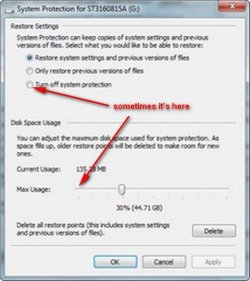
-- any comments on this question....I sometimes see my settings for system restore going back to zero% and "Turn off protection"..I'd have to confirm this again but just earlier I saw that it's like that after using CCleaner v3.5 and Auslogics defrag..
 

Attachments

  • sres.jpg
    sres.jpg
    29.4 KB · Views: 5

My Computer

Computer type
PC/Desktop
Computer Manufacturer/Model Number
Custom Build
OS
Win7 Ultimate 64bit
CPU
AMD A8 5600K APU
Motherboard
Gigabyte F2A75MD3H
Memory
16gb DDR3
Graphics Card(s)
Radeon 7560
Sound Card
onboard
Monitor(s) Displays
kingston lcd 23inch wide
Hard Drives
WD 500gb (2)
WD 1TB
Antivirus
EAM + Online Armor Premium -- desktop
If the "System" boot files are stored on the Windows 7 System Reserved partition and you don't include it in the image/backup the system will not boot when the image is used.
 

My Computer

Computer Manufacturer/Model Number
* BFK Customs *
OS
W 7 64-bit Ultimate
CPU
Intel Q9550 Yorkfield
Motherboard
ASUS P5Q Pro
Memory
8GB Dominator 8500C5D
Graphics Card(s)
ATI : XFX 5870
Sound Card
Realtek HD Audio 7-1
Monitor(s) Displays
1x 47" LCD HDMI & 3x 26" LCD HDMI
Screen Resolution
1920x1080P & 1920x1200
Hard Drives
1x 80GB Intel X25-M G2 SSD : 1x 500GB & 1x 640GB WD Caviar Black(s)
PSU
Corsair 620HX
Case
Cooler Master RC-690
Cooling
Tuniq Tower 120, 2x 140mm and 3x 120mm case fans
Keyboard
Microsoft 500
Mouse
Razer Diamondback 3G
Internet Speed
14 Mb/s
Other Info
1x Koutech 3Gb/s SATA HDD Hot Swap Rack
@Bare Foot Kid;

Will keep that in mind. Thank you:)
 

My Computer

Computer type
PC/Desktop
Computer Manufacturer/Model Number
Custom Build
OS
Win7 Ultimate 64bit
CPU
AMD A8 5600K APU
Motherboard
Gigabyte F2A75MD3H
Memory
16gb DDR3
Graphics Card(s)
Radeon 7560
Sound Card
onboard
Monitor(s) Displays
kingston lcd 23inch wide
Hard Drives
WD 500gb (2)
WD 1TB
Antivirus
EAM + Online Armor Premium -- desktop

My Computer

Computer Manufacturer/Model Number
* BFK Customs *
OS
W 7 64-bit Ultimate
CPU
Intel Q9550 Yorkfield
Motherboard
ASUS P5Q Pro
Memory
8GB Dominator 8500C5D
Graphics Card(s)
ATI : XFX 5870
Sound Card
Realtek HD Audio 7-1
Monitor(s) Displays
1x 47" LCD HDMI & 3x 26" LCD HDMI
Screen Resolution
1920x1080P & 1920x1200
Hard Drives
1x 80GB Intel X25-M G2 SSD : 1x 500GB & 1x 640GB WD Caviar Black(s)
PSU
Corsair 620HX
Case
Cooler Master RC-690
Cooling
Tuniq Tower 120, 2x 140mm and 3x 120mm case fans
Keyboard
Microsoft 500
Mouse
Razer Diamondback 3G
Internet Speed
14 Mb/s
Other Info
1x Koutech 3Gb/s SATA HDD Hot Swap Rack
Back
Top