
Sync, Backup and Store your Files to the Cloud with OneDrive

gregrocker

New member
Guru
Local time
2:48 PM
Messages
50,634
Keep your files backed-up and synching together across all of your devices using OneDrive Desktop App for Windows which offers 15gb free cloud storage for each Windows Live/Hotmail/Outlook ID and sells more for cheap.

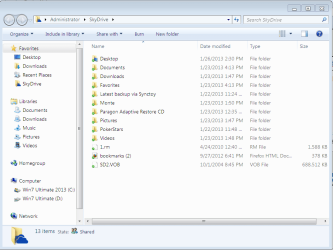
It can be as easy as dragging anything you want backed up into OneDrive (formerly SkyDrive) folder which lives both on your HD and in the Cloud, which is the gauzy name for MS Servers. But with a few more minutes configuration you'll have your User folders stored in the cloud ready to access on the internet and sync'd to any of your devices.
Capture1.PNG

After trying several methods for over a year I've settled on physically moving the active User folders to the OneDrive folder with the steps in User Folders - Change Default Location.

You can also place the OneDrive folder on any other HD, but be aware that if it is moved from C and you use Win7 Backup Imaging it will force the inclusion of the data drive to which Onedrive and/or User folders are moved since they are System folders.

You can do the same on all your PC's and have one master set of files hosted and kept Sync'd this way by Onedrive, even access them from any device anywhere via the internet, share them publicly, by invitation, or link.

Capture4.PNG

In using this method the only risk is if you'd delete a file or folder and have it sync on other devices before you realize you still need it. In this case the file/folder will be in each Recycle Bin. For this reason I'd uncheck Recycle Bin in CCleaner so that it is only emptied manually when you have the chance to review contents.

Alternative method:

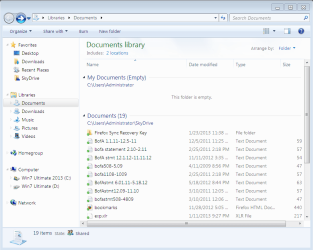
If you prefer not to move the User folders into Skydrive folder, you can also copy each one there, delete the content in the C: User folder, then rightclick each User folder in Onedrive to add it to the related Library - Include a Folder - Windows 7 Forums.

Capture2.PNG

If you use this Library method, keep each empty C: User folder in the Library so you can visually monitor if any files land there and simply drag them over to the Onedrive User folder. You may want to leave some files which exceed the Onedrive size limit in C: user folder so they don't cause an oversize error message.
Capture3.PNG


Last edited:
Hi Greg,

Sounds like a pretty nifty idea. I've got a similar idea and I'm sure there is a downside to it that escapes me at the moment, but instead of copying why not just change the location of your user's document folder from its default location, i.e. via right clicking on the folder, then properties, and then the location tab and choosing change location, and moving it to within your SkyDrive folder on your hard drive? I guess the down side would be every document you saved, unless you made a conscious effort to "Save As" in an alternative location, it would naturally if a document, be automatically saved in the "Default" user's documents folder, which now after the change in locations would happen to be the newly relocated user's "Documents" folder now inside the SkyDrive folder which gets synced to the cloud and you might not want it in the cloud. That's the only downside I can see. Can you think of others? I'm sure I got to be missing something...
 

My Computer

Computer Manufacturer/Model Number
Homebuilt with parts from NewEgg
OS
Windows 7 Professional x64
CPU
Intel Core i7-3770K Ivy Bridge 3.5GHz (3.9GHz Turbo) LGA1155
Motherboard
MSI Z77MPOWER LGA 1155 Intel Z77 HDMI SATA 6Gb/s USB 3.0 ATA
Memory
CORSAIR Vengeance 32GB (4x8GB) 240-Pin DDR3 SDRAM DDR3 1866
Graphics Card(s)
XFX GeForce 7800GTX 256MB 256-bit GDDR3 PCI Express x16 SLI
Sound Card
Integrated on motherboard
Monitor(s) Displays
The 19" Dell UltraSharp 1908FP-BLK & Acer flat LCD panels
Screen Resolution
Dell 1280 x 1024 resolution and Acer
Hard Drives
Western Digital WD Black WD2002FAEX 2TB 7200 RPM 64MB Cache SATA 6.0Gb/s 3.5" Internal Hard Drive -Bare Drive and a Seagate Barracuda ST2000DM001 2TB 7200 RPM 64MB Cache SATA 6.0Gb/s 3.5" Internal Hard Drive -Bare Drive
PSU
CORSAIR ProSeries GoldCertified AX750 750W ATX12V v2.31
Case
Corsair Vengeance C70 Military Green Steel ATX Mid Tower
Cooling
CORSAIR HydroSeries H60 (CWCH60) High Performance Liquid CPU
Keyboard
Cheapie Logitech
Mouse
Cheapie HP
Internet Speed
Download: 1561 kbps Upload: 214 kbps Latency: 181 ms
Other Info
LG DVD Burner 24X DVD+R 8X DVD+RW 8X DVD+R DL 24X DVD-R 6X DVD-RW 16X DVD-ROM 48X CD-R 32X CD-RW 48X CD-ROM Black SATA Model GH24NS90 - OEM
I have ended up Moving the User folders to Skydrive using the folder's Location tab, however this may not work for everyone because it will then make Skydrive a System folder which is forced to be included in a Win7 backup image.

If you don't care or use Win7 backup imaging then this should work OK, although some have also reported unfixable permissioning errors trying to run installers from a moved Downloads folder.
 
That's one issue I did forget about Greg for I've had that problem with Windows backup having folders like DropBox, SkyDrive, GoogleDrive, and MyBox Files in my User Folder. I don't care much for the backup program either.
 

My Computer

Computer Manufacturer/Model Number
Homebuilt with parts from NewEgg
OS
Windows 7 Professional x64
CPU
Intel Core i7-3770K Ivy Bridge 3.5GHz (3.9GHz Turbo) LGA1155
Motherboard
MSI Z77MPOWER LGA 1155 Intel Z77 HDMI SATA 6Gb/s USB 3.0 ATA
Memory
CORSAIR Vengeance 32GB (4x8GB) 240-Pin DDR3 SDRAM DDR3 1866
Graphics Card(s)
XFX GeForce 7800GTX 256MB 256-bit GDDR3 PCI Express x16 SLI
Sound Card
Integrated on motherboard
Monitor(s) Displays
The 19" Dell UltraSharp 1908FP-BLK & Acer flat LCD panels
Screen Resolution
Dell 1280 x 1024 resolution and Acer
Hard Drives
Western Digital WD Black WD2002FAEX 2TB 7200 RPM 64MB Cache SATA 6.0Gb/s 3.5" Internal Hard Drive -Bare Drive and a Seagate Barracuda ST2000DM001 2TB 7200 RPM 64MB Cache SATA 6.0Gb/s 3.5" Internal Hard Drive -Bare Drive
PSU
CORSAIR ProSeries GoldCertified AX750 750W ATX12V v2.31
Case
Corsair Vengeance C70 Military Green Steel ATX Mid Tower
Cooling
CORSAIR HydroSeries H60 (CWCH60) High Performance Liquid CPU
Keyboard
Cheapie Logitech
Mouse
Cheapie HP
Internet Speed
Download: 1561 kbps Upload: 214 kbps Latency: 181 ms
Other Info
LG DVD Burner 24X DVD+R 8X DVD+RW 8X DVD+R DL 24X DVD-R 6X DVD-RW 16X DVD-ROM 48X CD-R 32X CD-RW 48X CD-ROM Black SATA Model GH24NS90 - OEM
Greg, would a data drive using the 'include in library' avoid the permission error and the Windows backup problem? That way you could always have a folder on your data drive for folders you don't want in the cloud, and have a local backup for them or for all of them? Just thinking out loud.
 

My Computers

System One System Two

  • Computer type
    PC/Desktop
    Computer Manufacturer/Model Number
    ALWAYS UNDER CONSTRUCTION
    OS
    Windows 11 Pro
    CPU
    Ryzen 9 5900X
    Motherboard
    Asus X570 Crosshair Viii Hero
    Memory
    32GB G Skill DDR4-3600
    Graphics Card(s)
    EVGA RTX 3080 FTW 3 Ultra
    Sound Card
    On Board/Sennheiser PC37X Headset
    Monitor(s) Displays
    3 X Asus 27"
    Screen Resolution
    2560x1440
    Hard Drives
    2 X 1 TB NVME drives
    PSU
    EVGA 850
    Case
    Phanteks Eclipse P400A
    Cooling
    EVGA 280 AIO
    Keyboard
    Logitech G510s/ Logitech G13
    Mouse
    Logitech G502
    Internet Speed
    24/1
    Antivirus
    ESET/MBAM Pro/SAS Pro
    Browser
    Chrome/ Firefox/ Edge
  • Computer type
    Laptop
    System Manufacturer/Model Number
    Dell 16 Plus
    OS
    Windows 11 Pro
    CPU
    Intel Ultra 9 288V
    Memory
    32 GB LPDDR5X 8533
    Monitor(s) Displays
    16" Mini-LED HDR600 Touch 90 Hz
    Screen Resolution
    2560X1600
    Hard Drives
    1 TB NVME
Yes, Steve, thanks for the feedback. I have just yesterday edited this to de-emphasize using Libraries since moving User folders to Skydrive has presented no issues in over a year now of testing that system. I also realized that there was no possible permissioning error having Skydrive as typical on the C drive.

However as you point out moving both Skydrive and User folders to another HD in a dedicated data partition would cause Win7 backup imaging to force that data drive's inclusion in the System image, so a better method in that case would be to link to copied User folders there via Library - Include a Folder - Windows 7 Forums.

This thread is a tutorial in the making, so if you have any suggestions for editing into the text this important addition I would also appreciate that. For now I have added this paragraph but it seems a bit disjointed where I placed it, so any feedback is welcome:
You can also place the Skydrive folder on any other HD, but be aware that if it is moved from C and you use Win7 Backup Imaging it will force the inclusion of the data drive to which Skydrive and/or User folders are moved since they are System folders. This is remedied by using the Alternate Method below.
Thanks again.
 
Question about SkyDrive (and any other Cloud Sync Service)...

I would like to find a service to ARCHIVE my data to the cloud. I have several hundred GBs of old photos and home movies that I don't need to keep on my hard drive (And sync across devices), but I would like to keep.

Essentially, I am asking if there is a Cloud version of archiving to CDs/DVDs and removing from your PC.

Every service I know of, including backup services, requires you to maintain a copy of the file on at least one HDD of your synced devices. I essentially want to say "This folder, c:\SkyDrive\Archive\Photos2006, is ready to be archived" and then have the service copy it and verify it in the cloud, and then allow me to delete it (or, even better, delete it locally for me after verification).

Any ideas?
 

My Computer

OS
XP, Vista, W7, all flavors
I am now re-evaluating this method vs. the latest version of Jan Hanneman's popular method to Sync any folder to SkyDrive – Reloaded | Bitdisaster https://janhannemann.wordpress.com/2012/04/26/sync-any-folder-to-skydrive/#comment-190which had problems in its last version that led me to simply move the User folders into Skydrive folder.

I'll post here the comparison and recommendations, and welcome others' views of the two methods. :geek: It may be that having a junction point with surrogate replacement User folder is useful with keeping the User account fully populated.
 
Back
Top