
Cant find "System Image" of 36 GB but its shows on "Manage Disc Space"

sattyaji

New member
Local time
12:53 AM
Messages
5
Cant find "System Image" of 36 GB but its shows on "Manage Disc Space"

Dear Experts,

I have created windows image on Drive F: but delete it after some time manually due to some space prob.
But while backup shows about 40 GB only few GB space got free after deletion. When i try to again take the the backup using windows 7 backup & restore option, its still shows 35 Gb of System Image in drive F: when i brows the Manage Disc Space option but i cant find it on the same drive. (Plz see attached pic)
Plz help me to locate this and delete the same.

Thanks
 

Attachments
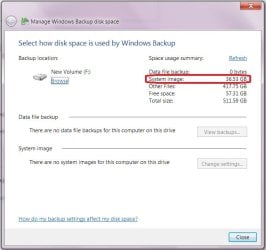
  • System image.jpg
    System image.jpg
    43.2 KB · Views: 4

My Computer My Computer

At a glance

Win 7 ultimate sp1i5 2500K4 gbnone
Computer type
PC/Desktop
Computer Manufacturer/Model Number
Custom
OS
Win 7 ultimate sp1
CPU
i5 2500K
Motherboard
Asus P8Z68 M-Pro
Memory
4 gb
Graphics Card(s)
none
Hard Drives
1 tb Seagate
Antivirus
Eset
Browser
Mozilla

My Computer My Computer

At a glance

64-bit Windows 11 Pro for WorkstationsIntel i7-8700K OC'd to 5 GHz64 GB (4x16GB) G.SKILL TridentZ RGB DDR4 3600...ASUS ROG-STRIX-GTX1080TI-O11G-GAMING
Computer type
PC/Desktop
Computer Manufacturer/Model Number
Self built custom
OS
64-bit Windows 11 Pro for Workstations
CPU
Intel i7-8700K OC'd to 5 GHz
Motherboard
ASUS ROG Maximus XI Formula Z390
Memory
64 GB (4x16GB) G.SKILL TridentZ RGB DDR4 3600 MHz
Graphics Card(s)
ASUS ROG-STRIX-GTX1080TI-O11G-GAMING
Sound Card
Integrated
Monitor(s) Displays
2 x Samsung Odyssey G7 27"
Screen Resolution
2560x1440
Hard Drives
1TB Samsung 990 PRO M.2,
4TB Samsung 990 PRO PRO M.2,
TerraMaster F8 SSD Plus NAS
PSU
Seasonic Prime Titanium 850W
Case
Thermaltake Core P3
Cooling
Corsair Hydro H115i
Keyboard
Logitech wireless K800
Mouse
Logitech MX Master 4
Internet Speed
2 Gb/s Download and 100 Mb/s Upload
Antivirus
Malwarebyte Anti-Malware Premium
Browser
Google Chrome
Other Info
Logitech Z625 speaker system,
Logitech BRIO 4K Pro webcam,
HP Color LaserJet Pro MFP M477fdn,
APC SMART-UPS RT 1000 XL - SURT1000XLI,
Galaxy S23 Plus phone

My Computer My Computer

At a glance

Win 7 ultimate sp1i5 2500K4 gbnone
Computer type
PC/Desktop
Computer Manufacturer/Model Number
Custom
OS
Win 7 ultimate sp1
CPU
i5 2500K
Motherboard
Asus P8Z68 M-Pro
Memory
4 gb
Graphics Card(s)
none
Hard Drives
1 tb Seagate
Antivirus
Eset
Browser
Mozilla
Is it still showing in the "Manage Windows Backup..." window?

Check to see if you have System Protection turned on for the F: drive. If so, then turn it off to delete all restore points for the F: drive to regain the space.

If the space is still missing on F: , then go ahead and post a screenshot showing the full layout of Disk Management (diskmgmt.msc) to see if it may ID what the issue may be with F: .
 

My Computer My Computer

At a glance

64-bit Windows 11 Pro for WorkstationsIntel i7-8700K OC'd to 5 GHz64 GB (4x16GB) G.SKILL TridentZ RGB DDR4 3600...ASUS ROG-STRIX-GTX1080TI-O11G-GAMING
Computer type
PC/Desktop
Computer Manufacturer/Model Number
Self built custom
OS
64-bit Windows 11 Pro for Workstations
CPU
Intel i7-8700K OC'd to 5 GHz
Motherboard
ASUS ROG Maximus XI Formula Z390
Memory
64 GB (4x16GB) G.SKILL TridentZ RGB DDR4 3600 MHz
Graphics Card(s)
ASUS ROG-STRIX-GTX1080TI-O11G-GAMING
Sound Card
Integrated
Monitor(s) Displays
2 x Samsung Odyssey G7 27"
Screen Resolution
2560x1440
Hard Drives
1TB Samsung 990 PRO M.2,
4TB Samsung 990 PRO PRO M.2,
TerraMaster F8 SSD Plus NAS
PSU
Seasonic Prime Titanium 850W
Case
Thermaltake Core P3
Cooling
Corsair Hydro H115i
Keyboard
Logitech wireless K800
Mouse
Logitech MX Master 4
Internet Speed
2 Gb/s Download and 100 Mb/s Upload
Antivirus
Malwarebyte Anti-Malware Premium
Browser
Google Chrome
Other Info
Logitech Z625 speaker system,
Logitech BRIO 4K Pro webcam,
HP Color LaserJet Pro MFP M477fdn,
APC SMART-UPS RT 1000 XL - SURT1000XLI,
Galaxy S23 Plus phone
HiI backup again using same setting...Old hidden system image merged with new image. Then after completion of backup, delete it from "manage window backup". Now the space restored...
Got a problem though in learning all these steps and end up crashing the system with "Black screen of Death"
Now re-installing the OS.


Thanks
 

My Computer My Computer

At a glance

Win 7 ultimate sp1i5 2500K4 gbnone
Computer type
PC/Desktop
Computer Manufacturer/Model Number
Custom
OS
Win 7 ultimate sp1
CPU
i5 2500K
Motherboard
Asus P8Z68 M-Pro
Memory
4 gb
Graphics Card(s)
none
Hard Drives
1 tb Seagate
Antivirus
Eset
Browser
Mozilla
Ooops. :(
 

My Computer My Computer

At a glance

64-bit Windows 11 Pro for WorkstationsIntel i7-8700K OC'd to 5 GHz64 GB (4x16GB) G.SKILL TridentZ RGB DDR4 3600...ASUS ROG-STRIX-GTX1080TI-O11G-GAMING
Computer type
PC/Desktop
Computer Manufacturer/Model Number
Self built custom
OS
64-bit Windows 11 Pro for Workstations
CPU
Intel i7-8700K OC'd to 5 GHz
Motherboard
ASUS ROG Maximus XI Formula Z390
Memory
64 GB (4x16GB) G.SKILL TridentZ RGB DDR4 3600 MHz
Graphics Card(s)
ASUS ROG-STRIX-GTX1080TI-O11G-GAMING
Sound Card
Integrated
Monitor(s) Displays
2 x Samsung Odyssey G7 27"
Screen Resolution
2560x1440
Hard Drives
1TB Samsung 990 PRO M.2,
4TB Samsung 990 PRO PRO M.2,
TerraMaster F8 SSD Plus NAS
PSU
Seasonic Prime Titanium 850W
Case
Thermaltake Core P3
Cooling
Corsair Hydro H115i
Keyboard
Logitech wireless K800
Mouse
Logitech MX Master 4
Internet Speed
2 Gb/s Download and 100 Mb/s Upload
Antivirus
Malwarebyte Anti-Malware Premium
Browser
Google Chrome
Other Info
Logitech Z625 speaker system,
Logitech BRIO 4K Pro webcam,
HP Color LaserJet Pro MFP M477fdn,
APC SMART-UPS RT 1000 XL - SURT1000XLI,
Galaxy S23 Plus phone
Back
Top