Solved Mouse and Keyboard Don't Work in Recovery Mode

4mylgl6

New member
Local time
12:51 AM
Messages
3
Hi,
I'm trying to restore my system to a backup image that I saved a while ago. The problem is that when booting to recovery mode, my mouse and keyboard aren't recognized, and I can't move forward with the onscreen dialogue, leaving me stuck at the language selection window.

Some of the things I've tried:
  • Plugging the mouse and keyboard to a USB 2.0 port instead of 3.0
  • Using a PS/2 mouse and keyboard
  • Resetting the registry key HKEY_LOCAL_MACHINE\SYSTEM\CurrentControlSet\Services\i8042prt to 1, to make sure the PS/2 port is recognized
  • Installing the latest motherboard driver
  • Enabling USB legacy support in UEFI

None of these proved helpful.
I should maybe mention that in safe mode there's no problem recognizing the devices, and also that the Num lock key on the keyboard lights up and stays lit, even when the computer doesn't detect keystrokes.

If anyone has any advice on this (or an alternative approach altogether to restoring the system), I'd really appreciate it - it's driving me nuts.
Thank you!
 
Last edited:

My Computer My Computer

At a glance

Windows 7 Ultimate x64
Computer type
PC/Desktop
OS
Windows 7 Ultimate x64
Hello and welcome 4mylgl6 now you have used a few of the things I would have tried already the teaser is that safe mode works whereas a normal Windows boot does not which may or may not indicate something amiss in the image.

You mention you have updated the mobo driver just what is that?

Plus can you please update the specs of your machine either in your profile or just post them as it very difficult to advise when we do not know what we are actually dealing with especially components like the mobo GPU RAM your AV etc etc System Info - See Your System Specs
 

My Computer My Computer

At a glance

Desk1 7 Home Prem / Desk2 10 Pro / Main lap A...Desk1 i5 3750K / Laptop i7 GTX 860M / Desk2 i...Desk1 8GB (1866) / Desk2 16GB (1333) / Laptop...Desk 1& 2NVidia GTX 650 & Laptops on board Intel
Computer type
PC/Desktop
Computer Manufacturer/Model Number
Own build (new) Desk1 / Asus ROG Win 7 / Desk2 1st build
OS
Desk1 7 Home Prem / Desk2 10 Pro / Main lap Asus ROG 10 Pro 2 laptop Toshiba 7 Pro Asus P2520 7 & 10
CPU
Desk1 i5 3750K / Laptop i7 GTX 860M / Desk2 i5 2500
Motherboard
Desk1 Asus P877-V / Desk2 Gigabyte H67 UD3H / Laptop ?
Memory
Desk1 8GB (1866) / Desk2 16GB (1333) / Laptop 8Gb DDR3
Graphics Card(s)
Desk 1& 2NVidia GTX 650 & Laptops on board Intel
Sound Card
Desk 1 & 2 -XONAR DG Realtek High Def audio Laptop
Monitor(s) Displays
Desk 1 Benq HD 2450 / Desk2 Philips 24" / Laptop 17.5"
Screen Resolution
1920x1080 D1 & D2 & Laptop 1
Hard Drives
Desk1 Samsung 120GB 830 SSD
Asus ROG 256GB 850 Pro SSD
Desk2 Samsung 840 256 SSD
Toshiba 120GB EVO
PSU
Desk 1 Corsair HX 1050/ Laptop ? / Desk 2 Corsair HX 650
Case
Desk 1 Cooler HAF XM ? Toshiba laptop / Desk2 Coolermaster
Cooling
Fans on all Desk1 -2 Desk2 - all Coolermasters 5 Laptop ?
Keyboard
Desk 1 MS Sidewinder X6 Desk 2 MS Sidewinder X 4
Mouse
Desk 1&2 - Gigabyte MS 900 gamer - laptop - Logitec wireless
Internet Speed
ADSL2+
Other Info
One other Desktop (tester) and spare Toshba laptop both with SSD's
Running Kaspersky 2016 ISS on all machines config'd identically
Logitec audio stereo systems on each machine (x3)
Canon MG5250MFC
Router/modem TP-Link running WPA2SK
What program did you use to make the back up image. Usually a boot CD is required to load all the drivers etc. for booting & to find where you have the recovery image.
 

My Computer My Computer

At a glance

Windows 7 Home Premium 64 bit sp1Intel i5 3570 3.4Ghz Ivy Bridge SKT 1155 quad...G-Skill Rip Jaws 16Gb (8x2) DDR3 -1600 PC3 12...Gigabyte NVIDIA GT610 1Gb DDR3 810/1200 PCI-E...
Computer type
PC/Desktop
Computer Manufacturer/Model Number
Self built using existing case
OS
Windows 7 Home Premium 64 bit sp1
CPU
Intel i5 3570 3.4Ghz Ivy Bridge SKT 1155 quad core
Motherboard
Gigabyte Z77-HD3 SKT 1155 2xSata 3, 4x USB 3.0
Memory
G-Skill Rip Jaws 16Gb (8x2) DDR3 -1600 PC3 12800 CL 10 red
Graphics Card(s)
Gigabyte NVIDIA GT610 1Gb DDR3 810/1200 PCI-E 2.0 Silent
Sound Card
NVIDIA High Definition & Realtech High Definition Audio
Monitor(s) Displays
2 x Philips 226V4L 16:9 aspect ratio
Screen Resolution
1920 x 1080 HD
Hard Drives
Samsung 840 Pro 256gb SSD, SATA 3.
Hitachi Touro Portable 1tb, USB 3.0 HDD used for image b/ups.
PSU
Corsair VS450
Case
Codeng
Cooling
PSU fan & CPU fan
Keyboard
Logitech
Mouse
Logitech Wireless trackball M570
Internet Speed
Wireless 3G. 3mg down & 550kb up.
Antivirus
Bitdefender Internet Security 2020
Browser
Opera (Current Version) & Firefox
Other Info
MS Office 2013 Pro. Davis weather station software. MGE Nova 600 avr UPS.
ICIT2LOL -
  • A normal boot works as well, just when setting the system to boot into recovery mode (via Control Panel > Backup and Restore), that's when the problem turns up.
  • About the mobo, I actually didn't install anything, just ensured via the manufacturer's website that there weren't any relevant new updates.
  • System Specs:
    CPU: Intel i7 Core 4790
    Motherboard: ASUS Z97-I PLUS
    RAM: DDR3 16GB
    SSD: Samsung 840 Evo-Series 250GB
    HDD: WD Caviar Blue 3.5" 1TB

Ranger4 -

I used the windows Backup application to create a system image folder. The image folder resides on the HDD, and the OS itself on the SSD. According to the recovery guidelines I've read, the dialogue that I reach when booting into recovery mode is meant for me to point to where the system image I'd like to restore to is located, so a boot CD seems to be unnecessary, but like I said I have no way to interact with this dialogue. Plus, I don't think the format this image is saved in is something a machine is supposed to boot from.
 

My Computer My Computer

At a glance

Windows 7 Ultimate x64
Computer type
PC/Desktop
OS
Windows 7 Ultimate x64
Greetings,


I'm willing to bet this is not a Windows issue but a motherboard bios issue. I see your using Z97 MB that uses the Intel Chipset drivers for the USB ports so they will be disabled without the drivers loaded. You can try either enabeling USB Legacy Support 'Set to Auto' (which you stated you did) or try to disable USB xHCI support in the bios settings.

If the bios is not set to Legacy mode and/or the drivers for the USB ports are not loaded the USB/PS2 ports may be disabled and I've read other posts that say the Asmedia/Intel drivers for that board can cause issues at times. I would also check the bios setting for ECHI Hand-off and ASMedia USB 3.0 Controllers and make sure they are ENABLED.

I have an MSI M3 Z170 board and had some issues with the USB/PS2 ports on the build not working in safe mode and would randomly disappear in Windows which was fixed with both bios settings and the USB drivers from Intel/Asmedia and not the motherboard manufacture.
 

My Computer My Computer

At a glance

Windows 7 Pro 64bit SP1+UpdatesIntel I3 6100G.Skill Ripjaws V Series 16GB (2 x 8GB) DDR4 ...MSI GTX 960 GAMING 100ME 2GB
Computer type
PC/Desktop
Computer Manufacturer/Model Number
Custom Build
OS
Windows 7 Pro 64bit SP1+Updates
CPU
Intel I3 6100
Motherboard
MSI Z170a Gaming 3 Bios ver a.4
Memory
G.Skill Ripjaws V Series 16GB (2 x 8GB) DDR4 2133mhz
Graphics Card(s)
MSI GTX 960 GAMING 100ME 2GB
Sound Card
X-Fi xtremegamer fatal1ty pro series
Monitor(s) Displays
LG 32MP58HQ-P 32"
Screen Resolution
1920X1080
Hard Drives
Samsung 850EVO SSD 250GB
4 WD HD
PSU
EVGA SuperNova 650 G2 650w
Case
Thermaltake Armor II Tower
Cooling
6 Fan air cooled modded case
Keyboard
Logitech G15
Mouse
Logitech G5
Internet Speed
Cable 120MB/3MB
Antivirus
Avast Ver 12.1.2272
Browser
Chrome
A shot in the dark here - are you running the Samsung Magician software to tune and test the SSD??

I ask because some time ago my Ivy Bridge lost the USB ports on the front and a couple at the back of the machine plus a card reader.

Now another member saw my problem which I had been trying to get fixed for a few months had come across this before and the fix was to uninstall the Samsung software. This fixed the problem and even though it fixed the problem the Samsung software can be reinstalled afterwards, but in my own humble opinion for what it did I could not be bothered as I saw no actual benefits from running it.
 

My Computer My Computer

At a glance

Desk1 7 Home Prem / Desk2 10 Pro / Main lap A...Desk1 i5 3750K / Laptop i7 GTX 860M / Desk2 i...Desk1 8GB (1866) / Desk2 16GB (1333) / Laptop...Desk 1& 2NVidia GTX 650 & Laptops on board Intel
Computer type
PC/Desktop
Computer Manufacturer/Model Number
Own build (new) Desk1 / Asus ROG Win 7 / Desk2 1st build
OS
Desk1 7 Home Prem / Desk2 10 Pro / Main lap Asus ROG 10 Pro 2 laptop Toshiba 7 Pro Asus P2520 7 & 10
CPU
Desk1 i5 3750K / Laptop i7 GTX 860M / Desk2 i5 2500
Motherboard
Desk1 Asus P877-V / Desk2 Gigabyte H67 UD3H / Laptop ?
Memory
Desk1 8GB (1866) / Desk2 16GB (1333) / Laptop 8Gb DDR3
Graphics Card(s)
Desk 1& 2NVidia GTX 650 & Laptops on board Intel
Sound Card
Desk 1 & 2 -XONAR DG Realtek High Def audio Laptop
Monitor(s) Displays
Desk 1 Benq HD 2450 / Desk2 Philips 24" / Laptop 17.5"
Screen Resolution
1920x1080 D1 & D2 & Laptop 1
Hard Drives
Desk1 Samsung 120GB 830 SSD
Asus ROG 256GB 850 Pro SSD
Desk2 Samsung 840 256 SSD
Toshiba 120GB EVO
PSU
Desk 1 Corsair HX 1050/ Laptop ? / Desk 2 Corsair HX 650
Case
Desk 1 Cooler HAF XM ? Toshiba laptop / Desk2 Coolermaster
Cooling
Fans on all Desk1 -2 Desk2 - all Coolermasters 5 Laptop ?
Keyboard
Desk 1 MS Sidewinder X6 Desk 2 MS Sidewinder X 4
Mouse
Desk 1&2 - Gigabyte MS 900 gamer - laptop - Logitec wireless
Internet Speed
ADSL2+
Other Info
One other Desktop (tester) and spare Toshba laptop both with SSD's
Running Kaspersky 2016 ISS on all machines config'd identically
Logitec audio stereo systems on each machine (x3)
Canon MG5250MFC
Router/modem TP-Link running WPA2SK
Thanks a ton - Microbell !!
I was giving up already, but that fixed it!
I appreciate it :)
 

My Computer My Computer

At a glance

Windows 7 Ultimate x64
Computer type
PC/Desktop
OS
Windows 7 Ultimate x64
Glad it worked for ya!! Take care
 

My Computer My Computer

At a glance

Windows 7 Pro 64bit SP1+UpdatesIntel I3 6100G.Skill Ripjaws V Series 16GB (2 x 8GB) DDR4 ...MSI GTX 960 GAMING 100ME 2GB
Computer type
PC/Desktop
Computer Manufacturer/Model Number
Custom Build
OS
Windows 7 Pro 64bit SP1+Updates
CPU
Intel I3 6100
Motherboard
MSI Z170a Gaming 3 Bios ver a.4
Memory
G.Skill Ripjaws V Series 16GB (2 x 8GB) DDR4 2133mhz
Graphics Card(s)
MSI GTX 960 GAMING 100ME 2GB
Sound Card
X-Fi xtremegamer fatal1ty pro series
Monitor(s) Displays
LG 32MP58HQ-P 32"
Screen Resolution
1920X1080
Hard Drives
Samsung 850EVO SSD 250GB
4 WD HD
PSU
EVGA SuperNova 650 G2 650w
Case
Thermaltake Armor II Tower
Cooling
6 Fan air cooled modded case
Keyboard
Logitech G15
Mouse
Logitech G5
Internet Speed
Cable 120MB/3MB
Antivirus
Avast Ver 12.1.2272
Browser
Chrome
Can't find Legacy option in BIOS anymore

I know this post is old, but worth a shot!

I am using a data recovery tool from a bootable DVD. Made requisite changes in BIOS and was able to launch the recovery program interface. My keyboard and trackpad aren't working now, so I can't make selections or start scanning. Read Microbell's post and thought I'd try that, but now I'm in BIOS and don't see anything about Legacy (don't even know if it is enabled or not). Any suggestions?
 

My Computer My Computer

At a glance

10, 64 bit
Computer type
Laptop
Computer Manufacturer/Model Number
Asus
OS
10, 64 bit
What board do you have?


I have an MSI M3 Z170 board and had some issues with the USB/PS2 ports on the build not working in safe mode and would randomly disappear in Windows which was fixed with both bios settings and the USB drivers from Intel/Asmedia and not the motherboard manufacture.


1.Run dism++ , select drivers in left pane. Export any relevant 3rd party drivers from your current operating system to a folder.

2. Copy the contents of your "data recovery tool from a bootable DVD" to your hard drive.

3.Use dism++ to mount the boot.wim, add the drivers you exported, save image, then unmount image.

4. Next use dism++ to create bootable iso file.

http://cdn.chuyu.me/Dism++10.1.1000.100_2d2bf466baca088c4b35248f5a7316f4e00cac0b.zip
 

My Computers My Computers

  • At a glance

    7 X64i5 84002x8gb 3200mhz
    Computer type
    PC/Desktop
    OS
    7 X64
    CPU
    i5 8400
    Motherboard
    gigabyte b365m ds3h
    Memory
    2x8gb 3200mhz
    Hard Drives
    various
    PSU
    pure power 11 400w cm
    Case
    Coolermaster
    Cooling
    cryorig m9i
  • At a glance

    7x64g54008gb ddr4 2400
    Computer type
    PC/Desktop
    OS
    7x64
    CPU
    g5400
    Motherboard
    ga b365m ds3h
    Memory
    8gb ddr4 2400
    PSU
    xfx pro 450w
Not sure if that last post was directed at me, but I don't even know what dism++ is, and I can't access my hard drive. That's why I'm trying to run a recovery tool from bootable disc. Now that I've got the tool interface open, keyboard and trackpad aren't working.
 

My Computer My Computer

At a glance

10, 64 bit
Computer type
Laptop
Computer Manufacturer/Model Number
Asus
OS
10, 64 bit
As SIW2 requested we need to know the manufacture and model number of your computers motherboard. That setting in the bios is usually listed as "Boot Mode" under the main setting called "Boot" or may be named "Fast Boot" or "Disable Secure Boot in other bios versions. If it's a newer motherboard with desktop type clickable bios then your in UEFI/EFI mode so it may be your USB ports are disabled if the setting for Legacy mode is not in Auto/Enabled.

If your motherboard has both USB2.0 and USB3.0 move the mouse and keyboard temporarily to the USB2.0 ports as some UEFI bios that are set to "Auto" will pick up those ports on the boot without needing specific drivers. The when your finished doing whatever....move them back for normal boot.
 

My Computer My Computer

At a glance

Windows 7 Pro 64bit SP1+UpdatesIntel I3 6100G.Skill Ripjaws V Series 16GB (2 x 8GB) DDR4 ...MSI GTX 960 GAMING 100ME 2GB
Computer type
PC/Desktop
Computer Manufacturer/Model Number
Custom Build
OS
Windows 7 Pro 64bit SP1+Updates
CPU
Intel I3 6100
Motherboard
MSI Z170a Gaming 3 Bios ver a.4
Memory
G.Skill Ripjaws V Series 16GB (2 x 8GB) DDR4 2133mhz
Graphics Card(s)
MSI GTX 960 GAMING 100ME 2GB
Sound Card
X-Fi xtremegamer fatal1ty pro series
Monitor(s) Displays
LG 32MP58HQ-P 32"
Screen Resolution
1920X1080
Hard Drives
Samsung 850EVO SSD 250GB
4 WD HD
PSU
EVGA SuperNova 650 G2 650w
Case
Thermaltake Armor II Tower
Cooling
6 Fan air cooled modded case
Keyboard
Logitech G15
Mouse
Logitech G5
Internet Speed
Cable 120MB/3MB
Antivirus
Avast Ver 12.1.2272
Browser
Chrome
Same issues with keyboard not being recognized.

Hello -
I, too, am trying to restore an image file using the Windows 7 recovery option. I have the Z97-E Asus motherboard and changed the ECHI Hand-off settings to enabled. I couldn't find anything regarding ASMedia UBS 3.0 controllers. I tried plugging the keyboard into a USB 2.0 slot and still no luck. Any ideas? I've considered reloading Windows from scratch but really don't want to spend the next 3 hours downloading drivers when my drive image already contains that. Thanks for your help.
 

My Computer My Computer

At a glance

Windows 7 Professional x64Intel Core i5-4590 @ 3.30GHZ8GBNVidia GTX 960
Computer type
PC/Desktop
Computer Manufacturer/Model Number
Custom Build
OS
Windows 7 Professional x64
CPU
Intel Core i5-4590 @ 3.30GHZ
Motherboard
Asus Z97-E
Memory
8GB
Graphics Card(s)
NVidia GTX 960
Hard Drives
Western Digital
Samsung SSD
Antivirus
AVG
Browser
Chrome
You can try this boot media
17514x64v14.iso


extract to create bootable usb stick using rufus, or similar
Rufus
 

My Computers My Computers

  • At a glance

    7 X64i5 84002x8gb 3200mhz
    Computer type
    PC/Desktop
    OS
    7 X64
    CPU
    i5 8400
    Motherboard
    gigabyte b365m ds3h
    Memory
    2x8gb 3200mhz
    Hard Drives
    various
    PSU
    pure power 11 400w cm
    Case
    Coolermaster
    Cooling
    cryorig m9i
  • At a glance

    7x64g54008gb ddr4 2400
    Computer type
    PC/Desktop
    OS
    7x64
    CPU
    g5400
    Motherboard
    ga b365m ds3h
    Memory
    8gb ddr4 2400
    PSU
    xfx pro 450w
same problem, different bios options

Seamingly the same issue's here but with some differences.
First of all I'm running windows 10.
Secondly my ASUS M5A78L-M/USB3 has different options in the bios.
It seems the options are more limited.
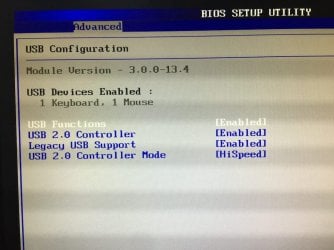
The main menu tab: "Advanced" has the option USB Configuration.
The list below only shows the Legacy USB support option, but nothing called USB xHCI or ECHI hand-off.
biosusb2.JPG
The only other menu item that mentions USB is "Advanced" -> "Onboard Devices Configuration" with a setting for USB3.0 controller which is set to Enabled.

How can I create an input to select language and perform a system restore?
 

My Computer My Computer

At a glance

Windows 10 x64AMD Phenom II X4 965
Computer type
PC/Desktop
OS
Windows 10 x64
CPU
AMD Phenom II X4 965
Motherboard
ASUS M5A78L-M

My Computer My Computer

At a glance

Windows 10 x64AMD Phenom II X4 965
Computer type
PC/Desktop
OS
Windows 10 x64
CPU
AMD Phenom II X4 965
Motherboard
ASUS M5A78L-M
Back
Top