- Local time
- 9:01 PM
- Messages
- 565
Hi All,
Greets,
Sir(s),
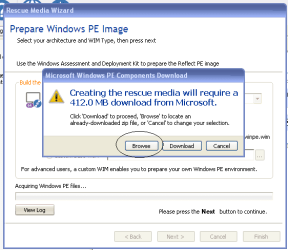
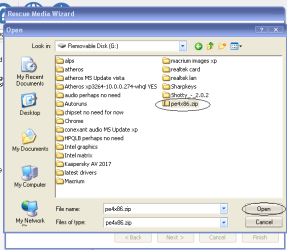
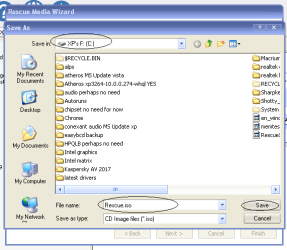
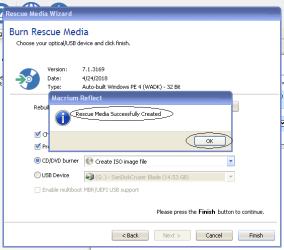
Macrium Reflect is just amazing. One should make sure that at least the basic OS & drivers are installed ( Chipsets, storage & graphics drivers ). After that we can proceed with macrium installation. Though the complete functionality will be limited but we can comfortably make & restore system images. But the problem is that we can make system images right after installing the main application but can't restore them without a rescue media ! The way to make a rescue media involves connecting the OS to internet and let the macrium downloader find itself what downloads suits best. But I found it sometimes necessary to have the ability/functionality to make & restore a system image in the initial phase of setting up a stable operating system even when it can't be connected to the internet or for a OS that is never to be connected to the internet !
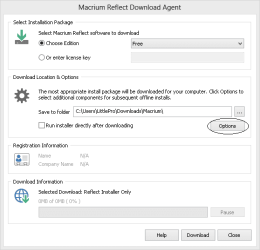
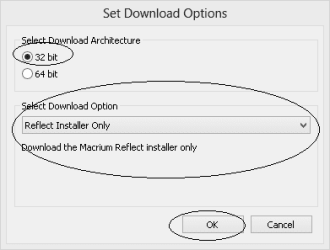
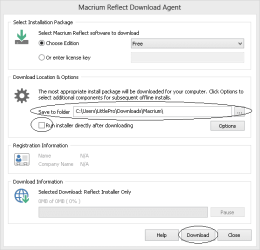
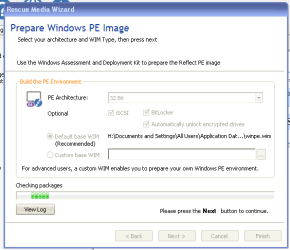
Therefore we will be using an OS that can be connected to the internet to make a rescue media for the one which can't be. As the Macrium supports OS XP through windows 10, the article will work flawlessly with all Those OSs. The idea is simply to download the right main installer 32 or 64 bit, install it on the required OS, let the application decide the PE environment for the OS, download it on the other OS ( connected to the internet ) and then finally let the application made the right changes to the PE according to the required os ( drivers, UEFI/MBR support etc.) We will try to make the process effortless & passing on the tips in between if any. Please help me in the process. I will be editing it as required with my available leisure.
[[[
I would like to mention that :
1. once rescue media created with/on a system would work for it for the lifetime of the machine & hardware for a given OS.
2. I refrain from updating the application & rescue media to be able to use the oldest of system images. OR i will keep several rescue isos and switch between them carefully.
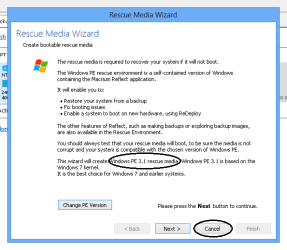
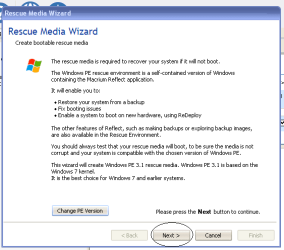
3. Rescue media made on/for a particular machine/hardware with a particular os with particular bios setup may be used flawlessly used with other Os on the same machine with the same bios setting most of the times . For eg. i am using a rescue media made on compaq presario c 700 series with Legacy Bios/MBR to work flawlessly and almost in full for XP , Vista & windows 7 32bit versions. It was made on windows 7 32 & boots as if you are booting in Vista ! I got the idea when i saw that on all the three Os, macrium picked the same PE i.e. 3.1. To be a little careful i made it on the windows 7 32 to make it sure that it works on all the three ! Even we can use it to switch between the OSs that too in multiboots. ( Macrium Reflect is so flexible !)
4. I suppose that when we write rescue media to pen drive from within such apps ( i.e. with the in-built feature ), we have to actually dedicate the drive. Therefore I always prefer to make and have rescue media isos ready than making and dedicating a cd or pen drive for it. Instead it would be better to make multiboot drives with specialists. Though YUMI multiboot USB pendrive is successfully working for me on Legacy Bios/ MBR, i am still looking for a free multiboot installer for UEFI ! ( I hope SARDU fills the gap ! )
5. Rufus is always the expert for whatever be the system ( 32 or 64, Legacy bios, UEFI MBR, UEFI GPT ) There are partition scheme options that has to be opted according to the system .Though It does n't make a multiboot installer and always formats the data on the pen drive. I will use it for recovery if YUMI fails ! [ Whether installing windows, linux,etc. ; running live linux with/without persistent storage ; running recovery medias or tools, Rufus ( portable for me ) is the never failing expert ! ]
6. Once we have made the rescue iso , we should make sure that its working. It is just like another OS with reduced functionality, isn't it ?
7. I prefer to keep all my files on a separate dedicated partition & keep the OS partitions just for OS & programs/apps. I neither use the default folders of Downloads, Documents, Music, Videos, etc. nor even the Desktop because they all land in the OS partition. It saves my OS partition from fragmentation, makes it easy for me to make & restore system images without backing up files again & again, decrease the size of system images and thus saves my time & resources.
]]]
Now we will look into our main topic & how to .
To be Contd. ...
Greets,
Sir(s),
Macrium Reflect is just amazing. One should make sure that at least the basic OS & drivers are installed ( Chipsets, storage & graphics drivers ). After that we can proceed with macrium installation. Though the complete functionality will be limited but we can comfortably make & restore system images. But the problem is that we can make system images right after installing the main application but can't restore them without a rescue media ! The way to make a rescue media involves connecting the OS to internet and let the macrium downloader find itself what downloads suits best. But I found it sometimes necessary to have the ability/functionality to make & restore a system image in the initial phase of setting up a stable operating system even when it can't be connected to the internet or for a OS that is never to be connected to the internet !
Therefore we will be using an OS that can be connected to the internet to make a rescue media for the one which can't be. As the Macrium supports OS XP through windows 10, the article will work flawlessly with all Those OSs. The idea is simply to download the right main installer 32 or 64 bit, install it on the required OS, let the application decide the PE environment for the OS, download it on the other OS ( connected to the internet ) and then finally let the application made the right changes to the PE according to the required os ( drivers, UEFI/MBR support etc.) We will try to make the process effortless & passing on the tips in between if any. Please help me in the process. I will be editing it as required with my available leisure.
[[[
I would like to mention that :
1. once rescue media created with/on a system would work for it for the lifetime of the machine & hardware for a given OS.
2. I refrain from updating the application & rescue media to be able to use the oldest of system images. OR i will keep several rescue isos and switch between them carefully.
3. Rescue media made on/for a particular machine/hardware with a particular os with particular bios setup may be used flawlessly used with other Os on the same machine with the same bios setting most of the times . For eg. i am using a rescue media made on compaq presario c 700 series with Legacy Bios/MBR to work flawlessly and almost in full for XP , Vista & windows 7 32bit versions. It was made on windows 7 32 & boots as if you are booting in Vista ! I got the idea when i saw that on all the three Os, macrium picked the same PE i.e. 3.1. To be a little careful i made it on the windows 7 32 to make it sure that it works on all the three ! Even we can use it to switch between the OSs that too in multiboots. ( Macrium Reflect is so flexible !)
4. I suppose that when we write rescue media to pen drive from within such apps ( i.e. with the in-built feature ), we have to actually dedicate the drive. Therefore I always prefer to make and have rescue media isos ready than making and dedicating a cd or pen drive for it. Instead it would be better to make multiboot drives with specialists. Though YUMI multiboot USB pendrive is successfully working for me on Legacy Bios/ MBR, i am still looking for a free multiboot installer for UEFI ! ( I hope SARDU fills the gap ! )
5. Rufus is always the expert for whatever be the system ( 32 or 64, Legacy bios, UEFI MBR, UEFI GPT ) There are partition scheme options that has to be opted according to the system .Though It does n't make a multiboot installer and always formats the data on the pen drive. I will use it for recovery if YUMI fails ! [ Whether installing windows, linux,etc. ; running live linux with/without persistent storage ; running recovery medias or tools, Rufus ( portable for me ) is the never failing expert ! ]
6. Once we have made the rescue iso , we should make sure that its working. It is just like another OS with reduced functionality, isn't it ?
7. I prefer to keep all my files on a separate dedicated partition & keep the OS partitions just for OS & programs/apps. I neither use the default folders of Downloads, Documents, Music, Videos, etc. nor even the Desktop because they all land in the OS partition. It saves my OS partition from fragmentation, makes it easy for me to make & restore system images without backing up files again & again, decrease the size of system images and thus saves my time & resources.
]]]
Now we will look into our main topic & how to .
To be Contd. ...
Last edited:
My Computer
At a glance
Windows 7 Ultimate x32 With Sp1 + Vista Ultim...Intel Mobile Core 2 Duo T5750 @ 2.00GHz Merom...2.00GB Dual-Channel DDR2 @ 332MHz (5-5-5-15)Mobile Intel(R) 965 Express Chipset Family
- Computer type
- Laptop
- Computer Manufacturer/Model Number
- hp compaq presario c795VU notebook pc
- OS
- Windows 7 Ultimate x32 With Sp1 + Vista Ultimate x32 with Sp1 & Sp2 !!
- CPU
- Intel Mobile Core 2 Duo T5750 @ 2.00GHz Merom 65nm Technolog
- Motherboard
- Hewlett-Packard 30D9 (CPU)
- Memory
- 2.00GB Dual-Channel DDR2 @ 332MHz (5-5-5-15)
- Graphics Card(s)
- Mobile Intel(R) 965 Express Chipset Family
- Sound Card
- High Definition Audio Device
- Monitor(s) Displays
- LP154WX4-TLCB on Mobile Intel 965 Express Chipset Family
- Screen Resolution
- 1280x800 @ 60Hz
- Hard Drives
- 149GB Western Digital WDC WD1600BEVS-60VAT0 ATA Device (SATA)
- Keyboard
- Standard 101/102-Key or Microsoft Natural PS/2 Key + HP QLB
- Mouse
- ALPS pointing device
- Antivirus
- Kaspersky AV 2017(Win 7) & AVG AntiVirus Free 2016 (VISTA)
- Browser
- google chrome