Solved Importing mail from Outlook to Windows Live Mail

jimbo45

New member
Hi all
This is quite a complex operation and MS doesn't actually explain how to do it so here goes.

The trick is to get your email messages into Outlook Express (OE on XP) or Windows Mail (on Vista) before you can import into Windows Live mail. Then the import can be done directly.

There isn't any way currently to import mail directly from Outlook to Windows Live Mail so you have to do it indirectly BEFORE installing Windows 7.

1) even if you don't use Outlook Express (XP) or Windows Mail (VISTA) you need to have them running on the same machine as your copy of OUTLOOK.

2) create (if you haven't already) email accounts in OE or Windows mail identical to those you have in Outlook.

3) Now import your messages from Outlook into OE or Windows Mail.

4) Change the Store Identity in OE or Windows mail to a disk that your W7 can read (do this under Maintenance - data storage locations in OE or Windows Mail).
Doing this saves you having to install Live Mail on Vista or XP

5) Logon to your W7 system and install Windows Live mail.

6) Set up your email accounts

7) File ==> import==>messages

8) Chose Outlook express or Windows mail depending on step 3)

9) Browse to the directory where you stored the messages in step 4)

10) Job done. :D

A bit fiddly but obviously MS don't want to make it easy for people to switch from Outlook

Note also the "Send and Receive" function is calles "SYNC" in Windows Live mail -- confusing but there it is.

If you also installed Windows Messenger you can prevent it from starting automatically at startup by going to the Orb ==>acessories==>run. type msconfig and unclick windows messenger in the start up box.

There doesn't appear to be ANY method of importing mail directly from Outlook 2003/2007


Cheers
jimbo
 

My Computer

Computer type
PC/Desktop
Computer Manufacturer/Model Number
Custom built, several laptops HP/ASUS
OS
Linux CENTOS 7 / various Windows OS'es and servers
CPU
Intel i7 Intel i5
Memory
8GB, 16GB
Graphics Card(s)
On Motherboard
Sound Card
Realtek HD audio
Monitor(s) Displays
Apple Cinema display, Samsung LCD
Screen Resolution
1920 X 1080
Hard Drives
4 X 1TB SATA
Mouse
Toshiba wireless laser
Internet Speed
> 20MB up
Importing Messages from Outlook into Windows 7

Hi all
This is quite a complex operation and MS doesn't actually explain how to do it so here goes.

The trick is to get your email messages into Outlook Express (OE on XP) or Windows Mail (on Vista) before you can import into Windows Live mail. Then the import can be done directly.

There isn't any way currently to import mail directly from Outlook to Windows Live Mail so you have to do it indirectly BEFORE installing Windows 7.

1) even if you don't use Outlook Express (XP) or Windows Mail (VISTA) you need to have them running on the same machine as your copy of OUTLOOK.

2) create (if you haven't already) email accounts in OE or Windows mail identical to those you have in Outlook.

3) Now import your messages from Outlook into OE or Windows Mail.

4) Change the Store Identity in OE or Windows mail to a disk that your W7 can read (do this under Maintenance - data storage locations in OE or Windows Mail).
Doing this saves you having to install Live Mail on Vista or XP

5) Logon to your W7 system and install Windows Live mail.

6) Set up your email accounts

7) File ==> import==>messages

8) Chose Outlook express or Windows mail depending on step 3)

9) Browse to the directory where you stored the messages in step 4)

10) Job done. :D

A bit fiddly but obviously MS don't want to make it easy for people to switch from Outlook

Note also the "Send and Receive" function is calles "SYNC" in Windows Live mail -- confusing but there it is.

If you also installed Windows Messenger you can prevent it from starting automatically at startup by going to the Orb ==>acessories==>run. type msconfig and unclick windows messenger in the start up box.

There doesn't appear to be ANY method of importing mail directly from Outlook 2003/2007


Cheers
jimbo
Hi Jimbo,
I am purchasing a new pc with Windows7. I read your thread above, and have one problem and one question:
Problem: When trying to save the messages from OE into a CD-RW or pen drive, following the procedure of your step Nr. 4 above, Outlook does not allow it. The OK button is not activated.
Question: Is there a procedure available to import the Address book (Contacts) from Outlook into Windows7 mail?
Thank you
 

My Computer

OS
Windows XP
Hi Jimbo - maybe you can help me with this one:
I had to rebuild my laptop (XP) so, before pressing the button, I Exported my Outlook (2002?) message files (as *.CSV) to a safe place. I now have Outlook Express (not Outlook) and/or Windows Live up and running but cannot find how to Import my old files - any suggestions? I moved my Contacts to Live without problems.

Thanks for any advice
 

My Computer

OS
Windows 7
It seems that Jimbo is not reading the messages posted in this topic, as he did not reply to you nor to my former message. Does anyone know how to call anybody´s attention?
 

My Computer

OS
Windows XP
Hi Jimbo - maybe you can help me with this one:
I had to rebuild my laptop (XP) so, before pressing the button, I Exported my Outlook (2002?) message files (as *.CSV) to a safe place. I now have Outlook Express (not Outlook) and/or Windows Live up and running but cannot find how to Import my old files - any suggestions? I moved my Contacts to Live without problems.

Thanks for any advice

Look here

Importing Items into Outlook Express
 

My Computer

Computer Manufacturer/Model Number
Self build
OS
Windows 7 Ultimate x64
CPU
AMD Phenom II x4
Motherboard
Gigabyte 880
Memory
8GB
Graphics Card(s)
NVIDIA GeForce HD
Sound Card
Realtek HD Audio
Screen Resolution
1920 x 1080
Hard Drives
2 x 1TB
PSU
Thermalake 550w
Case
XCase
Internet Speed
8MB
[/quote]
Hi Jimbo,
I am purchasing a new pc with Windows7. I read your thread above, and have one problem and one question:
Problem: When trying to save the messages from OE into a CD-RW or pen drive, following the procedure of your step Nr. 4 above, Outlook does not allow it. The OK button is not activated.
Question: Is there a procedure available to import the Address book (Contacts) from Outlook into Windows7 mail?
Thank you[/QUOTE]

Outlook Express & Windows Live Mail
 

My Computer

Computer Manufacturer/Model Number
Self build
OS
Windows 7 Ultimate x64
CPU
AMD Phenom II x4
Motherboard
Gigabyte 880
Memory
8GB
Graphics Card(s)
NVIDIA GeForce HD
Sound Card
Realtek HD Audio
Screen Resolution
1920 x 1080
Hard Drives
2 x 1TB
PSU
Thermalake 550w
Case
XCase
Internet Speed
8MB
Easy Fix

I had the same problem. I inadvetantly found that Mailstore Home (free) can import from outlook and export to LiveMail.

I was easy just a few clicks and 8000 eamils were transfered.

As as a plus Mailstore look like a much better archive. searching the 8000 emails is lightning fast.
 

My Computer

OS
Windows 7
Here is a step by step

Download & install Mailstore Home from Mailstore.com


1) Use Mailstore to read all of my Outlook email.
2) Export to "File System" using the eml format
3) Export to a directory such as C:\temp\email
4) In Live Mail use the Import Function
5) Select "Windows Mail" format
6) Select the directory such as C:\temp\email

David
 

My Computer

OS
Windows 7
Many thanks to dguy777 and the publishers of Mailstore Home. The solution offered above worked like magic! The first step was a little confusing for me initially. I suggest it could read:

1) In Mailstore Home, select "Archive Email" and point to Outlook

The other steps were easy to understand for me.
 

My Computer

Computer Manufacturer/Model Number
Dell
OS
Windows7
CPU
Intel Core2 Duo
Motherboard
Dont know
Memory
4G
Problems with Mailstore Mail

I downlaoded Mailstore and created both an archive and an export which I loaded on my flash drive. I then tried to import either one to my Mail Live both unsuccessfully. I'm getting an error message that says "no messages can be found in this folder.................." what am I doing wrong?

Bob
 

My Computer

Computer Manufacturer/Model Number
HP Pavilion e180t
OS
Windows 7
CPU
i7-920
Motherboard
HP
Memory
8 GB
Graphics Card(s)
ATI HD4650
Sound Card
Integrated
Monitor(s) Displays
HP vs19e
Hard Drives
1 TB
PSU
HP
Case
HP
Cooling
Fan
Hello Bob,

I cannot say for sure. Did Mailstore actully import ?

Go into Mailstore and search the mail and see if they come up.

The next thought that I have is if the mail is in Mailstore you may have turned on an export filter.

good luck... post your progress.


Dave
 

My Computer

OS
Windows 7
I am not a techie so understand that from the start. I just purchased a new laptop with Windows 7. I used Outlook running on XP. My computer guy refuses to do anything with Outlook so I am on my own here. I've read all of your messages and this is what I have done so far.

I have copied my Outlook files to MailStore and then exported them to a thumb drive.

There is a message that says the next step is to import them from Windows Live. I cannot find anywhere in Windows Live Mail that gives me the option to import anything.

This is so frustrating.

Can someone help me, please?

Thanks!
 

My Computer

OS
Windows 7
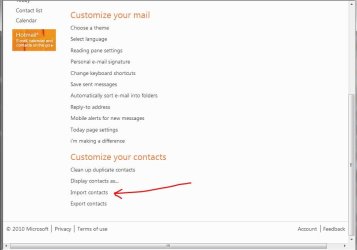
Mail :ar: Options :ar: More Options :ar:
 

Attachments

  • Wlm_Contacts_Import.JPG
    Wlm_Contacts_Import.JPG
    53.9 KB · Views: 2,100

My Computer

Computer type
PC/Desktop
Computer Manufacturer/Model Number
Built them myself, Science Experiments !
OS
Win7 Enterprise, Win7 x86 (Ult 7600), Win7 x64 Ult 7600, TechNet RTM on AMD x64 (2.8Ghz)
CPU
AMD fx8350 4ghz, AMD-32 2400mhz, AMD-64 3200mhz, AMDx64 2.8G
Motherboard
SIS 755, ECS-K8M890M-M (Ult 7600), GigaByte & others
Memory
2gb, 4gb on the Ult 7600, 4gb on Technet RTM, 32gb on FX8350
Graphics Card(s)
Draw my own Graphics, several nVidia cards
Sound Card
on motherboard
Monitor(s) Displays
19" flat scr, 28" I-Inc widescr,22" Emprex Widescr, 23" Acer
Screen Resolution
1280 x 1024, 1440 x 900, 1920 x 1080
Hard Drives
6 pata Ide HD's & 2 Sata HD's
added 80gb external on Ult 7600 computer,
numerous extra 1tb, 2TB, 3Tb SATA HD's
A collection of ext HD Docks w/ HDs
PSU
430w, 550w, 600w, 700, 800, etc
Case
All Generic Full Towers
Cooling
Open Air & a few fans, some w/ colored LEDs
Keyboard
Compaq & Dell recycled from GoodWill
Mouse
Made in China Optical Wired Mouse
Internet Speed
Fast Cable InterNet
Antivirus
AVG Free on 24 different Desktops, NO Problems!
Browser
IE 8 is preferred, but use FireFox sometimes
Other Info
Linksys Routers, switches, & Hubs
Too Many USB Flash Drives to count, Biggest is 64GB !
Eight computers in my home network.
Sixteen computers at my business network.
Linked via TeamViewer !
Lots of old used spare computer parts everywhere!
Unknown Window

Dear DocBrown:
Would you please explain, how you reached the above window? I could not work out hoh to get there.
Thanks.
Mario
 

My Computer

OS
Windows XP
WOW!
dguy777, thank you very much, that was exactly what I needed. A very easy solution, worked perfectly. :)
 

My Computer

OS
Win 7 Professional 64bit
CPU
Intel i7-3930K @ 3.2GHz
Memory
16 GB
Graphics Card(s)
NVIDIA GeForce GTX 650
Monitor(s) Displays
1 CRT, 1 LCD
Hard Drives
3 hard drives
dguy777--Your tips made it easy!
 

My Computer

Computer Manufacturer/Model Number
Self Build #2 Workstation
OS
Windows 7 Enterprise 64bit
CPU
intel core i3 2100 3.1 GH
Motherboard
Gigabyte Z68AP-D3
Memory
Kingston DDR3 1333 8GB
Graphics Card(s)
nvidia Geforce 9500GT
Sound Card
On board Realtek HD Audio
Monitor(s) Displays
ViewSonic
Screen Resolution
1440x900
Hard Drives
1 Maxtor 250GB
1 Seagate 320 GB
1 WD 1TB
PSU
Thermaltake Pure Power 600W
Case
Antec Solo
I was all set to use David's solution too, but either I'm doing it wrong or it doesn't work with current versions of the applications in question.

I have a new laptop with Win7 64bit and I'm trying to use WLM. The old machine is XP SP3 with Outlook 2010. I've copied the PST file over from the old machine and installed the current version of MailStore Home. However, when I open MSH, click Archive, choose Outlook, then select PST file, I get "Direct PST file archiving is not available in MailStore Home." It goes on to say that's only supported in MailStore Server, which is a $190 product.

So I tried Plan B - download OE6 to install on the old machine, with the intent of exporting from Outlook to OE, then copy over all the DBX files to the new machine for import to WLM. This has become so convoluted now that I can't even accurately describe why that didn't work.

MS, if this is how you expect people to "upgrade" to your new products, this is not the way to go about it.

Please, does anyone have any ideas?

Mike F.
Kansas City
 

My Computer

Computer type
Laptop
Computer Manufacturer/Model Number
Dell Latitude D830
OS
Microsoft Windows 7 Professional 64-bit 7601 Multiprocessor Free Service Pack 1
CPU
Intel(R) Core(TM)2 Duo CPU T7500 @ 2.20GHz
Motherboard
Dell 0UY141--BIOS: Phoenix ROM BIOS PLUS Version 1.10 A17
Memory
4.00GB
Graphics Card(s)
NVIDIA Quadro NVS 140M
Sound Card
(1) Bluetooth Stereo Audio (2) High Definition Audio Device
Monitor(s) Displays
Integrated "Generic PnP Monitor"
Screen Resolution
1280 x 800
Hard Drives
Samsung SSD 850 PRO 512GB ATA Device
PSU
Integrated
Case
Standard
Cooling
Standard (all vents cleaned & fan operating normally)
Keyboard
Integrated "Standard PS/2 Keyboard"
Mouse
Dell Touchpad, HID-compliant mouse, Logitech HID-compliant
Internet Speed
A/B/G/N, 36Mbps down, 6Mbps up
Antivirus
MS Security Essentials
Browser
Firefox (latest version)
Other Info
WiFi Module: Intel(R) Wireless WiFi Link 4965AGN
Never mind, I got it. Duh. You have to install MSH on the old machine, do the export there, then copy over the exported .eml data to the new machine.

Sorry for being so obtuse, this has been a painful process but seems to be good now.

Mike
 

My Computer

Computer type
Laptop
Computer Manufacturer/Model Number
Dell Latitude D830
OS
Microsoft Windows 7 Professional 64-bit 7601 Multiprocessor Free Service Pack 1
CPU
Intel(R) Core(TM)2 Duo CPU T7500 @ 2.20GHz
Motherboard
Dell 0UY141--BIOS: Phoenix ROM BIOS PLUS Version 1.10 A17
Memory
4.00GB
Graphics Card(s)
NVIDIA Quadro NVS 140M
Sound Card
(1) Bluetooth Stereo Audio (2) High Definition Audio Device
Monitor(s) Displays
Integrated "Generic PnP Monitor"
Screen Resolution
1280 x 800
Hard Drives
Samsung SSD 850 PRO 512GB ATA Device
PSU
Integrated
Case
Standard
Cooling
Standard (all vents cleaned & fan operating normally)
Keyboard
Integrated "Standard PS/2 Keyboard"
Mouse
Dell Touchpad, HID-compliant mouse, Logitech HID-compliant
Internet Speed
A/B/G/N, 36Mbps down, 6Mbps up
Antivirus
MS Security Essentials
Browser
Firefox (latest version)
Other Info
WiFi Module: Intel(R) Wireless WiFi Link 4965AGN
Subfolders?

Thanks dGuy777. This woked great, however, the subfolder structure is gone. All the imported emails show up under one Inbox with no sorting, as opposed to the different subfolders that they are in in Outlook and also in Mailstore Home.

Do you have a method to get the subfolder structure to import?
 

My Computer

Computer Manufacturer/Model Number
HP dv5163cl
OS
XP 32bit
CPU
T2300
Motherboard
1.66
Memory
4MB
Graphics Card(s)
nVidia
Monitor(s) Displays
Laptop and Samsung
Back
Top