IE10 uses WebcacheV01.dat vs index.dat files. How to clear/delete?

Lexus45

New member
Member
Local time
5:11 AM
Messages
29
Hope to open a discussion regarding privacy with Internet Explorer 10 and the way information is now cached.
There appears to be a lack of information on the internet regarding the handling of this cache.

Prior to IE10, much was written about how IE utilizes index.dat files (cookies/history/temporary internet files) to retain the users browsing history even after utilizing the built in IE deletion tools.
The only way to eleminate that collection of data was by deleting IE's index.dat files.
Many methods, programs, and procedures were developed and posted over the years to accomplish this deletion.

It is my understanding that beginning with IE10, IE no longer utilizes index.dat files.

Instead it stores all browsing information (cookies/history/visited URL's) in a central database located at C:\user\username\AppData\Local\Microsoft\Windows\WebCache\WebcacheV01.dat

This file accumulates all activities the way the index.dat files did on earlier IE versions and presents the same privacy issues.

Since IE10 (and I suspect now IE11) retain this information in a different manner,

Are there any other places that browsing information is cached?
What effect does utilizing the IE Delete Browsing History tool have on this cache?
Has anyone successfully deleted/cleared this file?
Is so how?
Can it just be deleted like the old index.dat files?
Can the gurus here created a script to accomplish this?

Any discussion on this topic would be appreciated since there is little published on how to control the users information being captured in the newer IE's.

Thx
 

My Computer My Computer

At a glance

Windows 7 Professional x64Intel
Computer Manufacturer/Model Number
Maingear
OS
Windows 7 Professional x64
CPU
Intel
I was wondering how long it would be until I saw a thread like this.

You are correct about the lack of info on this issue...
...well, the lack of correct info - that is.

Skim thru this PDF:
http://hj.diva-portal.org/smash/get/diva2:512242/FULLTEXT02
Edit: see the PDF attached to the post below.
I wish it had been around when I started researching this topic.
Be careful if you opt to kill taskhost.exe on a real computer.

I have my solution in place for clearing the data, but I would rather hear from others before I start rambling on the topic.

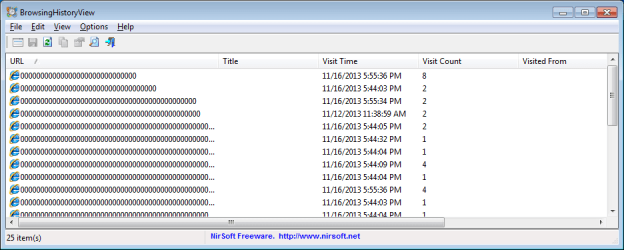
Before people start suggesting clearing/deleting history/cookies via Internet (Properties) Options, they might want to download/use BrowsingHistoryView.

As for this question:
Are there any other places that browsing information is cached?
There are lots of places that can leak such info.
Search the registry for DOMStorage.

I've been looking into various aspects of this for quite a while and there are several things that don't make sense to me yet. So let's see what others have to say on this topic. I would really like to see if others have reduced the cleanup to a script/batch file combo. I'm not sure that the one that I use is a good solution for the masses.
 
Last edited:

My Computer My Computer

At a glance

W7 Pro SP1 64biti78GBIntel HD Graphics
Computer type
Laptop
Computer Manufacturer/Model Number
Employer provided Dell Latitude
OS
W7 Pro SP1 64bit
CPU
i7
Memory
8GB
Graphics Card(s)
Intel HD Graphics
Hard Drives
crappy SSD
Antivirus
Employer mandated Symantec Endpoint Protection
Browser
Pale Moon 64bit, IE11 64bit & Chrome 64bit
Thanks for your response.
As critical as this is to a user's privacy, I am surprised how little has been published.
Here are some info sites that I have found:

Eric Lawrence

There is also a PDF that I have attached which was written by a computer forensic organization. They also are trying to figure out how to obtain your browsing information!
Note that toward the end of the PDF it talks about information being collected in Logs then transferred to the WebcacheV01.dat file after IE is closed. Also with a Private Session, information is not retained but can be recovered using specialized program(s).

Starting at the basics, I am using IE9 and have yet to update to IE10 pending some answers.
From the info above, it appears that IE going forward, including the new IE11, will be utilizing this new caching arrangement.

Questions for those who have IE10 installed:

1. Does utililizing the IE "Delete Browsing History" option with ALL items checked reduce the size of the WebcacheV01.dat file?
(ie: by chance does "Delete Browsing History" clear out the WebcacheV01.dat file information? Or similar to the old index.dat does WebcacheV01.dat continue to accumulate all your browsing history/cookies/URL sites?)

2. With IE10, has anyone moved the Temporary Internet Files folder to a alternate location or hard drive? If so does the WebcacheV01.dat file (or another copy of it) move to the new location? If so, can the file be cleared, or deleted from the alternate location?
(Note: with IE9, after I moved the TIF folder to my second hard drive I discovered that I could delete the TIF index.dat file whenever I wanted and IE would simply recreate an empty index.dat the next time I opened IE).

3. I think that CCleaner may be able to clean these files. Does anyone have CCleaner installed that can confirm this?

Hopefully through this forum we can get some working knowledge of this feature and how to manage our privacy going forward with IE.
 

Attachments

My Computer My Computer

At a glance

Windows 7 Professional x64Intel
Computer Manufacturer/Model Number
Maingear
OS
Windows 7 Professional x64
CPU
Intel
~~~
Questions for those who have IE10 installed:

1. Does utililizing the IE "Delete Browsing History" option with ALL items checked reduce the size of the WebcacheV01.dat file?
(ie: by chance does "Delete Browsing History" clear out the WebcacheV01.dat file information? Or similar to the old index.dat does WebcacheV01.dat continue to accumulate all your browsing history/cookies/URL sites?)

2. With IE10, has anyone moved the Temporary Internet Files folder to a alternate location or hard drive? If so does the WebcacheV01.dat file (or another copy of it) move to the new location? If so, can the file be cleared, or deleted from the alternate location?
(Note: with IE9, after I moved the TIF folder to my second hard drive I discovered that I could delete the TIF index.dat file whenever I wanted and IE would simply recreate an empty index.dat the next time I opened IE).

3. I think that CCleaner may be able to clean these files. Does anyone have CCleaner installed that can confirm this?

Hopefully through this forum we can get some working knowledge of this feature and how to manage our privacy going forward with IE.
In my opinion, the webcache folder/files/database is more of an OS thing than an IE thing. As mentioned in Eric's blog (and elsewhere): you can remove IE from the OS and "surfing" data will still be tracked in the webcache database. I have found that opening certain help files (CHM files) will cause data to be added to this database. Most any app that makes a call to the INET API will cause data to be added to the webcache database. (I tested this using a CHM file and IE11 "removed" via "Turn Windows features on or off".)

The link that you posted to Eric's blog briefly mentions WinINET - but I'm willing to say the starting with IE10, MS just opted to change the way that the OS handles that API - thus the webcache database is an OS thing. I mention this because your questions mention IE10 and I'm testing with IE11. It should not matter which browser version we discuss; the webcache principles should be the same.

So:
> Does utilizing the IE "Delete Browsing History" option with ALL items checked reduce the size of the WebcacheV01.dat file?
You seem to be assuming that a reduction in the file size means that some or all surfing history has been removed. This is not always the case.

Deleting the webcache folder and its contents
then restarting the OS
should cause WebCacheV01.dat to be 32,832KB.

Running the "Delete Browsing History" option...*
(with all items checked and nothing preserved)
...does not change the size of the file.

*this is not the option to "Delete browsing history on exit".

Killing the taskhost.exe process** and then
running the "Delete Browsing History" option...
(with all items checked and nothing preserved)
...DOES reduce the size of the file.
In my test, WebCacheV01.dat shrunk to 20,544KB.

**the OS will eventually take control of the webcache folder (locking some of its files) using a dllhost.exe process. Once this happens, removing the webcache folder requires killing the correct dllhost.exe process.

Running the "Delete Browsing History" option does NOT remove the surfing history from the webcache database - even if taskhost/dllhost has been killed.


> With IE10, has anyone moved the Temporary Internet Files folder to a alternate location or hard drive?
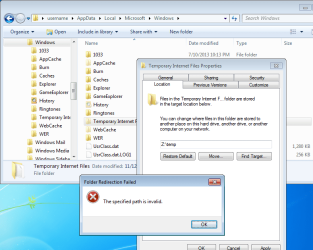
I could not get that folder to move to another drive using the folder properties > location tab method. Perhaps the Virtual Machine setup does not perfectly mimic a real system.

TIF.png


> I think that CCleaner may be able to clean these files. Does anyone have CCleaner installed that can confirm this?
Not a chance. CCleaner (by its conservative nature) is not going to touch these files. Testing confirms that the surfing history remains after running CCleaner.


I'm still hoping that others will chime in. I can't be the only member that has spent time on this prior to your post. I'm more interested in scripting the removal of the surfing history.
 

My Computer My Computer

At a glance

W7 Pro SP1 64biti78GBIntel HD Graphics
Computer type
Laptop
Computer Manufacturer/Model Number
Employer provided Dell Latitude
OS
W7 Pro SP1 64bit
CPU
i7
Memory
8GB
Graphics Card(s)
Intel HD Graphics
Hard Drives
crappy SSD
Antivirus
Employer mandated Symantec Endpoint Protection
Browser
Pale Moon 64bit, IE11 64bit & Chrome 64bit
UsernameIssues,

Did you have a chance to read the PDF file? The info regarding databases will probably make more sense to you than it did for me.

Yes, I was approaching this assuming that the changes were IE related not so much a change in the OS as you suspect.

I have also posted in the MS Community - Internet Explorer and have received very little response.

It is hard to believe that almost no one including PC Magazines and blogs seem interested or concerned with this major privacy issue as they once where with the index.dat files.
 

My Computer My Computer

At a glance

Windows 7 Professional x64Intel
Computer Manufacturer/Model Number
Maingear
OS
Windows 7 Professional x64
CPU
Intel
UsernameIssues,

Did you have a chance to read the PDF file?.....
I skimmed thru it. I'm not too interested in how the database works or why MS had to change. I simply delete the entire webcache folder. The part of the PDF that I have yet to work thru in detail is the info in the screenshot at the top of page 22: the list of where other info is cached/recorded. I have yet to compare it to the list of folders that I attempt to clear.


~~~
It is hard to believe that almost no one including PC Magazines and blogs seem interested or concerned with this major privacy issue as they once where with the index.dat files.
My guess is: they have concluded that privacy is an illusion.

My reason for clearing out all of the data is: Many moons ago, there were a few problematic websites inside the company that I work for. The help desk just told us to clear everything out of IE. Sadly, this did help, so I automated the process. As IE has changed, I've learned more than I really care to know about where all IE stashes stuff.

I doubt that the info in the webcache has any impact on return visits to a website (like a cookie does); but it does not matter to me since I automatically delete the entire folder each time IE closes.

I'm still interested in what (if anything) others do with these files.
 

My Computer My Computer

At a glance

W7 Pro SP1 64biti78GBIntel HD Graphics
Computer type
Laptop
Computer Manufacturer/Model Number
Employer provided Dell Latitude
OS
W7 Pro SP1 64bit
CPU
i7
Memory
8GB
Graphics Card(s)
Intel HD Graphics
Hard Drives
crappy SSD
Antivirus
Employer mandated Symantec Endpoint Protection
Browser
Pale Moon 64bit, IE11 64bit & Chrome 64bit
@Lexus45,
Just think how unique* we are. It seems that no other members wish to post about this topic :-(


*that's my term for us and I'm sticking to it :-)
 

My Computer My Computer

At a glance

W7 Pro SP1 64biti78GBIntel HD Graphics
Computer type
Laptop
Computer Manufacturer/Model Number
Employer provided Dell Latitude
OS
W7 Pro SP1 64bit
CPU
i7
Memory
8GB
Graphics Card(s)
Intel HD Graphics
Hard Drives
crappy SSD
Antivirus
Employer mandated Symantec Endpoint Protection
Browser
Pale Moon 64bit, IE11 64bit & Chrome 64bit
Our machine was purchased new with IE8, then upgraded to IE9, IE10, and probably IE11 in the near future.
Is this the correct path?
Code:
C:\user\username\AppData\Local\Microsoft\Windows\WebCache\WebcacheV01.dat
I ask because I can not find it anywhere on my system. I can only go as far as:
Code:
C:\Users\My Username\AppData\Local\Microsoft\Windows
I searched two ways:

  1. With Folders, Files, Drives, and protected Operating System Files hidden, and
  2. One with them showing.

I search from the Start Menu Search box then a manual search and I can not find WebCache or WebcacheV01.dat anywhere.
 

My Computer My Computer

At a glance

Originally Win 7 Hm Prem x64 Ver 6.1.7600 Bui...Intel i3 530 2.93GHz, 2933MHz 2 Cores 4 Logic...6GB of 1,333MHz DDR3 SDRAM32MB Intel Graphics Media Accelerator HD IGChip
Computer type
PC/Desktop
Computer Manufacturer/Model Number
Gateway DX4831-01e (Mid-Tower Desktop)
OS
Originally Win 7 Hm Prem x64 Ver 6.1.7600 Build 7601-SP1 | Upgraded to Windows 10 December 14, 2019
CPU
Intel i3 530 2.93GHz, 2933MHz 2 Cores 4 Logical Processors
Motherboard
Gateway H57M01 133 megahertz
Memory
6GB of 1,333MHz DDR3 SDRAM
Graphics Card(s)
32MB Intel Graphics Media Accelerator HD IGChip
Sound Card
Realtek High Definition Audio
Monitor(s) Displays
Gateway HX2000 20inch TFT active matrix TN
Screen Resolution
1600 x 900 x 59 hertz
Hard Drives
WDC WD10EADS-00M2B0 [HDD] (1000.20 GB) -- drive 0,
HL-DT-ST DVDRAM GH41N [CD-ROM dr]
Four card readers, and Four USB 2.0
PSU
300watts.
Case
Mid-Tower Desktop
Cooling
Stock from Gateway
Keyboard
Natural Ergonomic Keyboard 4000, see Other Info
Mouse
Orig. Gateway wore out now using Insignia USB wired optical
Internet Speed
Vz FIOS 10ms png 57.64Mbps down 65.53Mbps up Speedtest.org
Antivirus
Zamana Anti-logger with Anti-malware, MSE, Windows Firewall,
Browser
IE11.0.9600.19399-Upd ver11.0.135, Firefox 68.0.1 x64
Other Info
System Specs by Belarc.

BIOS: American Megatrends Inc. P01-A0 11/17/2009

Replaced the MS 'Natural' Standard PS/2 Enhanced 101-102 Keyboard with a new Natural Ergonomic Keyboard 4000 on August 1st 2014.

Canon Pixma MG3222 Printer.

Updated to IE11 on 12102015 | Fios Quantum Router g1100

Additional AV: SpywareBlaster, manual Mbam, SAS
Set your folder options like this:

(you can see the folder path)
webcache.png

But don't delete any files in there just yet.
 

My Computer My Computer

At a glance

W7 Pro SP1 64biti78GBIntel HD Graphics
Computer type
Laptop
Computer Manufacturer/Model Number
Employer provided Dell Latitude
OS
W7 Pro SP1 64bit
CPU
i7
Memory
8GB
Graphics Card(s)
Intel HD Graphics
Hard Drives
crappy SSD
Antivirus
Employer mandated Symantec Endpoint Protection
Browser
Pale Moon 64bit, IE11 64bit & Chrome 64bit
I searched two ways:

  1. With Folders, Files, Drives, and protected Operating System Files hidden, and
  2. One with them showing.
I could've sworn I had it set right the last time I checked, I must of missed an Apply or OK.

I have it sitting quietly at 51.8KB .


But don't delete any files in there just yet.
Delete? It won't let me in, Its saying It is being used by another process and I'm using FF25 right now, although, from previous posts it seems WebcacheV01.dat is used for any system activity despite its filename.

It must be related to taskhost.exe:
Be careful if you opt to kill taskhost.exe on a real computer.


In your experience does deleting the contents mess with log-ins / passwords to various web sites, any difficulties running ones system after deletion?
 

My Computer My Computer

At a glance

Originally Win 7 Hm Prem x64 Ver 6.1.7600 Bui...Intel i3 530 2.93GHz, 2933MHz 2 Cores 4 Logic...6GB of 1,333MHz DDR3 SDRAM32MB Intel Graphics Media Accelerator HD IGChip
Computer type
PC/Desktop
Computer Manufacturer/Model Number
Gateway DX4831-01e (Mid-Tower Desktop)
OS
Originally Win 7 Hm Prem x64 Ver 6.1.7600 Build 7601-SP1 | Upgraded to Windows 10 December 14, 2019
CPU
Intel i3 530 2.93GHz, 2933MHz 2 Cores 4 Logical Processors
Motherboard
Gateway H57M01 133 megahertz
Memory
6GB of 1,333MHz DDR3 SDRAM
Graphics Card(s)
32MB Intel Graphics Media Accelerator HD IGChip
Sound Card
Realtek High Definition Audio
Monitor(s) Displays
Gateway HX2000 20inch TFT active matrix TN
Screen Resolution
1600 x 900 x 59 hertz
Hard Drives
WDC WD10EADS-00M2B0 [HDD] (1000.20 GB) -- drive 0,
HL-DT-ST DVDRAM GH41N [CD-ROM dr]
Four card readers, and Four USB 2.0
PSU
300watts.
Case
Mid-Tower Desktop
Cooling
Stock from Gateway
Keyboard
Natural Ergonomic Keyboard 4000, see Other Info
Mouse
Orig. Gateway wore out now using Insignia USB wired optical
Internet Speed
Vz FIOS 10ms png 57.64Mbps down 65.53Mbps up Speedtest.org
Antivirus
Zamana Anti-logger with Anti-malware, MSE, Windows Firewall,
Browser
IE11.0.9600.19399-Upd ver11.0.135, Firefox 68.0.1 x64
Other Info
System Specs by Belarc.

BIOS: American Megatrends Inc. P01-A0 11/17/2009

Replaced the MS 'Natural' Standard PS/2 Enhanced 101-102 Keyboard with a new Natural Ergonomic Keyboard 4000 on August 1st 2014.

Canon Pixma MG3222 Printer.

Updated to IE11 on 12102015 | Fios Quantum Router g1100

Additional AV: SpywareBlaster, manual Mbam, SAS
@Anak,
There is not much harm in deleting the entire folder. I just want people to see what is in there before blowing it away (or leaving it alone - if desired).

Use this tool [BrowsingHistoryView - View browsing history of your Web browsers] to see some of the contents of that database. There is nothing to install with that tool. When you exit the tool, it creates a config file to save its settings.

I seem to recall that the first time that I looked at the database, it held history going back almost a year. Even a total reset of IE does not clear this history. If you are willing, let us know how far back your history goes.

If you close IE (make sure IE is out of RAM)...
...kill taskhost*
...then you can delete the folder**

*other apps might close when you do this

**as long as you do not wait too long. Some other process might call the INET API and thus cause a dllhost process to lock the folder again. Killing all instances of dllhost will also close apps like the Windows Photo Viewer. Restarting IE or restarting the computer will create a fresh set of files related to this database. If you restart IE without restarting the computer, then the folder/files are locked via a dllhost process.

It is possible to block the creation of this database via NTFS permissions, but doing so messes up a few things. Those things would vary from system to system since they depend on what apps are installed.
 

My Computer My Computer

At a glance

W7 Pro SP1 64biti78GBIntel HD Graphics
Computer type
Laptop
Computer Manufacturer/Model Number
Employer provided Dell Latitude
OS
W7 Pro SP1 64bit
CPU
i7
Memory
8GB
Graphics Card(s)
Intel HD Graphics
Hard Drives
crappy SSD
Antivirus
Employer mandated Symantec Endpoint Protection
Browser
Pale Moon 64bit, IE11 64bit & Chrome 64bit
All Folders, Files, Drives, and protected Operating System Files were set to "show".

The build date on my system is July of 2009 and that's the start date setting I used for BrowsingHistoryView (BHV) the "load history from" setting was "current running system (All current users)" and it came up with over 85K "items". The earliest Item on the list is from a little over a year ago on 10 - 16 - 2012.

I could not see any particular rhyme or reason to any of the items, but did notice a pecularity with the IE listings.

Whenever one of these items showed up, the timings for a corresponding web site appeared

:Host: technet.microsoft.com - 10/16/2012 7:54:22 AM
Microsoft Security Bulletin MS12-054 - Critical : Vulnerabilities in Windows Networking Components Could Allow Remote Code Execution (2733594) - 10/16/2012 7:56:15 AM

:Host: Google - 10/16/2012 8:12:58 AM
Google - 10/16/2012 8:14:52 AM

:Host: Bing - 10/16/2012 8:02:56 AM
Kerberos - Bing - 10/16/2012 8:02:56 AM

Whenever one of these would show; :Host: Computer, the next item most often was a reference to a file I accessed on my machine, now that's a little disconcerting.


When I used the "load history from a specified Folder or profile" setting(s) where I could drill down to
Code:
C:\Users\My Username\AppData\Local\Microsoft\Windows\WebCache\
The result was "0 items"

Until I understand this more I'm going to let sleeping dogs lie.....
 

My Computer My Computer

At a glance

Originally Win 7 Hm Prem x64 Ver 6.1.7600 Bui...Intel i3 530 2.93GHz, 2933MHz 2 Cores 4 Logic...6GB of 1,333MHz DDR3 SDRAM32MB Intel Graphics Media Accelerator HD IGChip
Computer type
PC/Desktop
Computer Manufacturer/Model Number
Gateway DX4831-01e (Mid-Tower Desktop)
OS
Originally Win 7 Hm Prem x64 Ver 6.1.7600 Build 7601-SP1 | Upgraded to Windows 10 December 14, 2019
CPU
Intel i3 530 2.93GHz, 2933MHz 2 Cores 4 Logical Processors
Motherboard
Gateway H57M01 133 megahertz
Memory
6GB of 1,333MHz DDR3 SDRAM
Graphics Card(s)
32MB Intel Graphics Media Accelerator HD IGChip
Sound Card
Realtek High Definition Audio
Monitor(s) Displays
Gateway HX2000 20inch TFT active matrix TN
Screen Resolution
1600 x 900 x 59 hertz
Hard Drives
WDC WD10EADS-00M2B0 [HDD] (1000.20 GB) -- drive 0,
HL-DT-ST DVDRAM GH41N [CD-ROM dr]
Four card readers, and Four USB 2.0
PSU
300watts.
Case
Mid-Tower Desktop
Cooling
Stock from Gateway
Keyboard
Natural Ergonomic Keyboard 4000, see Other Info
Mouse
Orig. Gateway wore out now using Insignia USB wired optical
Internet Speed
Vz FIOS 10ms png 57.64Mbps down 65.53Mbps up Speedtest.org
Antivirus
Zamana Anti-logger with Anti-malware, MSE, Windows Firewall,
Browser
IE11.0.9600.19399-Upd ver11.0.135, Firefox 68.0.1 x64
Other Info
System Specs by Belarc.

BIOS: American Megatrends Inc. P01-A0 11/17/2009

Replaced the MS 'Natural' Standard PS/2 Enhanced 101-102 Keyboard with a new Natural Ergonomic Keyboard 4000 on August 1st 2014.

Canon Pixma MG3222 Printer.

Updated to IE11 on 12102015 | Fios Quantum Router g1100

Additional AV: SpywareBlaster, manual Mbam, SAS
Thanks for the details.

It is rather puzzling that you got 0 items - but reading the file can be hit and miss at times - even with that tool.

And yes, I too see records of some files being opened.
 

My Computer My Computer

At a glance

W7 Pro SP1 64biti78GBIntel HD Graphics
Computer type
Laptop
Computer Manufacturer/Model Number
Employer provided Dell Latitude
OS
W7 Pro SP1 64bit
CPU
i7
Memory
8GB
Graphics Card(s)
Intel HD Graphics
Hard Drives
crappy SSD
Antivirus
Employer mandated Symantec Endpoint Protection
Browser
Pale Moon 64bit, IE11 64bit & Chrome 64bit
Your welcome, for the both of you,

I was doing some research on WebCacheV01.dat and came across something that I believe the both of you will be interested in: Delete WebCacheV01.dat, WebCacheV01.dat Viewer & Deleter - Wilders Security Forums the program is here: Free PC cleaner

I can't find it now, but all you need to do is run the program to either delete V01 or view it with no special adjustments like killing taskhost or running a third-party, the program takes care of that.

There is a user guide and how to's on the Support page. I downloaded it, but its getting late for me and I'm going to wait till tomorrow to look it over and use it.

There is a way to run it in portable mode, but for now I can only see that option on the installer help page | Step #3.

Wait, I did find it, the portable version link is on the Download page.

PrivaZer v2.8
. Compatible : XP, Vista, Win7, Win8/8.1, 32bits & 64bits
. Compatible : HDD and SSD

Source: Free PC cleaner - Download
Be nice if it's as good as it sounds........
 

My Computer My Computer

At a glance

Originally Win 7 Hm Prem x64 Ver 6.1.7600 Bui...Intel i3 530 2.93GHz, 2933MHz 2 Cores 4 Logic...6GB of 1,333MHz DDR3 SDRAM32MB Intel Graphics Media Accelerator HD IGChip
Computer type
PC/Desktop
Computer Manufacturer/Model Number
Gateway DX4831-01e (Mid-Tower Desktop)
OS
Originally Win 7 Hm Prem x64 Ver 6.1.7600 Build 7601-SP1 | Upgraded to Windows 10 December 14, 2019
CPU
Intel i3 530 2.93GHz, 2933MHz 2 Cores 4 Logical Processors
Motherboard
Gateway H57M01 133 megahertz
Memory
6GB of 1,333MHz DDR3 SDRAM
Graphics Card(s)
32MB Intel Graphics Media Accelerator HD IGChip
Sound Card
Realtek High Definition Audio
Monitor(s) Displays
Gateway HX2000 20inch TFT active matrix TN
Screen Resolution
1600 x 900 x 59 hertz
Hard Drives
WDC WD10EADS-00M2B0 [HDD] (1000.20 GB) -- drive 0,
HL-DT-ST DVDRAM GH41N [CD-ROM dr]
Four card readers, and Four USB 2.0
PSU
300watts.
Case
Mid-Tower Desktop
Cooling
Stock from Gateway
Keyboard
Natural Ergonomic Keyboard 4000, see Other Info
Mouse
Orig. Gateway wore out now using Insignia USB wired optical
Internet Speed
Vz FIOS 10ms png 57.64Mbps down 65.53Mbps up Speedtest.org
Antivirus
Zamana Anti-logger with Anti-malware, MSE, Windows Firewall,
Browser
IE11.0.9600.19399-Upd ver11.0.135, Firefox 68.0.1 x64
Other Info
System Specs by Belarc.

BIOS: American Megatrends Inc. P01-A0 11/17/2009

Replaced the MS 'Natural' Standard PS/2 Enhanced 101-102 Keyboard with a new Natural Ergonomic Keyboard 4000 on August 1st 2014.

Canon Pixma MG3222 Printer.

Updated to IE11 on 12102015 | Fios Quantum Router g1100

Additional AV: SpywareBlaster, manual Mbam, SAS
My guess is that our OP (Lexus45) is the same person as (Lex2345) in the Wilder Security Forums.

As far as the cleaning app. I might look to see what it does using Process Monitor - but for now, my method is automated. It clears the entire folder (among other things) each time IE exits RAM :-)
 

My Computer My Computer

At a glance

W7 Pro SP1 64biti78GBIntel HD Graphics
Computer type
Laptop
Computer Manufacturer/Model Number
Employer provided Dell Latitude
OS
W7 Pro SP1 64bit
CPU
i7
Memory
8GB
Graphics Card(s)
Intel HD Graphics
Hard Drives
crappy SSD
Antivirus
Employer mandated Symantec Endpoint Protection
Browser
Pale Moon 64bit, IE11 64bit & Chrome 64bit
I thought the same about the OP, let me know what you find out using Process Monitor.

I'm going to sign-out and hit the sack, till tomorrow.......
 

My Computer My Computer

At a glance

Originally Win 7 Hm Prem x64 Ver 6.1.7600 Bui...Intel i3 530 2.93GHz, 2933MHz 2 Cores 4 Logic...6GB of 1,333MHz DDR3 SDRAM32MB Intel Graphics Media Accelerator HD IGChip
Computer type
PC/Desktop
Computer Manufacturer/Model Number
Gateway DX4831-01e (Mid-Tower Desktop)
OS
Originally Win 7 Hm Prem x64 Ver 6.1.7600 Build 7601-SP1 | Upgraded to Windows 10 December 14, 2019
CPU
Intel i3 530 2.93GHz, 2933MHz 2 Cores 4 Logical Processors
Motherboard
Gateway H57M01 133 megahertz
Memory
6GB of 1,333MHz DDR3 SDRAM
Graphics Card(s)
32MB Intel Graphics Media Accelerator HD IGChip
Sound Card
Realtek High Definition Audio
Monitor(s) Displays
Gateway HX2000 20inch TFT active matrix TN
Screen Resolution
1600 x 900 x 59 hertz
Hard Drives
WDC WD10EADS-00M2B0 [HDD] (1000.20 GB) -- drive 0,
HL-DT-ST DVDRAM GH41N [CD-ROM dr]
Four card readers, and Four USB 2.0
PSU
300watts.
Case
Mid-Tower Desktop
Cooling
Stock from Gateway
Keyboard
Natural Ergonomic Keyboard 4000, see Other Info
Mouse
Orig. Gateway wore out now using Insignia USB wired optical
Internet Speed
Vz FIOS 10ms png 57.64Mbps down 65.53Mbps up Speedtest.org
Antivirus
Zamana Anti-logger with Anti-malware, MSE, Windows Firewall,
Browser
IE11.0.9600.19399-Upd ver11.0.135, Firefox 68.0.1 x64
Other Info
System Specs by Belarc.

BIOS: American Megatrends Inc. P01-A0 11/17/2009

Replaced the MS 'Natural' Standard PS/2 Enhanced 101-102 Keyboard with a new Natural Ergonomic Keyboard 4000 on August 1st 2014.

Canon Pixma MG3222 Printer.

Updated to IE11 on 12102015 | Fios Quantum Router g1100

Additional AV: SpywareBlaster, manual Mbam, SAS
Yep that's me.

I located that site the other day.
Based on the site, the actual program to handle WebcacheV01.dat is not yet available.

The PrivaZer also appears to have decided to add it to the PrivaZer software vs making it a separate program.

I dont know anything else about this program, its safety record, or who the folks behind this are.

If you use the link and go to the PrivaZer site, then Support, then PrivaZer review and discussion, it will bring you to their forum - but I did not see anything yet about our issue which is still the stand alone thread.
 

My Computer My Computer

At a glance

Windows 7 Professional x64Intel
Computer Manufacturer/Model Number
Maingear
OS
Windows 7 Professional x64
CPU
Intel
I installed and ran PrivaZer (PZ) this morning and liked what I saw, but I still want to wait until I read more about it before I go and start trusting it.

  • 6.9MB download - 18.3MB installed.

Lexus, good to know that's you, and thanks for the clarification about the inclusion of the WebCacheV01 cleaner in later versions, it was getting late last night and these ol' eyes don't see as well as they used to.

In my previous post I quoted PZ's specs where it is x64 compatible. but when I installed it, it asked to be installed in my C:\Program Files (x86) Folder, I've seen other dual bit programs do this so I didn't think it out of the ordinary.

Don't know how your notifications are set at Wilders, but M0rris0n replied last night: Wilders Security Forums - View Single Post - Delete WebCacheV01.dat, WebCacheV01.dat Viewer & Deleter


p.s. Saw your first attempt to create your thread: http://www.sevenforums.com/browsers...e-clear-webcachev01-dat-ie10.html#post2592468 There are two possible ways to delete a thread.

  1. Go back to that thread and click on Edit, then click on Go Advanced. At the top of the page you should see an area where you can delete the message, click on delete. Fill out the reason, and that should do it, if not.
  2. Click on the
    report.gif
    in the upper right corner of the post, fill out the message that you would like the thread deleted, then click on send report. I usually start a report with Dear Mods or Admins, and end with a thank you. ;)
 

My Computer My Computer

At a glance

Originally Win 7 Hm Prem x64 Ver 6.1.7600 Bui...Intel i3 530 2.93GHz, 2933MHz 2 Cores 4 Logic...6GB of 1,333MHz DDR3 SDRAM32MB Intel Graphics Media Accelerator HD IGChip
Computer type
PC/Desktop
Computer Manufacturer/Model Number
Gateway DX4831-01e (Mid-Tower Desktop)
OS
Originally Win 7 Hm Prem x64 Ver 6.1.7600 Build 7601-SP1 | Upgraded to Windows 10 December 14, 2019
CPU
Intel i3 530 2.93GHz, 2933MHz 2 Cores 4 Logical Processors
Motherboard
Gateway H57M01 133 megahertz
Memory
6GB of 1,333MHz DDR3 SDRAM
Graphics Card(s)
32MB Intel Graphics Media Accelerator HD IGChip
Sound Card
Realtek High Definition Audio
Monitor(s) Displays
Gateway HX2000 20inch TFT active matrix TN
Screen Resolution
1600 x 900 x 59 hertz
Hard Drives
WDC WD10EADS-00M2B0 [HDD] (1000.20 GB) -- drive 0,
HL-DT-ST DVDRAM GH41N [CD-ROM dr]
Four card readers, and Four USB 2.0
PSU
300watts.
Case
Mid-Tower Desktop
Cooling
Stock from Gateway
Keyboard
Natural Ergonomic Keyboard 4000, see Other Info
Mouse
Orig. Gateway wore out now using Insignia USB wired optical
Internet Speed
Vz FIOS 10ms png 57.64Mbps down 65.53Mbps up Speedtest.org
Antivirus
Zamana Anti-logger with Anti-malware, MSE, Windows Firewall,
Browser
IE11.0.9600.19399-Upd ver11.0.135, Firefox 68.0.1 x64
Other Info
System Specs by Belarc.

BIOS: American Megatrends Inc. P01-A0 11/17/2009

Replaced the MS 'Natural' Standard PS/2 Enhanced 101-102 Keyboard with a new Natural Ergonomic Keyboard 4000 on August 1st 2014.

Canon Pixma MG3222 Printer.

Updated to IE11 on 12102015 | Fios Quantum Router g1100

Additional AV: SpywareBlaster, manual Mbam, SAS
I thought the same about the OP, let me know what you find out using Process Monitor.

I'm going to sign-out and hit the sack, till tomorrow.......

The PrivaZer app changes the entries in the webcache database...
webc.png
...but leaves the info in the other columns intact. You can know that I surfed to somewhere at a certain time, you just won't know where (unless you ask my ISP or the NSA :-)

I take the more draconian approach and just delete the database.

There was nothing new to learn via process monitor.
 

My Computer My Computer

At a glance

W7 Pro SP1 64biti78GBIntel HD Graphics
Computer type
Laptop
Computer Manufacturer/Model Number
Employer provided Dell Latitude
OS
W7 Pro SP1 64bit
CPU
i7
Memory
8GB
Graphics Card(s)
Intel HD Graphics
Hard Drives
crappy SSD
Antivirus
Employer mandated Symantec Endpoint Protection
Browser
Pale Moon 64bit, IE11 64bit & Chrome 64bit
What "Load history from" setting are you using in BrowsingHistoryView (BHV)?
 

My Computer My Computer

At a glance

Originally Win 7 Hm Prem x64 Ver 6.1.7600 Bui...Intel i3 530 2.93GHz, 2933MHz 2 Cores 4 Logic...6GB of 1,333MHz DDR3 SDRAM32MB Intel Graphics Media Accelerator HD IGChip
Computer type
PC/Desktop
Computer Manufacturer/Model Number
Gateway DX4831-01e (Mid-Tower Desktop)
OS
Originally Win 7 Hm Prem x64 Ver 6.1.7600 Build 7601-SP1 | Upgraded to Windows 10 December 14, 2019
CPU
Intel i3 530 2.93GHz, 2933MHz 2 Cores 4 Logical Processors
Motherboard
Gateway H57M01 133 megahertz
Memory
6GB of 1,333MHz DDR3 SDRAM
Graphics Card(s)
32MB Intel Graphics Media Accelerator HD IGChip
Sound Card
Realtek High Definition Audio
Monitor(s) Displays
Gateway HX2000 20inch TFT active matrix TN
Screen Resolution
1600 x 900 x 59 hertz
Hard Drives
WDC WD10EADS-00M2B0 [HDD] (1000.20 GB) -- drive 0,
HL-DT-ST DVDRAM GH41N [CD-ROM dr]
Four card readers, and Four USB 2.0
PSU
300watts.
Case
Mid-Tower Desktop
Cooling
Stock from Gateway
Keyboard
Natural Ergonomic Keyboard 4000, see Other Info
Mouse
Orig. Gateway wore out now using Insignia USB wired optical
Internet Speed
Vz FIOS 10ms png 57.64Mbps down 65.53Mbps up Speedtest.org
Antivirus
Zamana Anti-logger with Anti-malware, MSE, Windows Firewall,
Browser
IE11.0.9600.19399-Upd ver11.0.135, Firefox 68.0.1 x64
Other Info
System Specs by Belarc.

BIOS: American Megatrends Inc. P01-A0 11/17/2009

Replaced the MS 'Natural' Standard PS/2 Enhanced 101-102 Keyboard with a new Natural Ergonomic Keyboard 4000 on August 1st 2014.

Canon Pixma MG3222 Printer.

Updated to IE11 on 12102015 | Fios Quantum Router g1100

Additional AV: SpywareBlaster, manual Mbam, SAS
Back
Top