
Solved IE 11 Crashing while listening to Pandora or chatting with Amazon cs

rwtimmons

New member
Local time
5:50 AM
Messages
17
I just did a fresh install onto a new SSD and in the last day or so I have started getting the webpage has stopped working error. I have downloaded the debugdiag.exe program and have a couple of .dmp files that have generated due to crashes, but am unable to analyze or open them. They are 300+MB each and even after zipping them they are too big to upload here (130+MB).

I have attached screenshots of the debugdiag program after I try and analyze the dmp files. Any assistance figuring this out would be appreciated.
 

Attachments
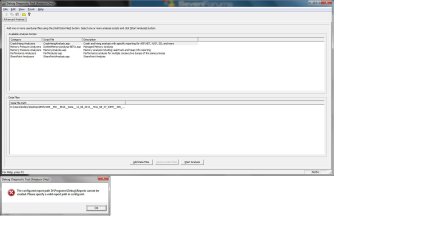
  • debug error.jpg
    debug error.jpg
    84.5 KB · Views: 3

My Computer My Computer

At a glance

Windows 7 Home Premium x64Core i7 - 4770K8 GBNvidia GeForce CTX 760 2GB
Computer type
PC/Desktop
Computer Manufacturer/Model Number
Me
OS
Windows 7 Home Premium x64
CPU
Core i7 - 4770K
Motherboard
Gigabyte GA-Z87X-UD4H-CF
Memory
8 GB
Graphics Card(s)
Nvidia GeForce CTX 760 2GB
Sound Card
N/A
Monitor(s) Displays
ViewSonic VX2250
Hard Drives
238 GB Plextor PX-256M5S ATA
WESTERN DIGITAL 1TB 6.0/SATA
PSU
CORSAIR TX750W
Case
SALVAGED
Cooling
GOOD OLD AIR - WITH THE HELP OF A FEW FANS
Hi,
One bad thing about clean installs and windows updates is that Microsoft skips to the most recent version of internet explorer,
All I can say is to uninstall ie11 and it should roll all the way back to ie8,
Hide the ie11 update by right clicking on it and click on Hide,
ie9 and probably 10 will appear after manually rechecking for updates,
Load and install ie9 then install all security related updates for ie9,
Then load and install ie10 and repeat installing related security updates for ie10,

Test the issue of crashing using ie10.
http://www.sevenforums.com/tutorials/282216-internet-explorer-10-install-uninstall-windows-7-a.html
 

My Computer My Computer

At a glance

Win-7-Pro64bit 7-H-Prem-64biti7-5930K 2nd i9-9940x both water blocked VRM'...Trident-z 3200C14 2nd Trident-z 3600C16EVGA 1080ti ftw3 2nd Titan Xp both water blocked
Computer type
PC/Desktop
Computer Manufacturer/Model Number
Custom assembled by me :}
OS
Win-7-Pro64bit 7-H-Prem-64bit
CPU
i7-5930K 2nd i9-9940x both water blocked VRM's too
Motherboard
ASUS SABERTOOTH X99 2nd ASUS x299 Apex
Memory
Trident-z 3200C14 2nd Trident-z 3600C16
Graphics Card(s)
EVGA 1080ti ftw3 2nd Titan Xp both water blocked
Sound Card
Built-in Realtek
Monitor(s) Displays
1-AOC G2460PG 24"G-Sync 144Hz/ 2nd 1-ASUS VG248QE 24" 144Hz
Screen Resolution
1920 x 1080 144Hz
Hard Drives
2-Samsung M.2 Evo & Evo Plus
2-Samsung 850 EVO 500GB SSD's/ 3-2.5 W.D. Black 1tb-&3-1tb/3-3.5 WD Black 1tb hdd's
PSU
EVGA SuperNOVA 1000-P2 2nd 1200-P2
Case
2-Corsair Obsidian Series 450D Black ATX Mid Tower
Cooling
Custom water loops
Keyboard
Logitech G710+/ 2nd Logitech G910
Mouse
2-RedDragon M901 Perdition 16400 dpi Gaming mouse = wired
Internet Speed
Comcast Ping 19ms 89.31mbps download speed 6.12mbps upload
Antivirus
Malwarebytes Pro/ Superantispyware Pro
Browser
FireFox & Pale moon
Other Info
2nd ASUS X299 Apex/Intel i9-9940x with Custom water loop/7H-Prem-x64/Corsair 450D case/Ram Trident-z 3600C16 4x8gb / Samsung970Evo plus 500gb SSD/Dual ssd EZ swap evo/PSU EVGA SuperNova 1200w-P2 80+Platinum/GPU Titan Xp /8-ML-140 on push-pull on 2-280GTX rads
Thank you for the reply. I have uninstalled IE and started from IE8 with updates as you described. At each step I tested Pandora to see if the crash would occur and with IE8 I got a "Stack overflow at line:7" error. With IE9 everything seemed to work just fine and I didn't have a crash. I installed IE10 and the crashes resumed again while listening to Pandora. A couple of things I noted during this process. 1) There were no updates available in between the IE9, 10, or 11. 2) It seems only the tab with Pandora is crashing while my other tabs remain active and usable. I have copied problem details below from the error box that pops up.

Problem signature:
Problem Event Name: APPCRASH
Application Name: IEXPLORE.EXE
Application Version: 10.0.9200.17148
Application Timestamp: 544c16cd
Fault Module Name: MF.dll
Fault Module Version: 12.0.7601.17514
Fault Module Timestamp: 4ce7b880
Exception Code: c0000005
Exception Offset: 000b7018
OS Version: 6.1.7601.2.1.0.768.3
Locale ID: 1033
Additional Information 1: 0a9e
Additional Information 2: 0a9e372d3b4ad19135b953a78882e789
Additional Information 3: 0a9e
Additional Information 4: 0a9e372d3b4ad19135b953a78882e789
Read our privacy statement online:
Windows 7 Privacy Statement - Microsoft Windows
If the online privacy statement is not available, please read our privacy statement offline:
C:\Windows\system32\en-US\erofflps.txt

Problem signature:
Problem Event Name: APPCRASH
Application Name: IEXPLORE.EXE
Application Version: 10.0.9200.17148
Application Timestamp: 544c16cd
Fault Module Name: MF.dll
Fault Module Version: 12.0.7601.17514
Fault Module Timestamp: 4ce7b880
Exception Code: c0000005
Exception Offset: 000b7018
OS Version: 6.1.7601.2.1.0.768.3
Locale ID: 1033
Additional Information 1: 0a9e
Additional Information 2: 0a9e372d3b4ad19135b953a78882e789
Additional Information 3: 0a9e
Additional Information 4: 0a9e372d3b4ad19135b953a78882e789
Read our privacy statement online:
Windows 7 Privacy Statement - Microsoft Windows
If the online privacy statement is not available, please read our privacy statement offline:
C:\Windows\system32\en-US\erofflps.txt

Please let me know what steps to take next.
 

My Computer My Computer

At a glance

Windows 7 Home Premium x64Core i7 - 4770K8 GBNvidia GeForce CTX 760 2GB
Computer type
PC/Desktop
Computer Manufacturer/Model Number
Me
OS
Windows 7 Home Premium x64
CPU
Core i7 - 4770K
Motherboard
Gigabyte GA-Z87X-UD4H-CF
Memory
8 GB
Graphics Card(s)
Nvidia GeForce CTX 760 2GB
Sound Card
N/A
Monitor(s) Displays
ViewSonic VX2250
Hard Drives
238 GB Plextor PX-256M5S ATA
WESTERN DIGITAL 1TB 6.0/SATA
PSU
CORSAIR TX750W
Case
SALVAGED
Cooling
GOOD OLD AIR - WITH THE HELP OF A FEW FANS
As far as I can tell Pandora does not require Adobe Flash player so in ie10 you can uninstall it completely ie11 you can't,
See after uninstalling Flash if Pandora still crashes,
Slumlords Radio - Listen to Slumlords, Free on Pandora Internet Radio
Also if you have Java from Oracle uninstall or at least disable it,
See what this does,
Use No Add-ons mode/ Click the Start button and type in the search box,
Internet explorer
Start-no%20add-ons-7.jpg

Click on the suggestion (No Add-ons) or it’s located at,
Start/ All programs/ Accessories folder/ System tools folder/ No add-ons.
http://windows.microsoft.com/en-us/internet-explorer/manage-add-ons#ie=ie-10-win-7
http://windows.microsoft.com/en-IN/windows7/How-to-manage-add-ons-in-Internet-Explorer-9
If using ie10 the first link will apply to ie9 as well,
http://windows.microsoft.com/en-us/internet-explorer/ie-crashes-stops-working#ie=ie-10-win-7

Activate EPM if on a 64 bit version of windows,
http://www.sevenforums.com/tutorial...10-enable-32-bit-64-bit-ie10-windows-7-a.html
Add the Run box to the Start menu list,
http://www.sevenforums.com/tutorials/559-start-menu-add-run-button.html
Open the Run command and Paste this into it and Okay,
"C:\Program Files\Internet Explorer\iexplore.exe" -extoff
 

My Computer My Computer

At a glance

Win-7-Pro64bit 7-H-Prem-64biti7-5930K 2nd i9-9940x both water blocked VRM'...Trident-z 3200C14 2nd Trident-z 3600C16EVGA 1080ti ftw3 2nd Titan Xp both water blocked
Computer type
PC/Desktop
Computer Manufacturer/Model Number
Custom assembled by me :}
OS
Win-7-Pro64bit 7-H-Prem-64bit
CPU
i7-5930K 2nd i9-9940x both water blocked VRM's too
Motherboard
ASUS SABERTOOTH X99 2nd ASUS x299 Apex
Memory
Trident-z 3200C14 2nd Trident-z 3600C16
Graphics Card(s)
EVGA 1080ti ftw3 2nd Titan Xp both water blocked
Sound Card
Built-in Realtek
Monitor(s) Displays
1-AOC G2460PG 24"G-Sync 144Hz/ 2nd 1-ASUS VG248QE 24" 144Hz
Screen Resolution
1920 x 1080 144Hz
Hard Drives
2-Samsung M.2 Evo & Evo Plus
2-Samsung 850 EVO 500GB SSD's/ 3-2.5 W.D. Black 1tb-&3-1tb/3-3.5 WD Black 1tb hdd's
PSU
EVGA SuperNOVA 1000-P2 2nd 1200-P2
Case
2-Corsair Obsidian Series 450D Black ATX Mid Tower
Cooling
Custom water loops
Keyboard
Logitech G710+/ 2nd Logitech G910
Mouse
2-RedDragon M901 Perdition 16400 dpi Gaming mouse = wired
Internet Speed
Comcast Ping 19ms 89.31mbps download speed 6.12mbps upload
Antivirus
Malwarebytes Pro/ Superantispyware Pro
Browser
FireFox & Pale moon
Other Info
2nd ASUS X299 Apex/Intel i9-9940x with Custom water loop/7H-Prem-x64/Corsair 450D case/Ram Trident-z 3600C16 4x8gb / Samsung970Evo plus 500gb SSD/Dual ssd EZ swap evo/PSU EVGA SuperNova 1200w-P2 80+Platinum/GPU Titan Xp /8-ML-140 on push-pull on 2-280GTX rads
Thrash,

Thanks for all your help. I was able to finally get Pandora to stop crashing IE. As far as I could find the MF.dll was causing the crash and it seemed to be associated with Media Player so I reinstalled my audio drivers and that seems to have fixed the issue. I guess without the audio drivers the machine was using the Media Player files to process the music from Pandora and it wasn't working well. As for the crash during a chat session with Amazon customer service I will just have to wait and see if similar events take place. Again thanks for your time.

rwt
 

My Computer My Computer

At a glance

Windows 7 Home Premium x64Core i7 - 4770K8 GBNvidia GeForce CTX 760 2GB
Computer type
PC/Desktop
Computer Manufacturer/Model Number
Me
OS
Windows 7 Home Premium x64
CPU
Core i7 - 4770K
Motherboard
Gigabyte GA-Z87X-UD4H-CF
Memory
8 GB
Graphics Card(s)
Nvidia GeForce CTX 760 2GB
Sound Card
N/A
Monitor(s) Displays
ViewSonic VX2250
Hard Drives
238 GB Plextor PX-256M5S ATA
WESTERN DIGITAL 1TB 6.0/SATA
PSU
CORSAIR TX750W
Case
SALVAGED
Cooling
GOOD OLD AIR - WITH THE HELP OF A FEW FANS
Back
Top