Copy letter from printer to laptop and send as e-mail

denwilliam

New member
Member
VIP
Local time
1:57 PM
Messages
201
Is it possible to copy a letter from my printer to my laptop and then send it as a e-mail?.
 

My Computer My Computer

At a glance

Windows 7 Professional 64 Bit
Computer type
Laptop
Computer Manufacturer/Model Number
Toshiba Satellite Pro C870-1E2
OS
Windows 7 Professional 64 Bit
If I understand correctly there are three ways possible.

1.) Open the file that you sent to the printer to print, select all of it and copy, then paste that into the body of your email.

2.) Scan the printed letter, save as file, then follow the instructions in #1.

3.) Cut to the chase and just attach the file to your email.

I might be missing something here. What is the make and model of your printer, does it save print jobs to make repetitive printing easier?

You need a file for the printer to interpret and print, once the file has been placed into the printers memory and print queue, and the print job is completed the printers programing wipes that job so it can move on to the next or wait for the next job.

Do you mean something like Cloud, Air, or mobile printing?

Related Links:
How to print anything from anywhere: Your ultimate guide to mobile printing | PCWorld

The Good, Bad And Ugly Of Different Mobile Printing Solutions | ZDNet
 

My Computer My Computer

At a glance

Originally Win 7 Hm Prem x64 Ver 6.1.7600 Bui...Intel i3 530 2.93GHz, 2933MHz 2 Cores 4 Logic...6GB of 1,333MHz DDR3 SDRAM32MB Intel Graphics Media Accelerator HD IGChip
Computer type
PC/Desktop
Computer Manufacturer/Model Number
Gateway DX4831-01e (Mid-Tower Desktop)
OS
Originally Win 7 Hm Prem x64 Ver 6.1.7600 Build 7601-SP1 | Upgraded to Windows 10 December 14, 2019
CPU
Intel i3 530 2.93GHz, 2933MHz 2 Cores 4 Logical Processors
Motherboard
Gateway H57M01 133 megahertz
Memory
6GB of 1,333MHz DDR3 SDRAM
Graphics Card(s)
32MB Intel Graphics Media Accelerator HD IGChip
Sound Card
Realtek High Definition Audio
Monitor(s) Displays
Gateway HX2000 20inch TFT active matrix TN
Screen Resolution
1600 x 900 x 59 hertz
Hard Drives
WDC WD10EADS-00M2B0 [HDD] (1000.20 GB) -- drive 0,
HL-DT-ST DVDRAM GH41N [CD-ROM dr]
Four card readers, and Four USB 2.0
PSU
300watts.
Case
Mid-Tower Desktop
Cooling
Stock from Gateway
Keyboard
Natural Ergonomic Keyboard 4000, see Other Info
Mouse
Orig. Gateway wore out now using Insignia USB wired optical
Internet Speed
Vz FIOS 10ms png 57.64Mbps down 65.53Mbps up Speedtest.org
Antivirus
Zamana Anti-logger with Anti-malware, MSE, Windows Firewall,
Browser
IE11.0.9600.19399-Upd ver11.0.135, Firefox 68.0.1 x64
Other Info
System Specs by Belarc.

BIOS: American Megatrends Inc. P01-A0 11/17/2009

Replaced the MS 'Natural' Standard PS/2 Enhanced 101-102 Keyboard with a new Natural Ergonomic Keyboard 4000 on August 1st 2014.

Canon Pixma MG3222 Printer.

Updated to IE11 on 12102015 | Fios Quantum Router g1100

Additional AV: SpywareBlaster, manual Mbam, SAS
Maybe I failed to explain properly.What I want to do is to take a letter that is not on my computer or files but to copy it from my printer to my laptop and then send it attached to a e-mail.
 

My Computer My Computer

At a glance

Windows 7 Professional 64 Bit
Computer type
Laptop
Computer Manufacturer/Model Number
Toshiba Satellite Pro C870-1E2
OS
Windows 7 Professional 64 Bit
  • How can it be physically on your printer?

  • Did it save a file?

  • Do you have a copy of the letter it printed? If you do, you have to open your word processor, create a new document by typing it into the new document and save it, then you can attach that to your email.

  • You still haven't told me what the make and model number of your printer is. ?/?
 

My Computer My Computer

At a glance

Originally Win 7 Hm Prem x64 Ver 6.1.7600 Bui...Intel i3 530 2.93GHz, 2933MHz 2 Cores 4 Logic...6GB of 1,333MHz DDR3 SDRAM32MB Intel Graphics Media Accelerator HD IGChip
Computer type
PC/Desktop
Computer Manufacturer/Model Number
Gateway DX4831-01e (Mid-Tower Desktop)
OS
Originally Win 7 Hm Prem x64 Ver 6.1.7600 Build 7601-SP1 | Upgraded to Windows 10 December 14, 2019
CPU
Intel i3 530 2.93GHz, 2933MHz 2 Cores 4 Logical Processors
Motherboard
Gateway H57M01 133 megahertz
Memory
6GB of 1,333MHz DDR3 SDRAM
Graphics Card(s)
32MB Intel Graphics Media Accelerator HD IGChip
Sound Card
Realtek High Definition Audio
Monitor(s) Displays
Gateway HX2000 20inch TFT active matrix TN
Screen Resolution
1600 x 900 x 59 hertz
Hard Drives
WDC WD10EADS-00M2B0 [HDD] (1000.20 GB) -- drive 0,
HL-DT-ST DVDRAM GH41N [CD-ROM dr]
Four card readers, and Four USB 2.0
PSU
300watts.
Case
Mid-Tower Desktop
Cooling
Stock from Gateway
Keyboard
Natural Ergonomic Keyboard 4000, see Other Info
Mouse
Orig. Gateway wore out now using Insignia USB wired optical
Internet Speed
Vz FIOS 10ms png 57.64Mbps down 65.53Mbps up Speedtest.org
Antivirus
Zamana Anti-logger with Anti-malware, MSE, Windows Firewall,
Browser
IE11.0.9600.19399-Upd ver11.0.135, Firefox 68.0.1 x64
Other Info
System Specs by Belarc.

BIOS: American Megatrends Inc. P01-A0 11/17/2009

Replaced the MS 'Natural' Standard PS/2 Enhanced 101-102 Keyboard with a new Natural Ergonomic Keyboard 4000 on August 1st 2014.

Canon Pixma MG3222 Printer.

Updated to IE11 on 12102015 | Fios Quantum Router g1100

Additional AV: SpywareBlaster, manual Mbam, SAS
My printer is a Epson sx 515w and I was trying to avoid having to retype the original letter as it is rather a long epistle.Was hoping there would be some easy way to return the letter contents back to the laptop via the printer.
 

My Computer My Computer

At a glance

Windows 7 Professional 64 Bit
Computer type
Laptop
Computer Manufacturer/Model Number
Toshiba Satellite Pro C870-1E2
OS
Windows 7 Professional 64 Bit
Do you know how to use the scan feature of that Epson? As an All-In-One it has scanning capabilities.

  • Open up the scanning utility.

  • Open the top lid to lay the letter onto the glass scan plate, close lid, start scan, save scan as a document or .PDF file.

  • Attach that file to your email.


  • If the letter is more than one page:
I downloaded the manual for your printer, but haven't found if the scanning utility can save multiple scans as one file. If it can not you will have to scan each page separately, create a file of each and send multiple files as attachments in your email. Not as elegant a solution, but it will work.

This may work but I can't find if there is a setting to save all scans made with the use of the Automatic Document Feeder (ADF) as one document: https://files.support.epson.com/htmldocs/gt25__/gt25__ug/set2_1.htm#S-00600-00010-00100
You may have to use the Professional setting: https://files.support.epson.com/htmldocs/gt25__/gt25__ug/featr_4.htm#S-00400-00300-00300


Related Links:
This is the Index for using the scanner:
https://files.support.epson.com/htmldocs/gt25__/gt25__ug/indexx.htm
How to create a .PDF file from a scan:
https://files.support.epson.com/htmldocs/gt25__/gt25__ug/projs_1.htm
 

My Computer My Computer

At a glance

Originally Win 7 Hm Prem x64 Ver 6.1.7600 Bui...Intel i3 530 2.93GHz, 2933MHz 2 Cores 4 Logic...6GB of 1,333MHz DDR3 SDRAM32MB Intel Graphics Media Accelerator HD IGChip
Computer type
PC/Desktop
Computer Manufacturer/Model Number
Gateway DX4831-01e (Mid-Tower Desktop)
OS
Originally Win 7 Hm Prem x64 Ver 6.1.7600 Build 7601-SP1 | Upgraded to Windows 10 December 14, 2019
CPU
Intel i3 530 2.93GHz, 2933MHz 2 Cores 4 Logical Processors
Motherboard
Gateway H57M01 133 megahertz
Memory
6GB of 1,333MHz DDR3 SDRAM
Graphics Card(s)
32MB Intel Graphics Media Accelerator HD IGChip
Sound Card
Realtek High Definition Audio
Monitor(s) Displays
Gateway HX2000 20inch TFT active matrix TN
Screen Resolution
1600 x 900 x 59 hertz
Hard Drives
WDC WD10EADS-00M2B0 [HDD] (1000.20 GB) -- drive 0,
HL-DT-ST DVDRAM GH41N [CD-ROM dr]
Four card readers, and Four USB 2.0
PSU
300watts.
Case
Mid-Tower Desktop
Cooling
Stock from Gateway
Keyboard
Natural Ergonomic Keyboard 4000, see Other Info
Mouse
Orig. Gateway wore out now using Insignia USB wired optical
Internet Speed
Vz FIOS 10ms png 57.64Mbps down 65.53Mbps up Speedtest.org
Antivirus
Zamana Anti-logger with Anti-malware, MSE, Windows Firewall,
Browser
IE11.0.9600.19399-Upd ver11.0.135, Firefox 68.0.1 x64
Other Info
System Specs by Belarc.

BIOS: American Megatrends Inc. P01-A0 11/17/2009

Replaced the MS 'Natural' Standard PS/2 Enhanced 101-102 Keyboard with a new Natural Ergonomic Keyboard 4000 on August 1st 2014.

Canon Pixma MG3222 Printer.

Updated to IE11 on 12102015 | Fios Quantum Router g1100

Additional AV: SpywareBlaster, manual Mbam, SAS
That looks like a solution to my problems,many many thanks for your assistance.
 

My Computer My Computer

At a glance

Windows 7 Professional 64 Bit
Computer type
Laptop
Computer Manufacturer/Model Number
Toshiba Satellite Pro C870-1E2
OS
Windows 7 Professional 64 Bit
You're welcome.

If you have any further questions on procedures or need clarification on certain steps, don't hesitate to ask.

One more consideration; If the letter is multiple pages and you're having problems sending it through email, check your email size limitations on the total amount of gigabytes (GB) you are allowed to send at one time.
Some email providers/programs can be stingy and only allow, let's say 5GB at a time so, if your letter's files total 6GB you will have to send two emails. You should receive a warning if the limitation has been reached, and the reverse is true also; Let's say you're allowed 10GB, but the person you're sending to has a 5GB limit, you will still have to send two emails.


Related Links:
Maximum email size limit for Gmail, Outlook.com, etc

"Attachment size exceeds the allowable limit" error when you add a large attachment to an email message in Outlook 2013
 

My Computer My Computer

At a glance

Originally Win 7 Hm Prem x64 Ver 6.1.7600 Bui...Intel i3 530 2.93GHz, 2933MHz 2 Cores 4 Logic...6GB of 1,333MHz DDR3 SDRAM32MB Intel Graphics Media Accelerator HD IGChip
Computer type
PC/Desktop
Computer Manufacturer/Model Number
Gateway DX4831-01e (Mid-Tower Desktop)
OS
Originally Win 7 Hm Prem x64 Ver 6.1.7600 Build 7601-SP1 | Upgraded to Windows 10 December 14, 2019
CPU
Intel i3 530 2.93GHz, 2933MHz 2 Cores 4 Logical Processors
Motherboard
Gateway H57M01 133 megahertz
Memory
6GB of 1,333MHz DDR3 SDRAM
Graphics Card(s)
32MB Intel Graphics Media Accelerator HD IGChip
Sound Card
Realtek High Definition Audio
Monitor(s) Displays
Gateway HX2000 20inch TFT active matrix TN
Screen Resolution
1600 x 900 x 59 hertz
Hard Drives
WDC WD10EADS-00M2B0 [HDD] (1000.20 GB) -- drive 0,
HL-DT-ST DVDRAM GH41N [CD-ROM dr]
Four card readers, and Four USB 2.0
PSU
300watts.
Case
Mid-Tower Desktop
Cooling
Stock from Gateway
Keyboard
Natural Ergonomic Keyboard 4000, see Other Info
Mouse
Orig. Gateway wore out now using Insignia USB wired optical
Internet Speed
Vz FIOS 10ms png 57.64Mbps down 65.53Mbps up Speedtest.org
Antivirus
Zamana Anti-logger with Anti-malware, MSE, Windows Firewall,
Browser
IE11.0.9600.19399-Upd ver11.0.135, Firefox 68.0.1 x64
Other Info
System Specs by Belarc.

BIOS: American Megatrends Inc. P01-A0 11/17/2009

Replaced the MS 'Natural' Standard PS/2 Enhanced 101-102 Keyboard with a new Natural Ergonomic Keyboard 4000 on August 1st 2014.

Canon Pixma MG3222 Printer.

Updated to IE11 on 12102015 | Fios Quantum Router g1100

Additional AV: SpywareBlaster, manual Mbam, SAS
Back again looking for your help.I can scan the letter o.k.and it shows on my laptop as the scanning time runs.It then tells me to select a PDF or Document to save it to.As I do not have a PDF setup I choose document and then I lose it.Where am I going wrong?.
 

My Computer My Computer

At a glance

Windows 7 Professional 64 Bit
Computer type
Laptop
Computer Manufacturer/Model Number
Toshiba Satellite Pro C870-1E2
OS
Windows 7 Professional 64 Bit

My Computer My Computer

At a glance

Windows 7 Ultimate 64 bitIntel Core i7 4770K overclocked to 4.7GHz Qua...16GB Team Group Vulcan Gold 2133MHzATI Radeon HD 7880 Series Display adapter
Computer type
PC/Desktop
Computer Manufacturer/Model Number
self build
OS
Windows 7 Ultimate 64 bit
CPU
Intel Core i7 4770K overclocked to 4.7GHz Quad Core Haswell
Motherboard
Asus Z87 Pro (Socket 1150) ATX Motherboard
Memory
16GB Team Group Vulcan Gold 2133MHz
Graphics Card(s)
ATI Radeon HD 7880 Series Display adapter
Monitor(s) Displays
NEC LCD2690WUXi2
Screen Resolution
26" 1920 x 1200
Hard Drives
Samsung 500GB SSD 840 EVO SATA 6Gb/s
Samsung 250GB SSD 840 EVO SATA 6Gb/s
PSU
Corsair AX760 Platinum
Case
Cooler Master HAF X Gaming Tower
Cooling
XSPC RayStorm 750 RS360 Water cooling
Mouse
Razer Death Adder left handed
Internet Speed
126Mb download 11.5Mb up
Antivirus
Avast free
Browser
Opera
Other Info
Main Browser is Opera
Favorite software Adobe Lightroom & Photoshop
best plugins Nik software
Firewall : Private firewall 7
stve, please give us some time, Den doesn't want to change the letter all he wants to do is copy, and save it, and I'm in the process of helping him to do that.
 

My Computer My Computer

At a glance

Originally Win 7 Hm Prem x64 Ver 6.1.7600 Bui...Intel i3 530 2.93GHz, 2933MHz 2 Cores 4 Logic...6GB of 1,333MHz DDR3 SDRAM32MB Intel Graphics Media Accelerator HD IGChip
Computer type
PC/Desktop
Computer Manufacturer/Model Number
Gateway DX4831-01e (Mid-Tower Desktop)
OS
Originally Win 7 Hm Prem x64 Ver 6.1.7600 Build 7601-SP1 | Upgraded to Windows 10 December 14, 2019
CPU
Intel i3 530 2.93GHz, 2933MHz 2 Cores 4 Logical Processors
Motherboard
Gateway H57M01 133 megahertz
Memory
6GB of 1,333MHz DDR3 SDRAM
Graphics Card(s)
32MB Intel Graphics Media Accelerator HD IGChip
Sound Card
Realtek High Definition Audio
Monitor(s) Displays
Gateway HX2000 20inch TFT active matrix TN
Screen Resolution
1600 x 900 x 59 hertz
Hard Drives
WDC WD10EADS-00M2B0 [HDD] (1000.20 GB) -- drive 0,
HL-DT-ST DVDRAM GH41N [CD-ROM dr]
Four card readers, and Four USB 2.0
PSU
300watts.
Case
Mid-Tower Desktop
Cooling
Stock from Gateway
Keyboard
Natural Ergonomic Keyboard 4000, see Other Info
Mouse
Orig. Gateway wore out now using Insignia USB wired optical
Internet Speed
Vz FIOS 10ms png 57.64Mbps down 65.53Mbps up Speedtest.org
Antivirus
Zamana Anti-logger with Anti-malware, MSE, Windows Firewall,
Browser
IE11.0.9600.19399-Upd ver11.0.135, Firefox 68.0.1 x64
Other Info
System Specs by Belarc.

BIOS: American Megatrends Inc. P01-A0 11/17/2009

Replaced the MS 'Natural' Standard PS/2 Enhanced 101-102 Keyboard with a new Natural Ergonomic Keyboard 4000 on August 1st 2014.

Canon Pixma MG3222 Printer.

Updated to IE11 on 12102015 | Fios Quantum Router g1100

Additional AV: SpywareBlaster, manual Mbam, SAS
It sounds as if you're not setting the file save location, refer to: Selecting File Save Settings

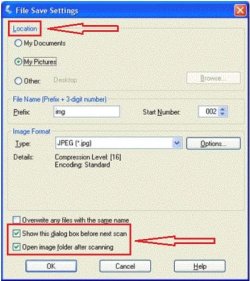
Did you notice a settings box like this?
dw1.JPG

If you did, do you remember how it was set? In the meantime, let's see if we can find that file. Pay attention to the File Name and Image Format areas of the settings box.

There are two ways Thru Explorer
1.) Using the Start Orb- Search box; Type the date of your scan into the search box, I presume that would be today 02/04/2015. from the results, do you see anything that resembles img001.jpeg?

2.) You can also see the result if you open Explorer and type the date into the search box in the upper right corner.


Once we get you squared away with your letter, stve or I can explain OCR to you and see if that would be something you would like to try.
 

My Computer My Computer

At a glance

Originally Win 7 Hm Prem x64 Ver 6.1.7600 Bui...Intel i3 530 2.93GHz, 2933MHz 2 Cores 4 Logic...6GB of 1,333MHz DDR3 SDRAM32MB Intel Graphics Media Accelerator HD IGChip
Computer type
PC/Desktop
Computer Manufacturer/Model Number
Gateway DX4831-01e (Mid-Tower Desktop)
OS
Originally Win 7 Hm Prem x64 Ver 6.1.7600 Build 7601-SP1 | Upgraded to Windows 10 December 14, 2019
CPU
Intel i3 530 2.93GHz, 2933MHz 2 Cores 4 Logical Processors
Motherboard
Gateway H57M01 133 megahertz
Memory
6GB of 1,333MHz DDR3 SDRAM
Graphics Card(s)
32MB Intel Graphics Media Accelerator HD IGChip
Sound Card
Realtek High Definition Audio
Monitor(s) Displays
Gateway HX2000 20inch TFT active matrix TN
Screen Resolution
1600 x 900 x 59 hertz
Hard Drives
WDC WD10EADS-00M2B0 [HDD] (1000.20 GB) -- drive 0,
HL-DT-ST DVDRAM GH41N [CD-ROM dr]
Four card readers, and Four USB 2.0
PSU
300watts.
Case
Mid-Tower Desktop
Cooling
Stock from Gateway
Keyboard
Natural Ergonomic Keyboard 4000, see Other Info
Mouse
Orig. Gateway wore out now using Insignia USB wired optical
Internet Speed
Vz FIOS 10ms png 57.64Mbps down 65.53Mbps up Speedtest.org
Antivirus
Zamana Anti-logger with Anti-malware, MSE, Windows Firewall,
Browser
IE11.0.9600.19399-Upd ver11.0.135, Firefox 68.0.1 x64
Other Info
System Specs by Belarc.

BIOS: American Megatrends Inc. P01-A0 11/17/2009

Replaced the MS 'Natural' Standard PS/2 Enhanced 101-102 Keyboard with a new Natural Ergonomic Keyboard 4000 on August 1st 2014.

Canon Pixma MG3222 Printer.

Updated to IE11 on 12102015 | Fios Quantum Router g1100

Additional AV: SpywareBlaster, manual Mbam, SAS
You have got me lost there as I do not want to change a image into text,it is text I want to transfer from my printer to my laptop to then e-mail it.
 

My Computer My Computer

At a glance

Windows 7 Professional 64 Bit
Computer type
Laptop
Computer Manufacturer/Model Number
Toshiba Satellite Pro C870-1E2
OS
Windows 7 Professional 64 Bit
stev replied about the OCR. I'm trying to show you how to find the letter you already scanned; Did you see my reply to stev?
stve, please give us some time, Den doesn't want to change the letter all he wants to do is copy, and save it, and I'm in the process of helping him to do that.
  • Did you try to find it by using the date technique I laid out in my post #12?

  • If you named the scan try using the name to search for it. If you didn't name it try using the date.

There is one more way to try and find the letter that was scanned. Since the file save settings seem to only show the My Documents, My Pictures or Other:

  • Open Explorer.

  • Click on My Documents and scroll down to below any Folders you may have and look for img001.

  • If it's not there go to My Pictures and do the same, scroll down to below any Folders you may have and look for img001.

  • You can even try img001 in your searches

  • If you see img001 click on it and see what it is.

  • From how you're describing your experience I don't believe you used the "Other" setting.


If you get frustrated and can't seem to find it, you may want to try re-scanning the letter only this time follow the instructions here: Selecting File Save Settings. Remember, you have to make these settings before you scan anything.

When you see the File Save Settings window, you need to select the location, name, and format of the scanned image file you want to save.

step_1.gif
In the File Save Settings window, specify the location in which you want to save your scanned image. Click the My Documents or My Pictures buttons (Windows), or the Documents or Pictures button (Mac OS X).


  • If you want to select another folder, click Other, then click Browse (Windows) or Choose (Mac OS X) and select the folder.
   Note
Use Other then browse to the folder you want to save the new letter scan in. After you re-scan go to the folder you selected and look for it there.

Once you find it, you'll know where to send your email program to go and look for it and attach to your email.
 

My Computer My Computer

At a glance

Originally Win 7 Hm Prem x64 Ver 6.1.7600 Bui...Intel i3 530 2.93GHz, 2933MHz 2 Cores 4 Logic...6GB of 1,333MHz DDR3 SDRAM32MB Intel Graphics Media Accelerator HD IGChip
Computer type
PC/Desktop
Computer Manufacturer/Model Number
Gateway DX4831-01e (Mid-Tower Desktop)
OS
Originally Win 7 Hm Prem x64 Ver 6.1.7600 Build 7601-SP1 | Upgraded to Windows 10 December 14, 2019
CPU
Intel i3 530 2.93GHz, 2933MHz 2 Cores 4 Logical Processors
Motherboard
Gateway H57M01 133 megahertz
Memory
6GB of 1,333MHz DDR3 SDRAM
Graphics Card(s)
32MB Intel Graphics Media Accelerator HD IGChip
Sound Card
Realtek High Definition Audio
Monitor(s) Displays
Gateway HX2000 20inch TFT active matrix TN
Screen Resolution
1600 x 900 x 59 hertz
Hard Drives
WDC WD10EADS-00M2B0 [HDD] (1000.20 GB) -- drive 0,
HL-DT-ST DVDRAM GH41N [CD-ROM dr]
Four card readers, and Four USB 2.0
PSU
300watts.
Case
Mid-Tower Desktop
Cooling
Stock from Gateway
Keyboard
Natural Ergonomic Keyboard 4000, see Other Info
Mouse
Orig. Gateway wore out now using Insignia USB wired optical
Internet Speed
Vz FIOS 10ms png 57.64Mbps down 65.53Mbps up Speedtest.org
Antivirus
Zamana Anti-logger with Anti-malware, MSE, Windows Firewall,
Browser
IE11.0.9600.19399-Upd ver11.0.135, Firefox 68.0.1 x64
Other Info
System Specs by Belarc.

BIOS: American Megatrends Inc. P01-A0 11/17/2009

Replaced the MS 'Natural' Standard PS/2 Enhanced 101-102 Keyboard with a new Natural Ergonomic Keyboard 4000 on August 1st 2014.

Canon Pixma MG3222 Printer.

Updated to IE11 on 12102015 | Fios Quantum Router g1100

Additional AV: SpywareBlaster, manual Mbam, SAS
Back
Top