Best Settings - Need to open 41 IE windows to perform Screen Capture

cyberic68

New member
Local time
7:39 PM
Messages
4
Hi I need to open 41 Internet Explorer (version 11 ) windows and then perform Screen Capture of each of them

I have a basic script/macro that brings the “WinActive” by title, one by one, and save the image from the Clipboard as jpeg.

Currently my PC hardware is Intel I5 vPro, 8 Gb RAM, 250 SSD, Windows 7 Pro 64 bits

My problem is after 4 hours or so, the PC starting slowing down and my script abort, due to the decrease in the PC performance, when he is too slow to bring the next IE window as the Active windows

I have tied to clear my temp folder after each cycle, it help a little bit but It still crashed after X hours

Given that I want to a full refreshed of the 41 Web Pages within a 2 minutes threshold. I cannot Open and Close the Internet Explorer each time. So, I open my 41 pages in 41 tabs, and flip from one to the other with the script using the Title of the page. Then restart the process

Currently I have No paging in the Virtual Memory (8 Gb only of RAM). Do 16 Gb of RAM or more would help me or other settings that I should set specifically?

Thanks
For your Help
 

My Computer My Computer

At a glance

Windows 7 Pro ( 32 & 63 bits )
Computer type
PC/Desktop
OS
Windows 7 Pro ( 32 & 63 bits )
What scripting tool are you using? If AutoIt, can you post your script? (Use the code tags.)


...I have No paging in the Virtual Memory...
As a test, set this to let Windows manage virtual memory and then restart the computer.

Do you close IE after you capture these 41 screenshots (before the next cycle)?
 

My Computer My Computer

At a glance

W7 Pro SP1 64biti78GBIntel HD Graphics
Computer type
Laptop
Computer Manufacturer/Model Number
Employer provided Dell Latitude
OS
W7 Pro SP1 64bit
CPU
i7
Memory
8GB
Graphics Card(s)
Intel HD Graphics
Hard Drives
crappy SSD
Antivirus
Employer mandated Symantec Endpoint Protection
Browser
Pale Moon 64bit, IE11 64bit & Chrome 64bit
Just curious. Do you have to use IE11 for this exercise? I recall a test we were doing several years ago with IE9 in opening multiple windows, or tabs, that would crash IE after about 25 were open. FireFox could handle double the number without issue.
 

My Computer My Computer

At a glance

Windows 7 Home Premium 64 bit SP1i5-2320 @3.00 GHz6GBNVIDIA GeForce 7300 LE
Computer type
PC/Desktop
Computer Manufacturer/Model Number
ASUS
OS
Windows 7 Home Premium 64 bit SP1
CPU
i5-2320 @3.00 GHz
Memory
6GB
Graphics Card(s)
NVIDIA GeForce 7300 LE
Monitor(s) Displays
Acer S200HQL 19.5 LED
Screen Resolution
1280 x 800 (1900 x 900 max)
Hard Drives
Drive 1: 1 TB SATA internal: C drive
Drive 2: 250 GB SATA internal: User Data Backup
Drive 3: 500 GB SATA USB: Full System Backup 1, Father
Drive 4: 500 GB SATA USB: Full System Backup 2, Son
Drive 5: 40 GB IDE USB: Kindle, ASUS Tabl
Keyboard
ASUS KB34211
Mouse
Logitech m325 cordless
Internet Speed
27Mb down, 3 Mb up cable modem w/Netgear R6400 WiFi
Antivirus
NIS, Spybot S&D, CCleaner, Malwarebytes, MSERT, MRT
Browser
FF v44.0.2;IE11 v11.0.9600.18015,uv11.0.23;Chrome v44.0.2403
Other Info
FF has AdBlockPlus and Ghostery plugins,
What scripting tool are you using? If AutoIt, can you post your script? (Use the code tags.)


...I have No paging in the Virtual Memory...
As a test, set this to let Windows manage virtual memory and then restart the computer.

Do you close IE after you capture these 41 screenshots (before the next cycle)?

I'm using Macro Express, but I have Auto It too, would it be better ?

Here's my first Macro that Open the 41 page


<HTTP2:1:T:http://www.net.com/Test/Testmypage.jsp?viewName=deux1><WAITTIME:00000001><TEXTTYPE:
><HTTP2:1:T:http://www.net.com/Test/Testmypage.jsp?viewName=deux2><WAITTIME:00000001><TEXTTYPE:
><HTTP2:1:T:http://www.net.com/Test/Testmypage.jsp?viewName=drummon1><WAITTIME:00000001><TEXTTYPE:
><HTTP2:1:T:http://www.net.com/Test/Testmypage.jsp?viewName=hervey1><WAITTIME:00000001><TEXTTYPE:
><HTTP2:1:T:http://www.net.com/Test/Testmypage.jsp?viewName=hy2><WAITTIME:00000001><TEXTTYPE:
><HTTP2:1:T:http://www.net.com/Test/Testmypage.jsp?viewName=mgybgpel1><WAITTIME:00000001><TEXTTYPE:
><HTTP2:1:T:http://www.net.com/Test/Testmypage.jsp?viewName=mgybgpel2><WAITTIME:00000001><TEXTTYPE:
><HTTP2:1:T:http://www.net.com/Test/Testmypage.jsp?viewName=napsprbd1><WAITTIME:00000001><TEXTTYPE:
><HTTP2:1:T:http://www.net.com/Test/Testmypage.jsp?viewName=napsprbd2><WAITTIME:00000001><TEXTTYPE:
><HTTP2:1:T:http://www.net.com/Test/Testmypage.jsp?viewName=napsprbd3><WAITTIME:00000001><TEXTTYPE:
><HTTP2:1:T:http://www.net.com/Test/Testmypage.jsp?viewName=wellingt1><WAITTIME:00000001><TEXTTYPE:
><HTTP2:1:T:http://www.net.com/Test/Testmypage.jsp?viewName=wellingt2><WAITTIME:00000001><TEXTTYPE:
><HTTP2:1:T:http://www.net.com/Test/Testmypage.jsp?viewName=yq8><WAITTIME:00000001><TEXTTYPE:
><HTTP2:1:T:http://www.net.com/Test/Testmypage.jsp?viewName=yq7><WAITTIME:00000001><TEXTTYPE:
><HTTP2:1:T:http://www.net.com/Test/Testmypage.jsp?viewName=allaredd1><WAITTIME:00000001><TEXTTYPE:
><HTTP2:1:T:http://www.net.com/Test/Testmypage.jsp?viewName=allaredd2><WAITTIME:00000001><TEXTTYPE:
><HTTP2:1:T:http://www.net.com/Test/Testmypage.jsp?viewName=allaredd3><WAITTIME:00000001><TEXTTYPE:
><HTTP2:1:T:http://www.net.com/Test/Testmypage.jsp?viewName=di1><WAITTIME:00000001><TEXTTYPE:
><HTTP2:1:T:http://www.net.com/Test/Testmypage.jsp?viewName=di2><WAITTIME:00000001><TEXTTYPE:
><HTTP2:1:T:http://www.net.com/Test/Testmypage.jsp?viewName=di3><WAITTIME:00000001><TEXTTYPE:
><HTTP2:1:T:http://www.net.com/Test/Testmypage.jsp?viewName=di4><WAITTIME:00000001><TEXTTYPE:
><HTTP2:1:T:http://www.net.com/Test/Testmypage.jsp?viewName=nod1><WAITTIME:00000001><TEXTTYPE:
><HTTP2:1:T:http://www.net.com/Test/Testmypage.jsp?viewName=nod2><WAITTIME:00000001><TEXTTYPE:
><HTTP2:1:T:http://www.net.com/Test/Testmypage.jsp?viewName=nod3><WAITTIME:00000001><TEXTTYPE:
><HTTP2:1:T:http://www.net.com/Test/Testmypage.jsp?viewName=nod4><WAITTIME:00000001><TEXTTYPE:
><HTTP2:1:T:http://www.net.com/Test/Testmypage.jsp?viewName=nod5><WAITTIME:00000001><TEXTTYPE:
><HTTP2:1:T:http://www.net.com/Test/Testmypage.jsp?viewName=oakville3><WAITTIME:00000001><TEXTTYPE:
><HTTP2:1:T:http://www.net.com/Test/Testmypage.jsp?viewName=oakville4><WAITTIME:00000001><TEXTTYPE:
><HTTP2:1:T:http://www.net.com/Test/Testmypage.jsp?viewName=oakville5><WAITTIME:00000001><TEXTTYPE:
><HTTP2:1:T:http://www.net.com/Test/Testmypage.jsp?viewName=oakville6><WAITTIME:00000001><TEXTTYPE:
><HTTP2:1:T:http://www.net.com/Test/Testmypage.jsp?viewName=oakville7><WAITTIME:00000001><TEXTTYPE:
><HTTP2:1:T:http://www.net.com/Test/Testmypage.jsp?viewName=oakville8><WAITTIME:00000001><TEXTTYPE:
><HTTP2:1:T:http://www.net.com/Test/Testmypage.jsp?viewName=yb1><WAITTIME:00000001><TEXTTYPE:
><HTTP2:1:T:http://www.net.com/Test/Testmypage.jsp?viewName=yb2><WAITTIME:00000001><TEXTTYPE:
><HTTP2:1:T:http://www.net.com/Test/Testmypage.jsp?viewName=yb3><WAITTIME:00000001><TEXTTYPE:
><HTTP2:1:T:http://www.net.com/Test/Testmypage.jsp?viewName=yb4><WAITTIME:00000001><TEXTTYPE:
><HTTP2:1:T:http://www.net.com/Test/Testmypage.jsp?viewName=yq1><WAITTIME:00000001><TEXTTYPE:
><HTTP2:1:T:http://www.net.com/Test/Testmypage.jsp?viewName=yq2><WAITTIME:00000001><TEXTTYPE:
><HTTP2:1:T:http://www.net.com/Test/Testmypage.jsp?viewName=yq3><WAITTIME:00000001><TEXTTYPE:
><HTTP2:1:T:http://www.net.com/Test/Testmypage.jsp?viewName=yq4><WAITTIME:00000001><TEXTTYPE:
><HTTP2:1:T:http://www.net.com/Test/Testmypage.jsp?viewName=yq5><TEXTTYPE:
>

Then I run the other macro in a loop, to perform the Screen Capture

<ACTIVATE2:WindowTitle : deux1><WAITWIN2:000000:000003:WindowTitle : deux1><WAITTIME:00000002><TEXTTYPE:<PRTSCR>><CLIPSG2:0:c:\ScreenCapture\m_deux1.jpg><TEXTTYPE:
><ACTIVATE2:WindowTitle : deux2><WAITWIN2:000000:000003:WindowTitle : deux2><WAITTIME:00000001><TEXTTYPE:<PRTSCR>><CLIPSG2:0:c:\ScreenCapture\m_deux2.jpg><TEXTTYPE:
><ACTIVATE2:WindowTitle : drummon1><WAITWIN2:000000:000003:WindowTitle : drummon1><WAITTIME:00000001><TEXTTYPE:<PRTSCR>><CLIPSG2:1:c:\ScreenCapture\m_drummon1.jpg><TEXTTYPE:
><ACTIVATE2:WindowTitle : hervey1><WAITWIN2:000000:000003:WindowTitle : hervey1><WAITTIME:00000001><TEXTTYPE:<PRTSCR>><CLIPSG2:1:c:\ScreenCapture\m_hervey1.jpg><TEXTTYPE:
><ACTIVATE2:WindowTitle : hy2><WAITWIN2:000000:000003:WindowTitle : hy2><WAITTIME:00000001><TEXTTYPE:<PRTSCR>><CLIPSG2:1:c:\ScreenCapture\m_hy2.jpg><TEXTTYPE:
><ACTIVATE2:WindowTitle : mgybgpel1><WAITWIN2:000000:000003:WindowTitle : mgybgpel1><WAITTIME:00000001><TEXTTYPE:<PRTSCR>><CLIPSG2:1:c:\ScreenCapture\m_mgybgpel1.jpg><TEXTTYPE:
><ACTIVATE2:WindowTitle : mgybgpel2><WAITWIN2:000000:000003:WindowTitle : mgybgpel2><WAITTIME:00000001><TEXTTYPE:<PRTSCR>><CLIPSG2:1:c:\ScreenCapture\m_mgybgpel2.jpg><TEXTTYPE:
><ACTIVATE2:WindowTitle : napsprbd1><WAITWIN2:000000:000003:WindowTitle : napsprbd1><WAITTIME:00000001><TEXTTYPE:<PRTSCR>><CLIPSG2:1:c:\ScreenCapture\m_napsprbd1.jpg><TEXTTYPE:
><ACTIVATE2:WindowTitle : napsprbd2><WAITWIN2:000000:000003:WindowTitle : napsprbd2><WAITTIME:00000001><TEXTTYPE:<PRTSCR>><CLIPSG2:1:c:\ScreenCapture\m_napsprbd2.jpg><TEXTTYPE:
><ACTIVATE2:WindowTitle : napsprbd3><WAITWIN2:000000:000003:WindowTitle : napsprbd3><WAITTIME:00000001><TEXTTYPE:<PRTSCR>><CLIPSG2:1:c:\ScreenCapture\m_napsprbd3.jpg><TEXTTYPE:
><ACTIVATE2:WindowTitle : wellingt1><WAITWIN2:000000:000003:WindowTitle : wellingt1><WAITTIME:00000001><TEXTTYPE:<PRTSCR>><CLIPSG2:1:c:\ScreenCapture\m_wellingt1.jpg><TEXTTYPE:
><ACTIVATE2:WindowTitle : wellingt2><WAITWIN2:000000:000003:WindowTitle : wellingt2><WAITTIME:00000001><TEXTTYPE:<PRTSCR>><CLIPSG2:1:c:\ScreenCapture\m_wellingt2.jpg><TEXTTYPE:
><ACTIVATE2:WindowTitle : yq8><WAITWIN2:000000:000003:WindowTitle : yq8><WAITTIME:00000001><TEXTTYPE:<PRTSCR>><CLIPSG2:1:c:\ScreenCapture\m_yq8.jpg><TEXTTYPE:
><ACTIVATE2:WindowTitle : yq7><WAITWIN2:000000:000003:WindowTitle : yq7><WAITTIME:00000001><TEXTTYPE:<PRTSCR>><CLIPSG2:1:c:\ScreenCapture\m_yq7.jpg><TEXTTYPE:
><ACTIVATE2:WindowTitle : allaredd1><WAITWIN2:000000:000003:WindowTitle : allaredd1><WAITTIME:00000001><TEXTTYPE:<PRTSCR>><CLIPSG2:1:c:\ScreenCapture\t_allaredd1.jpg><TEXTTYPE:
><ACTIVATE2:WindowTitle : allaredd2><WAITWIN2:000000:000003:WindowTitle : allaredd2><WAITTIME:00000001><TEXTTYPE:<PRTSCR>><CLIPSG2:1:c:\ScreenCapture\t_allaredd2.jpg><TEXTTYPE:
><ACTIVATE2:WindowTitle : allaredd3><WAITWIN2:000000:000003:WindowTitle : allaredd3><WAITTIME:00000001><TEXTTYPE:<PRTSCR>><CLIPSG2:1:c:\ScreenCapture\t_allaredd3.jpg><TEXTTYPE:
><ACTIVATE2:WindowTitle : di1><WAITWIN2:000000:000003:WindowTitle : di1><WAITTIME:00000001><TEXTTYPE:<PRTSCR>><CLIPSG2:1:c:\ScreenCapture\t_di1.jpg><TEXTTYPE:
><ACTIVATE2:WindowTitle : di2><WAITWIN2:000000:000003:WindowTitle : di2><WAITTIME:00000001><TEXTTYPE:<PRTSCR>><CLIPSG2:1:c:\ScreenCapture\t_di2.jpg><TEXTTYPE:
><ACTIVATE2:WindowTitle : di3><WAITWIN2:000000:000003:WindowTitle : di3><WAITTIME:00000001><TEXTTYPE:<PRTSCR>><CLIPSG2:1:c:\ScreenCapture\t_di3.jpg><TEXTTYPE:
><ACTIVATE2:WindowTitle : di4><WAITWIN2:000000:000003:WindowTitle : di4><WAITTIME:00000001><TEXTTYPE:<PRTSCR>><CLIPSG2:1:c:\ScreenCapture\t_di4.jpg><TEXTTYPE:
><ACTIVATE2:WindowTitle : nod1><WAITWIN2:000000:000003:WindowTitle : nod1><WAITTIME:00000001><TEXTTYPE:<PRTSCR>><CLIPSG2:1:c:\ScreenCapture\t_nod1.jpg><TEXTTYPE:
><ACTIVATE2:WindowTitle : nod2><WAITWIN2:000000:000003:WindowTitle : nod2><WAITTIME:00000001><TEXTTYPE:<PRTSCR>><CLIPSG2:1:c:\ScreenCapture\t_nod2.jpg><TEXTTYPE:
><ACTIVATE2:WindowTitle : nod3><WAITWIN2:000000:000003:WindowTitle : nod3><WAITTIME:00000001><TEXTTYPE:<PRTSCR>><CLIPSG2:1:c:\ScreenCapture\t_nod3.jpg><TEXTTYPE:
><ACTIVATE2:WindowTitle : nod4><WAITWIN2:000000:000003:WindowTitle : nod4><WAITTIME:00000001><TEXTTYPE:<PRTSCR>><CLIPSG2:1:c:\ScreenCapture\t_nod4.jpg><TEXTTYPE:
><ACTIVATE2:WindowTitle : nod5><WAITWIN2:000000:000003:WindowTitle : nod5><WAITTIME:00000001><TEXTTYPE:<PRTSCR>><CLIPSG2:1:c:\ScreenCapture\t_nod5.jpg><TEXTTYPE:
><ACTIVATE2:WindowTitle : oakville3><WAITWIN2:000000:000003:WindowTitle : oakville3><WAITTIME:00000001><TEXTTYPE:<PRTSCR>><CLIPSG2:1:c:\ScreenCapture\t_oakville3.jpg><TEXTTYPE:
><ACTIVATE2:WindowTitle : oakville4><WAITWIN2:000000:000003:WindowTitle : oakville4><WAITTIME:00000001><TEXTTYPE:<PRTSCR>><CLIPSG2:1:c:\ScreenCapture\t_oakville4.jpg><TEXTTYPE:
><ACTIVATE2:WindowTitle : oakville5><WAITWIN2:000000:000003:WindowTitle : oakville5><WAITTIME:00000001><TEXTTYPE:<PRTSCR>><CLIPSG2:1:c:\ScreenCapture\t_oakville5.jpg><TEXTTYPE:
><ACTIVATE2:WindowTitle : oakville6><WAITWIN2:000000:000003:WindowTitle : oakville6><WAITTIME:00000001><TEXTTYPE:<PRTSCR>><CLIPSG2:1:c:\ScreenCapture\t_oakville6.jpg><TEXTTYPE:
><ACTIVATE2:WindowTitle : oakville7><WAITWIN2:000000:000003:WindowTitle : oakville7><WAITTIME:00000001><TEXTTYPE:<PRTSCR>><CLIPSG2:1:c:\ScreenCapture\t_oakville7.jpg><TEXTTYPE:
><ACTIVATE2:WindowTitle : oakville8><WAITWIN2:000000:000003:WindowTitle : oakville8><WAITTIME:00000001><TEXTTYPE:<PRTSCR>><CLIPSG2:1:c:\ScreenCapture\t_oakville8.jpg><TEXTTYPE:
><ACTIVATE2:WindowTitle : yb1><WAITWIN2:000000:000003:WindowTitle : yb1><WAITTIME:00000001><TEXTTYPE:<PRTSCR>><CLIPSG2:1:c:\ScreenCapture\t_yb1.jpg><TEXTTYPE:
><ACTIVATE2:WindowTitle : yb2><WAITWIN2:000000:000003:WindowTitle : yb2><WAITTIME:00000001><TEXTTYPE:<PRTSCR>><CLIPSG2:1:c:\ScreenCapture\t_yb2.jpg><TEXTTYPE:
><ACTIVATE2:WindowTitle : yb3><WAITWIN2:000000:000003:WindowTitle : yb3><WAITTIME:00000001><TEXTTYPE:<PRTSCR>><CLIPSG2:1:c:\ScreenCapture\t_yb3.jpg><TEXTTYPE:
><ACTIVATE2:WindowTitle : yb4><WAITWIN2:000000:000003:WindowTitle : yb4><WAITTIME:00000001><TEXTTYPE:<PRTSCR>><CLIPSG2:1:c:\ScreenCapture\t_yb4.jpg><TEXTTYPE:
><ACTIVATE2:WindowTitle : yq1><WAITWIN2:000000:000003:WindowTitle : yq1><WAITTIME:00000001><TEXTTYPE:<PRTSCR>><CLIPSG2:1:c:\ScreenCapture\t_yq1.jpg><TEXTTYPE:
><ACTIVATE2:WindowTitle : yq2><WAITWIN2:000000:000003:WindowTitle : yq2><WAITTIME:00000001><TEXTTYPE:<PRTSCR>><CLIPSG2:1:c:\ScreenCapture\t_yq2.jpg><TEXTTYPE:
><ACTIVATE2:WindowTitle : yq3><WAITWIN2:000000:000003:WindowTitle : yq3><WAITTIME:00000001><TEXTTYPE:<PRTSCR>><CLIPSG2:1:c:\ScreenCapture\t_yq3.jpg><TEXTTYPE:
><ACTIVATE2:WindowTitle : yq4><WAITWIN2:000000:000003:WindowTitle : yq4><WAITTIME:00000001><TEXTTYPE:<PRTSCR>><CLIPSG2:1:c:\ScreenCapture\t_yq4.jpg><TEXTTYPE:
><ACTIVATE2:WindowTitle : yq5><WAITWIN2:000000:000003:WindowTitle : yq5><WAITTIME:00000001><TEXTTYPE:<PRTSCR>><CLIPSG2:1:c:\ScreenCapture\t_yq5.jpg><TEXTTYPE:
><ACTIVATE2:WindowTitle : deux1>

Previously my settings was set to "let Windows manage virtual memory" by the same things was happening

No I don't close the IE, I tried it, it was working better, but was increasing a lot the cycle, I had to wait that the page load, before taking the screen capture.

As additional info the web page that I'm trying to capture are dynamic, they autorefreshed themselves as they are made by the Old Adobe SVG.

Thanks for your help and let me know if AutoIt could be a better way?

Eric
 

My Computer My Computer

At a glance

Windows 7 Pro ( 32 & 63 bits )
Computer type
PC/Desktop
OS
Windows 7 Pro ( 32 & 63 bits )
Just curious. Do you have to use IE11 for this exercise? I recall a test we were doing several years ago with IE9 in opening multiple windows, or tabs, that would crash IE after about 25 were open. FireFox could handle double the number without issue.

Yes I'm using IE11, given that the Screen Capture That I'm trying to do are coming from Web page made by the OLD Adobe SVG, it is only working on IE. There are no SVG driver for FireFox or Chrome

Thanks
Eric
 

My Computer My Computer

At a glance

Windows 7 Pro ( 32 & 63 bits )
Computer type
PC/Desktop
OS
Windows 7 Pro ( 32 & 63 bits )
I cannot say if AutoIt will help just yet... probably not.

The next step is to determine why the computer slows down. One or more apps is probably using more and more RAM - causing things to bog down. Run IE and your scripts like you normally would and keep an eye on how much RAM Macro Express is using. Also keep an eye on how much RAM IE is using.

If IE seems to be the culprit, open the 41 IE windows of interest and end the scripts. Just let IE sit for hours to see if the content in those webpages causes IE to use more and more RAM. There is a slim chance that Macro Express causes IE to use more and more RAM. That is why I wanted to test IE's RAM usage without the scripts running.

To answer your question re: would 16GB of RAM help?
More RAM would probably delay the inevitable bog down.


BTW, it is not a big deal since your macros consisted of relatively few lines, but forum code tags can help if there are lots of lines of code to post. In this forum's default editor, you should see this symbol:
Untitled.png
Putting your script in between those code tags should make the post easier to read.

e.g.
Code:
<HTTP2:1:T:http://www.net.com/Test/Testmypage.jsp?viewName=deux1><WAITTIME:00000001><TEXTTYPE:
><HTTP2:1:T:http://www.net.com/Test/Testmypage.jsp?viewName=deux2><WAITTIME:00000001><TEXTTYPE:
><HTTP2:1:T:http://www.net.com/Test/Testmypage.jsp?viewName=drummon1><WAITTIME:00000001><TEXTTYPE:
><HTTP2:1:T:http://www.net.com/Test/Testmypage.jsp?viewName=hervey1><WAITTIME:00000001><TEXTTYPE:
><HTTP2:1:T:http://www.net.com/Test/Testmypage.jsp?viewName=hy2><WAITTIME:00000001><TEXTTYPE:
><HTTP2:1:T:http://www.net.com/Test/Testmypage.jsp?viewName=mgybgpel1><WAITTIME:00000001><TEXTTYPE:
><HTTP2:1:T:http://www.net.com/Test/Testmypage.jsp?viewName=mgybgpel2><WAITTIME:00000001><TEXTTYPE:
><HTTP2:1:T:http://www.net.com/Test/Testmypage.jsp?viewName=napsprbd1><WAITTIME:00000001><TEXTTYPE:
><HTTP2:1:T:http://www.net.com/Test/Testmypage.jsp?viewName=napsprbd2><WAITTIME:00000001><TEXTTYPE:
><HTTP2:1:T:http://www.net.com/Test/Testmypage.jsp?viewName=napsprbd3><WAITTIME:00000001><TEXTTYPE:
><HTTP2:1:T:http://www.net.com/Test/Testmypage.jsp?viewName=wellingt1><WAITTIME:00000001><TEXTTYPE:
><HTTP2:1:T:http://www.net.com/Test/Testmypage.jsp?viewName=wellingt2><WAITTIME:00000001><TEXTTYPE:
><HTTP2:1:T:http://www.net.com/Test/Testmypage.jsp?viewName=yq8><WAITTIME:00000001><TEXTTYPE:
><HTTP2:1:T:http://www.net.com/Test/Testmypage.jsp?viewName=yq7><WAITTIME:00000001><TEXTTYPE:
><HTTP2:1:T:http://www.net.com/Test/Testmypage.jsp?viewName=allaredd1><WAITTIME:00000001><TEXTTYPE:
><HTTP2:1:T:http://www.net.com/Test/Testmypage.jsp?viewName=allaredd2><WAITTIME:00000001><TEXTTYPE:
><HTTP2:1:T:http://www.net.com/Test/Testmypage.jsp?viewName=allaredd3><WAITTIME:00000001><TEXTTYPE:
><HTTP2:1:T:http://www.net.com/Test/Testmypage.jsp?viewName=di1><WAITTIME:00000001><TEXTTYPE:
><HTTP2:1:T:http://www.net.com/Test/Testmypage.jsp?viewName=di2><WAITTIME:00000001><TEXTTYPE:
><HTTP2:1:T:http://www.net.com/Test/Testmypage.jsp?viewName=di3><WAITTIME:00000001><TEXTTYPE:
><HTTP2:1:T:http://www.net.com/Test/Testmypage.jsp?viewName=di4><WAITTIME:00000001><TEXTTYPE:
><HTTP2:1:T:http://www.net.com/Test/Testmypage.jsp?viewName=nod1><WAITTIME:00000001><TEXTTYPE:
><HTTP2:1:T:http://www.net.com/Test/Testmypage.jsp?viewName=nod2><WAITTIME:00000001><TEXTTYPE:
><HTTP2:1:T:http://www.net.com/Test/Testmypage.jsp?viewName=nod3><WAITTIME:00000001><TEXTTYPE:
><HTTP2:1:T:http://www.net.com/Test/Testmypage.jsp?viewName=nod4><WAITTIME:00000001><TEXTTYPE:
><HTTP2:1:T:http://www.net.com/Test/Testmypage.jsp?viewName=nod5><WAITTIME:00000001><TEXTTYPE:
><HTTP2:1:T:http://www.net.com/Test/Testmypage.jsp?viewName=oakville3><WAITTIME:00000001><TEXTTYPE:
><HTTP2:1:T:http://www.net.com/Test/Testmypage.jsp?viewName=oakville4><WAITTIME:00000001><TEXTTYPE:
><HTTP2:1:T:http://www.net.com/Test/Testmypage.jsp?viewName=oakville5><WAITTIME:00000001><TEXTTYPE:
><HTTP2:1:T:http://www.net.com/Test/Testmypage.jsp?viewName=oakville6><WAITTIME:00000001><TEXTTYPE:
><HTTP2:1:T:http://www.net.com/Test/Testmypage.jsp?viewName=oakville7><WAITTIME:00000001><TEXTTYPE:
><HTTP2:1:T:http://www.net.com/Test/Testmypage.jsp?viewName=oakville8><WAITTIME:00000001><TEXTTYPE:
><HTTP2:1:T:http://www.net.com/Test/Testmypage.jsp?viewName=yb1><WAITTIME:00000001><TEXTTYPE:
><HTTP2:1:T:http://www.net.com/Test/Testmypage.jsp?viewName=yb2><WAITTIME:00000001><TEXTTYPE:
><HTTP2:1:T:http://www.net.com/Test/Testmypage.jsp?viewName=yb3><WAITTIME:00000001><TEXTTYPE:
><HTTP2:1:T:http://www.net.com/Test/Testmypage.jsp?viewName=yb4><WAITTIME:00000001><TEXTTYPE:
><HTTP2:1:T:http://www.net.com/Test/Testmypage.jsp?viewName=yq1><WAITTIME:00000001><TEXTTYPE:
><HTTP2:1:T:http://www.net.com/Test/Testmypage.jsp?viewName=yq2><WAITTIME:00000001><TEXTTYPE:
><HTTP2:1:T:http://www.net.com/Test/Testmypage.jsp?viewName=yq3><WAITTIME:00000001><TEXTTYPE:
><HTTP2:1:T:http://www.net.com/Test/Testmypage.jsp?viewName=yq4><WAITTIME:00000001><TEXTTYPE:
><HTTP2:1:T:http://www.net.com/Test/Testmypage.jsp?viewName=yq5><TEXTTYPE:
>
 

My Computer My Computer

At a glance

W7 Pro SP1 64biti78GBIntel HD Graphics
Computer type
Laptop
Computer Manufacturer/Model Number
Employer provided Dell Latitude
OS
W7 Pro SP1 64bit
CPU
i7
Memory
8GB
Graphics Card(s)
Intel HD Graphics
Hard Drives
crappy SSD
Antivirus
Employer mandated Symantec Endpoint Protection
Browser
Pale Moon 64bit, IE11 64bit & Chrome 64bit
Hi,
Not surprising you're crashing try adding more ram 8gb sure isn't enough to do it
41 windows = 82 processes for ie11 :/

You're not showing nearly enough system spec's see the link above my signature ;)
 

My Computer My Computer

At a glance

Win-7-Pro64bit 7-H-Prem-64biti7-5930K 2nd i9-9940x both water blocked VRM'...Trident-z 3200C14 2nd Trident-z 3600C16EVGA 1080ti ftw3 2nd Titan Xp both water blocked
Computer type
PC/Desktop
Computer Manufacturer/Model Number
Custom assembled by me :}
OS
Win-7-Pro64bit 7-H-Prem-64bit
CPU
i7-5930K 2nd i9-9940x both water blocked VRM's too
Motherboard
ASUS SABERTOOTH X99 2nd ASUS x299 Apex
Memory
Trident-z 3200C14 2nd Trident-z 3600C16
Graphics Card(s)
EVGA 1080ti ftw3 2nd Titan Xp both water blocked
Sound Card
Built-in Realtek
Monitor(s) Displays
1-AOC G2460PG 24"G-Sync 144Hz/ 2nd 1-ASUS VG248QE 24" 144Hz
Screen Resolution
1920 x 1080 144Hz
Hard Drives
2-Samsung M.2 Evo & Evo Plus
2-Samsung 850 EVO 500GB SSD's/ 3-2.5 W.D. Black 1tb-&3-1tb/3-3.5 WD Black 1tb hdd's
PSU
EVGA SuperNOVA 1000-P2 2nd 1200-P2
Case
2-Corsair Obsidian Series 450D Black ATX Mid Tower
Cooling
Custom water loops
Keyboard
Logitech G710+/ 2nd Logitech G910
Mouse
2-RedDragon M901 Perdition 16400 dpi Gaming mouse = wired
Internet Speed
Comcast Ping 19ms 89.31mbps download speed 6.12mbps upload
Antivirus
Malwarebytes Pro/ Superantispyware Pro
Browser
FireFox & Pale moon
Other Info
2nd ASUS X299 Apex/Intel i9-9940x with Custom water loop/7H-Prem-x64/Corsair 450D case/Ram Trident-z 3600C16 4x8gb / Samsung970Evo plus 500gb SSD/Dual ssd EZ swap evo/PSU EVGA SuperNova 1200w-P2 80+Platinum/GPU Titan Xp /8-ML-140 on push-pull on 2-280GTX rads
Hi,
Not surprising you're crashing try adding more ram 8gb sure isn't enough to do it
41 windows = 82 processes for ie11 :/

You're not showing nearly enough system spec's see the link above my signature ;)
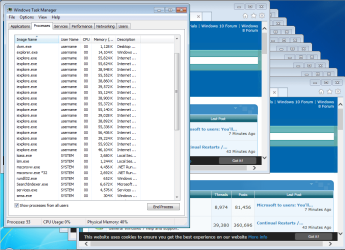
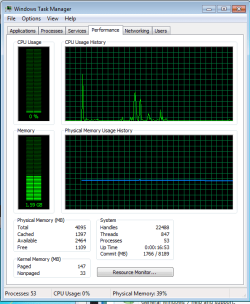
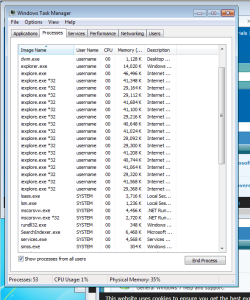
41 windows does not equal 82 processes for IE11. There is only one "parent" process that watches over the "children". I only see 16 child processes for 41 IE11 windows. There could be more if the website being loaded used more RAM.

Note the 40% of 4GB RAM usage with 41 IE11 windows open:
(64bit children via EPM = on)

41-1.PNG

41-2.PNG


Note the 35% of 4GB RAM usage with 41 IE11 windows open:
(32bit children via EPM = off)

41-3.PNG


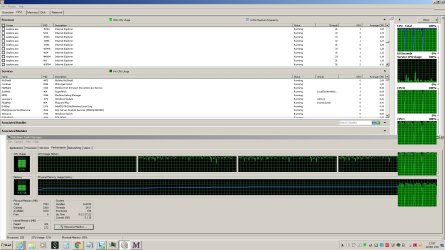
Here are 41 IE11 windows showing a website that takes more RAM to display:

41-4.PNG

So far, there are still only 16 "children" for 41 IE11 windows.


The RAM usage needed for the OP's 41 IE11 windows could be huge or it could be tiny. We do not know if the OP needs more RAM yet. If there is a memory leak issue, then more RAM will only delay the inevitable bog down.
 
Last edited:

My Computer My Computer

At a glance

W7 Pro SP1 64biti78GBIntel HD Graphics
Computer type
Laptop
Computer Manufacturer/Model Number
Employer provided Dell Latitude
OS
W7 Pro SP1 64bit
CPU
i7
Memory
8GB
Graphics Card(s)
Intel HD Graphics
Hard Drives
crappy SSD
Antivirus
Employer mandated Symantec Endpoint Protection
Browser
Pale Moon 64bit, IE11 64bit & Chrome 64bit
Hi

Here's couple screen shot

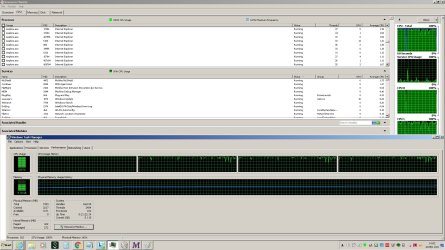
Here's the CPU % increasing after loading 25 IE pages or so. The CPU is cranking at 72% and Memory at 58%

CPU_Rate_1.jpg

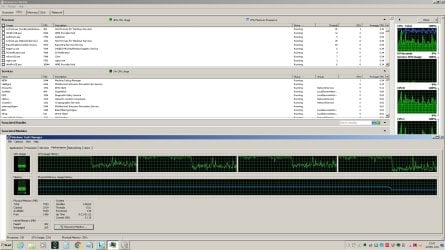
After it terminates loading teh 41 page

CPU_Rate_2.jpg

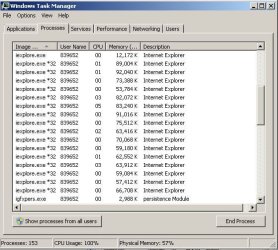
The 4 CPU are at 100% and memory at 60%

I have 18 iexplore process

IE_Process.JPG

And when I close all of them the CPU fall at 23% amd memory at 35%

CPU_Rate_9.jpg

When I have the 41 windows open, I'm still able to work on the computer, it's a bit slow but workable. But when I add the Macro to take the Screen Capture, This kills the PC completely
 

My Computer My Computer

At a glance

Windows 7 Pro ( 32 & 63 bits )
Computer type
PC/Desktop
OS
Windows 7 Pro ( 32 & 63 bits )
I did not expect the bog down to be CPU related. I wonder if IE's RAM usage increases over time.

We might be able to lighten the CPU load by uninstalling any app that tries to watch over IE. Uninstall McAfee's McShield and any other antivirus/security app that you can stand to be without. Install Microsoft Security Essentials as a light weight antivirus app. Those steps might not help, but they are worth a shot.

You can also prevent many apps from starting when you start Windows. That might help your CPU loading too.
 

My Computer My Computer

At a glance

W7 Pro SP1 64biti78GBIntel HD Graphics
Computer type
Laptop
Computer Manufacturer/Model Number
Employer provided Dell Latitude
OS
W7 Pro SP1 64bit
CPU
i7
Memory
8GB
Graphics Card(s)
Intel HD Graphics
Hard Drives
crappy SSD
Antivirus
Employer mandated Symantec Endpoint Protection
Browser
Pale Moon 64bit, IE11 64bit & Chrome 64bit
Back
Top