madmax888
New member
Paypal login returns "obsolete cipher suite" error then freezes
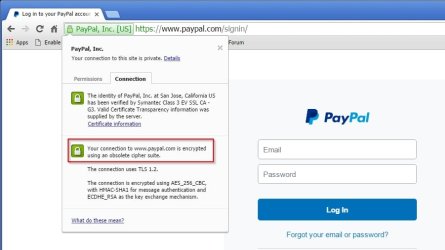
I tried to access PAYPAL through my usual URL, https://www.paypal.com/ using Windows 7 Ultimate 64 bit and Chrome 48. on February 15th. after pressing ENTER, I got a Green lock, next to the URL, and a blank screen. I could go no further. Clicking on the lock, a small dropdown appeared, showing 2 cookies from Paypal below a message "Your connection to PAYPAL is private" the connections tab showed that PAYPAL was verified, but my connection was encrypted using an obsolete cipher suite". I could not continue. I had been able to access and use PAYPAL on Feb 9, with no problem. Googled everything I could think of with no fix found. I finally reached a live person at PAYPAL Customer support. Who told me that it was something on their end (he did not elaborate) and suggeested I try IE11. I downloaded and installed IE11, tried to access PAYPAL, and got an error message "Access forbidden error 403". I called PAYPAL again and got the tech support line, who told me my account was locked, then he unlocked it, and I was able to get in. The following day, I tried to access PAYPAL again, and it again returned the "forbidden 403" error. I called PAYPAL again, got a support agent who had no clue what to do, and told me to talk to MY ISP provider.
Can anyone on the Forum shed any light on this?
I tried to access PAYPAL through my usual URL, https://www.paypal.com/ using Windows 7 Ultimate 64 bit and Chrome 48. on February 15th. after pressing ENTER, I got a Green lock, next to the URL, and a blank screen. I could go no further. Clicking on the lock, a small dropdown appeared, showing 2 cookies from Paypal below a message "Your connection to PAYPAL is private" the connections tab showed that PAYPAL was verified, but my connection was encrypted using an obsolete cipher suite". I could not continue. I had been able to access and use PAYPAL on Feb 9, with no problem. Googled everything I could think of with no fix found. I finally reached a live person at PAYPAL Customer support. Who told me that it was something on their end (he did not elaborate) and suggeested I try IE11. I downloaded and installed IE11, tried to access PAYPAL, and got an error message "Access forbidden error 403". I called PAYPAL again and got the tech support line, who told me my account was locked, then he unlocked it, and I was able to get in. The following day, I tried to access PAYPAL again, and it again returned the "forbidden 403" error. I called PAYPAL again, got a support agent who had no clue what to do, and told me to talk to MY ISP provider.
Can anyone on the Forum shed any light on this?
My Computer
At a glance
Windows 7 Ultimate x64bitIntel i34GBNvidia Gforce 210
- Computer type
- PC/Desktop
- Computer Manufacturer/Model Number
- custom built
- OS
- Windows 7 Ultimate x64bit
- CPU
- Intel i3
- Motherboard
- Asus H81-me
- Memory
- 4GB
- Graphics Card(s)
- Nvidia Gforce 210
- Hard Drives
- Seagate ST1000DM003-1ERE162 ATA device
- Antivirus
- Avira Antivirus
- Browser
- Firefox, Chrome