Can't Watch Online Video or any Flash pages

RealGem

New member
Member
VIP
Local time
2:59 AM
Messages
269
Location
UK
Hi,

I'm using the latest Firefox and Chrome.

But only sometimes during the day can I watch online video. At least half of the time the videos jump and are unwatchable.

I notice in Task Manager that it is when Adobe Flash is using a lot of power that I can't watch videos.

I am also on a business course that uses a lot of video tutorials and interactive flash pages. I need to finish this course before my business advisor will help me any more. It should have taken less than 2 weeks to complete but I started it mid December, and it still says I have not completed parts that I have completed.

I contacted the site, but they say no-one else has complained about the function of the site.

Please can someone tell me:

1. why this happens.

2. And is there something I can do on the PC to stop it happening?


I already have only a few tabs open. It delete my cache and cookies regularly. And I make sure other apps are not running, so I am confused as to why I can only work half of the time.

Thank you
 
Last edited:

My Computer My Computer

At a glance

Windows 7 Home Premium 64 bitIntel® Core™ i5 650 Dual Core 2x 3.2Ghz 4MB C...Samsung 4GB (2x2GB) DDR3 1333MHznvidia GT430 1GB Graphics Card
Computer type
PC/Desktop
Computer Manufacturer/Model Number
iBuild™ custom PC
OS
Windows 7 Home Premium 64 bit
CPU
Intel® Core™ i5 650 Dual Core 2x 3.2Ghz 4MB Cache
Motherboard
ASUS P7H55-M 6x Rear USB 2.0 2x Front
Memory
Samsung 4GB (2x2GB) DDR3 1333MHz
Graphics Card(s)
nvidia GT430 1GB Graphics Card
Sound Card
Built-in audio
Monitor(s) Displays
Videoseven CMC 17" AD
Screen Resolution
1280 x 1024
Hard Drives
250GB 7200RPM SATA II
Hitachi 1TB Serial ATA II 32MB cache
PSU
Corsair 500Watt PSU
Case
Gigabyte GZ-X2 Black ATX MIDI Tower Case
Cooling
Standard CPU Cooling Fan
Keyboard
Packard Bell 9205
Mouse
Microsoft IntelliMouse Optical
Internet Speed
Supposed to be 100mbps (Average: 54mbps!)
Other Info
Also Windows 7 64 Bit on my Acer i3 Laptop
I thought someone would know why this happens.

Is it not a common problem then? I have spent the last week trying everything I can to speed up my PC, but it hasn't made a difference to the browsers. Video still lags and jumps a lot of the time.

Could it be related to my Virgin Media connection?

thanks
 

My Computer My Computer

At a glance

Windows 7 Home Premium 64 bitIntel® Core™ i5 650 Dual Core 2x 3.2Ghz 4MB C...Samsung 4GB (2x2GB) DDR3 1333MHznvidia GT430 1GB Graphics Card
Computer type
PC/Desktop
Computer Manufacturer/Model Number
iBuild™ custom PC
OS
Windows 7 Home Premium 64 bit
CPU
Intel® Core™ i5 650 Dual Core 2x 3.2Ghz 4MB Cache
Motherboard
ASUS P7H55-M 6x Rear USB 2.0 2x Front
Memory
Samsung 4GB (2x2GB) DDR3 1333MHz
Graphics Card(s)
nvidia GT430 1GB Graphics Card
Sound Card
Built-in audio
Monitor(s) Displays
Videoseven CMC 17" AD
Screen Resolution
1280 x 1024
Hard Drives
250GB 7200RPM SATA II
Hitachi 1TB Serial ATA II 32MB cache
PSU
Corsair 500Watt PSU
Case
Gigabyte GZ-X2 Black ATX MIDI Tower Case
Cooling
Standard CPU Cooling Fan
Keyboard
Packard Bell 9205
Mouse
Microsoft IntelliMouse Optical
Internet Speed
Supposed to be 100mbps (Average: 54mbps!)
Other Info
Also Windows 7 64 Bit on my Acer i3 Laptop
Hi,

I'm using the latest Firefox and Chrome.

But only sometimes during the day can I watch online video. At least half of the time the videos jump and are unwatchable.

I notice in Task Manager that it is when Adobe Flash is using a lot of power that I can't watch videos.

I think you need to clean install flash player. If you just keep updating it when updates are available it screws up eventually.

Run the flash player removal tool:

Uninstall Flash Player for Windows

Direct download link for uninstaller: https://fpdownload.macromedia.com/get/flashplayer/current/support/uninstall_flash_player.exe

Follow all steps listed.

Important:

Delete the following folders:

C:\Windows\system32\Macromed\Flash
C:\Windows\SysWOW64\Macromed\Flash
%appdata%\Adobe\Flash Player
%appdata%\Macromedia\Flash Player

Copy and paste the above four lines one at a time into Start> Run dialog box or Explorer window address bar to confirm that the folders no longer exist.

You must reboot after removal.

Install flash player. Currently you can download from here:

Direct download links for installers:

For Internet Explorer :
http://fpdownload.macromedia.com/pub/flashplayer/latest/help/install_flash_player_ax.exe

For Mozilla Firefox & Chrome :
http://fpdownload.macromedia.com/pub/flashplayer/latest/help/install_flash_player.exe

I am also on a business course that uses a lot of video tutorials and interactive flash pages. I need to finish this course before my business advisor will help me any more. It should have taken less than 2 weeks to complete but I started it mid December, and it still says I have not completed parts that I have completed.

I contacted the site, but they say no-one else has complained about the function of the site.

Please can someone tell me:

1. why this happens.

2. And is there something I can do on the PC to stop it happening?

I already have only a few tabs open. I delete my cache and cookies regularly. And I make sure other apps are not running, so I am confused as to why I can only work half of the time.

If the course uses cookies or flash cookies to track your progress then you'd need to figure out which cookies are used and avoid deleting those ones. It depends how your browser handles cookie deletion/ retention and whether you use any other types of browser history cleaning utilities.
 
Last edited:

My Computer My Computer

At a glance

Microsoft Windows 7 Home Premium 64-bit 7601 ...AMD C-60 APU with Radeon(tm) HD Graphics4.00 GBAMD Radeon HD 6290 Graphics
Computer type
Laptop
Computer Manufacturer/Model Number
ASUS
OS
Microsoft Windows 7 Home Premium 64-bit 7601 Multiprocessor Free Service Pack 1
CPU
AMD C-60 APU with Radeon(tm) HD Graphics
Motherboard
ASUSTeK COMPUTER INC. X501U
Memory
4.00 GB
Graphics Card(s)
AMD Radeon HD 6290 Graphics
Sound Card
(1) AMD High Definition Audio Device (2) Realtek High Defi
Screen Resolution
1366 x 768 x 32 bits (4294967296 colors) @ 60 Hz
Hard Drives
Hitachi HTS545050A7E380 SATA Disk Device
Antivirus
Comodo CIS & FW, SecureAplus App Whitelisting, Threatfire
Browser
Cyberfox 64bit, Opera 64bit, Airfox
Other Info
Spy-The-Spy, HitmanPro.Alert, Norton Connect Safe, MJRegWatcher, BitDefender TrafficLight, Voodoo Shield, Zemana AntiMalware
What version of FF and flash if you in FF check your plugins etc they have disabled flash as its a security risk depending on ff and flash version
 

My Computer My Computer

At a glance

win 8 32 bit
Computer type
PC/Desktop
OS
win 8 32 bit
Thanks guys,

I have the latest Flash but yes, it has always automatically updated so doing a fresh install.

I am following Callender's instructions now. Need to close browser to continue...

"I'll be back!"
 

My Computer My Computer

At a glance

Windows 7 Home Premium 64 bitIntel® Core™ i5 650 Dual Core 2x 3.2Ghz 4MB C...Samsung 4GB (2x2GB) DDR3 1333MHznvidia GT430 1GB Graphics Card
Computer type
PC/Desktop
Computer Manufacturer/Model Number
iBuild™ custom PC
OS
Windows 7 Home Premium 64 bit
CPU
Intel® Core™ i5 650 Dual Core 2x 3.2Ghz 4MB Cache
Motherboard
ASUS P7H55-M 6x Rear USB 2.0 2x Front
Memory
Samsung 4GB (2x2GB) DDR3 1333MHz
Graphics Card(s)
nvidia GT430 1GB Graphics Card
Sound Card
Built-in audio
Monitor(s) Displays
Videoseven CMC 17" AD
Screen Resolution
1280 x 1024
Hard Drives
250GB 7200RPM SATA II
Hitachi 1TB Serial ATA II 32MB cache
PSU
Corsair 500Watt PSU
Case
Gigabyte GZ-X2 Black ATX MIDI Tower Case
Cooling
Standard CPU Cooling Fan
Keyboard
Packard Bell 9205
Mouse
Microsoft IntelliMouse Optical
Internet Speed
Supposed to be 100mbps (Average: 54mbps!)
Other Info
Also Windows 7 64 Bit on my Acer i3 Laptop
Try right clicking the video, entering "Settings" and then click the "Enable Hardware Acceleration" box. What happens?
 

My Computer My Computer

At a glance

Windows 10 x64Intel i5 4210M6GB DDRIIIIntel HD4600/Nvidia GeForce 825M
Computer type
Laptop
Computer Manufacturer/Model Number
Medion
OS
Windows 10 x64
CPU
Intel i5 4210M
Motherboard
N/A
Memory
6GB DDRIII
Graphics Card(s)
Intel HD4600/Nvidia GeForce 825M
Monitor(s) Displays
15.6"
Screen Resolution
1366x768
Hard Drives
Samsung EVO 850 500GB
PSU
N/A
Case
N/A
Cooling
N/A
Keyboard
N/A
Mouse
N/A
Internet Speed
13Mbps (actual)
Antivirus
N/A
Browser
Firefox ;)
Try right clicking the video, entering "Settings" and then click the "Enable Hardware Acceleration" box. What happens?

There is no "Enable Hardware Acceleration" option in Settings or Roght Click. This is in YouTube?

I can't really test that anyway, as the videos are playing ok at the moment.

Calender, I have done your instructions to the letter! Full uninstall of Flash and new re-install. Fingers crossed that worked! Will see how it goes for a few days then will let you know and click Solved if no problem.

thanks a lot
 

My Computer My Computer

At a glance

Windows 7 Home Premium 64 bitIntel® Core™ i5 650 Dual Core 2x 3.2Ghz 4MB C...Samsung 4GB (2x2GB) DDR3 1333MHznvidia GT430 1GB Graphics Card
Computer type
PC/Desktop
Computer Manufacturer/Model Number
iBuild™ custom PC
OS
Windows 7 Home Premium 64 bit
CPU
Intel® Core™ i5 650 Dual Core 2x 3.2Ghz 4MB Cache
Motherboard
ASUS P7H55-M 6x Rear USB 2.0 2x Front
Memory
Samsung 4GB (2x2GB) DDR3 1333MHz
Graphics Card(s)
nvidia GT430 1GB Graphics Card
Sound Card
Built-in audio
Monitor(s) Displays
Videoseven CMC 17" AD
Screen Resolution
1280 x 1024
Hard Drives
250GB 7200RPM SATA II
Hitachi 1TB Serial ATA II 32MB cache
PSU
Corsair 500Watt PSU
Case
Gigabyte GZ-X2 Black ATX MIDI Tower Case
Cooling
Standard CPU Cooling Fan
Keyboard
Packard Bell 9205
Mouse
Microsoft IntelliMouse Optical
Internet Speed
Supposed to be 100mbps (Average: 54mbps!)
Other Info
Also Windows 7 64 Bit on my Acer i3 Laptop
There is no "Enable Hardware Acceleration" option in Settings or Roght Click. This is in YouTube?

I can't really test that anyway, as the videos are playing ok at the moment.

Calender, I have done your instructions to the letter! Full uninstall of Flash and new re-install. Fingers crossed that worked! Will see how it goes for a few days then will let you know and click Solved if no problem.

thanks a lot

Fingers crossed this works for you - if there is no "Settings" option then you're probably using YouTubes "HTML5 player." Reinstalling Flash shouldn't have an effect on this. Let's see how it goes though! :geek:
 

My Computer My Computer

At a glance

Windows 10 x64Intel i5 4210M6GB DDRIIIIntel HD4600/Nvidia GeForce 825M
Computer type
Laptop
Computer Manufacturer/Model Number
Medion
OS
Windows 10 x64
CPU
Intel i5 4210M
Motherboard
N/A
Memory
6GB DDRIII
Graphics Card(s)
Intel HD4600/Nvidia GeForce 825M
Monitor(s) Displays
15.6"
Screen Resolution
1366x768
Hard Drives
Samsung EVO 850 500GB
PSU
N/A
Case
N/A
Cooling
N/A
Keyboard
N/A
Mouse
N/A
Internet Speed
13Mbps (actual)
Antivirus
N/A
Browser
Firefox ;)
Hi guys,

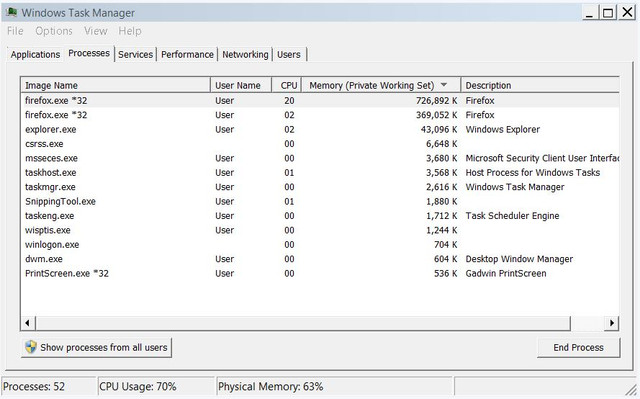
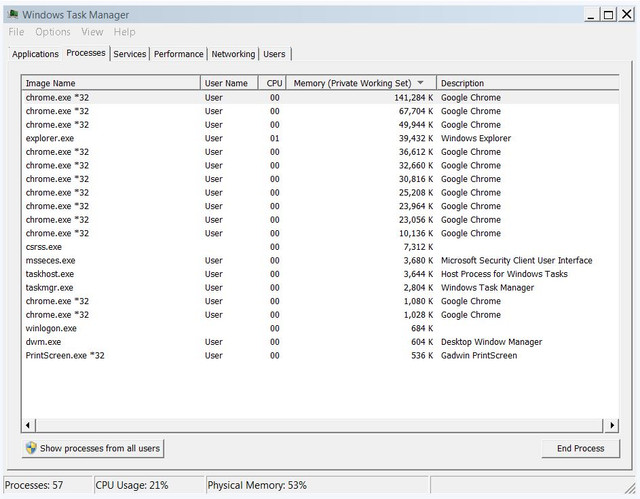
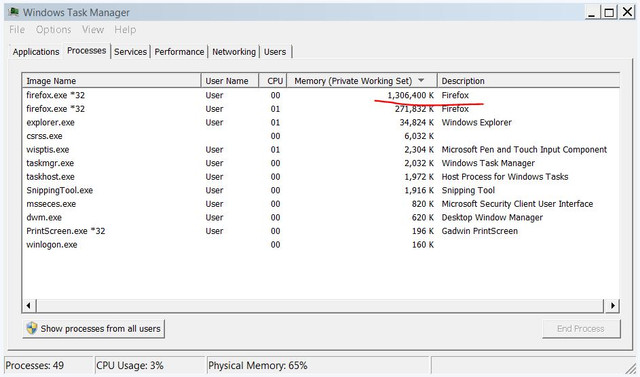
Sadly it seems it is not the Flash player that is causing it, because when I view YouTube videos only, Flash is not listed in Task Manager. It appears to be the browsers themsleves that are just using lots of memory and CPU resources. It's been fine all week but just started again the last two days.

Firefox makes the videos jump and miss out information, and uses lots of memory and CPU, while Chrome uses less CPU and only stops the videos for about half a second at a time. So far today, I have been ebale to watch some work tutorials on a private membership website, and have been able to follow along, despite the spilt second stops.

But it's impossible to follow along to a video on Firefox, as it rushes the video in places.

I tried closing tabs, but it didn't make a difference.

here are some Task Manager screeshots from both Firefox and Chrome when it happens:


nB4N8v


Anyone know how to prevent the browsers from using such high memory or CPU?

Is it my Virgin Media connection?

thanks

mny4MF
 

My Computer My Computer

At a glance

Windows 7 Home Premium 64 bitIntel® Core™ i5 650 Dual Core 2x 3.2Ghz 4MB C...Samsung 4GB (2x2GB) DDR3 1333MHznvidia GT430 1GB Graphics Card
Computer type
PC/Desktop
Computer Manufacturer/Model Number
iBuild™ custom PC
OS
Windows 7 Home Premium 64 bit
CPU
Intel® Core™ i5 650 Dual Core 2x 3.2Ghz 4MB Cache
Motherboard
ASUS P7H55-M 6x Rear USB 2.0 2x Front
Memory
Samsung 4GB (2x2GB) DDR3 1333MHz
Graphics Card(s)
nvidia GT430 1GB Graphics Card
Sound Card
Built-in audio
Monitor(s) Displays
Videoseven CMC 17" AD
Screen Resolution
1280 x 1024
Hard Drives
250GB 7200RPM SATA II
Hitachi 1TB Serial ATA II 32MB cache
PSU
Corsair 500Watt PSU
Case
Gigabyte GZ-X2 Black ATX MIDI Tower Case
Cooling
Standard CPU Cooling Fan
Keyboard
Packard Bell 9205
Mouse
Microsoft IntelliMouse Optical
Internet Speed
Supposed to be 100mbps (Average: 54mbps!)
Other Info
Also Windows 7 64 Bit on my Acer i3 Laptop
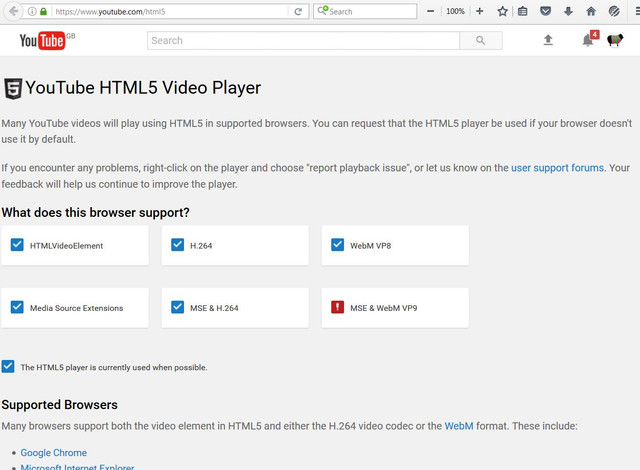
What shows up here as the "currently used player?

YouTube

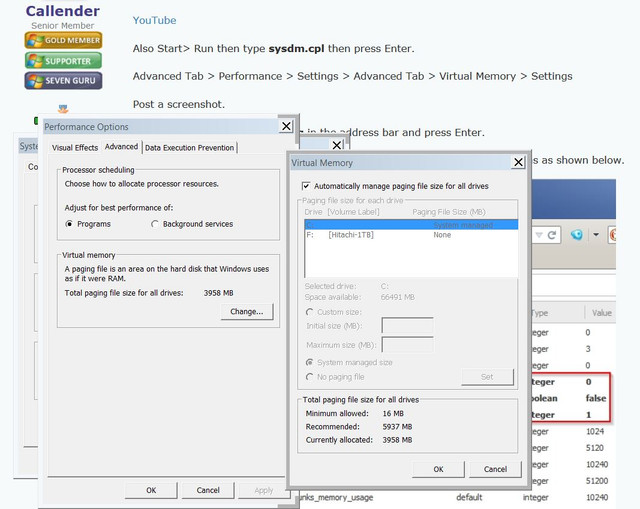
Also Start> Run then type sysdm.cpl then press Enter.

Advanced Tab > Performance > Settings > Advanced Tab > Virtual Memory > Settings

Post a screenshot.

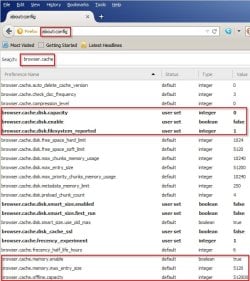
Also in Firefox type about:config in the address bar and press Enter.

Type browser.cache in the search box and check settings for highlighted items as shown below.

about_config.jpg

I cannot comment on Chrome as I will not use it. I do use Chrome variants though at times.
 

My Computer My Computer

At a glance

Microsoft Windows 7 Home Premium 64-bit 7601 ...AMD C-60 APU with Radeon(tm) HD Graphics4.00 GBAMD Radeon HD 6290 Graphics
Computer type
Laptop
Computer Manufacturer/Model Number
ASUS
OS
Microsoft Windows 7 Home Premium 64-bit 7601 Multiprocessor Free Service Pack 1
CPU
AMD C-60 APU with Radeon(tm) HD Graphics
Motherboard
ASUSTeK COMPUTER INC. X501U
Memory
4.00 GB
Graphics Card(s)
AMD Radeon HD 6290 Graphics
Sound Card
(1) AMD High Definition Audio Device (2) Realtek High Defi
Screen Resolution
1366 x 768 x 32 bits (4294967296 colors) @ 60 Hz
Hard Drives
Hitachi HTS545050A7E380 SATA Disk Device
Antivirus
Comodo CIS & FW, SecureAplus App Whitelisting, Threatfire
Browser
Cyberfox 64bit, Opera 64bit, Airfox
Other Info
Spy-The-Spy, HitmanPro.Alert, Norton Connect Safe, MJRegWatcher, BitDefender TrafficLight, Voodoo Shield, Zemana AntiMalware
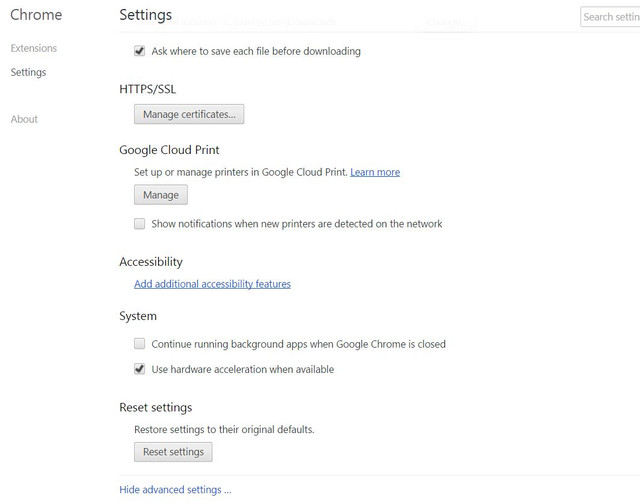
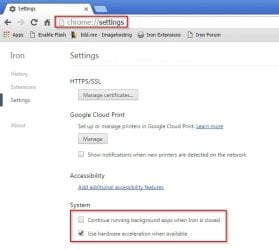
Screenshots from Iron. Should be the same in Chrome.

Settings - Iron.jpg

Components - Iron.jpg
 

My Computer My Computer

At a glance

Microsoft Windows 7 Home Premium 64-bit 7601 ...AMD C-60 APU with Radeon(tm) HD Graphics4.00 GBAMD Radeon HD 6290 Graphics
Computer type
Laptop
Computer Manufacturer/Model Number
ASUS
OS
Microsoft Windows 7 Home Premium 64-bit 7601 Multiprocessor Free Service Pack 1
CPU
AMD C-60 APU with Radeon(tm) HD Graphics
Motherboard
ASUSTeK COMPUTER INC. X501U
Memory
4.00 GB
Graphics Card(s)
AMD Radeon HD 6290 Graphics
Sound Card
(1) AMD High Definition Audio Device (2) Realtek High Defi
Screen Resolution
1366 x 768 x 32 bits (4294967296 colors) @ 60 Hz
Hard Drives
Hitachi HTS545050A7E380 SATA Disk Device
Antivirus
Comodo CIS & FW, SecureAplus App Whitelisting, Threatfire
Browser
Cyberfox 64bit, Opera 64bit, Airfox
Other Info
Spy-The-Spy, HitmanPro.Alert, Norton Connect Safe, MJRegWatcher, BitDefender TrafficLight, Voodoo Shield, Zemana AntiMalware
RE: "Use hardware acceleration when available" - try the opposite setting for whatever your current setting is.
 

My Computer My Computer

At a glance

Microsoft Windows 7 Home Premium 64-bit 7601 ...AMD C-60 APU with Radeon(tm) HD Graphics4.00 GBAMD Radeon HD 6290 Graphics
Computer type
Laptop
Computer Manufacturer/Model Number
ASUS
OS
Microsoft Windows 7 Home Premium 64-bit 7601 Multiprocessor Free Service Pack 1
CPU
AMD C-60 APU with Radeon(tm) HD Graphics
Motherboard
ASUSTeK COMPUTER INC. X501U
Memory
4.00 GB
Graphics Card(s)
AMD Radeon HD 6290 Graphics
Sound Card
(1) AMD High Definition Audio Device (2) Realtek High Defi
Screen Resolution
1366 x 768 x 32 bits (4294967296 colors) @ 60 Hz
Hard Drives
Hitachi HTS545050A7E380 SATA Disk Device
Antivirus
Comodo CIS & FW, SecureAplus App Whitelisting, Threatfire
Browser
Cyberfox 64bit, Opera 64bit, Airfox
Other Info
Spy-The-Spy, HitmanPro.Alert, Norton Connect Safe, MJRegWatcher, BitDefender TrafficLight, Voodoo Shield, Zemana AntiMalware
RE: Your internet connection. Do videos play fine on other sites? Is it a wireless connection?
 

My Computer My Computer

At a glance

Microsoft Windows 7 Home Premium 64-bit 7601 ...AMD C-60 APU with Radeon(tm) HD Graphics4.00 GBAMD Radeon HD 6290 Graphics
Computer type
Laptop
Computer Manufacturer/Model Number
ASUS
OS
Microsoft Windows 7 Home Premium 64-bit 7601 Multiprocessor Free Service Pack 1
CPU
AMD C-60 APU with Radeon(tm) HD Graphics
Motherboard
ASUSTeK COMPUTER INC. X501U
Memory
4.00 GB
Graphics Card(s)
AMD Radeon HD 6290 Graphics
Sound Card
(1) AMD High Definition Audio Device (2) Realtek High Defi
Screen Resolution
1366 x 768 x 32 bits (4294967296 colors) @ 60 Hz
Hard Drives
Hitachi HTS545050A7E380 SATA Disk Device
Antivirus
Comodo CIS & FW, SecureAplus App Whitelisting, Threatfire
Browser
Cyberfox 64bit, Opera 64bit, Airfox
Other Info
Spy-The-Spy, HitmanPro.Alert, Norton Connect Safe, MJRegWatcher, BitDefender TrafficLight, Voodoo Shield, Zemana AntiMalware
RE: Your internet connection. Do videos play fine on other sites? Is it a wireless connection?


Thanks a lot Callender

I will to the tech thing tomorrow as it's late in the UK now.

No it's a wired connection to the Virgin Media hub.

No, when it happens, it affects streaming videos on all sites.

thanks
 

My Computer My Computer

At a glance

Windows 7 Home Premium 64 bitIntel® Core™ i5 650 Dual Core 2x 3.2Ghz 4MB C...Samsung 4GB (2x2GB) DDR3 1333MHznvidia GT430 1GB Graphics Card
Computer type
PC/Desktop
Computer Manufacturer/Model Number
iBuild™ custom PC
OS
Windows 7 Home Premium 64 bit
CPU
Intel® Core™ i5 650 Dual Core 2x 3.2Ghz 4MB Cache
Motherboard
ASUS P7H55-M 6x Rear USB 2.0 2x Front
Memory
Samsung 4GB (2x2GB) DDR3 1333MHz
Graphics Card(s)
nvidia GT430 1GB Graphics Card
Sound Card
Built-in audio
Monitor(s) Displays
Videoseven CMC 17" AD
Screen Resolution
1280 x 1024
Hard Drives
250GB 7200RPM SATA II
Hitachi 1TB Serial ATA II 32MB cache
PSU
Corsair 500Watt PSU
Case
Gigabyte GZ-X2 Black ATX MIDI Tower Case
Cooling
Standard CPU Cooling Fan
Keyboard
Packard Bell 9205
Mouse
Microsoft IntelliMouse Optical
Internet Speed
Supposed to be 100mbps (Average: 54mbps!)
Other Info
Also Windows 7 64 Bit on my Acer i3 Laptop
What shows up here as the "currently used player?

YouTube

Also Start> Run then type sysdm.cpl then press Enter.

Advanced Tab > Performance > Settings > Advanced Tab > Virtual Memory > Settings

Post a screenshot.

Also in Firefox type about:config in the address bar and press Enter.

Type browser.cache in the search box and check settings for highlighted items as shown below.I cannot comment on Chrome as I will not use it. I do use Chrome variants though at times.


OK thanks a lot Callender. I hope I did it right. Here's what I have:


My Computer My Computer

At a glance

Windows 7 Home Premium 64 bitIntel® Core™ i5 650 Dual Core 2x 3.2Ghz 4MB C...Samsung 4GB (2x2GB) DDR3 1333MHznvidia GT430 1GB Graphics Card
Computer type
PC/Desktop
Computer Manufacturer/Model Number
iBuild™ custom PC
OS
Windows 7 Home Premium 64 bit
CPU
Intel® Core™ i5 650 Dual Core 2x 3.2Ghz 4MB Cache
Motherboard
ASUS P7H55-M 6x Rear USB 2.0 2x Front
Memory
Samsung 4GB (2x2GB) DDR3 1333MHz
Graphics Card(s)
nvidia GT430 1GB Graphics Card
Sound Card
Built-in audio
Monitor(s) Displays
Videoseven CMC 17" AD
Screen Resolution
1280 x 1024
Hard Drives
250GB 7200RPM SATA II
Hitachi 1TB Serial ATA II 32MB cache
PSU
Corsair 500Watt PSU
Case
Gigabyte GZ-X2 Black ATX MIDI Tower Case
Cooling
Standard CPU Cooling Fan
Keyboard
Packard Bell 9205
Mouse
Microsoft IntelliMouse Optical
Internet Speed
Supposed to be 100mbps (Average: 54mbps!)
Other Info
Also Windows 7 64 Bit on my Acer i3 Laptop
And for Chrome:


I have no clue what any of that means. I hope it makes sense to you!

thanks a lot
 

My Computer My Computer

At a glance

Windows 7 Home Premium 64 bitIntel® Core™ i5 650 Dual Core 2x 3.2Ghz 4MB C...Samsung 4GB (2x2GB) DDR3 1333MHznvidia GT430 1GB Graphics Card
Computer type
PC/Desktop
Computer Manufacturer/Model Number
iBuild™ custom PC
OS
Windows 7 Home Premium 64 bit
CPU
Intel® Core™ i5 650 Dual Core 2x 3.2Ghz 4MB Cache
Motherboard
ASUS P7H55-M 6x Rear USB 2.0 2x Front
Memory
Samsung 4GB (2x2GB) DDR3 1333MHz
Graphics Card(s)
nvidia GT430 1GB Graphics Card
Sound Card
Built-in audio
Monitor(s) Displays
Videoseven CMC 17" AD
Screen Resolution
1280 x 1024
Hard Drives
250GB 7200RPM SATA II
Hitachi 1TB Serial ATA II 32MB cache
PSU
Corsair 500Watt PSU
Case
Gigabyte GZ-X2 Black ATX MIDI Tower Case
Cooling
Standard CPU Cooling Fan
Keyboard
Packard Bell 9205
Mouse
Microsoft IntelliMouse Optical
Internet Speed
Supposed to be 100mbps (Average: 54mbps!)
Other Info
Also Windows 7 64 Bit on my Acer i3 Laptop
Well Pagefile looks okay. RE: Firefox browser cache settings. You appear to have disk cache enabled. It should be disabled.

Set these:

browser.cache.disk.enable = false
browser.cache.memory.enable = true

Now if Youtube is using HTML5 player by default that rules out flash player as the culprit but you seemed to see an improvement after clean installing flash player. I wonder if it would be worth trying the same thing again.

I'm almost out of ideas but you can try these:

Get about:addons-memory :: Add-ons for Firefox and add to Firefox.

Once installed type about:addons-memory into Firefox address bar and press Enter. Check the list to see if anything is using a lot of RAM.

Also it might be an idea to look at connections when Firefox or Chrome are running and playing video.

Grab a copy of Essential NetTools™ free and install it. Close all browsers and run the program.

Click the NetStat tab in the left pane. Press [Ctrl+L] for logging options.
Set them like this:

Logging.jpg

Note where logs are saved.

Leave Essential NetTools running.

Launch Chrome and play a problem video. Exit Chrome. Launch Firefox and play a problem video. Exit Firefox.

Exit Essential NetTools. Find the logs and upload them. Maybe some other background processes/ connections could be the issue.
 

My Computer My Computer

At a glance

Microsoft Windows 7 Home Premium 64-bit 7601 ...AMD C-60 APU with Radeon(tm) HD Graphics4.00 GBAMD Radeon HD 6290 Graphics
Computer type
Laptop
Computer Manufacturer/Model Number
ASUS
OS
Microsoft Windows 7 Home Premium 64-bit 7601 Multiprocessor Free Service Pack 1
CPU
AMD C-60 APU with Radeon(tm) HD Graphics
Motherboard
ASUSTeK COMPUTER INC. X501U
Memory
4.00 GB
Graphics Card(s)
AMD Radeon HD 6290 Graphics
Sound Card
(1) AMD High Definition Audio Device (2) Realtek High Defi
Screen Resolution
1366 x 768 x 32 bits (4294967296 colors) @ 60 Hz
Hard Drives
Hitachi HTS545050A7E380 SATA Disk Device
Antivirus
Comodo CIS & FW, SecureAplus App Whitelisting, Threatfire
Browser
Cyberfox 64bit, Opera 64bit, Airfox
Other Info
Spy-The-Spy, HitmanPro.Alert, Norton Connect Safe, MJRegWatcher, BitDefender TrafficLight, Voodoo Shield, Zemana AntiMalware
thanks a lot Callender

I did the first bit:

browser.cache.disk.enable = false
browser.cache.memory.enable = true

Will try the others too.

Really appreciate your help

thanks
 

My Computer My Computer

At a glance

Windows 7 Home Premium 64 bitIntel® Core™ i5 650 Dual Core 2x 3.2Ghz 4MB C...Samsung 4GB (2x2GB) DDR3 1333MHznvidia GT430 1GB Graphics Card
Computer type
PC/Desktop
Computer Manufacturer/Model Number
iBuild™ custom PC
OS
Windows 7 Home Premium 64 bit
CPU
Intel® Core™ i5 650 Dual Core 2x 3.2Ghz 4MB Cache
Motherboard
ASUS P7H55-M 6x Rear USB 2.0 2x Front
Memory
Samsung 4GB (2x2GB) DDR3 1333MHz
Graphics Card(s)
nvidia GT430 1GB Graphics Card
Sound Card
Built-in audio
Monitor(s) Displays
Videoseven CMC 17" AD
Screen Resolution
1280 x 1024
Hard Drives
250GB 7200RPM SATA II
Hitachi 1TB Serial ATA II 32MB cache
PSU
Corsair 500Watt PSU
Case
Gigabyte GZ-X2 Black ATX MIDI Tower Case
Cooling
Standard CPU Cooling Fan
Keyboard
Packard Bell 9205
Mouse
Microsoft IntelliMouse Optical
Internet Speed
Supposed to be 100mbps (Average: 54mbps!)
Other Info
Also Windows 7 64 Bit on my Acer i3 Laptop
Well Pagefile looks okay. RE: Firefox browser cache settings. You appear to have disk cache enabled. It should be disabled.

Set these:

browser.cache.disk.enable = false
browser.cache.memory.enable = true

Now if Youtube is using HTML5 player by default that rules out flash player as the culprit but you seemed to see an improvement after clean installing flash player. I wonder if it would be worth trying the same thing again.

I'm almost out of ideas but you can try these:

Get about:addons-memory :: Add-ons for Firefox and add to Firefox.

Once installed type about:addons-memory into Firefox address bar and press Enter. Check the list to see if anything is using a lot of RAM.

Also it might be an idea to look at connections when Firefox or Chrome are running and playing video.

Grab a copy of Essential NetTools™ free and install it. Close all browsers and run the program.

Click the NetStat tab in the left pane. Press [Ctrl+L] for logging options.
Set them like this:Note where logs are saved.

Leave Essential NetTools running.

Launch Chrome and play a problem video. Exit Chrome. Launch Firefox and play a problem video. Exit Firefox.

Exit Essential NetTools. Find the logs and upload them. Maybe some other background processes/ connections could be the issue.


OK I did all this and this is what I have.


The logs from Essential NetTools are xls files. I uploaded them here:

Gofile - File sharing platform, anonymous and free

At the time the logs were taken Chrome was playing videos ok, but videos on Firefox were jumpy and unwatchable.

thanks a lot
 

My Computer My Computer

At a glance

Windows 7 Home Premium 64 bitIntel® Core™ i5 650 Dual Core 2x 3.2Ghz 4MB C...Samsung 4GB (2x2GB) DDR3 1333MHznvidia GT430 1GB Graphics Card
Computer type
PC/Desktop
Computer Manufacturer/Model Number
iBuild™ custom PC
OS
Windows 7 Home Premium 64 bit
CPU
Intel® Core™ i5 650 Dual Core 2x 3.2Ghz 4MB Cache
Motherboard
ASUS P7H55-M 6x Rear USB 2.0 2x Front
Memory
Samsung 4GB (2x2GB) DDR3 1333MHz
Graphics Card(s)
nvidia GT430 1GB Graphics Card
Sound Card
Built-in audio
Monitor(s) Displays
Videoseven CMC 17" AD
Screen Resolution
1280 x 1024
Hard Drives
250GB 7200RPM SATA II
Hitachi 1TB Serial ATA II 32MB cache
PSU
Corsair 500Watt PSU
Case
Gigabyte GZ-X2 Black ATX MIDI Tower Case
Cooling
Standard CPU Cooling Fan
Keyboard
Packard Bell 9205
Mouse
Microsoft IntelliMouse Optical
Internet Speed
Supposed to be 100mbps (Average: 54mbps!)
Other Info
Also Windows 7 64 Bit on my Acer i3 Laptop
Thanks. I can't see any obvious issues in your logs. I'm out of ideas really but specifically for Firefox you could try these instructions for a clean install of Firefox that will retains bookmarks and extensions.

a problem with firefox

Ignore the part about "install add on from file" as the extension should install anyway.

Other than that I'd say update your graphics driver or reinstall it but I'm not expert on that. Actually if the problem only affected Firefox this time around you can probably rule out your graphics driver.

On another note -what is your firewall? It seems that you have a lot of stuff being allowed to connect. Do you get notified on new connections with options to block or allow?
 

My Computer My Computer

At a glance

Microsoft Windows 7 Home Premium 64-bit 7601 ...AMD C-60 APU with Radeon(tm) HD Graphics4.00 GBAMD Radeon HD 6290 Graphics
Computer type
Laptop
Computer Manufacturer/Model Number
ASUS
OS
Microsoft Windows 7 Home Premium 64-bit 7601 Multiprocessor Free Service Pack 1
CPU
AMD C-60 APU with Radeon(tm) HD Graphics
Motherboard
ASUSTeK COMPUTER INC. X501U
Memory
4.00 GB
Graphics Card(s)
AMD Radeon HD 6290 Graphics
Sound Card
(1) AMD High Definition Audio Device (2) Realtek High Defi
Screen Resolution
1366 x 768 x 32 bits (4294967296 colors) @ 60 Hz
Hard Drives
Hitachi HTS545050A7E380 SATA Disk Device
Antivirus
Comodo CIS & FW, SecureAplus App Whitelisting, Threatfire
Browser
Cyberfox 64bit, Opera 64bit, Airfox
Other Info
Spy-The-Spy, HitmanPro.Alert, Norton Connect Safe, MJRegWatcher, BitDefender TrafficLight, Voodoo Shield, Zemana AntiMalware
Back
Top