
You are using an out of date browser. It may not display this or other websites correctly.
You should upgrade or use an alternative browser.
You should upgrade or use an alternative browser.
Firefox Browser which will continue to be updated on Windows 7?
- Thread starter Cskully
- Start date
michael diemer
New member
R3dfox: Eclipse r3dfox web browser
My Computer
- Computer type
- PC/Desktop
- Computer Manufacturer/Model Number
- Gateway GT5656
- OS
- Windows 7 x64 SP1
- CPU
- AMD Athlon 64 X2 6000+ / 3.0 GHz
- Motherboard
- NVIDIA GeForce 6150 SE
- Memory
- 6 GB
- Monitor(s) Displays
- Lenovo LED
- Screen Resolution
- 1920 X 1080
- Hard Drives
- Windows on 500 GB spinner; Ubuntu 16 on Sandisk 250GB SSD; Bodhi5 on Samsung 250GB SSD; another old spinner for fooling around.
- PSU
- Original that came with computer
- Keyboard
- Logitech wireless
- Mouse
- Logitech wireless
- Antivirus
- Microsoft Sec Essentials
- Browser
- Vivaldi
'updates' are random, by the dedicated FFFans..  I am currently using v 115.21.0 esr 64 bit, seems ok so far...
a few here..
Windows XP/Vista/7/8/32-bit Compatible Apps Available and Requested | PortableApps.com
might need to check these...
Mozilla Firefox, Portable Edition | PortableApps.com
I am currently using v 115.21.0 esr 64 bit, seems ok so far... a few here..
Windows XP/Vista/7/8/32-bit Compatible Apps Available and Requested | PortableApps.com
might need to check these...
Mozilla Firefox, Portable Edition | PortableApps.com
My Computer
- Computer type
- PC/Desktop
- OS
- Windows 7 Ultimate x32
@michael diemer Thank you much. [MENTION=337220]comnut[/MENTION]: That's been updated to 115.29.0 esr 64 bit. Smoke em while you gotem. Here's a portable version.
My Computer
- Computer type
- PC/Desktop
- OS
- Windows 7 Home Premium 64bit

NewW7User
Member
I've been running 115.29.0 esr 64 bit for a while but some financial websites won't allow me to use it because "it's not supported" and I "must upgrade FF" to access the website. Yes, I agree the IT support on those websites is incompetent in not recognizing the ESR 115 version is the latest up-to-date ESR version.
In any case, what do we do after February when Mozilla drops all ESR support?
In any case, what do we do after February when Mozilla drops all ESR support?
My Computers
System One System Two
-
- Computer type
- PC/Desktop
- Computer Manufacturer/Model Number
- Dell XPS 8300
- OS
- W7 Pro 64
- Memory
- 8G
- Sound Card
- RealTek High Definition Audio
- Monitor(s) Displays
- Asus
- Hard Drives
- WD Elements, Samsung Story Station, Samsung EVO 860 / 870
- Mouse
- Logitech M310
- Antivirus
- Avast, Malwarebytes, SUPERAntiSpyware
- Browser
- Firefox, Avast Secure Browser
-
- Computer type
- Laptop
- System Manufacturer/Model Number
- HP
- OS
- Win10
- Keyboard
- external
- Mouse
- wireless
- Browser
- Firefox, Avast
- Antivirus
- Avast / Malwarebytes / Superantispyware
I've been running 115.29.0 esr 64 bit for a while but some financial websites won't allow me to use it because "it's not supported" and I "must upgrade FF" to access the website.
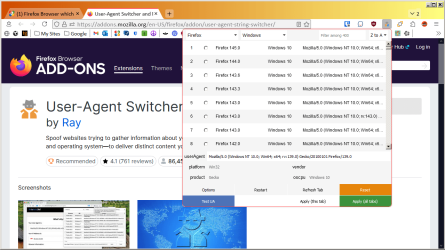
Try using Ray's "User-Agent Switcher and Manager" browser add-on. (Caution: there are others with the same name, so make sure you get the one by "Ray".)
The problem is the browser header being sent to your bank website is tattling that you're using Firefox 115 on Windows 7, so the bank can nag you for an out-of-date OS and (what they perceive is) an out-of-date browser version. With Ray's add-on you can set what OS, browser, and browser version you want to bank to think you're using. You can make the bank's website think you're using Firefox 145 on Windows 10, if you want.
My Computer
- Computer type
- PC/Desktop
- Computer Manufacturer/Model Number
- Dell Optiplex 7050
- OS
- Windows 7/8.1/10 multiboot
- CPU
- Intel Core i7-7700
- Motherboard
- Dell, Intel Q270 chipset
- Memory
- 48GB (2x16GB Crucial DDR4-3200 + 2x8GB Hynix DDR4-2400)
- Graphics Card(s)
- Intel HD630 + AMD Radeon R7 450 PCIe
- Monitor(s) Displays
- Asus VC279 (27")
- Screen Resolution
- 1920x1080
- Hard Drives
- Toshiba M.2 NVMe (256GB),
Samsung 960 Evo (500GB),
WD Red Plus 80EFBX (8TB)
NewW7User
Member
Thank you dg1261. I'm trying to follow this but I'm a bit confused. If I install this extension in Firefox, do I just choose from any one of the canned Firefox "current" user agents in the list?
And I also use Avast browser, which under the covers is a version of Chrome. I ran "What's My User Agent" in the Avast browser to see what's there. I get back "Mozilla/5.0 (Windows NT 6.1; Win64; x64) AppleWebKit/537.36 (KHTML, like Gecko) Chrome/109.0.5414.120 Safari/537.36 Avast/109.0.31826.120". How/why does the Avast browser user agent have Firefox information in it? Is there a version of the extension for the Avast browser, with a canned Avast browser "current" user agent in the extension's list?
And I also use Avast browser, which under the covers is a version of Chrome. I ran "What's My User Agent" in the Avast browser to see what's there. I get back "Mozilla/5.0 (Windows NT 6.1; Win64; x64) AppleWebKit/537.36 (KHTML, like Gecko) Chrome/109.0.5414.120 Safari/537.36 Avast/109.0.31826.120". How/why does the Avast browser user agent have Firefox information in it? Is there a version of the extension for the Avast browser, with a canned Avast browser "current" user agent in the extension's list?
My Computers
System One System Two
-
- Computer type
- PC/Desktop
- Computer Manufacturer/Model Number
- Dell XPS 8300
- OS
- W7 Pro 64
- Memory
- 8G
- Sound Card
- RealTek High Definition Audio
- Monitor(s) Displays
- Asus
- Hard Drives
- WD Elements, Samsung Story Station, Samsung EVO 860 / 870
- Mouse
- Logitech M310
- Antivirus
- Avast, Malwarebytes, SUPERAntiSpyware
- Browser
- Firefox, Avast Secure Browser
-
- Computer type
- Laptop
- System Manufacturer/Model Number
- HP
- OS
- Win10
- Keyboard
- external
- Mouse
- wireless
- Browser
- Firefox, Avast
- Antivirus
- Avast / Malwarebytes / Superantispyware
If I install this extension in Firefox, do I just choose from any one of the canned Firefox "current" user agents in the list?
Correct. Install the extension, then click the extension's icon in the browser toolbar. From the drop-down list, you can select your desired choices. You can choose to masquerade as a Windows OS, linux, Android, etc. You can pretend to be Firefox, Chrome, Opera, etc. Lots of choices. You can even make your Firefox/Win7 device appear to websites as Safari/MacOS, for instance. You can also manually edit the "userAgent" field in that drop-down if you want to customize the string.
Your Avast browser's default User-Agent doesn't indicate Firefox, it's saying the browser speaks Mozilla, WebKit, and KHTML languages on either Chrome or Safari. In fact, it's telling websites you're using Chrome 109 on Windows 7 (NT 6.1), which will give the banking websites fits. Install Ray's extension on your Avast browser (there is a version in the Chrome Store), and you can make it appear to be Chrome 142 on Win 10, if you want.
FTR, note spoofing the User-Agent string won't fool every website, but it seems to work with most. I've seen a couple financial investment sites that go the extra mile and use java/javascript to ask the underlying OS to identify itself, so spoofing the User-Agent string won't help with those. But most bank websites seem to be lazier and just accept whatever the User-Agent string is telling them.
My Computer
- Computer type
- PC/Desktop
- Computer Manufacturer/Model Number
- Dell Optiplex 7050
- OS
- Windows 7/8.1/10 multiboot
- CPU
- Intel Core i7-7700
- Motherboard
- Dell, Intel Q270 chipset
- Memory
- 48GB (2x16GB Crucial DDR4-3200 + 2x8GB Hynix DDR4-2400)
- Graphics Card(s)
- Intel HD630 + AMD Radeon R7 450 PCIe
- Monitor(s) Displays
- Asus VC279 (27")
- Screen Resolution
- 1920x1080
- Hard Drives
- Toshiba M.2 NVMe (256GB),
Samsung 960 Evo (500GB),
WD Red Plus 80EFBX (8TB)
NewW7User
Member
Thank you very much dg1261 for explaining it so clearly for me.
- - - Updated - - -
I'm lost at this point. I wanted to try this out with the Avast browser. I went to the chrome store link. That's confusing because there are a few user-agent extensions on the bottom of that page. I ignored those and clicked on the "Install" at the top right but I don't see anything on the Avast toolbar. There are some icons at top of the page that says "Download for: with chrome and Firefox icons. But if I click on the chrome icon it just loops back and asks me if I want to "remove from chrome".
- - - Updated - - -
I'm lost at this point. I wanted to try this out with the Avast browser. I went to the chrome store link. That's confusing because there are a few user-agent extensions on the bottom of that page. I ignored those and clicked on the "Install" at the top right but I don't see anything on the Avast toolbar. There are some icons at top of the page that says "Download for: with chrome and Firefox icons. But if I click on the chrome icon it just loops back and asks me if I want to "remove from chrome".
My Computers
System One System Two
-
- Computer type
- PC/Desktop
- Computer Manufacturer/Model Number
- Dell XPS 8300
- OS
- W7 Pro 64
- Memory
- 8G
- Sound Card
- RealTek High Definition Audio
- Monitor(s) Displays
- Asus
- Hard Drives
- WD Elements, Samsung Story Station, Samsung EVO 860 / 870
- Mouse
- Logitech M310
- Antivirus
- Avast, Malwarebytes, SUPERAntiSpyware
- Browser
- Firefox, Avast Secure Browser
-
- Computer type
- Laptop
- System Manufacturer/Model Number
- HP
- OS
- Win10
- Keyboard
- external
- Mouse
- wireless
- Browser
- Firefox, Avast
- Antivirus
- Avast / Malwarebytes / Superantispyware
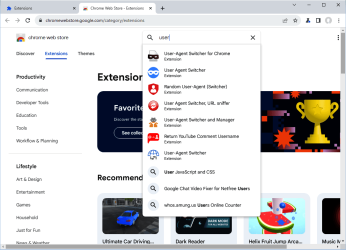
If you've already installed the Firefox extension, then you should be familiar with the toolbar icon. So the easiest way to find it in the Chrome store is to start a search and look for the one with the same icon. In my example below, you'll note it happens to be the fifth one on the search list.
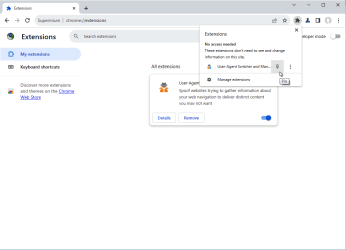
I've never used the Avast browser, but I'll assume it's essentially the same as Chrome so I'll illustrate with Chrome. After installation completes, you may need to manually pin it to the toolbar. Click the extensions icon (the puzzle piece) in the toolbar, then click the "Pin" icon.
I've never used the Avast browser, but I'll assume it's essentially the same as Chrome so I'll illustrate with Chrome. After installation completes, you may need to manually pin it to the toolbar. Click the extensions icon (the puzzle piece) in the toolbar, then click the "Pin" icon.
My Computer
- Computer type
- PC/Desktop
- Computer Manufacturer/Model Number
- Dell Optiplex 7050
- OS
- Windows 7/8.1/10 multiboot
- CPU
- Intel Core i7-7700
- Motherboard
- Dell, Intel Q270 chipset
- Memory
- 48GB (2x16GB Crucial DDR4-3200 + 2x8GB Hynix DDR4-2400)
- Graphics Card(s)
- Intel HD630 + AMD Radeon R7 450 PCIe
- Monitor(s) Displays
- Asus VC279 (27")
- Screen Resolution
- 1920x1080
- Hard Drives
- Toshiba M.2 NVMe (256GB),
Samsung 960 Evo (500GB),
WD Red Plus 80EFBX (8TB)
NewW7User
Member
I did not install the extension on Firefox as I didn't want to risk doing something wrong and losing Firefox so I first tried it with Avast browser. I found where to display all the extensions, found the user-agent switcher and thanks to your instructions was able to pin it. It seems to work, at least at the first financial site that I tried. The switcher extension screen is too busy and it took a while to figure out what to press to get it to apply my chosen user-agent.
Update: I tried doing things on the financial website and it hung. Doesn't give me a comfortable feeling to try it with Firefox. I closed and re-opened Avast browser and it sees to be working but I'm going to wait a while before applying it to Firefox.
By the way: I selected a Win 7 user-agent; could I have selected a Win 10 (later browser version) user-agent or would/could the financial site see a conflict between Windows 7 and browser Win 10 version and not work?
Just in case: is there a way to reset the user-agent to what it originally had been? The extension webpage says "Open the toolbar popup (action popup) and press the reset button" but I don't see a popup in neither Firefox nor Avast browsers.
Update: I tried doing things on the financial website and it hung. Doesn't give me a comfortable feeling to try it with Firefox. I closed and re-opened Avast browser and it sees to be working but I'm going to wait a while before applying it to Firefox.
By the way: I selected a Win 7 user-agent; could I have selected a Win 10 (later browser version) user-agent or would/could the financial site see a conflict between Windows 7 and browser Win 10 version and not work?
Just in case: is there a way to reset the user-agent to what it originally had been? The extension webpage says "Open the toolbar popup (action popup) and press the reset button" but I don't see a popup in neither Firefox nor Avast browsers.
Last edited:
My Computers
System One System Two
-
- Computer type
- PC/Desktop
- Computer Manufacturer/Model Number
- Dell XPS 8300
- OS
- W7 Pro 64
- Memory
- 8G
- Sound Card
- RealTek High Definition Audio
- Monitor(s) Displays
- Asus
- Hard Drives
- WD Elements, Samsung Story Station, Samsung EVO 860 / 870
- Mouse
- Logitech M310
- Antivirus
- Avast, Malwarebytes, SUPERAntiSpyware
- Browser
- Firefox, Avast Secure Browser
-
- Computer type
- Laptop
- System Manufacturer/Model Number
- HP
- OS
- Win10
- Keyboard
- external
- Mouse
- wireless
- Browser
- Firefox, Avast
- Antivirus
- Avast / Malwarebytes / Superantispyware
is there a way to reset the user-agent to what it originally had been? The extension webpage says "Open the toolbar popup (action popup) and press the reset button" but I don't see a popup in neither Firefox nor Avast browsers.
The popup is what you get when you click the toolbar icon. As shown in my post #6, there is a big orange [Reset] button in the lower-right.
While clicking around various browser/OS choices, observe the "userAgent" line in that popup and you can see what User-Agent string will be set when the [Apply] button is pressed. When you click the [Reset] button, the "userAgent" line will show the browser's default (i.e., without the extension intervening).
I selected a Win 7 user-agent; could I have selected a Win 10 (later browser version) user-agent or would/could the financial site see a conflict between Windows 7 and browser Win 10 version and not work?
Yes, use a Win 10 UA. Your bank probably doesn't like seeing the Win 7 UA, so you want the bank to think you're on Win 10.
The only way there could be a conflict between Win 7 and 10 is if the website uses scripting that relies on functions available in the Win 10 OS that are not in 7. That's highly unlikely as there just aren't any differences in HTML. Websites speak in HTML and different browsers implement HTML differently so websites might use browser-specific functions, but there just aren't any OS-specific differences in HTML. (Caveat: The most common exception would be websites that use java applets, but that's not HTML.)
I tried doing things on the financial website and it hung. Doesn't give me a comfortable feeling to try it with Firefox. I closed and re-opened Avast browser and it sees to be working but I'm going to wait a while before applying it to Firefox.
Try switching the UA to Win 10.
FWIW, if you want to experiment without messing up your existing Firefox, use a portable version of Firefox and experiment as you wish. Download the portable version, run the downloaded exe, and direct it to extract the package to a folder on your desktop for easy access. To avoid conflicts, make sure no other Firefox instances are running, then open the extracted folder and start the portable launcher. Add extensions and play around, experimenting to your heart's content. When you close it down, you can go back to your installed Firefox and nothing will have changed. When you no longer need it, you can delete the portable folder from your desktop, no "uninstall" required.
My Computer
- Computer type
- PC/Desktop
- Computer Manufacturer/Model Number
- Dell Optiplex 7050
- OS
- Windows 7/8.1/10 multiboot
- CPU
- Intel Core i7-7700
- Motherboard
- Dell, Intel Q270 chipset
- Memory
- 48GB (2x16GB Crucial DDR4-3200 + 2x8GB Hynix DDR4-2400)
- Graphics Card(s)
- Intel HD630 + AMD Radeon R7 450 PCIe
- Monitor(s) Displays
- Asus VC279 (27")
- Screen Resolution
- 1920x1080
- Hard Drives
- Toshiba M.2 NVMe (256GB),
Samsung 960 Evo (500GB),
WD Red Plus 80EFBX (8TB)
NewW7User
Member
Thank you for all the explanations! I found the "reset" button and also changed the user-agent to Win 10 version and it seems to be OK. But the toolbar icon when I open up the Avast browser, before I go to any site, is half-orange half-blue. Is that "normal" when the browser is opened but not going yet to a website? I looked on the agent-switcher website and it says "A half-blue color means the tab is being ignored, and the default user-agent string is used." but I don't know what that really means.
My Computers
System One System Two
-
- Computer type
- PC/Desktop
- Computer Manufacturer/Model Number
- Dell XPS 8300
- OS
- W7 Pro 64
- Memory
- 8G
- Sound Card
- RealTek High Definition Audio
- Monitor(s) Displays
- Asus
- Hard Drives
- WD Elements, Samsung Story Station, Samsung EVO 860 / 870
- Mouse
- Logitech M310
- Antivirus
- Avast, Malwarebytes, SUPERAntiSpyware
- Browser
- Firefox, Avast Secure Browser
-
- Computer type
- Laptop
- System Manufacturer/Model Number
- HP
- OS
- Win10
- Keyboard
- external
- Mouse
- wireless
- Browser
- Firefox, Avast
- Antivirus
- Avast / Malwarebytes / Superantispyware
If you haven't loaded a webpage yet, it doesn't matter. If it's half-blue when a webpage is loaded, try pressing the browser's tab refresh button. Content that populates a webpage can come from many sources, including third-party sources, and half-blue is just warning you some part of the webpage might not have the UA-spoofing treatment. Refreshing the tab often takes care of that.
My Computer
- Computer type
- PC/Desktop
- Computer Manufacturer/Model Number
- Dell Optiplex 7050
- OS
- Windows 7/8.1/10 multiboot
- CPU
- Intel Core i7-7700
- Motherboard
- Dell, Intel Q270 chipset
- Memory
- 48GB (2x16GB Crucial DDR4-3200 + 2x8GB Hynix DDR4-2400)
- Graphics Card(s)
- Intel HD630 + AMD Radeon R7 450 PCIe
- Monitor(s) Displays
- Asus VC279 (27")
- Screen Resolution
- 1920x1080
- Hard Drives
- Toshiba M.2 NVMe (256GB),
Samsung 960 Evo (500GB),
WD Red Plus 80EFBX (8TB)
NewW7User
Member
Thank you dg1261 for the clarification!
My Computers
System One System Two
-
- Computer type
- PC/Desktop
- Computer Manufacturer/Model Number
- Dell XPS 8300
- OS
- W7 Pro 64
- Memory
- 8G
- Sound Card
- RealTek High Definition Audio
- Monitor(s) Displays
- Asus
- Hard Drives
- WD Elements, Samsung Story Station, Samsung EVO 860 / 870
- Mouse
- Logitech M310
- Antivirus
- Avast, Malwarebytes, SUPERAntiSpyware
- Browser
- Firefox, Avast Secure Browser
-
- Computer type
- Laptop
- System Manufacturer/Model Number
- HP
- OS
- Win10
- Keyboard
- external
- Mouse
- wireless
- Browser
- Firefox, Avast
- Antivirus
- Avast / Malwarebytes / Superantispyware
NewW7User
Member
Something changed and I can't find the web page that lists where to download the user-agent for each type browser that I used to download the Avast browser version. Now I'm on page "https://webextension.org/listing/useragent-switcher.html#log-container". There are icons on the top right. When I select the Firefox icon, it goes to a Firefox add-ons page. There isn't a download button for the extension; just a button to download "the new Firefox and get the extension". Selecting that I get an error message that it can't download the extension because the Firefox is "not current".
When I downloaded the Avast browser, it was from a page that listed downloads for each browser but I can't find that page. What is the right link for that page?
When I downloaded the Avast browser, it was from a page that listed downloads for each browser but I can't find that page. What is the right link for that page?
My Computers
System One System Two
-
- Computer type
- PC/Desktop
- Computer Manufacturer/Model Number
- Dell XPS 8300
- OS
- W7 Pro 64
- Memory
- 8G
- Sound Card
- RealTek High Definition Audio
- Monitor(s) Displays
- Asus
- Hard Drives
- WD Elements, Samsung Story Station, Samsung EVO 860 / 870
- Mouse
- Logitech M310
- Antivirus
- Avast, Malwarebytes, SUPERAntiSpyware
- Browser
- Firefox, Avast Secure Browser
-
- Computer type
- Laptop
- System Manufacturer/Model Number
- HP
- OS
- Win10
- Keyboard
- external
- Mouse
- wireless
- Browser
- Firefox, Avast
- Antivirus
- Avast / Malwarebytes / Superantispyware
According to this page, the latest version of Ray's UA Switcher requires Firefox 132+.
For 115 you need to scroll down to Ray's 0.5.0 version and click "Download file", which will be saved as a .xpi file on your computer. Open a new tab in Firefox and drag-and-drop the .xpi file into the tab window. Firefox will then install the extension. Note the embedded list of UA strings to choose from will be old, so you may have to wait awhile for the list to be updated in the background ... (assuming it does -- I don't use Firefox so don't have to deal with Ray's v. 0.5.0).
For better results, I suggest you consider switching to the Firefox fork, R3dfox. The R3dfox versions are forks of more recent Firefox versions but have been modified to be compatible with Windows 7. R3dfox will take Ray's version 0.6.6, and just gives an overall smoother Firefox-like experience anyway.
See this thread for more info about the differences between R3dfox and Firefox. Note that if you want to trial-run R3dfox first, download the portable version (link is in my post #14 in that thread).
For 115 you need to scroll down to Ray's 0.5.0 version and click "Download file", which will be saved as a .xpi file on your computer. Open a new tab in Firefox and drag-and-drop the .xpi file into the tab window. Firefox will then install the extension. Note the embedded list of UA strings to choose from will be old, so you may have to wait awhile for the list to be updated in the background ... (assuming it does -- I don't use Firefox so don't have to deal with Ray's v. 0.5.0).
For better results, I suggest you consider switching to the Firefox fork, R3dfox. The R3dfox versions are forks of more recent Firefox versions but have been modified to be compatible with Windows 7. R3dfox will take Ray's version 0.6.6, and just gives an overall smoother Firefox-like experience anyway.
See this thread for more info about the differences between R3dfox and Firefox. Note that if you want to trial-run R3dfox first, download the portable version (link is in my post #14 in that thread).
My Computer
- Computer type
- PC/Desktop
- Computer Manufacturer/Model Number
- Dell Optiplex 7050
- OS
- Windows 7/8.1/10 multiboot
- CPU
- Intel Core i7-7700
- Motherboard
- Dell, Intel Q270 chipset
- Memory
- 48GB (2x16GB Crucial DDR4-3200 + 2x8GB Hynix DDR4-2400)
- Graphics Card(s)
- Intel HD630 + AMD Radeon R7 450 PCIe
- Monitor(s) Displays
- Asus VC279 (27")
- Screen Resolution
- 1920x1080
- Hard Drives
- Toshiba M.2 NVMe (256GB),
Samsung 960 Evo (500GB),
WD Red Plus 80EFBX (8TB)
NewW7User
Member
I'm running Firefox ESR, for which 115 is the latest version. The ESR version is compatible with Win 7 which is why I'm using it. There isn't any post #14 in that thread that you pointed to. Sorry but I just don't understand how to use the portable Firefox. On the portable apps website, the Firefox I saw was the current one (144) which won't work on Win 7. The "Legacy Edition" is the same 115 that I have now. Is the only thing I have left is to try downloading that user-agent version v. 0.5.0 and see if it will work with FF115ESR?
My Computers
System One System Two
-
- Computer type
- PC/Desktop
- Computer Manufacturer/Model Number
- Dell XPS 8300
- OS
- W7 Pro 64
- Memory
- 8G
- Sound Card
- RealTek High Definition Audio
- Monitor(s) Displays
- Asus
- Hard Drives
- WD Elements, Samsung Story Station, Samsung EVO 860 / 870
- Mouse
- Logitech M310
- Antivirus
- Avast, Malwarebytes, SUPERAntiSpyware
- Browser
- Firefox, Avast Secure Browser
-
- Computer type
- Laptop
- System Manufacturer/Model Number
- HP
- OS
- Win10
- Keyboard
- external
- Mouse
- wireless
- Browser
- Firefox, Avast
- Antivirus
- Avast / Malwarebytes / Superantispyware
There isn't any post #14 in that thread that you pointed to.
Well, if you can’t find it, I can’t hold your hand.
If you insist on using an outdated version of Firefox, then you must use a version of the extension that is compatible with that version of Firefox.
Is Firefox 115 compatible with Windows 7? Yes.
Is 115 secure? Yes, at least for the time being.
Is 115 up to date? No.
That’s partly what your bank was complaining about – your outdated version of Firefox. (Sadly, the banks seem to incorrectly equate “outdated” with “insecure” . . . but that’s a topic for a different thread.)
If you want a version of Firefox that is both up to date and Windows 7 compatible, use R3dfox. Version 142 is consistent with Firefox 142 but modified to still work on Windows 7.
FWIW, note that Ray’s 0.5.0 extension was compatible with Firefox versions 48 through 131. Clearly, he was loath to cut off older versions of Firefox arbitrarily, so there must have been a good reason. Perhaps there was a change in the Firefox 132 open source base code that required him to recode his extension, with the consequence that the extension update was incompatible with the older Firefox versions.
Note that if you insist on using the outdated 115 version of Firefox, you can still do so with the 0.5.0 extension if you manually tweak the userAgent string. It's very simple to do, takes about 30 seconds, and it will work. Start by selecting one of the later options from the extension’s quick-pick list (e.g, “Firefox 126.0”), then in the “userAgent” line manually change the “126” to “140” or whatever you want, and then click the "Apply" button.
So take your pick. Use Firefox 115, the 0.5.0 extension, and manually tweak the userAgent line. Or use R3dfox 142, the latest (0.6.6) extension, and pick the userAgent from the more up-to-date quick-pick list. It's your choice. You’re making a mountain out of a molehill.
My Computer
- Computer type
- PC/Desktop
- Computer Manufacturer/Model Number
- Dell Optiplex 7050
- OS
- Windows 7/8.1/10 multiboot
- CPU
- Intel Core i7-7700
- Motherboard
- Dell, Intel Q270 chipset
- Memory
- 48GB (2x16GB Crucial DDR4-3200 + 2x8GB Hynix DDR4-2400)
- Graphics Card(s)
- Intel HD630 + AMD Radeon R7 450 PCIe
- Monitor(s) Displays
- Asus VC279 (27")
- Screen Resolution
- 1920x1080
- Hard Drives
- Toshiba M.2 NVMe (256GB),
Samsung 960 Evo (500GB),
WD Red Plus 80EFBX (8TB)

townsbg
тσωηsвg
I remember reading Mozilla mentioning evaluating support in March. I don't remember if that was until march or thru it. I suppose they decided early to stop supporting it. 10 will be supported for years and although I've fought against it I got a copy and installed it. I put on atlas OS to debloat it, however there are other tools. So far I'm happy with it for internet stuff. I still have 7 installed though. Mozilla currently has no plans for stopping support of 10 and their article says will be supported for years.
My Computers
System One System Two
-
- Computer type
- PC/Desktop
- Computer Manufacturer/Model Number
- HP Pavillion Elite HPE-250f
- OS
- Windows 7 pro/Windows 10 Pro
- CPU
- Intel i7 860 Quad core 2.8 ghz
- Memory
- 8 gb
- Graphics Card(s)
- ATI Radeon HD 5770 1 gb ram
- Monitor(s) Displays
- Alienware 25 AW2521HF & Viewsonic
- Screen Resolution
- 1920 x1080 & 1680x1050
- Hard Drives
- WD blue 1 tb & 500 gb.
- Browser
- FF of course.
-
- Computer type
- PC/Desktop
- System Manufacturer/Model Number
- Dell Poweredge T140
- OS
- Windows 2012 R2 Data center/Linux Mint
- CPU
- i3 9100 3.6GHz, 8M cache, 4C/4T
- Memory
- 8GB 2666MT/s DDR4 ECC UDIMM
- Monitor(s) Displays
- Viewsonic
- Screen Resolution
- 1680x1050
- Hard Drives
- 1 TB & 750 GB