Browser Font possible corruption

leachy

New member
Local time
10:38 PM
Messages
7
Hi,

Im new to these forums but there looks like there is a lot of information on here so I thought this would be the best place to start...

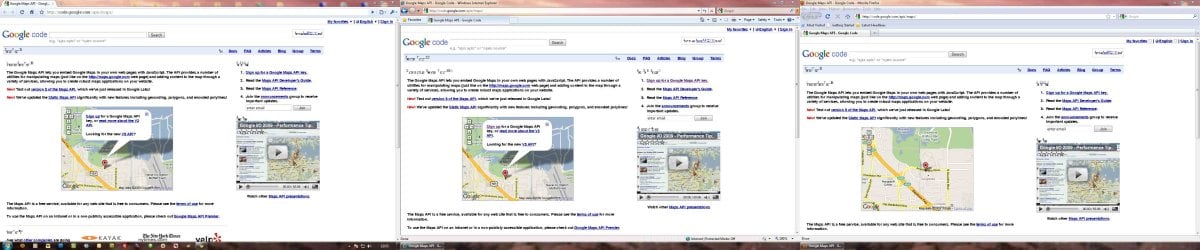
I have a problem viewing some website in the browser, see attached screenshot in three different browsers all doing the same thing. I have tried many programs to fix the font folder and regitry but none have seemed to work so far.

Any help with this problem would be greatly appriciated :D
 

Attachments

  • Browser Screenshot.jpg
    Browser Screenshot.jpg
    253.2 KB · Views: 801

My Computer

Computer Manufacturer/Model Number
HP A6027
OS
Windows 7
CPU
DualCore AMD Athlon 64 X2, 2300 MHz (11.5 x 200) 4400+
Motherboard
Asus M2N68-LA (Narra)
Graphics Card(s)
NVIDIA GeForce 6150SE nForce 430
Monitor(s) Displays
Acer AL1916W, Acer P193W, Acer X193W
Hard Drives
Drive #1 - SAMSUNG SP2504C (232 GB)
Hi,

Im new to these forums but there looks like there is a lot of information on here so I thought this would be the best place to start...

I have a problem viewing some website in the browser, see attached screenshot in three different browsers all doing the same thing. I have tried many programs to fix the font folder and regitry but none have seemed to work so far.

Any help with this problem would be greatly appriciated :D

It seems that the problem is not in the browsers, but in the whole system. Are the refresh rate and resolutions correct?
Or Are you talking about the weird letters in some points of the page? Coz the image doesnt look too good.
 

My Computer

Computer Manufacturer/Model Number
Acer Veriton m261 (modded)
OS
Win 7 pro 64-bit, Ubuntu 9.10 64-bit
CPU
Intel Core 2 Duo 2.60 Ghz
Motherboard
Whatever came with the system
Memory
4 gb ddr2 667 Mhz
Graphics Card(s)
NVidia Geforce 9400 GS 1 gb ddr2 550 mhz GPU
Sound Card
Intergrated
Monitor(s) Displays
samsung SyncMaster 2494 24"
Screen Resolution
1080p
Hard Drives
80gb - IDE
750gb - SATA II
PSU
whatever came with the system
Case
whatever came with the system
Cooling
whatever came with the system
Keyboard
Apple Aluminium (Awesome)
Mouse
Some awesome Dell mouse, really good.
Internet Speed
100mbps
Hi,

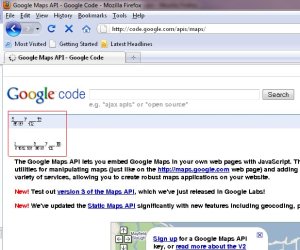
Thanks for the quick reply... I have uploaded a better screenshot of one of the browser. It is a system wide problem but is only really effecting some of the websites I go on. I have check all the resolutions and referesh rates and they have not changed, I have changed them to a different resolution and then back to the proper resolution and it still does the same thing.

I have three monitors, two connected to one graphics card and one connected to the onboard graphics card and all of them are replicating the same problem. I have read up on similiar ones and it seems like a corruption in the fonts directory of some sort.
 

Attachments

  • Browser-Screenshot2.jpg
    Browser-Screenshot2.jpg
    161.4 KB · Views: 288

My Computer

Computer Manufacturer/Model Number
HP A6027
OS
Windows 7
CPU
DualCore AMD Athlon 64 X2, 2300 MHz (11.5 x 200) 4400+
Motherboard
Asus M2N68-LA (Narra)
Graphics Card(s)
NVIDIA GeForce 6150SE nForce 430
Monitor(s) Displays
Acer AL1916W, Acer P193W, Acer X193W
Hard Drives
Drive #1 - SAMSUNG SP2504C (232 GB)
Hi,

Thanks for the quick reply... I have uploaded a better screenshot of one of the browser. It is a system wide problem but is only really effecting some of the websites I go on. I have check all the resolutions and referesh rates and they have not changed, I have changed them to a different resolution and then back to the proper resolution and it still does the same thing.

I have three monitors, two connected to one graphics card and one connected to the onboard graphics card and all of them are replicating the same problem. I have read up on similiar ones and it seems like a corruption in the fonts directory of some sort.

Alrighty, it has nothing to do with resolution, sorry. Anyway, go to ctrl panel -> appearance -> font -> font settings. Here check if you have the "hide fonts based on lanuage settings" checked. If not, check it. Also make sure you have ClearType on, and if theese dont work, "restore default fonts"
 

My Computer

Computer Manufacturer/Model Number
Acer Veriton m261 (modded)
OS
Win 7 pro 64-bit, Ubuntu 9.10 64-bit
CPU
Intel Core 2 Duo 2.60 Ghz
Motherboard
Whatever came with the system
Memory
4 gb ddr2 667 Mhz
Graphics Card(s)
NVidia Geforce 9400 GS 1 gb ddr2 550 mhz GPU
Sound Card
Intergrated
Monitor(s) Displays
samsung SyncMaster 2494 24"
Screen Resolution
1080p
Hard Drives
80gb - IDE
750gb - SATA II
PSU
whatever came with the system
Case
whatever came with the system
Cooling
whatever came with the system
Keyboard
Apple Aluminium (Awesome)
Mouse
Some awesome Dell mouse, really good.
Internet Speed
100mbps
Hi,

Yeh tried all that before I posted the message and none of them worked, I tried it again just to make sure I did it right and its still replicating the same problem...
 

My Computer

Computer Manufacturer/Model Number
HP A6027
OS
Windows 7
CPU
DualCore AMD Athlon 64 X2, 2300 MHz (11.5 x 200) 4400+
Motherboard
Asus M2N68-LA (Narra)
Graphics Card(s)
NVIDIA GeForce 6150SE nForce 430
Monitor(s) Displays
Acer AL1916W, Acer P193W, Acer X193W
Hard Drives
Drive #1 - SAMSUNG SP2504C (232 GB)
Hi,

Yeh tried all that before I posted the message and none of them worked, I tried it again just to make sure I did it right and its still replicating the same problem...

Ok. Well sorry for useless info. Is this the only site youre having probelms on? If not, can you name a few? Are all google sites having this issue?
 

My Computer

Computer Manufacturer/Model Number
Acer Veriton m261 (modded)
OS
Win 7 pro 64-bit, Ubuntu 9.10 64-bit
CPU
Intel Core 2 Duo 2.60 Ghz
Motherboard
Whatever came with the system
Memory
4 gb ddr2 667 Mhz
Graphics Card(s)
NVidia Geforce 9400 GS 1 gb ddr2 550 mhz GPU
Sound Card
Intergrated
Monitor(s) Displays
samsung SyncMaster 2494 24"
Screen Resolution
1080p
Hard Drives
80gb - IDE
750gb - SATA II
PSU
whatever came with the system
Case
whatever came with the system
Cooling
whatever came with the system
Keyboard
Apple Aluminium (Awesome)
Mouse
Some awesome Dell mouse, really good.
Internet Speed
100mbps
Hey,

I think I found the fix, I had a look deeper into the site, disabled the page style and the page displayed correctly with the default font, most likely arial, so I had a look at the stylesheet and the font family was Helvetica.

I opened my fonts directory, c:\windows\fonts\ and had a look at helvetic fonts, there was nearly 100, one in particular caught my attention, Helvetica Fractions Bold_1.ttf Opened it up and it looks idential to the one in the browser, so i am in the process of deleting all the helvetica fonts and replacing them with the original ones from the cd/another copy of win 7. But that looks like it will solve the problem.

Thanks for all the help anyways :D
 

My Computer

Computer Manufacturer/Model Number
HP A6027
OS
Windows 7
CPU
DualCore AMD Athlon 64 X2, 2300 MHz (11.5 x 200) 4400+
Motherboard
Asus M2N68-LA (Narra)
Graphics Card(s)
NVIDIA GeForce 6150SE nForce 430
Monitor(s) Displays
Acer AL1916W, Acer P193W, Acer X193W
Hard Drives
Drive #1 - SAMSUNG SP2504C (232 GB)
Hey,

I think I found the fix, I had a look deeper into the site, disabled the page style and the page displayed correctly with the default font, most likely arial, so I had a look at the stylesheet and the font family was Helvetica.

I opened my fonts directory, c:\windows\fonts\ and had a look at helvetic fonts, there was nearly 100, one in particular caught my attention, Helvetica Fractions Bold_1.ttf Opened it up and it looks idential to the one in the browser, so i am in the process of deleting all the helvetica fonts and replacing them with the original ones from the cd/another copy of win 7. But that looks like it will solve the problem.

Thanks for all the help anyways :D

Glad you did it. Just make sure you make a backup incase something goes wrong... :sarc:
 

My Computer

Computer Manufacturer/Model Number
Acer Veriton m261 (modded)
OS
Win 7 pro 64-bit, Ubuntu 9.10 64-bit
CPU
Intel Core 2 Duo 2.60 Ghz
Motherboard
Whatever came with the system
Memory
4 gb ddr2 667 Mhz
Graphics Card(s)
NVidia Geforce 9400 GS 1 gb ddr2 550 mhz GPU
Sound Card
Intergrated
Monitor(s) Displays
samsung SyncMaster 2494 24"
Screen Resolution
1080p
Hard Drives
80gb - IDE
750gb - SATA II
PSU
whatever came with the system
Case
whatever came with the system
Cooling
whatever came with the system
Keyboard
Apple Aluminium (Awesome)
Mouse
Some awesome Dell mouse, really good.
Internet Speed
100mbps
Haha thanks, I didn't manage to backup the fonts but already have a full font directory backup anyway.

It fixed the problem. I deleted the Helvetica fonts from the font folder, had to restart the computer but deleted all of them, then re-added the standard helvetica fonts from the fonts backup.

Thanks for all your help :D
 

My Computer

Computer Manufacturer/Model Number
HP A6027
OS
Windows 7
CPU
DualCore AMD Athlon 64 X2, 2300 MHz (11.5 x 200) 4400+
Motherboard
Asus M2N68-LA (Narra)
Graphics Card(s)
NVIDIA GeForce 6150SE nForce 430
Monitor(s) Displays
Acer AL1916W, Acer P193W, Acer X193W
Hard Drives
Drive #1 - SAMSUNG SP2504C (232 GB)
Haha thanks, I didn't manage to backup the fonts but already have a full font directory backup anyway.

It fixed the problem. I deleted the Helvetica fonts from the font folder, had to restart the computer but deleted all of them, then re-added the standard helvetica fonts from the fonts backup.

Thanks for all your help :D

Great, and thats what im here for. Thanks for the rep too :D
 

My Computer

Computer Manufacturer/Model Number
Acer Veriton m261 (modded)
OS
Win 7 pro 64-bit, Ubuntu 9.10 64-bit
CPU
Intel Core 2 Duo 2.60 Ghz
Motherboard
Whatever came with the system
Memory
4 gb ddr2 667 Mhz
Graphics Card(s)
NVidia Geforce 9400 GS 1 gb ddr2 550 mhz GPU
Sound Card
Intergrated
Monitor(s) Displays
samsung SyncMaster 2494 24"
Screen Resolution
1080p
Hard Drives
80gb - IDE
750gb - SATA II
PSU
whatever came with the system
Case
whatever came with the system
Cooling
whatever came with the system
Keyboard
Apple Aluminium (Awesome)
Mouse
Some awesome Dell mouse, really good.
Internet Speed
100mbps
I have the same problem, but can't cure it with what I've seen. The font is "Times New Roman", which displays on at least one site (NYTimes) in bold italic only. This happens in both Firefox and MSIE on this computer. I've tried reloading Firefox (no effect), reverting the computer to factory specs (ugh! clearing out all the adware again was a headache) which cured the problem for about 2-3 hours, and reloading a fresh copy of the Times New Roman ("TNR") font family downloaded from Microsoft. Because Win7 says this is a "protected system font" it won't let me do much with it, like drag all the TNR fonts out of the font folder so I could reboot and reload -- Win7 won't hear of it. Suggestions? Makes the website hard to read and really ugly! Thanks.
 

My Computer

Computer Manufacturer/Model Number
HP p6680t
OS
Windows 7 Home Premium 64
CPU
Intel Core i5
Memory
6 GB
Graphics Card(s)
Nvidia GE Force 315 (512 MB)
Sound Card
Integrated
Monitor(s) Displays
LG 27" LCD
Hard Drives
750 GB

My Computer

Computer type
PC/Desktop
Computer Manufacturer/Model Number
OQO 2+
OS
Windows 8 Pro w/MC 32-bit
CPU
Intel Atom 1.86 GHz
Motherboard
OQO 2+
Memory
2 GB
Graphics Card(s)
Intel GMA 500
Sound Card
IDT
Monitor(s) Displays
LCD
Screen Resolution
800 x 480 (portable) 1280 x 1024 (docked)
Hard Drives
64 GB SSD
PSU
9 Ah Battery (portable) or OQO Brick (docked)
Case
Shirt Pocket Sized
Cooling
Tiny Fan
Keyboard
Slide out (portable) DiNovo Edge (docked)
Mouse
Eraser head (portable) Logitech Bluetooth (docked)
Internet Speed
WWAN or 802.11G (portable) T1 (docked)
Browser
IE 10
Other Info
DVD-RW OQO Docking Station
Back
Top