BSOD 0xc2 BAD_POOL_CALLER while playing Minecraft

silvrwolf

New member
Local time
6:13 PM
Messages
6
I was playing minecraft when my computer randomly decided to bluescreen.

I've had trouble with it bluescreening in the past and have posted a thread a few months ago hoping to resolve it but after running furmark, prime95, and memtest86+ without any problems, it looks like something is still wrong.

Please advise, thank you.
 

My Computer My Computer

At a glance

Windows 7 Professional 64 bitIntel Quad-Core i5 4670K @3.4GHzCorsair Vengeance Blue 16 GB (2x8 GB) DDR3 16...GeForce GTX 770 EVGA SuperClocked w/ ACX Cooling
Computer type
PC/Desktop
Computer Manufacturer/Model Number
custom build
OS
Windows 7 Professional 64 bit
CPU
Intel Quad-Core i5 4670K @3.4GHz
Motherboard
Gigabyte Z87 LGA 1150
Memory
Corsair Vengeance Blue 16 GB (2x8 GB) DDR3 1600MHz
Graphics Card(s)
GeForce GTX 770 EVGA SuperClocked w/ ACX Cooling
Monitor(s) Displays
Asus VE228H 21.5 "
Screen Resolution
1920 x 1080
Hard Drives
Samsung MZ-7TD250BW 840 250 GB SSD
Western Digital Caviar Black 2 TB SATA III 7200 RPM 64 MB
PSU
Corsair Enthusiast Series TX 750 Watt ATX/EPS Modular 80 PLU
Case
Fractal Design Define R4 Cases, Titanium grey
Cooling
Stock
Keyboard
CM Storm QuickFire TK
Mouse
E-3lue Cobra
Internet Speed
5 mb down 5 mb up
Antivirus
AVG
Browser
Chrome

My Computer My Computer

At a glance

Windows 10Intel Core i5 3570K16GB 1600Mhz G.SkillGigabyte GTX 970 G1-Gaming
Computer type
PC/Desktop
OS
Windows 10
CPU
Intel Core i5 3570K
Motherboard
Asus P8Z77V-PRO
Memory
16GB 1600Mhz G.Skill
Graphics Card(s)
Gigabyte GTX 970 G1-Gaming
PSU
Seasonic 1000W Platinum
Case
Fractal Design Define R4
Cooling
Noctua NH-D14
Hi YoYo, thanks for the reply.

My PSU is: Corsair Enthusiast Series TX 750 Watt ATX/EPS Modular 80 PLU. It is about 6 months old as well as the rest of my computer's components.

The Power Supply Calculator returned:

Minimum PSU Wattage: 410 W
Recommended: 460 W

All 3 of my drives are connected via the cable in this image:
52310579.jpg


The SATA cables are all new (6 months old) and I have checked that they are secure and firmly in place.

I haven't had any difficulty waking my computer from sleep and hibernation.

And my Disk Management Screenshot is included with this post as your requested.

Thanks for your help.
 

My Computer My Computer

At a glance

Windows 7 Professional 64 bitIntel Quad-Core i5 4670K @3.4GHzCorsair Vengeance Blue 16 GB (2x8 GB) DDR3 16...GeForce GTX 770 EVGA SuperClocked w/ ACX Cooling
Computer type
PC/Desktop
Computer Manufacturer/Model Number
custom build
OS
Windows 7 Professional 64 bit
CPU
Intel Quad-Core i5 4670K @3.4GHz
Motherboard
Gigabyte Z87 LGA 1150
Memory
Corsair Vengeance Blue 16 GB (2x8 GB) DDR3 1600MHz
Graphics Card(s)
GeForce GTX 770 EVGA SuperClocked w/ ACX Cooling
Monitor(s) Displays
Asus VE228H 21.5 "
Screen Resolution
1920 x 1080
Hard Drives
Samsung MZ-7TD250BW 840 250 GB SSD
Western Digital Caviar Black 2 TB SATA III 7200 RPM 64 MB
PSU
Corsair Enthusiast Series TX 750 Watt ATX/EPS Modular 80 PLU
Case
Fractal Design Define R4 Cases, Titanium grey
Cooling
Stock
Keyboard
CM Storm QuickFire TK
Mouse
E-3lue Cobra
Internet Speed
5 mb down 5 mb up
Antivirus
AVG
Browser
Chrome
Thanks for the added info :) .

Disk0 is in an odd configuration, what is it used for?
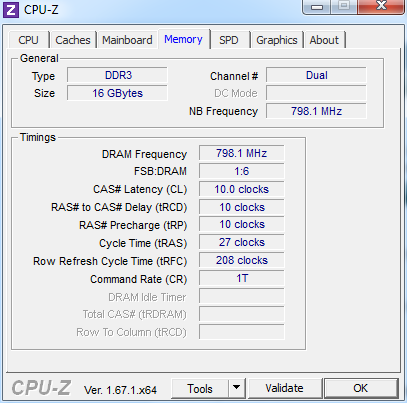
Please download CPU-Z and take a screenshot of the Memory tab, I want to know the RAM timings.
 

My Computer My Computer

At a glance

Windows 10Intel Core i5 3570K16GB 1600Mhz G.SkillGigabyte GTX 970 G1-Gaming
Computer type
PC/Desktop
OS
Windows 10
CPU
Intel Core i5 3570K
Motherboard
Asus P8Z77V-PRO
Memory
16GB 1600Mhz G.Skill
Graphics Card(s)
Gigabyte GTX 970 G1-Gaming
PSU
Seasonic 1000W Platinum
Case
Fractal Design Define R4
Cooling
Noctua NH-D14
Disk0 has a Linux Distro (Fedora) installed on it. Instead of making separate smaller partitions for Windows and Fedora on one drive, I separated them each to their own.

Here is the CPU-Z screenshot that you asked for
dqtEsOP.png
 

My Computer My Computer

At a glance

Windows 7 Professional 64 bitIntel Quad-Core i5 4670K @3.4GHzCorsair Vengeance Blue 16 GB (2x8 GB) DDR3 16...GeForce GTX 770 EVGA SuperClocked w/ ACX Cooling
Computer type
PC/Desktop
Computer Manufacturer/Model Number
custom build
OS
Windows 7 Professional 64 bit
CPU
Intel Quad-Core i5 4670K @3.4GHz
Motherboard
Gigabyte Z87 LGA 1150
Memory
Corsair Vengeance Blue 16 GB (2x8 GB) DDR3 1600MHz
Graphics Card(s)
GeForce GTX 770 EVGA SuperClocked w/ ACX Cooling
Monitor(s) Displays
Asus VE228H 21.5 "
Screen Resolution
1920 x 1080
Hard Drives
Samsung MZ-7TD250BW 840 250 GB SSD
Western Digital Caviar Black 2 TB SATA III 7200 RPM 64 MB
PSU
Corsair Enthusiast Series TX 750 Watt ATX/EPS Modular 80 PLU
Case
Fractal Design Define R4 Cases, Titanium grey
Cooling
Stock
Keyboard
CM Storm QuickFire TK
Mouse
E-3lue Cobra
Internet Speed
5 mb down 5 mb up
Antivirus
AVG
Browser
Chrome
Thanks :), the timings look to be in order.

The bugchecks are not showing a decisive cause, try to physically remove one of the modules
from the system and see how the it goes do it with both modules (RAM).
 

My Computer My Computer

At a glance

Windows 10Intel Core i5 3570K16GB 1600Mhz G.SkillGigabyte GTX 970 G1-Gaming
Computer type
PC/Desktop
OS
Windows 10
CPU
Intel Core i5 3570K
Motherboard
Asus P8Z77V-PRO
Memory
16GB 1600Mhz G.Skill
Graphics Card(s)
Gigabyte GTX 970 G1-Gaming
PSU
Seasonic 1000W Platinum
Case
Fractal Design Define R4
Cooling
Noctua NH-D14
Back
Top