This laptop used to have a 4GB RAM. I had upgraded it into 8GB due to me having difficulties handling some Adobe products for a project. If needed, I'll just remove the other stick or upgrade into a memory kit.
My Computer
Computer type
Laptop
Computer Manufacturer/Model Number
Samsung
OS
Microsoft Windows 7 Home Basic 64 Bit
CPU
Intel(R) Core(TM) i5-3210M CPU @ 2.50GHz
Motherboard
SAMSUNG ELECTRONICS CO., LTD. NP350V4C-S05PH
Memory
8 GB
Graphics Card(s)
(1) AMD Radeon HD 7600M Series (2) Intel(R) HD Graphics 40
Sound Card
(1) High Definition Audio Device (2) Intel(R) Display Audi
The problem is that you cannot just add sticks, you need a kit for the best stability, adding a stick leads to the system using sticks that aren't tested together and aren't produced in the same way what can cause problems. This makes that even if the model & make are the same, but either of the sticks are added later it still can cause problems.
My Computer
Computer type
PC/Desktop
Computer Manufacturer/Model Number
Custom build
OS
Windows 10 Pro
CPU
i5-6500
Motherboard
Gigabyte B150-HD3P-CF
Memory
16GB DDR4 2133 Crucial Ballistix Sport LT
Graphics Card(s)
MSI GeForce GTX 1060 GAMING X 6G
Sound Card
Intel Display Audio
Monitor(s) Displays
Liyama ProLite XB2483HSU-B2
Screen Resolution
1920 x 1080
Hard Drives
Crucial MX200 500GB & Toshiba DT01ACA300 3TB
PSU
Corsair RM550x
Case
Fractal Design Define S
Cooling
Cooler Master TX3 i
Keyboard
Func KB-460 (MX Red)
Mouse
Corsair Gaming M65 RGB
Antivirus
Bitdefender Total Security 2016 + MBAM Pro + MBAE Pro
Update:
I got myself a new hard drive
It still BSODs after installing the AMD drivers
I've tried the ones from the Samsung site, AMD versions 13.9 and 15.7.1
It BSODs on startup and during installation. But it's a constant atikmpag.sys, no other errors to report.
My Computer
Computer type
Laptop
Computer Manufacturer/Model Number
Samsung
OS
Microsoft Windows 7 Home Basic 64 Bit
CPU
Intel(R) Core(TM) i5-3210M CPU @ 2.50GHz
Motherboard
SAMSUNG ELECTRONICS CO., LTD. NP350V4C-S05PH
Memory
8 GB
Graphics Card(s)
(1) AMD Radeon HD 7600M Series (2) Intel(R) HD Graphics 40
Sound Card
(1) High Definition Audio Device (2) Intel(R) Display Audi
Would there be a way to make sure that my card is faulty?
Also, another update: I tried installing version 13.352
It doesn't blue screen during installation, but it blue screens on startup after it. Would this info be of any help?
My Computer
Computer type
Laptop
Computer Manufacturer/Model Number
Samsung
OS
Microsoft Windows 7 Home Basic 64 Bit
CPU
Intel(R) Core(TM) i5-3210M CPU @ 2.50GHz
Motherboard
SAMSUNG ELECTRONICS CO., LTD. NP350V4C-S05PH
Memory
8 GB
Graphics Card(s)
(1) AMD Radeon HD 7600M Series (2) Intel(R) HD Graphics 40
Sound Card
(1) High Definition Audio Device (2) Intel(R) Display Audi
Pretty much the same as you described earlier, maybe you meant it in a different way but I read it as a BSOD while installing and if the install process did finish you received a BSOD at startup (same as you described).
All I can suggest is to not use the GPU by disabling it in device manager and not installing the drivers, not much else can be done with a laptop.
My Computer
Computer type
PC/Desktop
Computer Manufacturer/Model Number
Custom build
OS
Windows 10 Pro
CPU
i5-6500
Motherboard
Gigabyte B150-HD3P-CF
Memory
16GB DDR4 2133 Crucial Ballistix Sport LT
Graphics Card(s)
MSI GeForce GTX 1060 GAMING X 6G
Sound Card
Intel Display Audio
Monitor(s) Displays
Liyama ProLite XB2483HSU-B2
Screen Resolution
1920 x 1080
Hard Drives
Crucial MX200 500GB & Toshiba DT01ACA300 3TB
PSU
Corsair RM550x
Case
Fractal Design Define S
Cooling
Cooler Master TX3 i
Keyboard
Func KB-460 (MX Red)
Mouse
Corsair Gaming M65 RGB
Antivirus
Bitdefender Total Security 2016 + MBAM Pro + MBAE Pro
I just opted not to install it, however wouldn't that would make my laptop susceptible to overheating? The graphics driver prevents that, am I right? It used to happen often before having my AMD drivers installed.
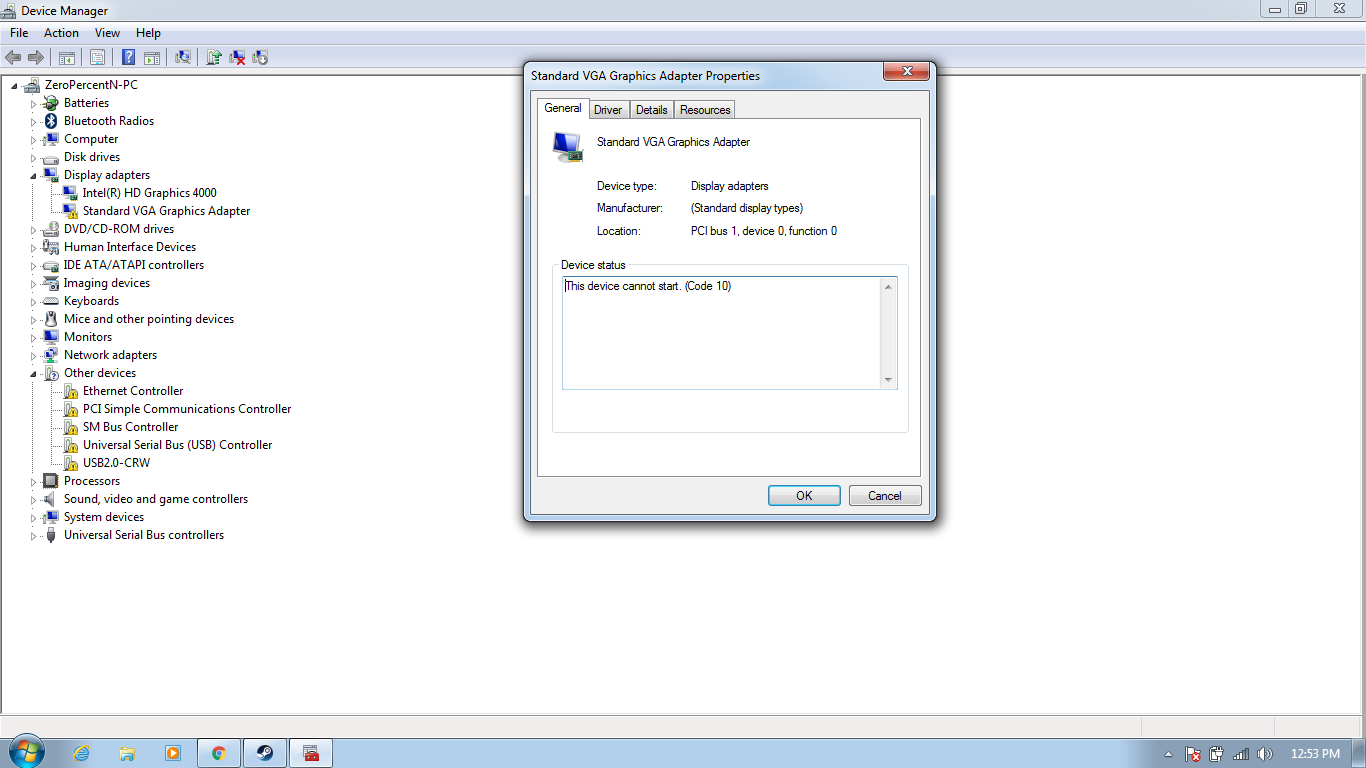
And also, my Standard VGA Adapter driver is marked with a yellow exclamation point on Device Manager. Any way how to properly fix it?
My Computer
Computer type
Laptop
Computer Manufacturer/Model Number
Samsung
OS
Microsoft Windows 7 Home Basic 64 Bit
CPU
Intel(R) Core(TM) i5-3210M CPU @ 2.50GHz
Motherboard
SAMSUNG ELECTRONICS CO., LTD. NP350V4C-S05PH
Memory
8 GB
Graphics Card(s)
(1) AMD Radeon HD 7600M Series (2) Intel(R) HD Graphics 40
Sound Card
(1) High Definition Audio Device (2) Intel(R) Display Audi
No and no. Overheating could be (or not) due to a driver bug letting the GPU work harder than it should, but the drivers cannot prevent hardware related problems such as overheating, they only control the GPU in how it works but cannot do more.
There are different reasons why an exclamation point is present in device manager, make a screenshot of the error and post it.
How to see the error:
right click on the device
choose 'properties'
My Computer
Computer type
PC/Desktop
Computer Manufacturer/Model Number
Custom build
OS
Windows 10 Pro
CPU
i5-6500
Motherboard
Gigabyte B150-HD3P-CF
Memory
16GB DDR4 2133 Crucial Ballistix Sport LT
Graphics Card(s)
MSI GeForce GTX 1060 GAMING X 6G
Sound Card
Intel Display Audio
Monitor(s) Displays
Liyama ProLite XB2483HSU-B2
Screen Resolution
1920 x 1080
Hard Drives
Crucial MX200 500GB & Toshiba DT01ACA300 3TB
PSU
Corsair RM550x
Case
Fractal Design Define S
Cooling
Cooler Master TX3 i
Keyboard
Func KB-460 (MX Red)
Mouse
Corsair Gaming M65 RGB
Antivirus
Bitdefender Total Security 2016 + MBAM Pro + MBAE Pro
I've included the other drivers that had the yellow icons as well. Though, their only problem is they are not installed. Would any of them be important to install?
My Computer
Computer type
Laptop
Computer Manufacturer/Model Number
Samsung
OS
Microsoft Windows 7 Home Basic 64 Bit
CPU
Intel(R) Core(TM) i5-3210M CPU @ 2.50GHz
Motherboard
SAMSUNG ELECTRONICS CO., LTD. NP350V4C-S05PH
Memory
8 GB
Graphics Card(s)
(1) AMD Radeon HD 7600M Series (2) Intel(R) HD Graphics 40
Sound Card
(1) High Definition Audio Device (2) Intel(R) Display Audi
Some of the others probably need reinstalling or updating of the drivers, visit Samsung support page to download fresh drivers.
If you normally do not see this device, then it is likely the AMD device. A suggestion to give is to install the drivers again somehow (BSODs will occur again) but then disable the device in safe mode.
My Computer
Computer type
PC/Desktop
Computer Manufacturer/Model Number
Custom build
OS
Windows 10 Pro
CPU
i5-6500
Motherboard
Gigabyte B150-HD3P-CF
Memory
16GB DDR4 2133 Crucial Ballistix Sport LT
Graphics Card(s)
MSI GeForce GTX 1060 GAMING X 6G
Sound Card
Intel Display Audio
Monitor(s) Displays
Liyama ProLite XB2483HSU-B2
Screen Resolution
1920 x 1080
Hard Drives
Crucial MX200 500GB & Toshiba DT01ACA300 3TB
PSU
Corsair RM550x
Case
Fractal Design Define S
Cooling
Cooler Master TX3 i
Keyboard
Func KB-460 (MX Red)
Mouse
Corsair Gaming M65 RGB
Antivirus
Bitdefender Total Security 2016 + MBAM Pro + MBAE Pro
I have decided to go upgrade to Windows 10 and it seemed that it automatically installed drivers for me.
It also installed the AMD drivers, but this time it didn't blue screen. It only did when I tried running CSGO, though it was an upgrade I may have to reinstall it the game for it to work.
Will be posting updates
My Computer
Computer type
Laptop
Computer Manufacturer/Model Number
Samsung
OS
Microsoft Windows 7 Home Basic 64 Bit
CPU
Intel(R) Core(TM) i5-3210M CPU @ 2.50GHz
Motherboard
SAMSUNG ELECTRONICS CO., LTD. NP350V4C-S05PH
Memory
8 GB
Graphics Card(s)
(1) AMD Radeon HD 7600M Series (2) Intel(R) HD Graphics 40
Sound Card
(1) High Definition Audio Device (2) Intel(R) Display Audi