

DeanP
Banned
STOP 0x7F and ZoneAlarm
STOP 0x7F (and Zonealarm), what to do...
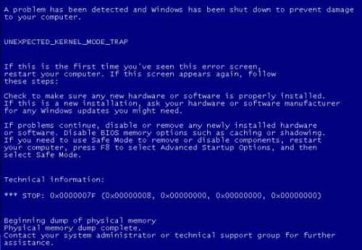
STOP 0x7F indicates if the system has ZoneAlarm installed - it is a known cause of BSOD with Windows 7. You may want to try this two options before you start removing ZoneAlarm.
1. Try these 4 Microsoft HotFix...
Microsoft has released 4 Microsoft HotFixes. These 4 Hotfix which I can neither verify or discount. It may work, it may not. (One is required after installing SP1 which is below how to install SP1.)
http://support.microsoft.com/kb/981889
http://support.microsoft.com/kb/981180
http://www.microsoft.com/downloads/en/details.aspx?FamilyID=7507447a-d065-4d43-8b8a-eb5357d19df1 ONLY FOR 32-BIT!
2. Upgrade to SP1 and this HotFix
SP1 provides bug fixes, improvements, new features, enhancements and much more. If you wish to upgrade to SP1, use Windows Update or use Microsoft Download Center if you are installing SP1 on more then one computer
How to Install SP1: Learn how to install Windows 7 Service Pack 1 (SP1)
Then try this HotFix....
http://support.microsoft.com/?kbid=2502285
If those 2 steps still cause BSOD - then it is best to remove ZoneAlarm completely. Then use a different anti-virus/firewall software.
1. Try these 4 Microsoft HotFix...
Microsoft has released 4 Microsoft HotFixes. These 4 Hotfix which I can neither verify or discount. It may work, it may not. (One is required after installing SP1 which is below how to install SP1.)
http://support.microsoft.com/kb/981889
http://support.microsoft.com/kb/981180
http://www.microsoft.com/downloads/en/details.aspx?FamilyID=7507447a-d065-4d43-8b8a-eb5357d19df1 ONLY FOR 32-BIT!
2. Upgrade to SP1 and this HotFix
SP1 provides bug fixes, improvements, new features, enhancements and much more. If you wish to upgrade to SP1, use Windows Update or use Microsoft Download Center if you are installing SP1 on more then one computer
How to Install SP1: Learn how to install Windows 7 Service Pack 1 (SP1)
Then try this HotFix....
http://support.microsoft.com/?kbid=2502285
If those 2 steps still cause BSOD - then it is best to remove ZoneAlarm completely. Then use a different anti-virus/firewall software.
Last edited:
My Computer
- Computer Manufacturer/Model Number
- Macbook Pro 15" (2011) (Matte Version)
- OS
- Win 7 Pro x64 SP1 OS X Snow Leopard 10.6.7
- CPU
- Intel Core i7 2820QM 2.3GHz (Quad-Core)
- Motherboard
- N/A
- Memory
- 8GB 1333 MHz PC3-10600 DDR3 SDRAM
- Graphics Card(s)
- ATI Radeon HD 6750M (1GB, GDDR5)
- Sound Card
- N/A
- Monitor(s) Displays
- 1 Display
- Screen Resolution
- 1,680 x 1050 (Matte Screen, Anti-Glare)
- Hard Drives
- 750GB SATA (5400 rpm)
WD My Passport Essential 1TB Portable Hard Drive
- PSU
- N/A
- Case
- N/A
- Cooling
- N/A
- Keyboard
- Apple Wireless Keyboard
- Mouse
- Apple Wireless Magic Mouse
- Internet Speed
- Max - 2.2MB/sec; DSL provided by Telecom NZ
- Other Info
- MS Office Professional 2010
McAfee Total Protection 2011
On a Laptop Stand (Hand-Built)
