black "blank" screen upon boot up

texaswolf

New member
a week ago i began having slow down issues with my computer after updating, i soon realized that the antivirus software i was using had updated but was not scanning properly(comodo). i took the slow down as a sign that my computer may had virus's running a mok in it so i began to pull what files i could safely off, since i had not done so for that months work. i was able to only use the computer at "half speed or slower" in safe mode, since booting in anything other than would cause it to stall up and just show my desktop and a frozen taskbar.

after being able to recover most of my simple picture data, i went onto larger video files and soon found that i could not get passed (approx) the 15-20% download before receiving a error code 0x8007045D. my computer issues then began to worsen.

it got to the present point that upon booting up, i would recieve the "toshiba" window, then a _ that would blink for a few then resize to a smaller _ and then blank screen

i cannot even trigger the "safe mode" boot up menu it seems. i have ran a memory diagnostic by hitting the f9 button(or any button it seemed other than f2 or f12) which would run through both parts of the test and get to 99% of 2 of 2 and then seem to stall for 15-20 min then go blank.

i have just recently been able to make a disc using a friends toshiba that also runs windows 64 bit like mine, and upon the first time putting the disc in, i got the "click any button to boot from disc...." phrase(not exact but you guys know the wording)

i hit space bar and the files loaded and i received the microsoft bar and then a screen asking to choose between the toshiba recovery or a windows 7 system repair. i accidentally clicked the wrong key and chose the toshiba recovery, which then spat out the disc and requested a different disc that i have no clue was. i tried canceling, which then brought me back to the toshiba boot screen, followed by _ screen and then blank....

i have re tried to get the selection screen for the recovery/repair, but have not been able to. every time i have boot from disc it has gone through the files screen then microsoft bar, then black screen with cursor, at which it responds to mouse movement(touchpad) but nothing else.


help?
 

My Computer

OS
Windows 7 64bit
try the following and see if you are able to boot from the CD/DVD again:
Note: backup any files if you are using a RAID controller of any kind.
1. Go into your BIOS and load default settings to clear the CMOS memory (this will reset your RAID configuration resulting in loss of data, so if you have RAID and want to proceed from step 3, that is fine).
2. Save Settings and exit the BIOS.
3. Shut down and turn off the computer.
4. Unplug the computer from the wall or surge protector (then remove the battery if it is a laptop).
5. Hold down the power button for 30 seconds to clear the software connections between the BIOS and hardware and clear any corruption in the temporary memory.
6. (If it is a laptop, plug the battery back into the laptop and then) Plug the computer back into the wall.
7. Turn it on to reinitialize the software connections between the BIOS and hardware.
 

My Computer

Computer Manufacturer/Model Number
HP Pavilion e9110t
OS
Windows 7 Home Premium 64 Bit
CPU
Intel(R) Core(TM)2 Quad CPU Q9550 @ 2.83GHz
Motherboard
Pegatron IPIEL-LA3
Memory
6.00 GB Hundai HMT125U6BFR8C-H9
Graphics Card(s)
ATI Radeon HD 4850
Sound Card
Realtek High Definition Audio/ATI High Definition Audio
Monitor(s) Displays
Acer AL2216W
Screen Resolution
1680x1050
Hard Drives
Hitachi HDP725050GLA360 ATA Device 500 GB
PSU
Unknown/installed by HP
Case
HP generic case
Cooling
Intel Stock Cooling
Keyboard
HP Keyboard
Mouse
HP Mouse
Internet Speed
Download: 19.15 Mbps Upload: 1.67 Mbps
Other Info
Network Adapter Realtek RTL8168D/8111D Family PCI-E Gigabit Ethernet NIC (NDIS 6.20)
Network Adapter 802.11n Wireless PCI Express Card LAN Adapter
try the following and see if you are able to boot from the CD/DVD again:
Note: backup any files if you are using a RAID controller of any kind.
1. Go into your BIOS and load default settings to clear the CMOS memory (this will reset your RAID configuration resulting in loss of data, so if you have RAID and want to proceed from step 3, that is fine).
2. Save Settings and exit the BIOS.
3. Shut down and turn off the computer.
4. Unplug the computer from the wall or surge protector (then remove the battery if it is a laptop).
5. Hold down the power button for 30 seconds to clear the software connections between the BIOS and hardware and clear any corruption in the temporary memory.
6. (If it is a laptop, plug the battery back into the laptop and then) Plug the computer back into the wall.
7. Turn it on to reinitialize the software connections between the BIOS and hardware.

any chance of being able to save data off of it?
i could dump my files onto a friends external and use the one i have to act as the computer so that i can access the other hard drive, possibly?'


als, no clue if i have a RAID on it, but knowing my luck of the draw, i do.
 

My Computer

OS
Windows 7 64bit
try the following and see if you are able to boot from the CD/DVD again:
Note: backup any files if you are using a RAID controller of any kind.
1. Go into your BIOS and load default settings to clear the CMOS memory (this will reset your RAID configuration resulting in loss of data, so if you have RAID and want to proceed from step 3, that is fine).
2. Save Settings and exit the BIOS.
3. Shut down and turn off the computer.
4. Unplug the computer from the wall or surge protector (then remove the battery if it is a laptop).
5. Hold down the power button for 30 seconds to clear the software connections between the BIOS and hardware and clear any corruption in the temporary memory.
6. (If it is a laptop, plug the battery back into the laptop and then) Plug the computer back into the wall.
7. Turn it on to reinitialize the software connections between the BIOS and hardware.

any chance of being able to save data off of it?
i could dump my files onto a friends external and use the one i have to act as the computer so that i can access the other hard drive, possibly?'


als, no clue if i have a RAID on it, but knowing my luck of the draw, i do.

Typically, you would know if you had a RAID on it because you would have either set it up yourself or you would have ordered a computer with one built in on purpose. They're usually set up custom during ordering.

As to getting data off, there are plenty of methods for doing so. The best would be to get windows system recovery up and running. You can use http://www.sevenforums.com/tutorials/666-advanced-boot-options.html and select Repair Your Computer or you can use a Windows repair CD/DVD to get to http://www.sevenforums.com/tutorials/668-system-recovery-options.html and use the command prompt. From the command prompt, you will have to find the drive you want to copy from and the drive you want to copy to.

The best way to find the two drives is to type the commands that follow into the prompt.

C:
dir
D:
dir
etc. until you see your folder system listed for whichever drive you are looking for. Once you have done so, use the command that follows (I'll assume the drive you want to copy from is C: and the drive you want to copy to is D:, so replace C: and D: accordingly)
robocopy /s /r:5 /w:0 /xj /xo C:\Users D:\UsersBackup​
Run the same command with any other folders you do not want to lose. For instance, use the command
robocopy /s /r:5 /w:0 /xj /xo C:\Folder D:\FolderBackup​
where Folder is a folder you want to backup. :)
 

My Computer

Computer Manufacturer/Model Number
HP Pavilion e9110t
OS
Windows 7 Home Premium 64 Bit
CPU
Intel(R) Core(TM)2 Quad CPU Q9550 @ 2.83GHz
Motherboard
Pegatron IPIEL-LA3
Memory
6.00 GB Hundai HMT125U6BFR8C-H9
Graphics Card(s)
ATI Radeon HD 4850
Sound Card
Realtek High Definition Audio/ATI High Definition Audio
Monitor(s) Displays
Acer AL2216W
Screen Resolution
1680x1050
Hard Drives
Hitachi HDP725050GLA360 ATA Device 500 GB
PSU
Unknown/installed by HP
Case
HP generic case
Cooling
Intel Stock Cooling
Keyboard
HP Keyboard
Mouse
HP Mouse
Internet Speed
Download: 19.15 Mbps Upload: 1.67 Mbps
Other Info
Network Adapter Realtek RTL8168D/8111D Family PCI-E Gigabit Ethernet NIC (NDIS 6.20)
Network Adapter 802.11n Wireless PCI Express Card LAN Adapter
ok so maybe im not doing it right but i tried the method last night of the remove all power then press the power button down... which my friend and i are still going "but there is no power, how does it register that ive pushed it x)"

im still getting same mess, boot up, f12, cd/dvd, files loading, see the microsoft opening screen then... blank screen, and no cursor now... having to fight urge not to throw comp at wall lol
 

My Computer

OS
Windows 7 64bit
ok so maybe im not doing it right but i tried the method last night of the remove all power then press the power button down... which my friend and i are still going "but there is no power, how does it register that ive pushed it x)"

im still getting same mess, boot up, f12, cd/dvd, files loading, see the microsoft opening screen then... blank screen, and no cursor now... having to fight urge not to throw comp at wall lol

I had the same reaction the first time about holding the power button down for 30 seconds. An electrical engineer explained it to me: you are closing the circuit so all capacitors are able to expel the power built up within.

Can you create a windows 7 repair DVD on another machine. http://www.sevenforums.com/tutorials/2083-system-repair-disc-create.html It has to be either 32 bit or 64 bit depending on what version you have on your computer. There is a site where you can download them as well, but I will have to look for it for you if you need to go that route.

If you want to download the discs, scroll to the middle of the Windows 7 Repair Disc Instructions and Download page to find the repair disc iso download links.
 

My Computer

Computer Manufacturer/Model Number
HP Pavilion e9110t
OS
Windows 7 Home Premium 64 Bit
CPU
Intel(R) Core(TM)2 Quad CPU Q9550 @ 2.83GHz
Motherboard
Pegatron IPIEL-LA3
Memory
6.00 GB Hundai HMT125U6BFR8C-H9
Graphics Card(s)
ATI Radeon HD 4850
Sound Card
Realtek High Definition Audio/ATI High Definition Audio
Monitor(s) Displays
Acer AL2216W
Screen Resolution
1680x1050
Hard Drives
Hitachi HDP725050GLA360 ATA Device 500 GB
PSU
Unknown/installed by HP
Case
HP generic case
Cooling
Intel Stock Cooling
Keyboard
HP Keyboard
Mouse
HP Mouse
Internet Speed
Download: 19.15 Mbps Upload: 1.67 Mbps
Other Info
Network Adapter Realtek RTL8168D/8111D Family PCI-E Gigabit Ethernet NIC (NDIS 6.20)
Network Adapter 802.11n Wireless PCI Express Card LAN Adapter
ok so maybe im not doing it right but i tried the method last night of the remove all power then press the power button down... which my friend and i are still going "but there is no power, how does it register that ive pushed it x)"

im still getting same mess, boot up, f12, cd/dvd, files loading, see the microsoft opening screen then... blank screen, and no cursor now... having to fight urge not to throw comp at wall lol

I had the same reaction the first time about holding the power button down for 30 seconds. An electrical engineer explained it to me: you are closing the circuit so all capacitors are able to expel the power built up within.

Can you create a windows 7 repair DVD on another machine. http://www.sevenforums.com/tutorials/2083-system-repair-disc-create.html It has to be either 32 bit or 64 bit depending on what version you have on your computer. There is a site where you can download them as well, but I will have to look for it for you if you need to go that route.

If you want to download the discs, scroll to the middle of the Windows 7 Repair Disc Instructions and Download page to find the repair disc iso download links.

thats the disc i have atm and the one i have been trying to boot from
 

My Computer

OS
Windows 7 64bit
Alright, looks like you will have to recover your files using PartedMagic and moving files by mounting the drives through the mount devices on the desktop and move files across. :)
 
Last edited:

My Computer

Computer Manufacturer/Model Number
HP Pavilion e9110t
OS
Windows 7 Home Premium 64 Bit
CPU
Intel(R) Core(TM)2 Quad CPU Q9550 @ 2.83GHz
Motherboard
Pegatron IPIEL-LA3
Memory
6.00 GB Hundai HMT125U6BFR8C-H9
Graphics Card(s)
ATI Radeon HD 4850
Sound Card
Realtek High Definition Audio/ATI High Definition Audio
Monitor(s) Displays
Acer AL2216W
Screen Resolution
1680x1050
Hard Drives
Hitachi HDP725050GLA360 ATA Device 500 GB
PSU
Unknown/installed by HP
Case
HP generic case
Cooling
Intel Stock Cooling
Keyboard
HP Keyboard
Mouse
HP Mouse
Internet Speed
Download: 19.15 Mbps Upload: 1.67 Mbps
Other Info
Network Adapter Realtek RTL8168D/8111D Family PCI-E Gigabit Ethernet NIC (NDIS 6.20)
Network Adapter 802.11n Wireless PCI Express Card LAN Adapter
Alright, looks like you will have to recover your files using PartedMagic and moving files by mounting the drives through the mount devices on the desktop and move files across. :)


ok... deer in head light syndrome is kicking in, what do i do?

i clicked the partedmagic link and read about it, noticed the "Gparted source", am i to click that?

also, should state this is a laptop and i have no desktops x3
 

My Computer

OS
Windows 7 64bit
Go to the download link and download PartedMagic as a boot CD ISO. Then burn the ISO to a disc. Put the CD/DVD into your laptop and see if you can boot into PartedMagic.

Plug in a drive to backup your data to. There is a drive icon that says Mount on the desktop of PartedMagic. Mount your drive you want to get the data off of, then mount the drive you want to copy the data to by right clicking that icon and choosing the drive to mount. You'll have to open each folder/drive to find the right drives and copy the folders you want to the backup drive.
 

My Computer

Computer Manufacturer/Model Number
HP Pavilion e9110t
OS
Windows 7 Home Premium 64 Bit
CPU
Intel(R) Core(TM)2 Quad CPU Q9550 @ 2.83GHz
Motherboard
Pegatron IPIEL-LA3
Memory
6.00 GB Hundai HMT125U6BFR8C-H9
Graphics Card(s)
ATI Radeon HD 4850
Sound Card
Realtek High Definition Audio/ATI High Definition Audio
Monitor(s) Displays
Acer AL2216W
Screen Resolution
1680x1050
Hard Drives
Hitachi HDP725050GLA360 ATA Device 500 GB
PSU
Unknown/installed by HP
Case
HP generic case
Cooling
Intel Stock Cooling
Keyboard
HP Keyboard
Mouse
HP Mouse
Internet Speed
Download: 19.15 Mbps Upload: 1.67 Mbps
Other Info
Network Adapter Realtek RTL8168D/8111D Family PCI-E Gigabit Ethernet NIC (NDIS 6.20)
Network Adapter 802.11n Wireless PCI Express Card LAN Adapter
Go to the download link and download PartedMagic as a boot CD ISO. Then burn the ISO to a disc. Put the CD/DVD into your laptop and see if you can boot into PartedMagic.

Plug in a drive to backup your data to. There is a drive icon that says Mount on the desktop of PartedMagic. Mount your drive you want to get the data off of, then mount the drive you want to copy the data to by right clicking that icon and choosing the drive to mount. You'll have to open each folder/drive to find the right drives and copy the folders you want to the backup drive.


so question becomes, if i already have stuff on my back up external, would it delete it?

still doesnt work out when i do the button thing, so may i ask when i unplug from wall do i leave the power cord connected to it or not? tried both but thought i should still ask.
 

My Computer

OS
Windows 7 64bit
Backup Files Using PartedMagic

Go to the download link and download PartedMagic as a boot CD ISO. Then burn the ISO to a disc. Put the CD/DVD into your laptop and see if you can boot into PartedMagic.

Plug in a drive to backup your data to. There is a drive icon that says Mount on the desktop of PartedMagic. Mount your drive you want to get the data off of, then mount the drive you want to copy the data to by right clicking that icon and choosing the drive to mount. You'll have to open each folder/drive to find the right drives and copy the folders you want to the backup drive.


so question becomes, if i already have stuff on my back up external, would it delete it?

still doesnt work out when i do the button thing, so may i ask when i unplug from wall do i leave the power cord connected to it or not? tried both but thought i should still ask.

As long as no power is being supplied to the machine, there should be no problems. And if you already have backup data on your external drive, it is safe as long as you are careful during the backup process. I'll give an example of how to backup the data for you to follow so you can see a set of careful instructions.

  1. Plug in your backup external drive
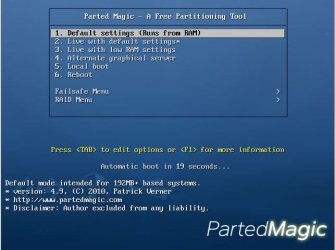
  2. Turn on the computer with the PartedMagic boot CD in the machine
  3. Start PartedMagic (See Image 1)
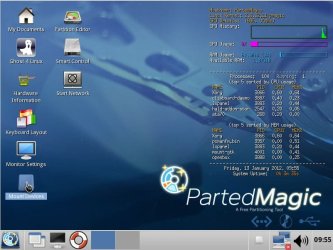
  4. On the desktop, single click the icon with the words Mount Devices below it (See Image 2)
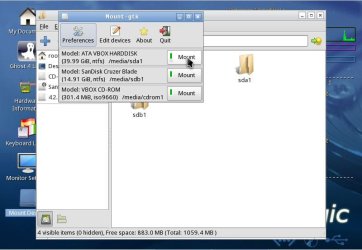
  5. After you click, you see a similar layout to that in Image 3; make note of media/sda1 and media/sdb1 and which is your windows disk and which is the external disk. Yours may not be sda1 and sdb1 but sda1 and sdc1 or a different combination, so just make note of what letter each is (a,b,c,etc.)
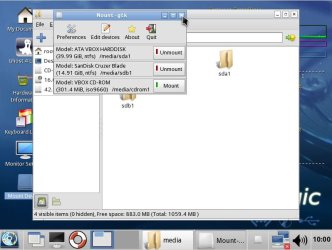
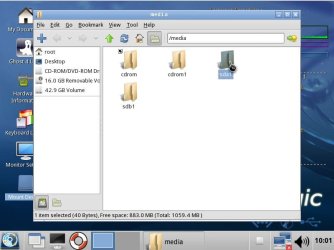
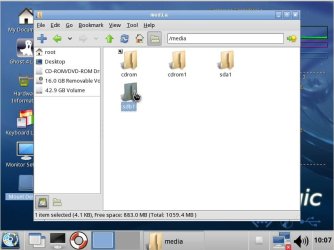
  6. After clicking mount for your two drives, it will look similar to Image 4. Your drives are now mounted. My Windows drive is sda1 and my external is sdb1. I will now open those folders and copy files across.
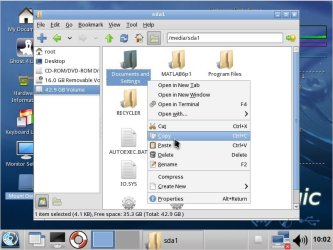
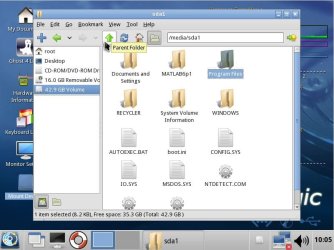
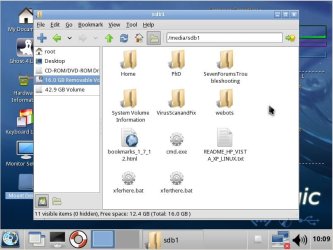
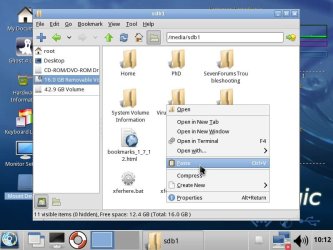
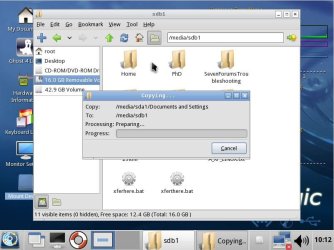
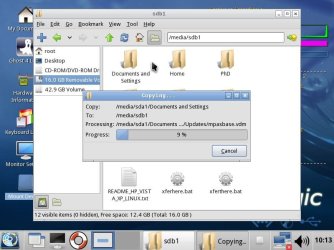
  7. Copying will proceed with images 5-12 and steps are:
    • Close out the Mount - gtk window
    • Image 5. Open the folder containing your drive you want to copy from (in my case, sda1)
    • Image 6. Right click the folder you want to copy (I chose Documents and Settings as this is my Windows XP Users folder)
    • Image 6. Click Copy
    • Image 7. Click the green up arrow to proceed back to the parent folder to open the external drive
    • Image 8. Open the folder containing your external drive you want to copy to (in my case, sdb1)
    • Image 9. Right click in an empty (white) area on the external drive
    • Image 10. Click Paste.
    • Image 11. You should see it prepare to copy.
    • Image 12. And then it will copy the files over.
Image 1.
PartedMagic1.JPG
Image 2.
PartedMagic2.JPG
Image 3.
PartedMagic3.JPG
Image 4.
PartedMagic4.JPG
Image 5.
PartedMagic5.JPG
Image 6.
PartedMagic6.JPG
Image 7.
PartedMagic7.JPG
Image 8.
PartedMagic8.JPG
Image 9.
PartedMagic9.JPG
Image 10.
PartedMagic10.JPG
Image 11.
PartedMagic11.JPG
Image 12.
PartedMagic12.JPG
 
Last edited:

My Computer

Computer Manufacturer/Model Number
HP Pavilion e9110t
OS
Windows 7 Home Premium 64 Bit
CPU
Intel(R) Core(TM)2 Quad CPU Q9550 @ 2.83GHz
Motherboard
Pegatron IPIEL-LA3
Memory
6.00 GB Hundai HMT125U6BFR8C-H9
Graphics Card(s)
ATI Radeon HD 4850
Sound Card
Realtek High Definition Audio/ATI High Definition Audio
Monitor(s) Displays
Acer AL2216W
Screen Resolution
1680x1050
Hard Drives
Hitachi HDP725050GLA360 ATA Device 500 GB
PSU
Unknown/installed by HP
Case
HP generic case
Cooling
Intel Stock Cooling
Keyboard
HP Keyboard
Mouse
HP Mouse
Internet Speed
Download: 19.15 Mbps Upload: 1.67 Mbps
Other Info
Network Adapter Realtek RTL8168D/8111D Family PCI-E Gigabit Ethernet NIC (NDIS 6.20)
Network Adapter 802.11n Wireless PCI Express Card LAN Adapter
ok, thank you for the walkthrough it helped, but you are going to love this news.

i dont know how but as i was working on pulling my info, what ever is on my comp activated again, and started apparently "eating" info, my entire music collection was gone by the time i moved from my photos to my music, got most of my videos before it ate 2 folders, and now i cant even get the toshiba boot up... i think the hard drive is completely gone... so im guessing new hard drive but how do i get windows 7 back on my comp?

to give an idea of how fast that thing ate, i got all of 20Gb off of my comp, and i had about 80Gb in total
 

My Computer

OS
Windows 7 64bit
ok, thank you for the walkthrough it helped, but you are going to love this news.

i dont know how but as i was working on pulling my info, what ever is on my comp activated again, and started apparently "eating" info, my entire music collection was gone by the time i moved from my photos to my music, got most of my videos before it ate 2 folders, and now i cant even get the toshiba boot up... i think the hard drive is completely gone... so im guessing new hard drive but how do i get windows 7 back on my comp?

to give an idea of how fast that thing ate, i got all of 20Gb off of my comp, and i had about 80Gb in total

Ouch. You think it was a virus or you just have a bad drive?
 

My Computer

Computer Manufacturer/Model Number
HP Pavilion e9110t
OS
Windows 7 Home Premium 64 Bit
CPU
Intel(R) Core(TM)2 Quad CPU Q9550 @ 2.83GHz
Motherboard
Pegatron IPIEL-LA3
Memory
6.00 GB Hundai HMT125U6BFR8C-H9
Graphics Card(s)
ATI Radeon HD 4850
Sound Card
Realtek High Definition Audio/ATI High Definition Audio
Monitor(s) Displays
Acer AL2216W
Screen Resolution
1680x1050
Hard Drives
Hitachi HDP725050GLA360 ATA Device 500 GB
PSU
Unknown/installed by HP
Case
HP generic case
Cooling
Intel Stock Cooling
Keyboard
HP Keyboard
Mouse
HP Mouse
Internet Speed
Download: 19.15 Mbps Upload: 1.67 Mbps
Other Info
Network Adapter Realtek RTL8168D/8111D Family PCI-E Gigabit Ethernet NIC (NDIS 6.20)
Network Adapter 802.11n Wireless PCI Express Card LAN Adapter
Ouch. You think it was a virus or you just have a bad drive?


the hard drive is showing as passing by the partedmagic, i was able to boot it up again as far as from cd checking the files seeing if it was hiding them or something

either way, do you think its possible to whipe the hard drive and use it again, or just have to get a new one?
 

My Computer

OS
Windows 7 64bit
Ouch. You think it was a virus or you just have a bad drive?


the hard drive is showing as passing by the partedmagic, i was able to boot it up again as far as from cd checking the files seeing if it was hiding them or something

either way, do you think its possible to whipe the hard drive and use it again, or just have to get a new one?

It depends on the damage. It is worth trying to wipe it. You can http://www.sevenforums.com/tutorials/1649-clean-install-windows-7-a.html using a Windows 7 DVD that has the same version that the laptop came with and use your key on the sticker attached to your computer. To get an official DVD ISO to burn to a DVD, just search Google for: windows 7 sp1 integrated iso offical direct download link
 

My Computer

Computer Manufacturer/Model Number
HP Pavilion e9110t
OS
Windows 7 Home Premium 64 Bit
CPU
Intel(R) Core(TM)2 Quad CPU Q9550 @ 2.83GHz
Motherboard
Pegatron IPIEL-LA3
Memory
6.00 GB Hundai HMT125U6BFR8C-H9
Graphics Card(s)
ATI Radeon HD 4850
Sound Card
Realtek High Definition Audio/ATI High Definition Audio
Monitor(s) Displays
Acer AL2216W
Screen Resolution
1680x1050
Hard Drives
Hitachi HDP725050GLA360 ATA Device 500 GB
PSU
Unknown/installed by HP
Case
HP generic case
Cooling
Intel Stock Cooling
Keyboard
HP Keyboard
Mouse
HP Mouse
Internet Speed
Download: 19.15 Mbps Upload: 1.67 Mbps
Other Info
Network Adapter Realtek RTL8168D/8111D Family PCI-E Gigabit Ethernet NIC (NDIS 6.20)
Network Adapter 802.11n Wireless PCI Express Card LAN Adapter
Did clean install recover your drive?
 

My Computer

Computer Manufacturer/Model Number
HP Pavilion e9110t
OS
Windows 7 Home Premium 64 Bit
CPU
Intel(R) Core(TM)2 Quad CPU Q9550 @ 2.83GHz
Motherboard
Pegatron IPIEL-LA3
Memory
6.00 GB Hundai HMT125U6BFR8C-H9
Graphics Card(s)
ATI Radeon HD 4850
Sound Card
Realtek High Definition Audio/ATI High Definition Audio
Monitor(s) Displays
Acer AL2216W
Screen Resolution
1680x1050
Hard Drives
Hitachi HDP725050GLA360 ATA Device 500 GB
PSU
Unknown/installed by HP
Case
HP generic case
Cooling
Intel Stock Cooling
Keyboard
HP Keyboard
Mouse
HP Mouse
Internet Speed
Download: 19.15 Mbps Upload: 1.67 Mbps
Other Info
Network Adapter Realtek RTL8168D/8111D Family PCI-E Gigabit Ethernet NIC (NDIS 6.20)
Network Adapter 802.11n Wireless PCI Express Card LAN Adapter
Back
Top