Solved How to remove desktop icon text? but laptop w/o numlock :(

hawkeyes

New member
Hi all you windows 7 buddies,
I'd like to get some help on how to remove the text beneath the icons on my desktop. I know you're supposed to rename it and type Alt+255 but my HP G62-144DX laptop doesn't have a numpad or a numlock that I can see or find. I'm running home premium 64bit. If you have a solution, that would be awesome! Thank you, have a great weekend!

btw, here is a link to a photo of my keyboard if that may help
 

Attachments

  • IMG_0356.jpg
    IMG_0356.jpg
    736.9 KB · Views: 82
Last edited by a moderator:

My Computer

OS
Windows 7 Home Premium 64bit
run "charmap" .. lots of blank words
 

My Computer

Computer Manufacturer/Model Number
AMD
OS
Windows 7 Ultimate x64 Build 7600[Desktop] , Windows XP Pro SP3 x86[Notebook]
CPU
Acer Aspire
Motherboard
Acer
Memory
1GB + 2GB
Graphics Card(s)
ATI Radeon 2100[Integrated]
Sound Card
Realtek High Definition Audio
Monitor(s) Displays
Acer X203H
Screen Resolution
1600 X 900
Hard Drives
160GB
Case
Acer
Cooling
Air conditioner xD
Keyboard
Logitech Compact Keyboard K300
Mouse
Nortek (Wireless mouse)
Internet Speed
DL 16mbps / UL 8mbps (Half)
Yes there is no numpad but it does have all the number keys across the top just above the letters. Why can't you use those? They are numbers by default, shift just gets you the symbols above them.
 

My Computer

Computer type
PC/Desktop
Computer Manufacturer/Model Number
Home Built
OS
Windows 10 Education 64 bit
CPU
AMD Phenom II X4 980 Black Edition Deneb 3.7GHz
Motherboard
Asus M4N68T-M V2 µATX Motherboard
Memory
8GB 4GBx2 Kingston PC10600 DDR3 1333 Memory
Graphics Card(s)
Zotac NVIDIA Geforce GT640 2 Gig DDR3 PCIe
Sound Card
VIA VT1708s High Definition Audio 8-channel Onboard
Monitor(s) Displays
22" LG E2242 1080p and 2 19" I-INC AG191D
Screen Resolution
1280x1024 - 1920x1080 - 1280x1024
Hard Drives
Crucial M100 256 GB SSD and 500 GB WD Blue SATA
PSU
Thermaltake TR 620
Case
Power Up Black ATX Mid-Tower Case
Cooling
Stock heatsink and fan
Keyboard
Logitech Wireless K350 Wave
Mouse
Logitech Wireless M570 Trackman Wheel
Internet Speed
80 Mbps Down 30 Mbps Up
Antivirus
Windows Defender
Browser
Internet Explorer 11
Other Info
HP DVD1040e Lightscribe - External USB2
The alt-numpad method does not work with the number keys on the keyboard just as the OP mentioned, alphanumeric.

However, SevenUser12's solution should do the trick.

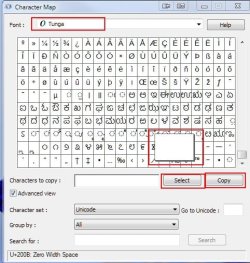
Open charmap.exe by typing it in your "Start" search bar or selecting "Run" and then typing it in. I randomly selected the "Tunga" font and found a blank character and then clicked "Select," then "Copy".
Screenshot_2.jpg

I then right clicked on this icon Screenshot_4.jpg and selected "Rename" then right clicked again and selected "Paste" resulting in Screenshot_5.jpg, a nameless icon.

The icon launches just as it did prior to the rename and I only used the mouse and charmap to do it.

Nice one, SevenUser12, thanks. I hope it helps hawkeyes.

I think we can mark this one as solved?
 

My Computer

Computer Manufacturer/Model Number
Toshiba L355D
OS
Windows 7 Ultimate x64 SP1
CPU
Core2 Duo
Motherboard
Intel
Memory
4 GB
Graphics Card(s)
GM965 on-board
Sound Card
RealTek on-board
Monitor(s) Displays
19"+17"(laptop)
Screen Resolution
1440x900 (x 2)
Hard Drives
500GB Ext. 200GB Internal
PSU
N/A
Case
N/A
Cooling
N/A
OK, fair enough, I didn't know there was a difference. :o Plugging in a full sized keyboard should get you around it too. :)
 

My Computer

Computer type
PC/Desktop
Computer Manufacturer/Model Number
Home Built
OS
Windows 10 Education 64 bit
CPU
AMD Phenom II X4 980 Black Edition Deneb 3.7GHz
Motherboard
Asus M4N68T-M V2 µATX Motherboard
Memory
8GB 4GBx2 Kingston PC10600 DDR3 1333 Memory
Graphics Card(s)
Zotac NVIDIA Geforce GT640 2 Gig DDR3 PCIe
Sound Card
VIA VT1708s High Definition Audio 8-channel Onboard
Monitor(s) Displays
22" LG E2242 1080p and 2 19" I-INC AG191D
Screen Resolution
1280x1024 - 1920x1080 - 1280x1024
Hard Drives
Crucial M100 256 GB SSD and 500 GB WD Blue SATA
PSU
Thermaltake TR 620
Case
Power Up Black ATX Mid-Tower Case
Cooling
Stock heatsink and fan
Keyboard
Logitech Wireless K350 Wave
Mouse
Logitech Wireless M570 Trackman Wheel
Internet Speed
80 Mbps Down 30 Mbps Up
Antivirus
Windows Defender
Browser
Internet Explorer 11
Other Info
HP DVD1040e Lightscribe - External USB2
OK, fair enough, I didn't know there was a difference. :o Plugging in a full sized keyboard should get you around it too. :)

Indeed, it will, however, the Thread Starter did not mention this as a viable option. He was merely asking how to accomplish getting rid of the icon text with the tools he has at hand. ;)

This method could come in handy for many others that have only their laptop keyboard available should they decide to make a few nameless icons on their desktop.

I have an attached keyboard as well as a laptop with a numeric keypad but not everyone has that luxury.
 

My Computer

Computer Manufacturer/Model Number
Toshiba L355D
OS
Windows 7 Ultimate x64 SP1
CPU
Core2 Duo
Motherboard
Intel
Memory
4 GB
Graphics Card(s)
GM965 on-board
Sound Card
RealTek on-board
Monitor(s) Displays
19"+17"(laptop)
Screen Resolution
1440x900 (x 2)
Hard Drives
500GB Ext. 200GB Internal
PSU
N/A
Case
N/A
Cooling
N/A
Back
Top