Help - Screen Blanker Utility - Is there One ?

thehappyman

New member
Pro User
Local time
11:59 PM
Messages
258
Location
Central Florida
I am looking for a Software Utility that puts an icon on the desktop, which, when double clicked, would totally blank my screen - and then either clicking the mouse, moving the mouse, or pressing any key would restore the screen.

I want to be able to blank the monitor without actually turning it off. Both to save the screen and to save power.

Any help on this would be appreciated a lot.
 

My Computer

Computer Manufacturer/Model Number
Alienware Aurora
OS
Win 7 Ultimate x64
CPU
Core I7 980X O.C. to 4.0 Ghz
Motherboard
Custom Intel mATX (Bios ver A10)
Memory
12GB 1600 mhz triple channel DDR3 - Kingston
Graphics Card(s)
ATI Radeon HD 5970 2GB Video Card
Sound Card
Creative Labs Titanium sound blaster
Monitor(s) Displays
30" Dell LCD
Screen Resolution
2560 x 1600
Hard Drives
240 GB OCZ Vertex 2 SSD
256 GB Samsung V2 SSD
2TB WD Black Caviar 7200 rpm SATA3
600GB WD Velociraptor 10,000 rpm SATA3
3TB WD MyBook Essential USB 3.0 7200 rpm External
PSU
850 Watt
Case
Alienware Aurora
Cooling
Water
Keyboard
Logitech G15 (original version)
Mouse
Logitech MX1000 Laser - Wireless
Internet Speed
Cable 22 Mb/sec download
Other Info
USB 3.0,
Blue Ray DVD Read/Writer
Bose Companion 3 Speakers
WRT54G Wireless Router
It's not a great idea to have a blank image displayed on your screen (even a black screen). This could lead to screen burn. Although most modern screens have pixel shift built in to them, allot of manufacturers still recommend using a moving image. I would suggest just turning off you screen via the power button is just as quick and easy. You won't save much power or the screens life by just blanking your screen but you will by turning it off. ;)
 

My Computer

Computer type
PC/Desktop
Computer Manufacturer/Model Number
Self Built
OS
Windows 7 Ultimate 64bit
CPU
AMD Phenom Quad core 9950 black edition
Motherboard
Gigabyte
Memory
16Gb
Graphics Card(s)
2x XFX Radeon 5850
Sound Card
PCI Express X-Fi Titanium / Logitech G35
Monitor(s) Displays
2x HP 2410i
Screen Resolution
1920x1080
Hard Drives
2x 500Gb Seagate
1x 300Gb Seagate
1x 1Tb Seagate
2x 1Tb Hitatchi
PSU
Jean Tech Storm 700W
Case
Cooler Master COSMOS S
Cooling
Akasa Evo Blue Pro
Keyboard
Logitech G15
Mouse
Mad Catz M.M.O. 7
Internet Speed
12mb
I've broken a monitor power button before - I compulsively switch off even if I leave the room just to take a leak - but that was a cheap crap CRT. Haven't had any issues switching off/on flatscreens so far these past few years.

Didn't know even a fullscreen black image was bad though, thanks for the heads up. I used to play this MMO on one laptop which would timeout the game if it went to sleep or I closed the lid, so I opened paint and had it display a full black screen. Kicked that habit though (both blacking out the screen and the game, lol).
 

My Computer

Computer Manufacturer/Model Number
Self-built rig
OS
Win7 Pro x64
CPU
Koa i5-2550K
Memory
8 GB
Graphics Card(s)
Sapphire ATI 6870 1GB GDDR5
Sound Card
RealTek HD Audio / ATI HDMI Audio
Monitor(s) Displays
Samsung HDTV Monitor T23A350
Screen Resolution
1920 x 1080
Hard Drives
- SSD (C:)
- HDD (D:)
- BD-ROM (E:)
Keyboard
Logitech G110
Internet Speed
Unifi home (5mbps)
There's a really easy and simple way to do this:

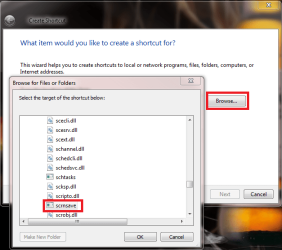
Create a new shortcut on your desktop. Browse to scrnsave.scr in C:\Windows\System32, click OK, click Next, name the shortcut as you wish, click OK.

scrsave.png

Now you have a shortcut to run Blank Screen screensaver on your desktop. Double click it to instantly blank the screen, move mouse or press a key to return to desktop. Screen stays blanked as long as nothing happens, and it does not disable your normal screen saver.

Blank Screen.PNG

You can use the same method to launch any screensaver (.scr) file.

Kari
 

My Computer

Computer type
Laptop
Computer Manufacturer/Model Number
HP ENVY 17-1150eg
OS
Windows 10 Pro x64 EN-GB
CPU
1.6 GHz Intel Core i7-720QM Processor
Memory
6 GB
Graphics Card(s)
ATI Mobility Radeon HD 5850 Graphics
Sound Card
Beats sound system with integrated subwoofer
Monitor(s) Displays
17" laptop display, 22" LED and 32" Full HD TV through HDMI
Screen Resolution
1600*900 (1), 1920*1080 (2&3)
Hard Drives
Internal: 2 x 500 GB SATA Hard Disk Drive 7200 rpm
External: 2TB for backups, 3TB USB3 network drive for media
Cooling
As Envy runs a bit warm, I have it on a Cooler Master pad
Keyboard
Logitech diNovo Media Desktop Laser (bluetooth)
Mouse
Logitech Performance Mouse MX
Internet Speed
50/10 Mbps VDSL
Antivirus
Windows Defender 4.3.9431.0
Browser
Maxthon 3.5.2., IE11
Thanks so much Kari - this works great - it's exactly what I wanted - Click the shortcut and it blanks the screen until you hit a key or move the mouse. :):):)
 

My Computer

Computer Manufacturer/Model Number
Alienware Aurora
OS
Win 7 Ultimate x64
CPU
Core I7 980X O.C. to 4.0 Ghz
Motherboard
Custom Intel mATX (Bios ver A10)
Memory
12GB 1600 mhz triple channel DDR3 - Kingston
Graphics Card(s)
ATI Radeon HD 5970 2GB Video Card
Sound Card
Creative Labs Titanium sound blaster
Monitor(s) Displays
30" Dell LCD
Screen Resolution
2560 x 1600
Hard Drives
240 GB OCZ Vertex 2 SSD
256 GB Samsung V2 SSD
2TB WD Black Caviar 7200 rpm SATA3
600GB WD Velociraptor 10,000 rpm SATA3
3TB WD MyBook Essential USB 3.0 7200 rpm External
PSU
850 Watt
Case
Alienware Aurora
Cooling
Water
Keyboard
Logitech G15 (original version)
Mouse
Logitech MX1000 Laser - Wireless
Internet Speed
Cable 22 Mb/sec download
Other Info
USB 3.0,
Blue Ray DVD Read/Writer
Bose Companion 3 Speakers
WRT54G Wireless Router
You are welcome. It's one of those features in Windows that are almost too easy, so we don't even think of them.
 

My Computer

Computer type
Laptop
Computer Manufacturer/Model Number
HP ENVY 17-1150eg
OS
Windows 10 Pro x64 EN-GB
CPU
1.6 GHz Intel Core i7-720QM Processor
Memory
6 GB
Graphics Card(s)
ATI Mobility Radeon HD 5850 Graphics
Sound Card
Beats sound system with integrated subwoofer
Monitor(s) Displays
17" laptop display, 22" LED and 32" Full HD TV through HDMI
Screen Resolution
1600*900 (1), 1920*1080 (2&3)
Hard Drives
Internal: 2 x 500 GB SATA Hard Disk Drive 7200 rpm
External: 2TB for backups, 3TB USB3 network drive for media
Cooling
As Envy runs a bit warm, I have it on a Cooler Master pad
Keyboard
Logitech diNovo Media Desktop Laser (bluetooth)
Mouse
Logitech Performance Mouse MX
Internet Speed
50/10 Mbps VDSL
Antivirus
Windows Defender 4.3.9431.0
Browser
Maxthon 3.5.2., IE11
It's not a great idea to have a blank image displayed on your screen (even a black screen). This could lead to screen burn. Although most modern screens have pixel shift built in to them, allot of manufacturers still recommend using a moving image. I would suggest just turning off you screen via the power button is just as quick and easy. You won't save much power or the screens life by just blanking your screen but you will by turning it off. ;)

Hi PooMan - I would have done as you suggested but powering electronics off and on again repeatedly is not particularly a good idea. It is not at all conducive to extending component lifetime.

As I have a 30 inch monitor, blanking the screen does save a noticeable, but small, amount of power. But that is not my main objective. In my particular case my computer/monitor is mounted on a desk with my 61" TV behind it so I am very often wanting to blank out the monitor without powering it down so I can shift my attention from the computer screen to the TV and not be distracted. Then, at a moments notice, switching back to the computer screen, if you see my logic.

This new shortcut, as suggested by Kari, works great for my purposes.
 

My Computer

Computer Manufacturer/Model Number
Alienware Aurora
OS
Win 7 Ultimate x64
CPU
Core I7 980X O.C. to 4.0 Ghz
Motherboard
Custom Intel mATX (Bios ver A10)
Memory
12GB 1600 mhz triple channel DDR3 - Kingston
Graphics Card(s)
ATI Radeon HD 5970 2GB Video Card
Sound Card
Creative Labs Titanium sound blaster
Monitor(s) Displays
30" Dell LCD
Screen Resolution
2560 x 1600
Hard Drives
240 GB OCZ Vertex 2 SSD
256 GB Samsung V2 SSD
2TB WD Black Caviar 7200 rpm SATA3
600GB WD Velociraptor 10,000 rpm SATA3
3TB WD MyBook Essential USB 3.0 7200 rpm External
PSU
850 Watt
Case
Alienware Aurora
Cooling
Water
Keyboard
Logitech G15 (original version)
Mouse
Logitech MX1000 Laser - Wireless
Internet Speed
Cable 22 Mb/sec download
Other Info
USB 3.0,
Blue Ray DVD Read/Writer
Bose Companion 3 Speakers
WRT54G Wireless Router
There's a really easy and simple way to do this:

Create a new shortcut on your desktop. Browse to scrnsave.scr in C:\Windows\System32, click OK, click Next, name the shortcut as you wish, click OK.

View attachment 119919

Now you have a shortcut to run Blank Screen screensaver on your desktop. Double click it to instantly blank the screen, move mouse or press a key to return to desktop. Screen stays blanked as long as nothing happens, and it does not disable your normal screen saver.

View attachment 119920

You can use the same method to launch any screensaver (.scr) file.

Kari

Thanks that works great, I added the shortcut to my objectdock now it's one click.
Jerry
 

My Computer

Computer type
Laptop
Computer Manufacturer/Model Number
Sager NP9170
OS
Win 7 Pro x64 / Win 10 Pro
CPU
Intel(R) Core(TM) i7-3630QM CPU @ 2.40GHz
Motherboard
CLEVO P170EM
Memory
12 GB
Graphics Card(s)
(1) Intel(R) HD Graphics 4000 (2) NVIDIA GeForce GTX 675M
Sound Card
(1) Realtek High Definition Audio (2) Intel(R) Display Aud
Monitor(s) Displays
17.3
Screen Resolution
1920x1080
Hard Drives
(1) Samsung 860 EVO 500GB(OS) (1) Samsung 860 EVO 500GB(Data)
Keyboard
Backlite
Antivirus
MSE, Malwarebytes Pro
Browser
Firefox
Other Info
DESKTOP: Custom-built.
OS: Win 10 Pro x64.
CASE: Rosewill R5.
CPU: Intel I5 4670K CPU @ 3.40GHz.
CPU COOLER: Cool Master Hyper 212 EVO.
MOTHERBOARD: Asus Z87-A.
MEMORY: Kingston HyperX 2x4 GB.
GPU: Nvidia Geforce 650 TI.
PSU: Corsair TX750.
DRIVES: (1) Samsung 840 120 GB SSD (2) Western Digital blue 500 GB 7200 RPM.
I was gonna suggest this: Windows Fader Screensaver
it's what I've been using, I made a shortcut just like the one listed above, but all this does is fade to black or any other color.
 

My Computer

Computer Manufacturer/Model Number
Toshiba p205-s7469
OS
Windows 7 Ultimate
CPU
intel Core 2 Duo t5250
Motherboard
Mobile Intel® GM965 Express Chipset
Memory
4gb PC2-5300 DDR2 SDRAM
Graphics Card(s)
Mobile Intel® Graphics Media Accelerator X3100 with 64MB-251
Sound Card
Toshiba w/Realtek Audio & Harmon Kardon Speakers(2)+ subwoof
Monitor(s) Displays
17.0” widescreen TruBrite TFT LCD 1440x900
Hard Drives
toshiba 500gb sata (primary) Toshiba 200gb (secondary)
Hi PooMan - I would have done as you suggested but powering electronics off and on again repeatedly is not particularly a good idea. It is not at all conducive to extending component lifetime.


This new shortcut, as suggested by Kari, works great for my purposes.

No probs pal, it was just that in your 1st post you said you wanted to

Both to save the screen and to save power.

Well powering off the screen isn't as bad as you think ;) and will prolong the life and save power over a blank screen saver. (you'de be surprised at how much power a 30" can use) I can only go on the info that manufacturers send us, but maybe
A Guy could give you better information as he's been a TV tech since they were invented :p but if Kari's solution is what your looking for then it's all good pal ;)
 

My Computer

Computer type
PC/Desktop
Computer Manufacturer/Model Number
Self Built
OS
Windows 7 Ultimate 64bit
CPU
AMD Phenom Quad core 9950 black edition
Motherboard
Gigabyte
Memory
16Gb
Graphics Card(s)
2x XFX Radeon 5850
Sound Card
PCI Express X-Fi Titanium / Logitech G35
Monitor(s) Displays
2x HP 2410i
Screen Resolution
1920x1080
Hard Drives
2x 500Gb Seagate
1x 300Gb Seagate
1x 1Tb Seagate
2x 1Tb Hitatchi
PSU
Jean Tech Storm 700W
Case
Cooler Master COSMOS S
Cooling
Akasa Evo Blue Pro
Keyboard
Logitech G15
Mouse
Mad Catz M.M.O. 7
Internet Speed
12mb
I would combine the two. The method Kari posted will allow you to blank the screen at will. But also set the computer to turn off the monitor after, say 15 mins. of inactivity. that way if you want to blank the screen, use the screensaver, and then if away for more than 15 mins., the monitor will also go into standby. Either way, you can wake it with the press of a key of movement of the mouse. Even creating the blank screensaver, the monitor is using almost the same power as when the picture is showing, as the backlights remain lit. Powering to standby will turn the backlights off, and prolong the life of the monitor.

A Guy
 

My Computer

Computer type
PC/Desktop
OS
Windows 10 Home x64
CPU
INTEL Core i5-750 Quad-Core 3.37GHz
Motherboard
ASUS P7P55D
Memory
HyperX Fury Black Series 8GB (2 x 4GB) 1866Mhz
Graphics Card(s)
EVGA GeForce GTX 750 Superclocked 1GB 128-Bit GDDR5
Monitor(s) Displays
LG 32MA68HY 32" IPS
Screen Resolution
1920 x 1080
Hard Drives
Samsung 840 Evo 120GB, SEAGATE 500GB Barracuda® 7200.12, SATA 3 Gb/s, 7200 RPM, 16MB cache
PSU
ANTEC TruePower New TP-550, 80 PLUS, 550W
Case
ANTEC Three Hundred Illusion
Cooling
COOLER MASTER Hyper 212 Plus, 4 x 120mm 1 x 140mm Noctua's
Internet Speed
85 + Mbps
Antivirus
Avast
Browser
Vivaldi
This "Combination" sounds like a good idea - being able to blank the screen instantly, without powering down the monitor, or turning it off if "unused" for 30 minutes - the best of both worlds.

Thanx All :):):)
 

My Computer

Computer Manufacturer/Model Number
Alienware Aurora
OS
Win 7 Ultimate x64
CPU
Core I7 980X O.C. to 4.0 Ghz
Motherboard
Custom Intel mATX (Bios ver A10)
Memory
12GB 1600 mhz triple channel DDR3 - Kingston
Graphics Card(s)
ATI Radeon HD 5970 2GB Video Card
Sound Card
Creative Labs Titanium sound blaster
Monitor(s) Displays
30" Dell LCD
Screen Resolution
2560 x 1600
Hard Drives
240 GB OCZ Vertex 2 SSD
256 GB Samsung V2 SSD
2TB WD Black Caviar 7200 rpm SATA3
600GB WD Velociraptor 10,000 rpm SATA3
3TB WD MyBook Essential USB 3.0 7200 rpm External
PSU
850 Watt
Case
Alienware Aurora
Cooling
Water
Keyboard
Logitech G15 (original version)
Mouse
Logitech MX1000 Laser - Wireless
Internet Speed
Cable 22 Mb/sec download
Other Info
USB 3.0,
Blue Ray DVD Read/Writer
Bose Companion 3 Speakers
WRT54G Wireless Router
This is an old thread but wanted to share another option - this one actually turns off the monitor (on my Tosh R700 at least)...

Google "nircmd", save the exe to your local drive and create a shortcut to the below command:

nircmd.exe cmdwait 1000 monitor off

I also use CTRL + SHIFT + M as a shortcut key to provide a quick way to execute...
 

My Computer

Computer Manufacturer/Model Number
Toshiba R700
OS
Windows 7 Enterprise
Back
Top