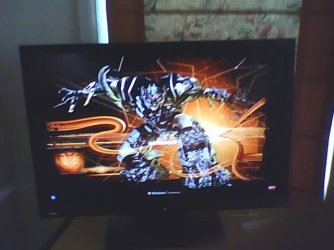
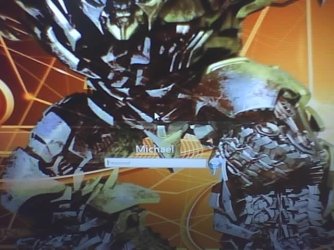
One last try, Get rid of User Account picture on login screen.

Tsuun

New member
Local time
3:44 AM
Messages
2
Hi 7forum!

This is my last resort, so please help me!
I have after a long time searching ended up here on this forum.

What I want to do is simply to remove the picture & frame on my login screen, only the password, my name, switch user should be left on the screen.

To clarify, I don't want to:
Remove the whole login screen.
Remove password protection.
Remove anything else except for that picture and frame.

Thats pretty much it, I would be really thankful if somebody could help me with this because I'm close to changing to linux just to get rid of it :cry:.

Thanks in advance!

Tsuun
 

My Computer My Computer

At a glance

Windows 7 Home Premiumnot worth mentioningnot worth mentioningnot worth mentioning
Computer Manufacturer/Model Number
Hp G62
OS
Windows 7 Home Premium
CPU
not worth mentioning
Motherboard
not worth mentioning
Memory
not worth mentioning
Graphics Card(s)
not worth mentioning
Sound Card
not worth mentioning
Monitor(s) Displays
not worth mentioning
Hard Drives
not worth mentioning
PSU
not worth mentioning
Case
not worth mentioning
Cooling
not worth mentioning
I'm thinking a transparent .png picture would take care of the profile picture. As for the frame... that's above my pay grade right now ;)
 

My Computer My Computer

At a glance

Windows 7 Ultimate (SP1)AMD Sempron 3600+ATI Radeon Xpress 1150
Computer Manufacturer/Model Number
Vostro
OS
Windows 7 Ultimate (SP1)
CPU
AMD Sempron 3600+
Graphics Card(s)
ATI Radeon Xpress 1150
Screen Resolution
1200 x 800
Hard Drives
WD Scorpio Blue 500 GB
I'll save you the trouble of looking any further.
You cannot change it. Done. Over.

Bye.
 

My Computer My Computer

At a glance

Windows 10 Pro (x64)Intel Core i7-3930K (3.2GHz - 4.5GHz)4x Samsung 4GB PC3-12800 DDR3 (16GB 1600MHz)Nvidia Geforce GTX 690
Computer type
PC/Desktop
Computer Manufacturer/Model Number
Alienware Aurora ALX R4
OS
Windows 10 Pro (x64)
CPU
Intel Core i7-3930K (3.2GHz - 4.5GHz)
Motherboard
Alienware Aurora-R4 x79
Memory
4x Samsung 4GB PC3-12800 DDR3 (16GB 1600MHz)
Graphics Card(s)
Nvidia Geforce GTX 690
Sound Card
SteelSeries Siberia Elite
Monitor(s) Displays
Dell UltraSharp U3011
Screen Resolution
2560x1600
Hard Drives
Samsung 850 Pro 256 GB, Seagate 1TB Desktop Hybrid HDD, 2x Western Digital 4TB Green HDD
PSU
875W Some Dell PSU <.<
Case
Alienware Aurora ALX
Cooling
Custom Liquid Cooling (EK CPU & GPU blocks) dual EK 480RAD
Keyboard
Logitech G710+ Mechanical
Mouse
Logitech G700s
Internet Speed
Verizon Fios (50 mbps average)
Other Info
Server: Intel NUC D54250WYK: i5-4250U, 16GB, 256 GB mSATA, Windows Server 2012 R2

My Computer My Computer

At a glance

7x64 SP1Intel 2600K8GB SamsungMSI 670
OS
7x64 SP1
CPU
Intel 2600K
Motherboard
Intel DZ77GA-70K
Memory
8GB Samsung
Graphics Card(s)
MSI 670
Sound Card
HT Omega Striker 7.1
Monitor(s) Displays
Dell U2412M
Screen Resolution
1920x1200
Hard Drives
2x 3TB WD Green
1x 4TB Hitachi
1x Intel 330 Series 180GB SSD
PSU
Corsair HX850

My Computer My Computer

At a glance

Windows 10 Pro (x64)Intel Core i7-3930K (3.2GHz - 4.5GHz)4x Samsung 4GB PC3-12800 DDR3 (16GB 1600MHz)Nvidia Geforce GTX 690
Computer type
PC/Desktop
Computer Manufacturer/Model Number
Alienware Aurora ALX R4
OS
Windows 10 Pro (x64)
CPU
Intel Core i7-3930K (3.2GHz - 4.5GHz)
Motherboard
Alienware Aurora-R4 x79
Memory
4x Samsung 4GB PC3-12800 DDR3 (16GB 1600MHz)
Graphics Card(s)
Nvidia Geforce GTX 690
Sound Card
SteelSeries Siberia Elite
Monitor(s) Displays
Dell UltraSharp U3011
Screen Resolution
2560x1600
Hard Drives
Samsung 850 Pro 256 GB, Seagate 1TB Desktop Hybrid HDD, 2x Western Digital 4TB Green HDD
PSU
875W Some Dell PSU <.<
Case
Alienware Aurora ALX
Cooling
Custom Liquid Cooling (EK CPU & GPU blocks) dual EK 480RAD
Keyboard
Logitech G710+ Mechanical
Mouse
Logitech G700s
Internet Speed
Verizon Fios (50 mbps average)
Other Info
Server: Intel NUC D54250WYK: i5-4250U, 16GB, 256 GB mSATA, Windows Server 2012 R2

Attachments

  • 11-08-11_0813.jpg
    11-08-11_0813.jpg
    33.1 KB · Views: 147
  • 11-08-11_0814.jpg
    11-08-11_0814.jpg
    44.5 KB · Views: 147

My Computer My Computer

At a glance

Windows 7 Professional x64AMD PhenomII x4 9654 x 2GB Kingston HyperX Blu2 x ATI HD6850/oc
OS
Windows 7 Professional x64
CPU
AMD PhenomII x4 965
Motherboard
MSI 890GXM-G65
Memory
4 x 2GB Kingston HyperX Blu
Graphics Card(s)
2 x ATI HD6850/oc
Sound Card
On Board
Monitor(s) Displays
BenQ G2400W
Hard Drives
360G & 160G
PSU
Thermaltake Evo Blue 750W
Case
Thermaltake Shark
Cooling
Corsair H70
It probably does say otherwise. But I prefer to avoid mentioning editing system files like that. Too much of a risk I rather not be involved in. Plus there is no guarantee it won't horribly break things.

I believe that the Authui.dll file is replaced in critical updates. By using your 7 Installation CD, you can roll back to the last backup and the file will be overwritten and replaced.

This also, in theory poses an issue with this method, as if a system update rolls along, the Authui.dll file would be overwritten.
 

My Computer My Computer

At a glance

Windows 7 Professional 32bit multiboot KDE Li...
OS
Windows 7 Professional 32bit multiboot KDE Linux/Unix
Back
Top