Solved Can't rename "Documents" library to "Comics"

FrozenInferno

New member
Member
Local time
5:39 PM
Messages
36
So here's what happened:


I was using my "Documents" library as a shortcut to my comics folder. I did this because I wanted my comics folder to be accessible through the upper right section of the start menu. So I renamed it to "Comics", and all was well. That is, until I installed the windows 7 service pack 1 update. After that, the library was renamed "Documents", and whenever I'd try to change it back to "Comics", it would simply revert after hitting enter. I even tried changing the name through the "HKEY_CURRENT_USER\Software\Microsoft\Windows\CurrentVersion\Explorer\User Shell Folders" registry key, but that didn't work either.


I'm certain it has something to do with the Service Pack 1 update. I assume during the update, as the Documents library was named "Comics", it sort of amalgamated that name with "Documents", expecting that to be the title, and now it can't tell a difference. I should point out though, when I do change it to "Comics", it does show up as Comics.library-ms under the registry key I mentioned.


Any suggestions?
 

My Computer

OS
Windows 7 Home Premium 64-bit
Hello FrozenInferno and welcome to Seven Forums.

Don't know if this will help or not because there seems to be a dependency between SP1 and default folder names. But it might be worth a try.

Uninstall SP1

How to uninstall Windows 7 Service Pack 1 (SP1)

Make sure "Documents" is still named "Documents" and not "Comics" (default name/setting)

Reinstall SP1

Learn how to install Windows 7 Service Pack 1 (SP1)

Try changing "Documents" to "Comics" after SP1 is installed.

And I would definitely make restore points and preferably a full system image just in case. Please post back and let us know if this helped or not.
 

My Computer

Computer type
Laptop
Computer Manufacturer/Model Number
Sony Vaio VPCEB47GM Laptop
OS
Win 7 Pro 64-bit
CPU
Intel i5 2.4 Ghz
Memory
8GB DDR3
Graphics Card(s)
Intel HD 3000
Sound Card
IDT High Definition
Monitor(s) Displays
15.6 WGXA Anti-Glare LED
Screen Resolution
1280x800
Hard Drives
640Gb 7200rpm
Antivirus
MSE
Browser
Opera (primary) with IE9 backup
Thanks for the reply, marsmimar. Your suggestion didn't seem to work.
 

My Computer

OS
Windows 7 Home Premium 64-bit

My Computer

Computer type
Laptop
Computer Manufacturer/Model Number
Sony Vaio VPCEB47GM Laptop
OS
Win 7 Pro 64-bit
CPU
Intel i5 2.4 Ghz
Memory
8GB DDR3
Graphics Card(s)
Intel HD 3000
Sound Card
IDT High Definition
Monitor(s) Displays
15.6 WGXA Anti-Glare LED
Screen Resolution
1280x800
Hard Drives
640Gb 7200rpm
Antivirus
MSE
Browser
Opera (primary) with IE9 backup
Well I understand I can create a new library, but I won't be able to access it through the upper right section of the start menu, which is where I prefer to access my library folders from.

Either way, I'd still be curious as to the source of the problem.
 

My Computer

OS
Windows 7 Home Premium 64-bit
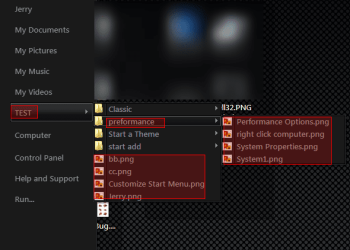
Something like this you can have multiple folders or multiple items or both you can even put a program in there to.
Jerry
 

Attachments

  • sm.png
    sm.png
    95.3 KB · Views: 66

My Computer

Computer type
Laptop
Computer Manufacturer/Model Number
Sager NP9170
OS
Win 7 Pro x64 / Win 10 Pro
CPU
Intel(R) Core(TM) i7-3630QM CPU @ 2.40GHz
Motherboard
CLEVO P170EM
Memory
12 GB
Graphics Card(s)
(1) Intel(R) HD Graphics 4000 (2) NVIDIA GeForce GTX 675M
Sound Card
(1) Realtek High Definition Audio (2) Intel(R) Display Aud
Monitor(s) Displays
17.3
Screen Resolution
1920x1080
Hard Drives
(1) Samsung 860 EVO 500GB(OS) (1) Samsung 860 EVO 500GB(Data)
Keyboard
Backlite
Antivirus
MSE, Malwarebytes Pro
Browser
Firefox
Other Info
DESKTOP: Custom-built.
OS: Win 10 Pro x64.
CASE: Rosewill R5.
CPU: Intel I5 4670K CPU @ 3.40GHz.
CPU COOLER: Cool Master Hyper 212 EVO.
MOTHERBOARD: Asus Z87-A.
MEMORY: Kingston HyperX 2x4 GB.
GPU: Nvidia Geforce 650 TI.
PSU: Corsair TX750.
DRIVES: (1) Samsung 840 120 GB SSD (2) Western Digital blue 500 GB 7200 RPM.
Hmm, that's cool. How would I go about doing it?
 

My Computer

OS
Windows 7 Home Premium 64-bit
Hmm, that's cool. How would I go about doing it?

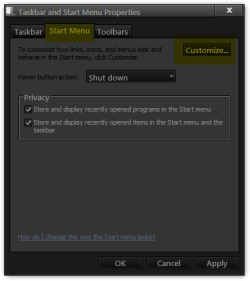
Right click on the Start Button or Taskbar > Properties > Go to the Start Menu tab & click on Customize.
Taskbar and Start Menu Properties.png
> In the Customize Start Menu window check Downloads Display as a menu.
Customize Start Menu.png
> Then right click on Download button & rename to your liking.
bb.png

It renames the Downloads folder in your user folder to your new name
Before
vv.png
After
Jerry.png
You will need to start downloading things to your desktop with no download folder. & clean out your download folder. Then put your stuff in that folder(new name one)
It's not perfect but it works
Jerry
 

My Computer

Computer type
Laptop
Computer Manufacturer/Model Number
Sager NP9170
OS
Win 7 Pro x64 / Win 10 Pro
CPU
Intel(R) Core(TM) i7-3630QM CPU @ 2.40GHz
Motherboard
CLEVO P170EM
Memory
12 GB
Graphics Card(s)
(1) Intel(R) HD Graphics 4000 (2) NVIDIA GeForce GTX 675M
Sound Card
(1) Realtek High Definition Audio (2) Intel(R) Display Aud
Monitor(s) Displays
17.3
Screen Resolution
1920x1080
Hard Drives
(1) Samsung 860 EVO 500GB(OS) (1) Samsung 860 EVO 500GB(Data)
Keyboard
Backlite
Antivirus
MSE, Malwarebytes Pro
Browser
Firefox
Other Info
DESKTOP: Custom-built.
OS: Win 10 Pro x64.
CASE: Rosewill R5.
CPU: Intel I5 4670K CPU @ 3.40GHz.
CPU COOLER: Cool Master Hyper 212 EVO.
MOTHERBOARD: Asus Z87-A.
MEMORY: Kingston HyperX 2x4 GB.
GPU: Nvidia Geforce 650 TI.
PSU: Corsair TX750.
DRIVES: (1) Samsung 840 120 GB SSD (2) Western Digital blue 500 GB 7200 RPM.
Oh, I thought you were implying there was a way to add a custom library folder there. That's definitely an alternative, but I'd prefer something a little less provisional.
 

My Computer

OS
Windows 7 Home Premium 64-bit
So here's what happened:


I was using my "Documents" library as a shortcut to my comics folder. I did this because I wanted my comics folder to be accessible through the upper right section of the start menu. So I renamed it to "Comics", and all was well. That is, until I installed the windows 7 service pack 1 update. After that, the library was renamed "Documents", and whenever I'd try to change it back to "Comics", it would simply revert after hitting enter. I even tried changing the name through the "HKEY_CURRENT_USER\Software\Microsoft\Windows\CurrentVersion\Explorer\User Shell Folders" registry key, but that didn't work either.


I'm certain it has something to do with the Service Pack 1 update. I assume during the update, as the Documents library was named "Comics", it sort of amalgamated that name with "Documents", expecting that to be the title, and now it can't tell a difference. I should point out though, when I do change it to "Comics", it does show up as Comics.library-ms under the registry key I mentioned.


Any suggestions?

Hello FrozenInferno,

You might see if you may be able to rename the library after doing this:

http://www.sevenforums.com/tutorials/154275-library-cannot-rename-fix.html

Hope this helps,
Shawn
 
Last edited:

My Computer

Computer type
PC/Desktop
Computer Manufacturer/Model Number
Self built custom
OS
64-bit Windows 11 Pro for Workstations
CPU
Intel i7-8700K OC'd to 5 GHz
Motherboard
ASUS ROG Maximus XI Formula Z390
Memory
64 GB (4x16GB) G.SKILL TridentZ RGB DDR4 3600 MHz
Graphics Card(s)
ASUS ROG-STRIX-GTX1080TI-O11G-GAMING
Sound Card
Integrated
Monitor(s) Displays
2 x Samsung Odyssey G7 27"
Screen Resolution
2560x1440
Hard Drives
1TB Samsung 990 PRO M.2,
4TB Samsung 990 PRO PRO M.2,
TerraMaster F8 SSD Plus NAS
PSU
Seasonic Prime Titanium 850W
Case
Thermaltake Core P3
Cooling
Corsair Hydro H115i
Keyboard
Logitech wireless K800
Mouse
Logitech MX Master 4
Internet Speed
2 Gb/s Download and 100 Mb/s Upload
Antivirus
Malwarebyte Anti-Malware Premium
Browser
Google Chrome
Other Info
Logitech Z625 speaker system,
Logitech BRIO 4K Pro webcam,
HP Color LaserJet Pro MFP M477fdn,
APC SMART-UPS RT 1000 XL - SURT1000XLI,
Galaxy S23 Plus phone
So here's what happened:

I was using my "Documents" library as a shortcut to my comics folder. I did this because I wanted my comics folder to be accessible through the upper right section of the start menu. So I renamed it to "Comics", and all was well. That is, until I installed the windows 7 service pack 1 update. After that, the library was renamed "Documents", and whenever I'd try to change it back to "Comics", it would simply revert after hitting enter. I even tried changing the name through the "HKEY_CURRENT_USER\Software\Microsoft\Windows\CurrentVersion\Explorer\User Shell Folders" registry key, but that didn't work either.

I'm certain it has something to do with the Service Pack 1 update. I assume during the update, as the Documents library was named "Comics", it sort of amalgamated that name with "Documents", expecting that to be the title, and now it can't tell a difference. I should point out though, when I do change it to "Comics", it does show up as Comics.library-ms under the registry key I mentioned.

Any suggestions?

Hello FrozenInferno,


You might see if you may be able to rename the library after doing this:
http://www.sevenforums.com/tutorials/154275-library-cannot-rename-fix.html

Hope this helps,
Shawn
Gold; totally worked. Thanks a lot.
 
Last edited by a moderator:

My Computer

OS
Windows 7 Home Premium 64-bit
You're most welcome FrozenInferno. I'm happy to hear it worked for you. :)
 

My Computer

Computer type
PC/Desktop
Computer Manufacturer/Model Number
Self built custom
OS
64-bit Windows 11 Pro for Workstations
CPU
Intel i7-8700K OC'd to 5 GHz
Motherboard
ASUS ROG Maximus XI Formula Z390
Memory
64 GB (4x16GB) G.SKILL TridentZ RGB DDR4 3600 MHz
Graphics Card(s)
ASUS ROG-STRIX-GTX1080TI-O11G-GAMING
Sound Card
Integrated
Monitor(s) Displays
2 x Samsung Odyssey G7 27"
Screen Resolution
2560x1440
Hard Drives
1TB Samsung 990 PRO M.2,
4TB Samsung 990 PRO PRO M.2,
TerraMaster F8 SSD Plus NAS
PSU
Seasonic Prime Titanium 850W
Case
Thermaltake Core P3
Cooling
Corsair Hydro H115i
Keyboard
Logitech wireless K800
Mouse
Logitech MX Master 4
Internet Speed
2 Gb/s Download and 100 Mb/s Upload
Antivirus
Malwarebyte Anti-Malware Premium
Browser
Google Chrome
Other Info
Logitech Z625 speaker system,
Logitech BRIO 4K Pro webcam,
HP Color LaserJet Pro MFP M477fdn,
APC SMART-UPS RT 1000 XL - SURT1000XLI,
Galaxy S23 Plus phone
Great solution! Thnx!
 

My Computer

Computer type
PC/Desktop
Computer Manufacturer/Model Number
HP (HP-P6212F)
OS
Microsoft Windows 7 Home Premium 64-bit 7601 Multiprocessor Free Service Pack 1
CPU
Pentium(R) Dual-Core CPU E5300 @ 2.60GHz
Motherboard
PEGATRON CORPORATION Benicia
Memory
6.00 GB
Graphics Card(s)
Intel(R) G33/G31 Express Chipset Family
Sound Card
Realtek High Definition Audio
Monitor(s) Displays
24'' HP WS LCD
Screen Resolution
1920 x 1080 x 32 bits (4294967296 colors) @ 60 Hz
Hard Drives
(1) ATA Hitachi HDT72106 SCSI Disk Device (2) Generic- Compact Flash USB Device (3) Generic- MS/MS-Pro USB Device (4) Generic- SD/MMC USB Device (5) Generic- SM/xD-Picture USB Device (6) Verbatim STORE N GO USB Device
Keyboard
Logitech G510s
Mouse
Logitech Trackball M570
Antivirus
Microsoft Security Essentials / Malwarebytes
Browser
IE / Firefox / Chrome
You're welcome MourningStar. I'm happy to hear that you got it sorted. :)
 

My Computer

Computer type
PC/Desktop
Computer Manufacturer/Model Number
Self built custom
OS
64-bit Windows 11 Pro for Workstations
CPU
Intel i7-8700K OC'd to 5 GHz
Motherboard
ASUS ROG Maximus XI Formula Z390
Memory
64 GB (4x16GB) G.SKILL TridentZ RGB DDR4 3600 MHz
Graphics Card(s)
ASUS ROG-STRIX-GTX1080TI-O11G-GAMING
Sound Card
Integrated
Monitor(s) Displays
2 x Samsung Odyssey G7 27"
Screen Resolution
2560x1440
Hard Drives
1TB Samsung 990 PRO M.2,
4TB Samsung 990 PRO PRO M.2,
TerraMaster F8 SSD Plus NAS
PSU
Seasonic Prime Titanium 850W
Case
Thermaltake Core P3
Cooling
Corsair Hydro H115i
Keyboard
Logitech wireless K800
Mouse
Logitech MX Master 4
Internet Speed
2 Gb/s Download and 100 Mb/s Upload
Antivirus
Malwarebyte Anti-Malware Premium
Browser
Google Chrome
Other Info
Logitech Z625 speaker system,
Logitech BRIO 4K Pro webcam,
HP Color LaserJet Pro MFP M477fdn,
APC SMART-UPS RT 1000 XL - SURT1000XLI,
Galaxy S23 Plus phone
Back
Top