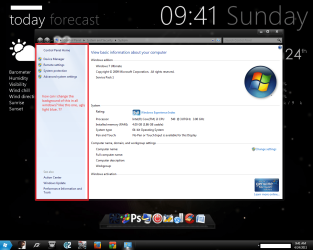
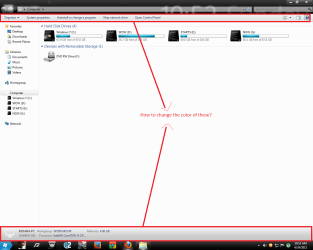
how to change the color of this?

rohanchougule

New member
Local time
3:08 AM
Messages
8
i want to know how can i change the background of this......
 

Attachments

  • Untitled.png
    Untitled.png
    328.9 KB · Views: 57

My Computer

OS
Windows 7 Ultimate x64
CPU
intel core i3 540 3.06ghz @ 3.62 GHz
Motherboard
intel dh55tc
Memory
transcend 2x2 4gb ram 8-7-7-17
Graphics Card(s)
sapphire radeon hd 5750
Sound Card
on board
Hard Drives
seagate 500gb HDD
PSU
cooler master extreme 500w PSU
Case
Zebronics oval- its shitty case
how to change the color of these 2 things?

please help me..............
 

Attachments

  • Untitled.png
    Untitled.png
    133.1 KB · Views: 61

My Computer

OS
Windows 7 Ultimate x64
CPU
intel core i3 540 3.06ghz @ 3.62 GHz
Motherboard
intel dh55tc
Memory
transcend 2x2 4gb ram 8-7-7-17
Graphics Card(s)
sapphire radeon hd 5750
Sound Card
on board
Hard Drives
seagate 500gb HDD
PSU
cooler master extreme 500w PSU
Case
Zebronics oval- its shitty case

My Computer

Computer type
Laptop
Computer Manufacturer/Model Number
Sager NP9170
OS
Win 7 Pro x64 / Win 10 Pro
CPU
Intel(R) Core(TM) i7-3630QM CPU @ 2.40GHz
Motherboard
CLEVO P170EM
Memory
12 GB
Graphics Card(s)
(1) Intel(R) HD Graphics 4000 (2) NVIDIA GeForce GTX 675M
Sound Card
(1) Realtek High Definition Audio (2) Intel(R) Display Aud
Monitor(s) Displays
17.3
Screen Resolution
1920x1080
Hard Drives
(1) Samsung 860 EVO 500GB(OS) (1) Samsung 860 EVO 500GB(Data)
Keyboard
Backlite
Antivirus
MSE, Malwarebytes Pro
Browser
Firefox
Other Info
DESKTOP: Custom-built.
OS: Win 10 Pro x64.
CASE: Rosewill R5.
CPU: Intel I5 4670K CPU @ 3.40GHz.
CPU COOLER: Cool Master Hyper 212 EVO.
MOTHERBOARD: Asus Z87-A.
MEMORY: Kingston HyperX 2x4 GB.
GPU: Nvidia Geforce 650 TI.
PSU: Corsair TX750.
DRIVES: (1) Samsung 840 120 GB SSD (2) Western Digital blue 500 GB 7200 RPM.
please help me..............

These are in C/Windows/Resources/Themes/Aero/aero.msstyle
The top # is 891
The bottom # is 903
& you need a Program like Ave's Windows7 Style Builder or Restorator - Bome Software - Restorator - the resource editor for customization, localization, and translation.
I have WSB
If you are using the default aero theme I can change that for you.
If you are using a custom theme you will need to ask the
theme maker. It's not cool to change someone else work.
&
You will need to do 1 of these 2 ways of Enabling custom themes for it to work.
http://www.sevenforums.com/tutorials/34579-enabling-custom-themes-windows-7-a.html
Or
http://www.sevenforums.com/tutorials/28377-theme-how-apply-custom-themes.html?filter
Jerry
 

My Computer

Computer type
Laptop
Computer Manufacturer/Model Number
Sager NP9170
OS
Win 7 Pro x64 / Win 10 Pro
CPU
Intel(R) Core(TM) i7-3630QM CPU @ 2.40GHz
Motherboard
CLEVO P170EM
Memory
12 GB
Graphics Card(s)
(1) Intel(R) HD Graphics 4000 (2) NVIDIA GeForce GTX 675M
Sound Card
(1) Realtek High Definition Audio (2) Intel(R) Display Aud
Monitor(s) Displays
17.3
Screen Resolution
1920x1080
Hard Drives
(1) Samsung 860 EVO 500GB(OS) (1) Samsung 860 EVO 500GB(Data)
Keyboard
Backlite
Antivirus
MSE, Malwarebytes Pro
Browser
Firefox
Other Info
DESKTOP: Custom-built.
OS: Win 10 Pro x64.
CASE: Rosewill R5.
CPU: Intel I5 4670K CPU @ 3.40GHz.
CPU COOLER: Cool Master Hyper 212 EVO.
MOTHERBOARD: Asus Z87-A.
MEMORY: Kingston HyperX 2x4 GB.
GPU: Nvidia Geforce 650 TI.
PSU: Corsair TX750.
DRIVES: (1) Samsung 840 120 GB SSD (2) Western Digital blue 500 GB 7200 RPM.
okay, i got that program and opened shell32.dll with that program, then?
 

My Computer

OS
Windows 7 Ultimate x64
CPU
intel core i3 540 3.06ghz @ 3.62 GHz
Motherboard
intel dh55tc
Memory
transcend 2x2 4gb ram 8-7-7-17
Graphics Card(s)
sapphire radeon hd 5750
Sound Card
on board
Hard Drives
seagate 500gb HDD
PSU
cooler master extreme 500w PSU
Case
Zebronics oval- its shitty case
okay, i got that program and opened shell32.dll with that program, then?

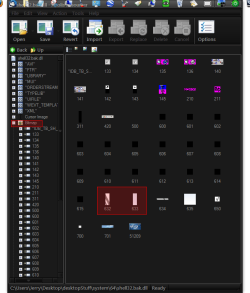
I have never used that program but I think you need to find Bitmaps #s 632 & 633 In Screenshot on the left find Bitmap then look for the #s this is a different program but the one you got has to be close.
Then extract the images change them an import them back in.
Be sure you make a copy & work on it do not work on the shell32.dll in the system.
Then you need to
For 32bit files:..........


Extract these the file . and browse to location

"drive:\windows\System32\shell32.dll"

1.Take Ownership of these the file.

2.Rename those the file to 'shell32.dll.old'.

3.Now Copy the extracted file to "drive:\windows\System32\" .

4.Restart to make changes.


For 64bit files:..........

Extract these the file . and browse to location

"drive:\windows\SysWOW64\shell32.dll"

1.Take Ownership of these the file.

2.Rename those the file to 'shell32.dll.old'.

3.Now Copy the extracted file to "drive:\windows\SysWOW32\" .

4.Restart to make changes.

You will need to take Ownership
http://www.sevenforums.com/tutorials/1911-take-ownership-shortcut.html
Then give Permissions
http://www.sevenforums.com/tutorials/122666-permissions-allow-deny-users-groups.html
To change the names
Make a system restore point 1st http://www.sevenforums.com/tutorials/697-system-restore-point-create.html
Jerry
 

Attachments

  • shell32.bak.dll - Anolis Resourcer.png
    shell32.bak.dll - Anolis Resourcer.png
    82.8 KB · Views: 34

My Computer

Computer type
Laptop
Computer Manufacturer/Model Number
Sager NP9170
OS
Win 7 Pro x64 / Win 10 Pro
CPU
Intel(R) Core(TM) i7-3630QM CPU @ 2.40GHz
Motherboard
CLEVO P170EM
Memory
12 GB
Graphics Card(s)
(1) Intel(R) HD Graphics 4000 (2) NVIDIA GeForce GTX 675M
Sound Card
(1) Realtek High Definition Audio (2) Intel(R) Display Aud
Monitor(s) Displays
17.3
Screen Resolution
1920x1080
Hard Drives
(1) Samsung 860 EVO 500GB(OS) (1) Samsung 860 EVO 500GB(Data)
Keyboard
Backlite
Antivirus
MSE, Malwarebytes Pro
Browser
Firefox
Other Info
DESKTOP: Custom-built.
OS: Win 10 Pro x64.
CASE: Rosewill R5.
CPU: Intel I5 4670K CPU @ 3.40GHz.
CPU COOLER: Cool Master Hyper 212 EVO.
MOTHERBOARD: Asus Z87-A.
MEMORY: Kingston HyperX 2x4 GB.
GPU: Nvidia Geforce 650 TI.
PSU: Corsair TX750.
DRIVES: (1) Samsung 840 120 GB SSD (2) Western Digital blue 500 GB 7200 RPM.
Similar problem

Im trying to replace the control panel side bar as well. I used res hacker to replace the resources (both in sysWOW64, and system32) shell32.ddls.

However there is no change when i restart. The control panel has the default side bar.


plz help:rolleyes:
 

My Computer

Computer Manufacturer/Model Number
HP m9000t
OS
Windows 7 Ultimate 32bit
CPU
E6750
Motherboard
ASUS IPB-LA "Berkley"
Memory
2 GB
Graphics Card(s)
Nvidia (Galaxy) 8400GS 512mb
Sound Card
Realtek
PSU
ANtec EarthWatts 500

My Computer

Computer Manufacturer/Model Number
SNODS BUILD
OS
Windows 7 ULTIMATE x64
CPU
INTEL I7 2600k @4.0 GHz
Motherboard
ASROCK Z77 Extreme4
Memory
ADATA 8 Gb XMGamer @ 1600
Graphics Card(s)
GIGABYTE GTX 560 Ti OC @900
Sound Card
REALTEK HD
Monitor(s) Displays
LG W2363D DVI-D CABLE
Screen Resolution
1920x1080 @120 Hz
Hard Drives
2x OCZ Agility 3 60Gb RAID0 OS
2x WD VELOCIRAPTOR 80Gb RAID0
SEAGATE 250 Gb
Hitachi HDP725050GLA360 SATA 500Gb
PSU
OCZ ZT 750 Watt
Case
NZXT Beta EVO Black
Cooling
COOLIT ECO
Keyboard
EMPREX USB Chicklet
Mouse
Cyber Sniper
Internet Speed
60 Meg Fiber
Will this app work on win 7 64bit? Site doesn't specify. It only does half of what i want to do; and id really prefer to do it manually.

Its strange that its so hard on 64 bit win 7.
 

My Computer

Computer Manufacturer/Model Number
HP m9000t
OS
Windows 7 Ultimate 32bit
CPU
E6750
Motherboard
ASUS IPB-LA "Berkley"
Memory
2 GB
Graphics Card(s)
Nvidia (Galaxy) 8400GS 512mb
Sound Card
Realtek
PSU
ANtec EarthWatts 500
Will this app work on win 7 64bit? Site doesn't specify. It only does half of what i want to do; and id really prefer to do it manually.

Its strange that its so hard on 64 bit win 7.
It will work on 64-bit :)
 

My Computer

Computer type
PC/Desktop
Computer Manufacturer/Model Number
Custom Build
OS
Windows 10 Pro x64, Arch Linux
CPU
Intel Core 2 Quad Q8200 OC'd 3.08GHz
Motherboard
Asus Rampage formula LGA775
Memory
8GB DDR2 900Mhz
Graphics Card(s)
MSI GT730 2GB GDDR5 (Kepler)
Sound Card
Supreme FX2
Monitor(s) Displays
Samsung LS22F350 LED
Screen Resolution
1080P
Hard Drives
Kingston SSDNow UV400 120GB, 500GB Hitachi, 2TB Samsung, 500GB Seagate FreeAgent, 640GB Samsung, 160GB Toshiba (Arch)
PSU
AeroCool 500W Bronze
Cooling
Cooler Master V6 + 3X fans
Keyboard
Prolink keyboard
Mouse
Logitech M705
Internet Speed
1MiB/s
Browser
Chrome Beta
The way i do it is to copy shell32.dll to my desktop and i only replaced bmp 633 with a white background using resourcehacker. Then take ownership of shell32.dll in system32 and rename it to shell32old.dll then copy your edited shell32.dll into the system32 folder. Reboot and all should be good.
 

My Computer

Computer Manufacturer/Model Number
SNODS BUILD
OS
Windows 7 ULTIMATE x64
CPU
INTEL I7 2600k @4.0 GHz
Motherboard
ASROCK Z77 Extreme4
Memory
ADATA 8 Gb XMGamer @ 1600
Graphics Card(s)
GIGABYTE GTX 560 Ti OC @900
Sound Card
REALTEK HD
Monitor(s) Displays
LG W2363D DVI-D CABLE
Screen Resolution
1920x1080 @120 Hz
Hard Drives
2x OCZ Agility 3 60Gb RAID0 OS
2x WD VELOCIRAPTOR 80Gb RAID0
SEAGATE 250 Gb
Hitachi HDP725050GLA360 SATA 500Gb
PSU
OCZ ZT 750 Watt
Case
NZXT Beta EVO Black
Cooling
COOLIT ECO
Keyboard
EMPREX USB Chicklet
Mouse
Cyber Sniper
Internet Speed
60 Meg Fiber
You need to locate the resource in the .msstyles file of your theme, (Restorator works well for this) then use Photoshop to edit whatever you want into that image, replace the resource with the new image, and re-load the theme.
 

My Computer

Computer type
PC/Desktop
Computer Manufacturer/Model Number
Custom
OS
Windows 7 Pro x64
CPU
Intel Core i7-5820k
Motherboard
ASUS X99-PRO
Memory
32GB Kingston HyperX FURY DDR4-2400
Graphics Card(s)
EVGA Geforce GTX970
Monitor(s) Displays
ASUS VC239h
Screen Resolution
1920x1080
Hard Drives
Samsung 850 EVO SSD 250GB x2
750 GB HDD
3TB HDD
PSU
Corsair RM750
Case
Fractal Design Define R5
Cooling
Noctua NH-D15
Keyboard
Corsair Strafe RGB
Mouse
Logitech G502
Back
Top