Change Windows Clock's font size

uhh186

New member
Local time
7:01 PM
Messages
6
Location
Massachusetts
Hey guys, I was wondering how you can change the font size of the windows clock (lower right, on the task bar). I have it two rows high, and I would like it to say the name of the day as well, instead of just the Time and numeric date without making it larger vertically. I think that making the font size smaller will allow this to happen, but I am unsure how to change the size of this particular font.

I'm new here so if this question is not in the right place, feel free to move it...

Thanks in advance!
uhh186
 

My Computer

Computer Manufacturer/Model Number
Microsoft Windows 7
OS
Microsoft Windows 7 RC v7100
CPU
Intel Core 2 - 2.67GHz
Memory
2 Gigs
Graphics Card(s)
nVidia GeForce 7900
Monitor(s) Displays
One 21" LCD
Hard Drives
One Hard Disk, 300 GB, two partitions (C: + D:)
Welcome to the forum! :)

I don't think changing the font will allow that. That is a setting and I cant make it to show the name of the day either.
Ubuntu does show it.
 

My Computer

Computer Manufacturer/Model Number
MasterB/Custom
OS
Windows 7 Professional x64
CPU
QuadCore AMD Phenom II X4 Black Edition 955 3.2 GHz
Motherboard
Asus M4A785TD-V Evo
Memory
8 GB Crucial DDR3
Graphics Card(s)
SAPPHIRE Radeon HD 4890 1GB HDMI New Edition
Sound Card
VIA VT1708S HD Audio 7.1 onboard/ ATI HDMI video card
Monitor(s) Displays
Acer H233H 23'' LCD HDMI
Screen Resolution
1920x1080
Hard Drives
1x 500GB and 1x 1TB 7200RPM 32MB Cache WD Caviar Black
PSU
CORSAIR CMPSU-620HX 620W
Case
COOLER MASTER Storm Scout SGC-2000
Cooling
2x 140mm and 1x 120mm case fans, Stock CPU fan
Keyboard
Logitech MX 3200
Mouse
Logitech MX 3200
Internet Speed
15 Mbps
Other Info
My first build!
How would you like it like this:

systray.jpg


I just stated using TClock today for the first time in a long time. I could upload it if you like. It is very customizeable.
 

My Computer

Computer type
PC/Desktop
Computer Manufacturer/Model Number
Made by Dixon Butz
OS
Win7 Win 10, Win 8.1
CPU
AMD FX-8350, Corsair H100i
Motherboard
ASUS Crosshair V Formula-Z
Memory
16GB G.SKILL Ripjaws DDR3
Graphics Card(s)
EVGA GTX 980, EVGA GTX 860
Sound Card
Denon x4200 Dolby AMOS!
Monitor(s) Displays
65" Samsung 4K, +3 27inch
Screen Resolution
4K, 1080x3
Hard Drives
2TB Samsung hd204ui

1X Samsung 850 SSD
PSU
1000w EVGA, 2000VA UPS, 1000VA UPS and many others
Case
Lian Li
Cooling
Corsair H100i
Keyboard
Logitech K800
Mouse
Logitech Couch Mouse
Internet Speed
Gigabit!
Antivirus
Defender
Browser
Slimjet Chrome
Hi uhh186, welcome to the forums.

You can change how the time & date is displayed on your taskbar.

Click the Time/Date icon & select 'Change time and date settings...' then 'Change date and time' followed by 'Change calendar settings'. You can then change the Time/Date format to your own preference.

Hope this helps :)


Jeff
 

My Computer

Computer Manufacturer/Model Number
Compaq Desktop
OS
Windows 7 Ultimate x64
CPU
AMD Sempron Dual Core
Memory
3GB
Graphics Card(s)
NVIDIA GeForce 6150SE nForce 430
Screen Resolution
1024x768
Hard Drives
150GB Sata
How would you like it like this:

systray.jpg


I just stated using TClock today for the first time in a long time. I could upload it if you like. It is very customizeable.

Wow but that's a big taskbar! I don't think I like something like that on my desktop. Just my opinion.
 

My Computer

Computer Manufacturer/Model Number
MasterB/Custom
OS
Windows 7 Professional x64
CPU
QuadCore AMD Phenom II X4 Black Edition 955 3.2 GHz
Motherboard
Asus M4A785TD-V Evo
Memory
8 GB Crucial DDR3
Graphics Card(s)
SAPPHIRE Radeon HD 4890 1GB HDMI New Edition
Sound Card
VIA VT1708S HD Audio 7.1 onboard/ ATI HDMI video card
Monitor(s) Displays
Acer H233H 23'' LCD HDMI
Screen Resolution
1920x1080
Hard Drives
1x 500GB and 1x 1TB 7200RPM 32MB Cache WD Caviar Black
PSU
CORSAIR CMPSU-620HX 620W
Case
COOLER MASTER Storm Scout SGC-2000
Cooling
2x 140mm and 1x 120mm case fans, Stock CPU fan
Keyboard
Logitech MX 3200
Mouse
Logitech MX 3200
Internet Speed
15 Mbps
Other Info
My first build!

My Computer

Computer type
PC/Desktop
Computer Manufacturer/Model Number
Made by Dixon Butz
OS
Win7 Win 10, Win 8.1
CPU
AMD FX-8350, Corsair H100i
Motherboard
ASUS Crosshair V Formula-Z
Memory
16GB G.SKILL Ripjaws DDR3
Graphics Card(s)
EVGA GTX 980, EVGA GTX 860
Sound Card
Denon x4200 Dolby AMOS!
Monitor(s) Displays
65" Samsung 4K, +3 27inch
Screen Resolution
4K, 1080x3
Hard Drives
2TB Samsung hd204ui

1X Samsung 850 SSD
PSU
1000w EVGA, 2000VA UPS, 1000VA UPS and many others
Case
Lian Li
Cooling
Corsair H100i
Keyboard
Logitech K800
Mouse
Logitech Couch Mouse
Internet Speed
Gigabit!
Antivirus
Defender
Browser
Slimjet Chrome
Wow but that's a big taskbar! I don't think I like something like that on my desktop. Just my opinion.

Yeah i have a lot of stuff open then. I use tripple monitor so don't matter to me.
 

My Computer

Computer type
PC/Desktop
Computer Manufacturer/Model Number
Made by Dixon Butz
OS
Win7 Win 10, Win 8.1
CPU
AMD FX-8350, Corsair H100i
Motherboard
ASUS Crosshair V Formula-Z
Memory
16GB G.SKILL Ripjaws DDR3
Graphics Card(s)
EVGA GTX 980, EVGA GTX 860
Sound Card
Denon x4200 Dolby AMOS!
Monitor(s) Displays
65" Samsung 4K, +3 27inch
Screen Resolution
4K, 1080x3
Hard Drives
2TB Samsung hd204ui

1X Samsung 850 SSD
PSU
1000w EVGA, 2000VA UPS, 1000VA UPS and many others
Case
Lian Li
Cooling
Corsair H100i
Keyboard
Logitech K800
Mouse
Logitech Couch Mouse
Internet Speed
Gigabit!
Antivirus
Defender
Browser
Slimjet Chrome
Thanks for your replies all. I don't like TClock as I think the lines are too close together. I would like it to look like Dixon Butz', but without TClock. Using your method, Orbital Shark, doesn't allow you to add the full day name in another line.

If this is impossible, I'll resort to TClock. I appreciate everyone's help :)

EDIT: I realized the Tclock that was posted here was a different version than the one I had previously tried, so I downloaded it. I have it exactly the way I want it, and it works great. One question though, can I make the background transparent?
 
Last edited:

My Computer

Computer Manufacturer/Model Number
Microsoft Windows 7
OS
Microsoft Windows 7 RC v7100
CPU
Intel Core 2 - 2.67GHz
Memory
2 Gigs
Graphics Card(s)
nVidia GeForce 7900
Monitor(s) Displays
One 21" LCD
Hard Drives
One Hard Disk, 300 GB, two partitions (C: + D:)
For a transparent background, use TClock light.

TClock Light
 

My Computer

Computer type
PC/Desktop
Computer Manufacturer/Model Number
Made by Dixon Butz
OS
Win7 Win 10, Win 8.1
CPU
AMD FX-8350, Corsair H100i
Motherboard
ASUS Crosshair V Formula-Z
Memory
16GB G.SKILL Ripjaws DDR3
Graphics Card(s)
EVGA GTX 980, EVGA GTX 860
Sound Card
Denon x4200 Dolby AMOS!
Monitor(s) Displays
65" Samsung 4K, +3 27inch
Screen Resolution
4K, 1080x3
Hard Drives
2TB Samsung hd204ui

1X Samsung 850 SSD
PSU
1000w EVGA, 2000VA UPS, 1000VA UPS and many others
Case
Lian Li
Cooling
Corsair H100i
Keyboard
Logitech K800
Mouse
Logitech Couch Mouse
Internet Speed
Gigabit!
Antivirus
Defender
Browser
Slimjet Chrome
wow, tclock light. i used that back in xp. i'm impressed that it still works!

too bad it kills access to the popup calendar, i use that every day...
 

My Computer

OS
7600 x86
CPU
Core 2 Duo e7200, 2.53 ghz
Motherboard
Micro-Star MS-7529
Memory
2x DDR2 PC5300 1gb, 667 mhz
Graphics Card(s)
GeForce 9500gt, 512mb
Monitor(s) Displays
22" LG Flatron w2234s
Screen Resolution
1680x1050
Hard Drives
Excelstor SATA-II 250gb 7200rpm, 8mb cache
PSU
CoolerMaster M520
Internet Speed
30/20 mbits
Yeah that is the only drawback of it. I have it configured to run a calander exe when clicking.
 

My Computer

Computer type
PC/Desktop
Computer Manufacturer/Model Number
Made by Dixon Butz
OS
Win7 Win 10, Win 8.1
CPU
AMD FX-8350, Corsair H100i
Motherboard
ASUS Crosshair V Formula-Z
Memory
16GB G.SKILL Ripjaws DDR3
Graphics Card(s)
EVGA GTX 980, EVGA GTX 860
Sound Card
Denon x4200 Dolby AMOS!
Monitor(s) Displays
65" Samsung 4K, +3 27inch
Screen Resolution
4K, 1080x3
Hard Drives
2TB Samsung hd204ui

1X Samsung 850 SSD
PSU
1000w EVGA, 2000VA UPS, 1000VA UPS and many others
Case
Lian Li
Cooling
Corsair H100i
Keyboard
Logitech K800
Mouse
Logitech Couch Mouse
Internet Speed
Gigabit!
Antivirus
Defender
Browser
Slimjet Chrome
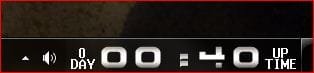
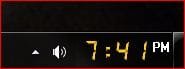
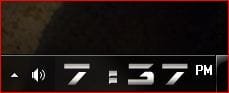
This is what I use - atomic clock

can show uptime wekkday date alarm calendar etc
 

Attachments

  • 2clock.JPG
    2clock.JPG
    11.4 KB · Views: 50
  • clcok3.JPG
    clcok3.JPG
    9.8 KB · Views: 2,645
  • clock1.JPG
    clock1.JPG
    10.6 KB · Views: 2,644

My Computer

Computer Manufacturer/Model Number
dell optiplex - 2003
OS
windows7 7600 x86
CPU
itel pentium 4
Memory
3.00 GB
Graphics Card(s)
diamond radion x1050
Sound Card
SoundMax
Monitor(s) Displays
dell 2408wfp dell e172fp
Screen Resolution
1920 x 1200 1280 x 1024
Hard Drives
2 - 80 GB internals WD
1 - 01 TB ext
2 - 750 GB ext
1- 500 GB ext
all running on system no problems
Keyboard
old logitech cordless
Mouse
logitech wireless
Internet Speed
16 / 4
Other Info
networked into my sbs2003 server running sp1 still
it's a wonder I could even get windows 7 to connect to it

My Computer

Computer Manufacturer/Model Number
Microsoft Windows 7
OS
Microsoft Windows 7 RC v7100
CPU
Intel Core 2 - 2.67GHz
Memory
2 Gigs
Graphics Card(s)
nVidia GeForce 7900
Monitor(s) Displays
One 21" LCD
Hard Drives
One Hard Disk, 300 GB, two partitions (C: + D:)
It is possible to change the font size of the system tray clock BUT its not easy. It involves editing the systems in the .msstyle file.

I was able to do it as I have already purchased a program called Vista Style Builder
 

My Computer

OS
Windows 7 RC x86
Here it is if anyone wants it. It's a no install app.

TClock 229b.zip - File Shared from Box.net - Free Online File Storage

To get that 3 line display like mine, use this in the format options

h:nn:ss tt\n dddd \n mmm dd yyyy
I d/l the file from the link you gave and clciked on the "exe" file after unzupping. Nothing happened. Checking Task Manager I find the executable is running but the default Win 7 clock is still there with nothing else. Running as Admin makes no difference.

I am using Win 7 RC 7100 64 bit. Wonder if it is the 64 bit that is screwing it up?
 

My Computer

Computer Manufacturer/Model Number
Intel
OS
Win 7_x64 Linux Kubuntu Jaunty_x64
CPU
E7400
Motherboard
Intel GZ35
Memory
2GB DDR2
Monitor(s) Displays
IBM 19"
Screen Resolution
1400x1050
Hard Drives
300GB SATA
PSU
650W
Cooling
Zalman
Other Info
Avira AVP, MSE, ASC Pro, IObit 360 Pro, Customized Win FW
wow, tclock light. i used that back in xp. i'm impressed that it still works!

too bad it kills access to the popup calendar, i use that every day...

**Bump**

Same problem here. None of these system tray clocks seem to work in Win7x64.
 

My Computer

OS
Win 7 & XP-SP3
How would you like it like this:

systray.jpg


I just stated using TClock today for the first time in a long time. I could upload it if you like. It is very customizeable.

I've been using something similar ever since Win95 called TClockEx. Last updated in 2000, but I use it now in Win Vista Ultimate 32-bit. Can't live without it, has a click-calendar as well. The memory variable on it (for displaying) is limited to 2GB, but I still use it to show if I'm really dipping into the memory.

Really hoping I can use it with Win7, but I'm also going 64-bit so I have no idea if it will even run.
 

My Computer

OS
Win Vista Ultimate 32
CPU
Intel Core2Duo E6600
Motherboard
DFI Lanparty DKX38-T2RB
Memory
4GB Mushkin PC8500
Graphics Card(s)
Sapphire Radeon 3870 Toxic PCIe 512MB
Sound Card
Sound Blaster Audigy SE
Monitor(s) Displays
Dell WFP2005
Screen Resolution
1680x1050
Hard Drives
WD6400AAKS - 640GB SATA
WD3200AAJS - 300GB SATA
PSU
Antec EarthWatts EA650 650W
Case
APEVIA X-Dreamer II ATXB4KLW-BK Black Steel ATX Mid Tower
Cooling
Cooler Master Hyper TX3
Keyboard
Logitech G11
Mouse
Logitech MX510 Blue
Internet Speed
Highspeed Turbo
Well, you could right click an empty spot on the desktop, select "Personalize", select "Display" from the left side of the dialog, and check "Smaller - 100%(default)". The problem there is, everythng else on the desktop will resize also.
 

My Computer

OS
Windows 7
Hi there, my OP is Windows 7/64, I sure like it. I had XP before, and got used to the "Clock tray skins" what I missing a lot. Would it be possible to have something similar task tray clock other than what Win7 offers. Would appreciate any help or direction to my problem.

Thanks:
sse4
 

My Computer

OS
Windows 7
Try "Zone Tick", it works flawlessly with Windows 7 x64 and is extremely customizable with multiple clocks, alarms etc.

97616515.jpg
 

My Computer

Computer Manufacturer/Model Number
Intel
OS
Win 7_x64 Linux Kubuntu Jaunty_x64
CPU
E7400
Motherboard
Intel GZ35
Memory
2GB DDR2
Monitor(s) Displays
IBM 19"
Screen Resolution
1400x1050
Hard Drives
300GB SATA
PSU
650W
Cooling
Zalman
Other Info
Avira AVP, MSE, ASC Pro, IObit 360 Pro, Customized Win FW
Back
Top