Best way to apply icons or an icon set system wide.

4ourFoxtrot

New member
Local time
7:34 PM
Messages
21
Location
UK
Best way to apply icons or an icon set system wide.

Hey guys well I've been using "icon packager" and the first time I used it, it was fine every icon was changed, but now (will share some screenshots below) only some icons are changed the rest are default windows ones.

Screenshots:

sdump0.png


sdump1.png


sdump2.png


You see so some areas of my system the icons are applied properly, but others they are not, any ideas or other app recommendations would be appreciated.

- regards

- 4F.
 

My Computer My Computer

At a glance

Dual booting: Ubuntu 10.10 & Windows 7 Ultima...Intel Core 2 Duo2.00GBNvidia Gforce 9200 MGS
Computer Manufacturer/Model Number
Samsung R610
OS
Dual booting: Ubuntu 10.10 & Windows 7 Ultimate 32bit
CPU
Intel Core 2 Duo
Motherboard
Notebook N/A
Memory
2.00GB
Graphics Card(s)
Nvidia Gforce 9200 MGS
Sound Card
Nvidia High Definition Audio (Microsoft made)
Monitor(s) Displays
Samsung Super-Bright HD display
Screen Resolution
1366 x 768
Hard Drives
Notebook N/A
PSU
Notebook N/A
Case
Notebook N/A
Cooling
Notebook N/A
Keyboard
Notebook N/A
Mouse
SPEEDLINK CUE SL-6345-SRD Wireless Multitouch Mouse
Internet Speed
9.88 mbit's , translates as over 1 megabytes per second.
Other Info
At the moment I only currently own a Notebook, but this will change in the future.
I am also experiencing the same issue.
 

My Computer My Computer

At a glance

Windows 7 Ultimate
OS
Windows 7 Ultimate
The best way to change icons is doing manually so you know what is being changed using "icon packager" you can only guess what is being changed and how many .dll have been modified. If you ever want to go back to the original icons most likely you're going to have to do a clean install.
You may want to try to rebuild your icon cache and see if that will help http://www.sevenforums.com/tutorials/49819-icon-cache-rebuild.html
Jerry
 

My Computer My Computer

At a glance

Win 7 Pro x64 / Win 10 ProIntel(R) Core(TM) i7-3630QM CPU @ 2.40GHz12 GB(1) Intel(R) HD Graphics 4000 (2) NVIDIA GeFo...
Computer type
Laptop
Computer Manufacturer/Model Number
Sager NP9170
OS
Win 7 Pro x64 / Win 10 Pro
CPU
Intel(R) Core(TM) i7-3630QM CPU @ 2.40GHz
Motherboard
CLEVO P170EM
Memory
12 GB
Graphics Card(s)
(1) Intel(R) HD Graphics 4000 (2) NVIDIA GeForce GTX 675M
Sound Card
(1) Realtek High Definition Audio (2) Intel(R) Display Aud
Monitor(s) Displays
17.3
Screen Resolution
1920x1080
Hard Drives
(1) Samsung 860 EVO 500GB(OS) (1) Samsung 860 EVO 500GB(Data)
Keyboard
Backlite
Antivirus
MSE, Malwarebytes Pro
Browser
Firefox
Other Info
DESKTOP: Custom-built.
OS: Win 10 Pro x64.
CASE: Rosewill R5.
CPU: Intel I5 4670K CPU @ 3.40GHz.
CPU COOLER: Cool Master Hyper 212 EVO.
MOTHERBOARD: Asus Z87-A.
MEMORY: Kingston HyperX 2x4 GB.
GPU: Nvidia Geforce 650 TI.
PSU: Corsair TX750.
DRIVES: (1) Samsung 840 120 GB SSD (2) Western Digital blue 500 GB 7200 RPM.
The best way to change icons is doing manually so you know what is being changed using "icon packager" you can only guess what is being changed and how many .dll have been modified. If you ever want to go back to the original icons most likely you're going to have to do a clean install.
You may want to try to rebuild your icon cache and see if that will help http://www.sevenforums.com/tutorials/49819-icon-cache-rebuild.html
Jerry

Cool thank you for the tutorial. Since I posted this, after a couple of reboots some more icons have actually loaded through and my system now looks mostly flush with the better icons, except for a few directories on my C: drive like "tracing" and dropbox, also nearly all directories on removable media fail to load the icon theme (but I guess that's understandable).

OK well keep the information coming guys I'd appreciate it, I think others would too, I know this can be achieved It's definitely done by some of the guys over at deviantart with ease, but hell people on there can be unreliable and screenshots featured could just be showing the best bits or they may have changed each icon individually.
 

My Computer My Computer

At a glance

Dual booting: Ubuntu 10.10 & Windows 7 Ultima...Intel Core 2 Duo2.00GBNvidia Gforce 9200 MGS
Computer Manufacturer/Model Number
Samsung R610
OS
Dual booting: Ubuntu 10.10 & Windows 7 Ultimate 32bit
CPU
Intel Core 2 Duo
Motherboard
Notebook N/A
Memory
2.00GB
Graphics Card(s)
Nvidia Gforce 9200 MGS
Sound Card
Nvidia High Definition Audio (Microsoft made)
Monitor(s) Displays
Samsung Super-Bright HD display
Screen Resolution
1366 x 768
Hard Drives
Notebook N/A
PSU
Notebook N/A
Case
Notebook N/A
Cooling
Notebook N/A
Keyboard
Notebook N/A
Mouse
SPEEDLINK CUE SL-6345-SRD Wireless Multitouch Mouse
Internet Speed
9.88 mbit's , translates as over 1 megabytes per second.
Other Info
At the moment I only currently own a Notebook, but this will change in the future.
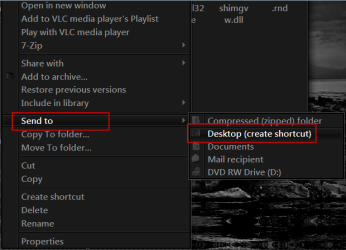
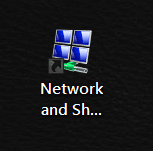
1 way of finding where an icon is at is to right click on it go to Send to> Desktop (create shortcut)
1.png

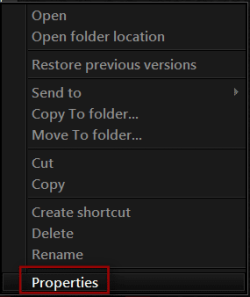
Right click on the shortcut go to Properties
2.png3.png

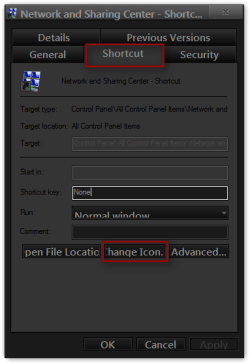
Go to the Shortcut tab and click on the Change Icon button
4.png

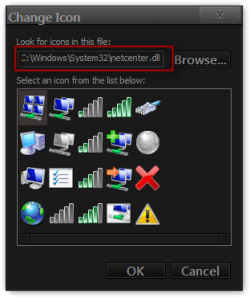
In most cases it will show you where it is located
5.png


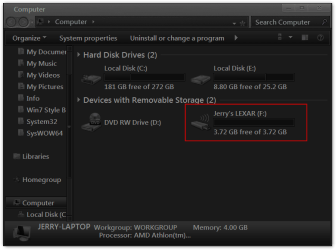
For the icon in the removable media you can create a AutoRun.inf file (If it does not have one if it does just modify it) and put it and a icon in the removable media and you will get the icon you want.
Open notepad type in
[autorun]
icon=logo.ico
label=any name you were (optional)

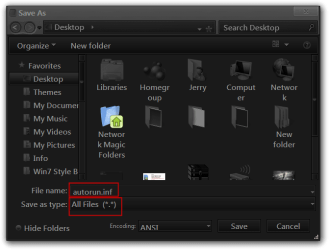
save it as AutoRun.inf be sure to use the drop-down menu at Save as type and switch to All Files (*.*)
Save As.png


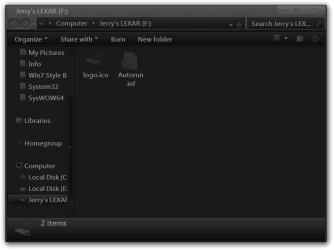
put it and a icon named logo.ico in the removable media.
Jerry's LEXAR (F).pngComputer.png
Jerry
 

My Computer My Computer

At a glance

Win 7 Pro x64 / Win 10 ProIntel(R) Core(TM) i7-3630QM CPU @ 2.40GHz12 GB(1) Intel(R) HD Graphics 4000 (2) NVIDIA GeFo...
Computer type
Laptop
Computer Manufacturer/Model Number
Sager NP9170
OS
Win 7 Pro x64 / Win 10 Pro
CPU
Intel(R) Core(TM) i7-3630QM CPU @ 2.40GHz
Motherboard
CLEVO P170EM
Memory
12 GB
Graphics Card(s)
(1) Intel(R) HD Graphics 4000 (2) NVIDIA GeForce GTX 675M
Sound Card
(1) Realtek High Definition Audio (2) Intel(R) Display Aud
Monitor(s) Displays
17.3
Screen Resolution
1920x1080
Hard Drives
(1) Samsung 860 EVO 500GB(OS) (1) Samsung 860 EVO 500GB(Data)
Keyboard
Backlite
Antivirus
MSE, Malwarebytes Pro
Browser
Firefox
Other Info
DESKTOP: Custom-built.
OS: Win 10 Pro x64.
CASE: Rosewill R5.
CPU: Intel I5 4670K CPU @ 3.40GHz.
CPU COOLER: Cool Master Hyper 212 EVO.
MOTHERBOARD: Asus Z87-A.
MEMORY: Kingston HyperX 2x4 GB.
GPU: Nvidia Geforce 650 TI.
PSU: Corsair TX750.
DRIVES: (1) Samsung 840 120 GB SSD (2) Western Digital blue 500 GB 7200 RPM.
Ah thanks again, another good tutorial. :)
 

My Computer My Computer

At a glance

Dual booting: Ubuntu 10.10 & Windows 7 Ultima...Intel Core 2 Duo2.00GBNvidia Gforce 9200 MGS
Computer Manufacturer/Model Number
Samsung R610
OS
Dual booting: Ubuntu 10.10 & Windows 7 Ultimate 32bit
CPU
Intel Core 2 Duo
Motherboard
Notebook N/A
Memory
2.00GB
Graphics Card(s)
Nvidia Gforce 9200 MGS
Sound Card
Nvidia High Definition Audio (Microsoft made)
Monitor(s) Displays
Samsung Super-Bright HD display
Screen Resolution
1366 x 768
Hard Drives
Notebook N/A
PSU
Notebook N/A
Case
Notebook N/A
Cooling
Notebook N/A
Keyboard
Notebook N/A
Mouse
SPEEDLINK CUE SL-6345-SRD Wireless Multitouch Mouse
Internet Speed
9.88 mbit's , translates as over 1 megabytes per second.
Other Info
At the moment I only currently own a Notebook, but this will change in the future.
My Computer My Computer

At a glance

Windows 10 Home x64INTEL Core i5-750 Quad-Core 3.37GHzHyperX Fury Black Series 8GB (2 x 4GB) 1866MhzEVGA GeForce GTX 750 Superclocked 1GB 128-Bit...
Computer type
PC/Desktop
OS
Windows 10 Home x64
CPU
INTEL Core i5-750 Quad-Core 3.37GHz
Motherboard
ASUS P7P55D
Memory
HyperX Fury Black Series 8GB (2 x 4GB) 1866Mhz
Graphics Card(s)
EVGA GeForce GTX 750 Superclocked 1GB 128-Bit GDDR5
Monitor(s) Displays
LG 32MA68HY 32" IPS
Screen Resolution
1920 x 1080
Hard Drives
Samsung 840 Evo 120GB, SEAGATE 500GB Barracuda® 7200.12, SATA 3 Gb/s, 7200 RPM, 16MB cache
PSU
ANTEC TruePower New TP-550, 80 PLUS, 550W
Case
ANTEC Three Hundred Illusion
Cooling
COOLER MASTER Hyper 212 Plus, 4 x 120mm 1 x 140mm Noctua's
Internet Speed
85 + Mbps
Antivirus
Avast
Browser
Vivaldi

My Computer My Computer

At a glance

Dual booting: Ubuntu 10.10 & Windows 7 Ultima...Intel Core 2 Duo2.00GBNvidia Gforce 9200 MGS
Computer Manufacturer/Model Number
Samsung R610
OS
Dual booting: Ubuntu 10.10 & Windows 7 Ultimate 32bit
CPU
Intel Core 2 Duo
Motherboard
Notebook N/A
Memory
2.00GB
Graphics Card(s)
Nvidia Gforce 9200 MGS
Sound Card
Nvidia High Definition Audio (Microsoft made)
Monitor(s) Displays
Samsung Super-Bright HD display
Screen Resolution
1366 x 768
Hard Drives
Notebook N/A
PSU
Notebook N/A
Case
Notebook N/A
Cooling
Notebook N/A
Keyboard
Notebook N/A
Mouse
SPEEDLINK CUE SL-6345-SRD Wireless Multitouch Mouse
Internet Speed
9.88 mbit's , translates as over 1 megabytes per second.
Other Info
At the moment I only currently own a Notebook, but this will change in the future.
Must have felt my Ears burning lol, I have moved away from the old installers and now use 7tsp to change all the icons, my latest Icon sets are for my HUD and HUD RED premium themes but I give away all my Icons and extras for free.

Here are some previews of the new packs.

15nm29w.jpg


endzp.jpg


You can have a look at all the themes and Icon packs here Windows 7 Premium Themes
 

My Computer My Computer

At a glance

Windows 7 Ultimate Vista Ultimate x64Core 2 Duo E8500 3.16Ghz @ 3.8Ghz2x2Gigs Patriot PC2-6400 LLInno3D GeForce GTX260 216 SP
Computer Manufacturer/Model Number
Home Brew
OS
Windows 7 Ultimate Vista Ultimate x64
CPU
Core 2 Duo E8500 3.16Ghz @ 3.8Ghz
Motherboard
eVGA 750i FTW
Memory
2x2Gigs Patriot PC2-6400 LL
Graphics Card(s)
Inno3D GeForce GTX260 216 SP
Monitor(s) Displays
ASUS VW222U 22" 2ms Response time
Screen Resolution
1680x1050
Hard Drives
SATA 150GB
SATA II 250GB
USB IDE 750GB Ext.
PSU
HYTEC 600W & Thermaltake 650W Toughpower Power Exp
Case
Thermaltake Armor LCS (Liquid Cooling System)
Cooling
Liquid Cooling System
Keyboard
Logitech G15 Gaming Keyboard
Mouse
Logitech G9 Gaming Mouse
Must have felt my Ears burning lol, I have moved away from the old installers and now use 7tsp to change all the icons, my latest Icon sets are for my HUD and HUD RED premium themes but I give away all my Icons and extras for free.

Thanks Mark, good to see you here. I tout your stuff all the time. A Guy
 

My Computer My Computer

At a glance

Windows 10 Home x64INTEL Core i5-750 Quad-Core 3.37GHzHyperX Fury Black Series 8GB (2 x 4GB) 1866MhzEVGA GeForce GTX 750 Superclocked 1GB 128-Bit...
Computer type
PC/Desktop
OS
Windows 10 Home x64
CPU
INTEL Core i5-750 Quad-Core 3.37GHz
Motherboard
ASUS P7P55D
Memory
HyperX Fury Black Series 8GB (2 x 4GB) 1866Mhz
Graphics Card(s)
EVGA GeForce GTX 750 Superclocked 1GB 128-Bit GDDR5
Monitor(s) Displays
LG 32MA68HY 32" IPS
Screen Resolution
1920 x 1080
Hard Drives
Samsung 840 Evo 120GB, SEAGATE 500GB Barracuda® 7200.12, SATA 3 Gb/s, 7200 RPM, 16MB cache
PSU
ANTEC TruePower New TP-550, 80 PLUS, 550W
Case
ANTEC Three Hundred Illusion
Cooling
COOLER MASTER Hyper 212 Plus, 4 x 120mm 1 x 140mm Noctua's
Internet Speed
85 + Mbps
Antivirus
Avast
Browser
Vivaldi
Must have felt my Ears burning lol, I have moved away from the old installers and now use 7tsp to change all the icons, my latest Icon sets are for my HUD and HUD RED premium themes but I give away all my Icons and extras for free.

Here are some previews of the new packs.

15nm29w.jpg


endzp.jpg


You can have a look at all the themes and Icon packs here Windows 7 Premium Themes

I went to this site and was inundated by Certificate errors and Norton quarrantined a download, calling it WS.Reputation.1. Anyone know what this is about? I realize it's been quite some time since anyone has added to this thread, I just hope someone is still watching.
 

My Computer My Computer

At a glance

Win7 Pro 64-bitIntel i3 Core4GIntel chipset integrated
Computer Manufacturer/Model Number
Toshiba Satellite A665
OS
Win7 Pro 64-bit
CPU
Intel i3 Core
Memory
4G
Graphics Card(s)
Intel chipset integrated
Sound Card
Intel HD
Monitor(s) Displays
Integrated 16"
Screen Resolution
1366x768
Hard Drives
500G SATA 7200rpm
Various external drives (250G, 160G, 120G)
Case
Laptop

My Computer My Computer

At a glance

Windows 10 Home x64INTEL Core i5-750 Quad-Core 3.37GHzHyperX Fury Black Series 8GB (2 x 4GB) 1866MhzEVGA GeForce GTX 750 Superclocked 1GB 128-Bit...
Computer type
PC/Desktop
OS
Windows 10 Home x64
CPU
INTEL Core i5-750 Quad-Core 3.37GHz
Motherboard
ASUS P7P55D
Memory
HyperX Fury Black Series 8GB (2 x 4GB) 1866Mhz
Graphics Card(s)
EVGA GeForce GTX 750 Superclocked 1GB 128-Bit GDDR5
Monitor(s) Displays
LG 32MA68HY 32" IPS
Screen Resolution
1920 x 1080
Hard Drives
Samsung 840 Evo 120GB, SEAGATE 500GB Barracuda® 7200.12, SATA 3 Gb/s, 7200 RPM, 16MB cache
PSU
ANTEC TruePower New TP-550, 80 PLUS, 550W
Case
ANTEC Three Hundred Illusion
Cooling
COOLER MASTER Hyper 212 Plus, 4 x 120mm 1 x 140mm Noctua's
Internet Speed
85 + Mbps
Antivirus
Avast
Browser
Vivaldi
Back
Top