anyone used Ave's Style Builder?

garbanzo

Expelled
apparently, not only does it support Windows 7 visual styles, but it can import/translate XP and Vista visual styles. of course there would be some extra elements to skin, but that sounds awesome.

anyway i'm thinking of ordering it, and wondered if anyone here has used it. let me know what you think :)

Ave's Windows7 Style Builder
 

My Computer

OS
7600 x86
CPU
Core 2 Duo e7200, 2.53 ghz
Motherboard
Micro-Star MS-7529
Memory
2x DDR2 PC5300 1gb, 667 mhz
Graphics Card(s)
GeForce 9500gt, 512mb
Monitor(s) Displays
22" LG Flatron w2234s
Screen Resolution
1680x1050
Hard Drives
Excelstor SATA-II 250gb 7200rpm, 8mb cache
PSU
CoolerMaster M520
Internet Speed
30/20 mbits
I havn't tried it mate, but I keep checking that site regular to see if they have added a demo version.
It's really missing that part and I think they really need to sort one out otherwise their sales might suffer from it IMO. :(
 

My Computer

Computer Manufacturer/Model Number
Self Built
OS
XP Pro SP3 x86/Vista SP2 x64/Win7 x64 Triple-boot
CPU
AMD64 X2 AM2 5000+
Motherboard
Asus MSN-X Plus
Memory
Corsair TWX 2Gb (2x1Gb) DDR2 800Mhz
Graphics Card(s)
PCI-X 2.0 Inno3D (NVidia) 9500GT 1Gb DDR2
Sound Card
Onboard Realtec ALC662-GR
Monitor(s) Displays
Relisys 17' CRT (model unknown)
Screen Resolution
1024x768
Hard Drives
750Gb Samsung 7200-3Gb/s 32Mb Cache SATA
PSU
500W
Cooling
Standard AMD CPU Fan, One side, front and rear case fan.
Keyboard
Microsoft Multimedia Keyboard
Mouse
Samsung Optical
Internet Speed
10M
i just went ahead and ordered it. i guess i'll be the guinea pig here :)

i'm having paypal trouble at the moment though, so the money won't clear until next week...

i'm not too adept when it comes to making my own graphics, but i can edit existing stuff just fine. that's what i plan to use this for. right now i've got a great plan for a mod of aero. and i think that later on, as more and more styles come out, it will be nice to have this to mod them.

it's kind of odd that there's not a free app available to do this, but such is life i guess...
 

My Computer

OS
7600 x86
CPU
Core 2 Duo e7200, 2.53 ghz
Motherboard
Micro-Star MS-7529
Memory
2x DDR2 PC5300 1gb, 667 mhz
Graphics Card(s)
GeForce 9500gt, 512mb
Monitor(s) Displays
22" LG Flatron w2234s
Screen Resolution
1680x1050
Hard Drives
Excelstor SATA-II 250gb 7200rpm, 8mb cache
PSU
CoolerMaster M520
Internet Speed
30/20 mbits
Lol!, temptation got the better of you? :)

You'll have to let us know if it's any good.. I might be tempted myself. It has to make it easier than using a conventional resource editor at the end of the day i suppose!
It's a right PITA going through a folder full of extracted resources with half of the images too small to even see.
 

My Computer

Computer Manufacturer/Model Number
Self Built
OS
XP Pro SP3 x86/Vista SP2 x64/Win7 x64 Triple-boot
CPU
AMD64 X2 AM2 5000+
Motherboard
Asus MSN-X Plus
Memory
Corsair TWX 2Gb (2x1Gb) DDR2 800Mhz
Graphics Card(s)
PCI-X 2.0 Inno3D (NVidia) 9500GT 1Gb DDR2
Sound Card
Onboard Realtec ALC662-GR
Monitor(s) Displays
Relisys 17' CRT (model unknown)
Screen Resolution
1024x768
Hard Drives
750Gb Samsung 7200-3Gb/s 32Mb Cache SATA
PSU
500W
Cooling
Standard AMD CPU Fan, One side, front and rear case fan.
Keyboard
Microsoft Multimedia Keyboard
Mouse
Samsung Optical
Internet Speed
10M
well it has quite a lot of advantages really. first of all, you get live previews as you change resources, so you don't have to keep applying the theme all the time. it treats the Stream image as separate images, and lets you edit each bit individually, reassembling it all behind the scenes. plus, you can change things font and colour values along or sizing margins without having to mess with hex. it really does simplify the whole process.

but most importantly, everything is labeled, so you know exactly what each image is. look at the screenshots on their site to see what i mean.

i've used stylebuilder before for making/editing XP styles, and it was really wonderful to use. this one looks 10x better. i'm convinced it will be good to use - i just hope the windows 7 support is all i'm expecting it to be :)
 

My Computer

OS
7600 x86
CPU
Core 2 Duo e7200, 2.53 ghz
Motherboard
Micro-Star MS-7529
Memory
2x DDR2 PC5300 1gb, 667 mhz
Graphics Card(s)
GeForce 9500gt, 512mb
Monitor(s) Displays
22" LG Flatron w2234s
Screen Resolution
1680x1050
Hard Drives
Excelstor SATA-II 250gb 7200rpm, 8mb cache
PSU
CoolerMaster M520
Internet Speed
30/20 mbits
Yeah ive bought it too..

It makes visual style editing atleast 300 times easier and not only that its just pure smarter, fast to test your style without actually saving it, and stuff like that. KAPLA!
 

My Computer

OS
Windows 98 SE
KAPLA! is the best review i could hope for :)

yeah like i said i won't get it until next week but i'm looking forward to it!
 

My Computer

OS
7600 x86
CPU
Core 2 Duo e7200, 2.53 ghz
Motherboard
Micro-Star MS-7529
Memory
2x DDR2 PC5300 1gb, 667 mhz
Graphics Card(s)
GeForce 9500gt, 512mb
Monitor(s) Displays
22" LG Flatron w2234s
Screen Resolution
1680x1050
Hard Drives
Excelstor SATA-II 250gb 7200rpm, 8mb cache
PSU
CoolerMaster M520
Internet Speed
30/20 mbits
well i got my copy finally :)

i was expecting live previews/mockups like the old TGSoft StyleBuilder for XP, but no such luck. fortunately it's got an in-memory uxtheme patcher built in, so it's dead easy to apply changes and see how it looks.

the layout is a bit overwhelming, it's going to take some time to get used to where things are, fortunately, it's possible to search for elements in a variety of ways, including by the resource number of the actual image inside the .msstyles file.

overall it's quite nice, and it's going to make building styles a whole lot easier. you can assign an external editor, so you just hit a button and send the image out. edit, save, then go back to Style Builder and click OK - it imports it immediately. i guess it uses a temp directory someplace... easy!

you can even edit parts of images - just export the hover or pressed or inactive parts of a button for example - and the app will re-assemble things for you.

not tried to import Vista styles yet - no time, i'll try later today and report back.

overall i'd say it's definitely a good investment for anyone interested in making visual styles for 7!
 

My Computer

OS
7600 x86
CPU
Core 2 Duo e7200, 2.53 ghz
Motherboard
Micro-Star MS-7529
Memory
2x DDR2 PC5300 1gb, 667 mhz
Graphics Card(s)
GeForce 9500gt, 512mb
Monitor(s) Displays
22" LG Flatron w2234s
Screen Resolution
1680x1050
Hard Drives
Excelstor SATA-II 250gb 7200rpm, 8mb cache
PSU
CoolerMaster M520
Internet Speed
30/20 mbits
Glad you finally got your hands on a copy garbanzo.

I guess you won't know until you've given it a proper bash when you do your next style on wether the live preview stuff is really needed.

The layout bit sounds a bit frightening mind!
 

My Computer

Computer Manufacturer/Model Number
Self Built
OS
XP Pro SP3 x86/Vista SP2 x64/Win7 x64 Triple-boot
CPU
AMD64 X2 AM2 5000+
Motherboard
Asus MSN-X Plus
Memory
Corsair TWX 2Gb (2x1Gb) DDR2 800Mhz
Graphics Card(s)
PCI-X 2.0 Inno3D (NVidia) 9500GT 1Gb DDR2
Sound Card
Onboard Realtec ALC662-GR
Monitor(s) Displays
Relisys 17' CRT (model unknown)
Screen Resolution
1024x768
Hard Drives
750Gb Samsung 7200-3Gb/s 32Mb Cache SATA
PSU
500W
Cooling
Standard AMD CPU Fan, One side, front and rear case fan.
Keyboard
Microsoft Multimedia Keyboard
Mouse
Samsung Optical
Internet Speed
10M
holy smokes!

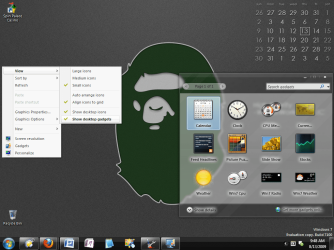
i finally got around to importing a visual style from Vista, and it basically works right out of the box. new UI elements are carried over from Windows 7 Aero, but everything else gets replaced. the only glitch i found is with the new start menu, but that's easy enough to repair...

this is awesome :D
 

Attachments

  • 2009-08-13_094805.png
    2009-08-13_094805.png
    601.9 KB · Views: 1,651

My Computer

OS
7600 x86
CPU
Core 2 Duo e7200, 2.53 ghz
Motherboard
Micro-Star MS-7529
Memory
2x DDR2 PC5300 1gb, 667 mhz
Graphics Card(s)
GeForce 9500gt, 512mb
Monitor(s) Displays
22" LG Flatron w2234s
Screen Resolution
1680x1050
Hard Drives
Excelstor SATA-II 250gb 7200rpm, 8mb cache
PSU
CoolerMaster M520
Internet Speed
30/20 mbits
nice garbanzo could you upload the theme in the image :D for win 7 x64 ?
 

My Computer

OS
windows 7 x64
CPU
amd athlon 64 x2 4000+ 2.25GHz
Motherboard
Asus
Memory
3gb
Graphics Card(s)
9800gtx+
Sound Card
audigy
Monitor(s) Displays
benq 22" lcd + HRH 17" crt
Hard Drives
640seagate
200western
PSU
400w
Case
Asus
Cooling
default
sorry i can't, i didn't actually continue with the port. and my win7 machine is fried at the moment, it'll be a week before it's up and running again, i think it needs a new mobo. i'm stuck using my wife's old laptop for the time being :(
 

My Computer

OS
7600 x86
CPU
Core 2 Duo e7200, 2.53 ghz
Motherboard
Micro-Star MS-7529
Memory
2x DDR2 PC5300 1gb, 667 mhz
Graphics Card(s)
GeForce 9500gt, 512mb
Monitor(s) Displays
22" LG Flatron w2234s
Screen Resolution
1680x1050
Hard Drives
Excelstor SATA-II 250gb 7200rpm, 8mb cache
PSU
CoolerMaster M520
Internet Speed
30/20 mbits
@garbanzo

could you post some screen shots of the interface? I am interested in buying it but they are horrible sales people - no screen shots (that i can see), no demo version, wait period between buying and getting the software :huh:
 

My Computer

Computer Manufacturer/Model Number
Dell Inspiron 1520
OS
Windows 7 Ultimate
CPU
Pentium D
Memory
1GB
apparently, not only does it support Windows 7 visual styles, but it can import/translate XP and Vista visual styles. of course there would be some extra elements to skin, but that sounds awesome.

anyway i'm thinking of ordering it, and wondered if anyone here has used it. let me know what you think :)

Ave's Windows7 Style Builder


I've been try it but nothing happen when try to use theme from devian art.i guess maybe problem with patch....
 

My Computer

Computer Manufacturer/Model Number
Acer Aspire 4520
OS
Windows 7 Ultimate x86/Ubuntu 10.10
Memory
2.5 GB
Graphics Card(s)
Nvidia GeForce 7000M

My Computer

Computer Manufacturer/Model Number
FujitsuSiemens Amilo Pa3553
OS
Windows 7 x64 Home Premium
CPU
AMD Turion X2 Ultra ZM-82
Memory
4GB DDR2-800
Graphics Card(s)
Ati Mobility Radeon 3200 & Ati Mobility Radeon 3450
can some1 teach me how to use style builder?

i already install it.turn off uac b4 install n restart then turn on back.after that i open style builder n try to import Devian Art theme but nothing happen.why?is there problem or what?or must use patcher first?i really2 confused now....plez......
 

My Computer

Computer Manufacturer/Model Number
Acer Aspire 4520
OS
Windows 7 Ultimate x86/Ubuntu 10.10
Memory
2.5 GB
Graphics Card(s)
Nvidia GeForce 7000M
No demo version ??

I am really interested in trying syle builder but they do not offer a trial or demo version , what's up with that ?

I mean it's only twenty two bucks (U.S.) but I would certainly would like to test drive it before buying it ........ they must be REALLY proud of their software !

I am not a professional theme designer by any means but would like to start getting into it but before I shell out the dough I'd like to see if it is something that I can grasp . They wonder why people hack software :mad:
 
Last edited:

My Computer

Computer type
PC/Desktop
Computer Manufacturer/Model Number
HP
OS
Windows 8 Pro / Windows 7 Home Premium x64 dual boot
Memory
6 gigs
Graphics Card(s)
Nvidia GEForce 9400 GT
Screen Resolution
1600 x 900
Hard Drives
Internal - Western Digital 600 gb HDD
Internal - Western Digital 250 gb HDD
External - Western Digital 1 TB HDD
Antivirus
Avast!
Browser
Pale Moon
I am really interested in trying syle builder but they do not offer a trial or demo version , what's up with that ?

I mean it's only twenty two bucks (U.S.) but I would certainly would like to test drive it before buying it ........ they must be REALLY proud of their software !

I am not a professional theme designer by any means but would like to start getting into it but before I shell out the dough I'd like to see if it is something that I can grasp . They wonder why people hack software :mad:

I can tell you if you are going to start themeing it's the BEST $22 I ever spent for a program. It's a 1 man operation & after you buy it (need # to join) there is a forum there with a lot of help & some of us on the SevenForum can help too. Ask away
Jerry
 

My Computer

Computer type
Laptop
Computer Manufacturer/Model Number
Sager NP9170
OS
Win 7 Pro x64 / Win 10 Pro
CPU
Intel(R) Core(TM) i7-3630QM CPU @ 2.40GHz
Motherboard
CLEVO P170EM
Memory
12 GB
Graphics Card(s)
(1) Intel(R) HD Graphics 4000 (2) NVIDIA GeForce GTX 675M
Sound Card
(1) Realtek High Definition Audio (2) Intel(R) Display Aud
Monitor(s) Displays
17.3
Screen Resolution
1920x1080
Hard Drives
(1) Samsung 860 EVO 500GB(OS) (1) Samsung 860 EVO 500GB(Data)
Keyboard
Backlite
Antivirus
MSE, Malwarebytes Pro
Browser
Firefox
Other Info
DESKTOP: Custom-built.
OS: Win 10 Pro x64.
CASE: Rosewill R5.
CPU: Intel I5 4670K CPU @ 3.40GHz.
CPU COOLER: Cool Master Hyper 212 EVO.
MOTHERBOARD: Asus Z87-A.
MEMORY: Kingston HyperX 2x4 GB.
GPU: Nvidia Geforce 650 TI.
PSU: Corsair TX750.
DRIVES: (1) Samsung 840 120 GB SSD (2) Western Digital blue 500 GB 7200 RPM.
I am really interested in trying syle builder but they do not offer a trial or demo version , what's up with that ?

I mean it's only twenty two bucks (U.S.) but I would certainly would like to test drive it before buying it ........ they must be REALLY proud of their software !

I am not a professional theme designer by any means but would like to start getting into it but before I shell out the dough I'd like to see if it is something that I can grasp . They wonder why people hack software :mad:

I can tell you if you are going to start themeing it's the BEST $22 I ever spent for a program. It's a 1 man operation & after you buy it (need # to join) there is a forum there with a lot of help & some of us on the SevenForum can help too. Ask away
Jerry

My opinion is opposite of that, worst 22 dollars I've ever spent. The app was supposed to have help file that would show detailed info/pics of the element that you click. I've found that it does do this for about maybe ten elements. Their forum is like SpongeBob Square Pants when Plankton took over his brain. You can't understand half of what they are trying to say. Most of their advice is dead on for the element that you want to change but it comes with side effects and will change something that you don't want to change. I only had about five things that I wanted to change but had already changed them using ResHacker. Style Builder is easy to use but it does have some quirks whilst using it.
 

My Computer

Computer Manufacturer/Model Number
Averatec 6130HS-20
OS
Windows 7 Professional 32-bit (6.1, Build 7600)
CPU
Intel(R) Pentium(R) 4 3.00 GHz HT
Memory
2.0 GB
Graphics Card(s)
ATI Mobility Radeon 9600 64MB
Sound Card
Realtek AC'97 Audio
Screen Resolution
1280 x 800
Hard Drives
Seagate 96023A 60GB 7200RPM -
Seagate FreeAgentDesktop 250GB
Cooling
20 Inch Box Fan
Mouse
Targus PAWM10 Wireless Optical Laptop Mouse
I am really interested in trying syle builder but they do not offer a trial or demo version , what's up with that ?

I mean it's only twenty two bucks (U.S.) but I would certainly would like to test drive it before buying it ........ they must be REALLY proud of their software !

I am not a professional theme designer by any means but would like to start getting into it but before I shell out the dough I'd like to see if it is something that I can grasp . They wonder why people hack software :mad:

I can tell you if you are going to start themeing it's the BEST $22 I ever spent for a program. It's a 1 man operation & after you buy it (need # to join) there is a forum there with a lot of help & some of us on the SevenForum can help too. Ask away
Jerry

My opinion is opposite of that, worst 22 dollars I've ever spent. The app was supposed to have help file that would show detailed info/pics of the element that you click. I've found that it does do this for about maybe ten elements. Their forum is like SpongeBob Square Pants when Plankton took over his brain. You can't understand half of what they are trying to say. Most of their advice is dead on for the element that you want to change but it comes with side effects and will change something that you don't want to change. I only had about five things that I wanted to change but had already changed them using ResHacker. Style Builder is easy to use but it does have some quirks whilst using it.

Well judging from their site which by the way is VERY limited on information which is almost none , the writer of the software somewhere between a relationship that he is head over heels on , working on a degree in school and writing style builder, that tells me he is just juggling too many thing in his life at the moment ...... and if it does not have a complete help file then what good is it if you can't get help from the writer / forum / blog ?

You can't get into their blog or forum WITHOUT buying the software because you need the license number they give you to sign up or log in ?

Does anyone know where I can get this software to at LEAST try it without getting any "cooties" or another software that does similar? :confused:
 

My Computer

Computer type
PC/Desktop
Computer Manufacturer/Model Number
HP
OS
Windows 8 Pro / Windows 7 Home Premium x64 dual boot
Memory
6 gigs
Graphics Card(s)
Nvidia GEForce 9400 GT
Screen Resolution
1600 x 900
Hard Drives
Internal - Western Digital 600 gb HDD
Internal - Western Digital 250 gb HDD
External - Western Digital 1 TB HDD
Antivirus
Avast!
Browser
Pale Moon
Back
Top