
You are using an out of date browser. It may not display this or other websites correctly.
You should upgrade or use an alternative browser.
You should upgrade or use an alternative browser.
Solved Remove Aero border around user account icon
- Thread starter shoober
- Start date

Bongo
Jerry ☮ 1956-2019 R.I.P.
For the login screen you would need to edit the authui.dll, look at Post #23 of this thread http://www.sevenforums.com/customiz...frame-startup-login-screen-3.html#post1693062 Danny has already made up a authui.dll that removes the logon picture.
To remove the user picture from the start menu have a look at these two options.
Windows 7 Start Menu User Picture Remover : Remove Windows 7 Start Menu User Picture With One Click | door2windows
How to Hide / Remove “User Picture” in Windows Vista and 7 Start Menu? - Tweaking with Vishal
Jerry
To remove the user picture from the start menu have a look at these two options.
Windows 7 Start Menu User Picture Remover : Remove Windows 7 Start Menu User Picture With One Click | door2windows
How to Hide / Remove “User Picture” in Windows Vista and 7 Start Menu? - Tweaking with Vishal
Jerry
My Computer
- Computer type
- Laptop
- Computer Manufacturer/Model Number
- Sager NP9170
- OS
- Win 7 Pro x64 / Win 10 Pro
- CPU
- Intel(R) Core(TM) i7-3630QM CPU @ 2.40GHz
- Motherboard
- CLEVO P170EM
- Memory
- 12 GB
- Graphics Card(s)
- (1) Intel(R) HD Graphics 4000 (2) NVIDIA GeForce GTX 675M
- Sound Card
- (1) Realtek High Definition Audio (2) Intel(R) Display Aud
- Monitor(s) Displays
- 17.3
- Screen Resolution
- 1920x1080
- Hard Drives
- (1) Samsung 860 EVO 500GB(OS) (1) Samsung 860 EVO 500GB(Data)
- Keyboard
- Backlite
- Antivirus
- MSE, Malwarebytes Pro
- Browser
- Firefox
- Other Info
- DESKTOP: Custom-built.
OS: Win 10 Pro x64.
CASE: Rosewill R5.
CPU: Intel I5 4670K CPU @ 3.40GHz.
CPU COOLER: Cool Master Hyper 212 EVO.
MOTHERBOARD: Asus Z87-A.
MEMORY: Kingston HyperX 2x4 GB.
GPU: Nvidia Geforce 650 TI.
PSU: Corsair TX750.
DRIVES: (1) Samsung 840 120 GB SSD (2) Western Digital blue 500 GB 7200 RPM.
Bongo
Jerry ☮ 1956-2019 R.I.P.
Sorry not that I'm aware of.
Jerry
Jerry
My Computer
- Computer type
- Laptop
- Computer Manufacturer/Model Number
- Sager NP9170
- OS
- Win 7 Pro x64 / Win 10 Pro
- CPU
- Intel(R) Core(TM) i7-3630QM CPU @ 2.40GHz
- Motherboard
- CLEVO P170EM
- Memory
- 12 GB
- Graphics Card(s)
- (1) Intel(R) HD Graphics 4000 (2) NVIDIA GeForce GTX 675M
- Sound Card
- (1) Realtek High Definition Audio (2) Intel(R) Display Aud
- Monitor(s) Displays
- 17.3
- Screen Resolution
- 1920x1080
- Hard Drives
- (1) Samsung 860 EVO 500GB(OS) (1) Samsung 860 EVO 500GB(Data)
- Keyboard
- Backlite
- Antivirus
- MSE, Malwarebytes Pro
- Browser
- Firefox
- Other Info
- DESKTOP: Custom-built.
OS: Win 10 Pro x64.
CASE: Rosewill R5.
CPU: Intel I5 4670K CPU @ 3.40GHz.
CPU COOLER: Cool Master Hyper 212 EVO.
MOTHERBOARD: Asus Z87-A.
MEMORY: Kingston HyperX 2x4 GB.
GPU: Nvidia Geforce 650 TI.
PSU: Corsair TX750.
DRIVES: (1) Samsung 840 120 GB SSD (2) Western Digital blue 500 GB 7200 RPM.
You can use Resource Hacker (ResHacker.exe) to do it. As Bongo mentioned you need to edit the authui.dll found in the system32 folder.
I tested it by making a copy of authui.dll then opening the copy in Reshack (2nd copy, not the backup).
In Reshack press CTRL+F to open the find text box and find
and replace with
The search term is found in the first 3 UIFILE folders but I only needed to change the first one, see image below.
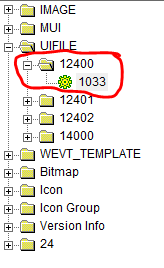
After replacing the text click Compile Script at the top of the window then click file save, not save as, I've had problems with save as.
Now you need to take ownership of "C:\Windows\System32\authui.dll". If you don't know how here is one way that makes it easy - http://www.sevenforums.com/tutorials/1911-take-ownership-shortcut.html
Next open the cmd prompt and type or copy,
This will kill explorer before replacing the original authui.dll with your modded one then restart explorer.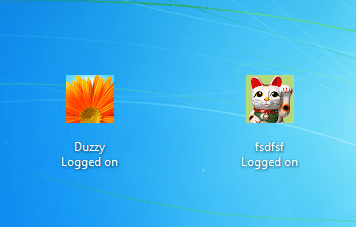
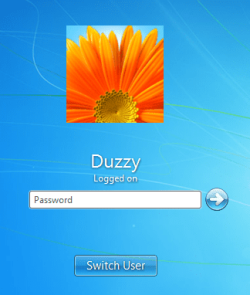
Warning
First the most important thing to do is to back up "C:\Windows\System32\authui.dll" before you do anything and learn how to replace it in case of not being able to boot into Windows after modding.
I tested it by making a copy of authui.dll then opening the copy in Reshack (2nd copy, not the backup).
In Reshack press CTRL+F to open the find text box and find
Code:
<ZoomableElement id="atom(Overlay)" layoutpos="client" />
Code:
<ZoomableElement id="atom(Overlay)" layoutpos="[B]none[/B]" />After replacing the text click Compile Script at the top of the window then click file save, not save as, I've had problems with save as.
Now you need to take ownership of "C:\Windows\System32\authui.dll". If you don't know how here is one way that makes it easy - http://www.sevenforums.com/tutorials/1911-take-ownership-shortcut.html
Next open the cmd prompt and type or copy,
Code:
taskkill /F /IM Explorer.exe
xcopy /vqy "[YOUR MODDED FILE PATH]\authui.dll" "C:\Windows\System32\*.*"
explorerMy Computer
- Computer Manufacturer/Model Number
- Self built
- OS
- Windows 7 Ultimate x64
- CPU
- Intel Pentium Dual Core E5200 2.5GHz (3.77GHz OC)
- Motherboard
- Asus P5Q-E
- Memory
- Corsair 4GB DDR2 (4x1GB CM2X1024-6400C4)
- Graphics Card(s)
- Palit GeForce GTS 250 (1024MB)
- Sound Card
- On Board (ADI AD2000B 8ch HD)
- Monitor(s) Displays
- Samsung 32in LCD TV
- Screen Resolution
- 1360x768
- Hard Drives
- 2 x 1TB Samsung 103SJ (Raid0)
2 x External 500GB Samsung 502IJ (NexStar 3 HD Enclosures)
- PSU
- 550W Antec Neo HE 550
- Case
- Antec P180
- Cooling
- Xigmatex Red Scorpion CPU Cooler. 3x120mm Fans
- Keyboard
- Logitech MX5000 Laser (Combo)
- Mouse
- Logitech MX5000 Laser (Combo)
- Internet Speed
- ADSL2+ (avg 10 Mbps Down, 0.80 Mbps up)
- Other Info
- Gigabyte GN-WP01GS 54g Wireless Lan Card
No problem, I've helped mod a couple of these so I had an idea it could be done.
If you want to make some more changes you might like to check out Logon-WorkShop. Although you would have to do this mod after using Logon-WorkShop as it can't do it and it may/may-not make it harder to do this one.
Logon Workshop also includes the Reshack.exe that I used.
http://www.softpedia.com/get/System/OS-Enhancements/Logon-WorkShop.shtml
If you want to make some more changes you might like to check out Logon-WorkShop. Although you would have to do this mod after using Logon-WorkShop as it can't do it and it may/may-not make it harder to do this one.
Logon Workshop also includes the Reshack.exe that I used.
http://www.softpedia.com/get/System/OS-Enhancements/Logon-WorkShop.shtml
My Computer
- Computer Manufacturer/Model Number
- Self built
- OS
- Windows 7 Ultimate x64
- CPU
- Intel Pentium Dual Core E5200 2.5GHz (3.77GHz OC)
- Motherboard
- Asus P5Q-E
- Memory
- Corsair 4GB DDR2 (4x1GB CM2X1024-6400C4)
- Graphics Card(s)
- Palit GeForce GTS 250 (1024MB)
- Sound Card
- On Board (ADI AD2000B 8ch HD)
- Monitor(s) Displays
- Samsung 32in LCD TV
- Screen Resolution
- 1360x768
- Hard Drives
- 2 x 1TB Samsung 103SJ (Raid0)
2 x External 500GB Samsung 502IJ (NexStar 3 HD Enclosures)
- PSU
- 550W Antec Neo HE 550
- Case
- Antec P180
- Cooling
- Xigmatex Red Scorpion CPU Cooler. 3x120mm Fans
- Keyboard
- Logitech MX5000 Laser (Combo)
- Mouse
- Logitech MX5000 Laser (Combo)
- Internet Speed
- ADSL2+ (avg 10 Mbps Down, 0.80 Mbps up)
- Other Info
- Gigabyte GN-WP01GS 54g Wireless Lan Card
Bongo
Jerry ☮ 1956-2019 R.I.P.
Very well done Duzzy
My Computer
- Computer type
- Laptop
- Computer Manufacturer/Model Number
- Sager NP9170
- OS
- Win 7 Pro x64 / Win 10 Pro
- CPU
- Intel(R) Core(TM) i7-3630QM CPU @ 2.40GHz
- Motherboard
- CLEVO P170EM
- Memory
- 12 GB
- Graphics Card(s)
- (1) Intel(R) HD Graphics 4000 (2) NVIDIA GeForce GTX 675M
- Sound Card
- (1) Realtek High Definition Audio (2) Intel(R) Display Aud
- Monitor(s) Displays
- 17.3
- Screen Resolution
- 1920x1080
- Hard Drives
- (1) Samsung 860 EVO 500GB(OS) (1) Samsung 860 EVO 500GB(Data)
- Keyboard
- Backlite
- Antivirus
- MSE, Malwarebytes Pro
- Browser
- Firefox
- Other Info
- DESKTOP: Custom-built.
OS: Win 10 Pro x64.
CASE: Rosewill R5.
CPU: Intel I5 4670K CPU @ 3.40GHz.
CPU COOLER: Cool Master Hyper 212 EVO.
MOTHERBOARD: Asus Z87-A.
MEMORY: Kingston HyperX 2x4 GB.
GPU: Nvidia Geforce 650 TI.
PSU: Corsair TX750.
DRIVES: (1) Samsung 840 120 GB SSD (2) Western Digital blue 500 GB 7200 RPM.

shoober
New member
I have been debating on whether or not I should do this tweak. If you do something wrong to the authid.dll, you will black screen at login and can't do anything. I don't have system restore enabled, so if I mess something up, I will have to do a lot of stuff to get my OS back.
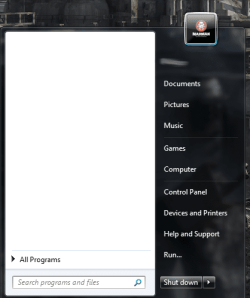
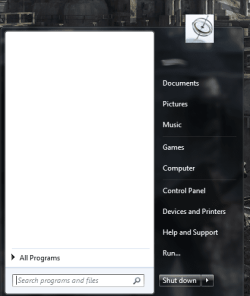
Does doing this authid.dll tweak remove the Aero picture frame from the user account icon in the start menu? Here is a picture of what I'm talking about.

Will this tweak remove the picture frame for the start menu user account icon also?
Does doing this authid.dll tweak remove the Aero picture frame from the user account icon in the start menu? Here is a picture of what I'm talking about.
Will this tweak remove the picture frame for the start menu user account icon also?
My Computer
- OS
- Windows 7 64-bit
Bongo
Jerry ☮ 1956-2019 R.I.P.
No it will not change that User picture frame in the start menu.
Jerry
Jerry
My Computer
- Computer type
- Laptop
- Computer Manufacturer/Model Number
- Sager NP9170
- OS
- Win 7 Pro x64 / Win 10 Pro
- CPU
- Intel(R) Core(TM) i7-3630QM CPU @ 2.40GHz
- Motherboard
- CLEVO P170EM
- Memory
- 12 GB
- Graphics Card(s)
- (1) Intel(R) HD Graphics 4000 (2) NVIDIA GeForce GTX 675M
- Sound Card
- (1) Realtek High Definition Audio (2) Intel(R) Display Aud
- Monitor(s) Displays
- 17.3
- Screen Resolution
- 1920x1080
- Hard Drives
- (1) Samsung 860 EVO 500GB(OS) (1) Samsung 860 EVO 500GB(Data)
- Keyboard
- Backlite
- Antivirus
- MSE, Malwarebytes Pro
- Browser
- Firefox
- Other Info
- DESKTOP: Custom-built.
OS: Win 10 Pro x64.
CASE: Rosewill R5.
CPU: Intel I5 4670K CPU @ 3.40GHz.
CPU COOLER: Cool Master Hyper 212 EVO.
MOTHERBOARD: Asus Z87-A.
MEMORY: Kingston HyperX 2x4 GB.
GPU: Nvidia Geforce 650 TI.
PSU: Corsair TX750.
DRIVES: (1) Samsung 840 120 GB SSD (2) Western Digital blue 500 GB 7200 RPM.
Bongo
Jerry ☮ 1956-2019 R.I.P.
That frame is bitmap image # 7013 in explorer.exe in C:\Windows, if you remove or edit the image to make it transparent it will leave a white space where the frame is at.
Jerry
Jerry
My Computer
- Computer type
- Laptop
- Computer Manufacturer/Model Number
- Sager NP9170
- OS
- Win 7 Pro x64 / Win 10 Pro
- CPU
- Intel(R) Core(TM) i7-3630QM CPU @ 2.40GHz
- Motherboard
- CLEVO P170EM
- Memory
- 12 GB
- Graphics Card(s)
- (1) Intel(R) HD Graphics 4000 (2) NVIDIA GeForce GTX 675M
- Sound Card
- (1) Realtek High Definition Audio (2) Intel(R) Display Aud
- Monitor(s) Displays
- 17.3
- Screen Resolution
- 1920x1080
- Hard Drives
- (1) Samsung 860 EVO 500GB(OS) (1) Samsung 860 EVO 500GB(Data)
- Keyboard
- Backlite
- Antivirus
- MSE, Malwarebytes Pro
- Browser
- Firefox
- Other Info
- DESKTOP: Custom-built.
OS: Win 10 Pro x64.
CASE: Rosewill R5.
CPU: Intel I5 4670K CPU @ 3.40GHz.
CPU COOLER: Cool Master Hyper 212 EVO.
MOTHERBOARD: Asus Z87-A.
MEMORY: Kingston HyperX 2x4 GB.
GPU: Nvidia Geforce 650 TI.
PSU: Corsair TX750.
DRIVES: (1) Samsung 840 120 GB SSD (2) Western Digital blue 500 GB 7200 RPM.
Bongo
Jerry ☮ 1956-2019 R.I.P.
You're welcome
My Computer
- Computer type
- Laptop
- Computer Manufacturer/Model Number
- Sager NP9170
- OS
- Win 7 Pro x64 / Win 10 Pro
- CPU
- Intel(R) Core(TM) i7-3630QM CPU @ 2.40GHz
- Motherboard
- CLEVO P170EM
- Memory
- 12 GB
- Graphics Card(s)
- (1) Intel(R) HD Graphics 4000 (2) NVIDIA GeForce GTX 675M
- Sound Card
- (1) Realtek High Definition Audio (2) Intel(R) Display Aud
- Monitor(s) Displays
- 17.3
- Screen Resolution
- 1920x1080
- Hard Drives
- (1) Samsung 860 EVO 500GB(OS) (1) Samsung 860 EVO 500GB(Data)
- Keyboard
- Backlite
- Antivirus
- MSE, Malwarebytes Pro
- Browser
- Firefox
- Other Info
- DESKTOP: Custom-built.
OS: Win 10 Pro x64.
CASE: Rosewill R5.
CPU: Intel I5 4670K CPU @ 3.40GHz.
CPU COOLER: Cool Master Hyper 212 EVO.
MOTHERBOARD: Asus Z87-A.
MEMORY: Kingston HyperX 2x4 GB.
GPU: Nvidia Geforce 650 TI.
PSU: Corsair TX750.
DRIVES: (1) Samsung 840 120 GB SSD (2) Western Digital blue 500 GB 7200 RPM.
Sorry Bongo, going to have to correct you again and also thank you for making it easier to locate the image.Is it possible to remove that Aero frame from the start menu? Does anyone know the dll responsible for this?
As Bongo said this is bitmap image #7013 in "C:\Windows\Explorer.exe" and you can use Reshack (Included with Logon Workshop) to replace it.
Also the warning I gave for authui.dll applies for this exe as well, Backup file. Check below the next quote for more help on restoring.
Again make a copy of Explorer.exe then open the copy in Reshack (2nd copy, not the backup).
Next the easiest way is to use Reshack to save the bitmap, 3rd line down in my screenshot.
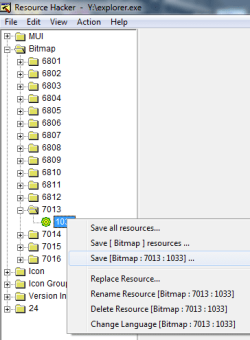
Next open the exported bitmap in paint and Select All, press Delete, use the paint bucket to fill with black so you have just a plain black square image and then hit save.
Now back in Reshack click Replace Resource, 4th line down in the screenshot above. This will open a new dialog, click "Open file with new bitmap" to browse to your modified bitmap, select it then click replace, then close.
Now just click File > Save.
You also need to Take Ownership of this file as well and close Explorer.exe before replacing.
After taking ownership you can use these commands in cmd prompt
Code:
taskkill /F /IM Explorer.exe
xcopy /vqy "[YOUR MODDED FILE PATH]\Explorer.exe" "C:\Windows\*.*"
explorerIf something goes wrong you may have to reset the computer using the button on the case so don't have any other programs running when you replace the files.I have been debating on whether or not I should do this tweak. If you do something wrong to the authid.dll, you will black screen at login and can't do anything. I don't have system restore enabled, so if I mess something up, I will have to do a lot of stuff to get my OS back.
You can use a Live Linux boot disk or Windows 7 Recovery Console to copy the backed up files back to there original location replacing the modified files if anything goes wrong. Here is a couple of pages that might help,
http://www.sevenforums.com/tutorials/93347-copy-paste-windows-recovery-console.html
http://www.sevenforums.com/tutorial...ate-live-cd-dvd-usb-use-emergency-backup.html
In the Peppermint3 - Create Live.... tutorial follow step A and B. Step C will show you how to open the File Manager to copy the files.
Ubuntu is another Linux distro that I believe is popular.
If your not familiar with this type of stuff then after backing up the files and taking ownership of the files in the original location I would recommend with either methods to try and copy the backed up files over the originals ones before replacing with your modified ones. This way you can confirm that you can replace the files before anything goes wrong.
Also replace only one file with your modified one before checking that it worked so you know which one does or doesn't work.
To check authui.dll - log off, switch user or lock computer. If you get a black screen then it has failed.
If there's a problem with Explorer.exe then Explorer will not restart when you run the command "explorer".
One last thing, you may be intrested in reading these two threads -
http://www.sevenforums.com/customization/276444-user-tile-border.html#post2275733
http://www.sevenforums.com/themes-s...working-my-account-picture-2.html#post1867323
The first link has a batch file you may be intrested in after modifying it for your files.
Attachments
My Computer
- Computer Manufacturer/Model Number
- Self built
- OS
- Windows 7 Ultimate x64
- CPU
- Intel Pentium Dual Core E5200 2.5GHz (3.77GHz OC)
- Motherboard
- Asus P5Q-E
- Memory
- Corsair 4GB DDR2 (4x1GB CM2X1024-6400C4)
- Graphics Card(s)
- Palit GeForce GTS 250 (1024MB)
- Sound Card
- On Board (ADI AD2000B 8ch HD)
- Monitor(s) Displays
- Samsung 32in LCD TV
- Screen Resolution
- 1360x768
- Hard Drives
- 2 x 1TB Samsung 103SJ (Raid0)
2 x External 500GB Samsung 502IJ (NexStar 3 HD Enclosures)
- PSU
- 550W Antec Neo HE 550
- Case
- Antec P180
- Cooling
- Xigmatex Red Scorpion CPU Cooler. 3x120mm Fans
- Keyboard
- Logitech MX5000 Laser (Combo)
- Mouse
- Logitech MX5000 Laser (Combo)
- Internet Speed
- ADSL2+ (avg 10 Mbps Down, 0.80 Mbps up)
- Other Info
- Gigabyte GN-WP01GS 54g Wireless Lan Card
Bongo
Jerry ☮ 1956-2019 R.I.P.
Thank you for correcting me Duzzy, I just tried it and it works perfectly even with the classic theme. I would have never thought that a solid black image would do that I learned something new.
Jerry
Jerry
My Computer
- Computer type
- Laptop
- Computer Manufacturer/Model Number
- Sager NP9170
- OS
- Win 7 Pro x64 / Win 10 Pro
- CPU
- Intel(R) Core(TM) i7-3630QM CPU @ 2.40GHz
- Motherboard
- CLEVO P170EM
- Memory
- 12 GB
- Graphics Card(s)
- (1) Intel(R) HD Graphics 4000 (2) NVIDIA GeForce GTX 675M
- Sound Card
- (1) Realtek High Definition Audio (2) Intel(R) Display Aud
- Monitor(s) Displays
- 17.3
- Screen Resolution
- 1920x1080
- Hard Drives
- (1) Samsung 860 EVO 500GB(OS) (1) Samsung 860 EVO 500GB(Data)
- Keyboard
- Backlite
- Antivirus
- MSE, Malwarebytes Pro
- Browser
- Firefox
- Other Info
- DESKTOP: Custom-built.
OS: Win 10 Pro x64.
CASE: Rosewill R5.
CPU: Intel I5 4670K CPU @ 3.40GHz.
CPU COOLER: Cool Master Hyper 212 EVO.
MOTHERBOARD: Asus Z87-A.
MEMORY: Kingston HyperX 2x4 GB.
GPU: Nvidia Geforce 650 TI.
PSU: Corsair TX750.
DRIVES: (1) Samsung 840 120 GB SSD (2) Western Digital blue 500 GB 7200 RPM.
@Bongo
It was more of a guess before I'd tried, I thought to myself bitmaps don't support transparency that I know of and because 99% of images in these type of mods are bitmap then Windows must make a colour transparent and while doing some logon mods I've noticed some images contain black in the parts that don't show, so I thought fully a black square would work and this trick may work for most images that appear to use the same method, but no guarantees.
And not all images use the same method, refer to the images for the logon screen below. 2 do, 1 doesn't. The 3rd image may make both black and gray transparent, I'll check it one day..... maybe.



It was more of a guess before I'd tried, I thought to myself bitmaps don't support transparency that I know of and because 99% of images in these type of mods are bitmap then Windows must make a colour transparent and while doing some logon mods I've noticed some images contain black in the parts that don't show, so I thought fully a black square would work and this trick may work for most images that appear to use the same method, but no guarantees.
And not all images use the same method, refer to the images for the logon screen below. 2 do, 1 doesn't. The 3rd image may make both black and gray transparent, I'll check it one day..... maybe.
My Computer
- Computer Manufacturer/Model Number
- Self built
- OS
- Windows 7 Ultimate x64
- CPU
- Intel Pentium Dual Core E5200 2.5GHz (3.77GHz OC)
- Motherboard
- Asus P5Q-E
- Memory
- Corsair 4GB DDR2 (4x1GB CM2X1024-6400C4)
- Graphics Card(s)
- Palit GeForce GTS 250 (1024MB)
- Sound Card
- On Board (ADI AD2000B 8ch HD)
- Monitor(s) Displays
- Samsung 32in LCD TV
- Screen Resolution
- 1360x768
- Hard Drives
- 2 x 1TB Samsung 103SJ (Raid0)
2 x External 500GB Samsung 502IJ (NexStar 3 HD Enclosures)
- PSU
- 550W Antec Neo HE 550
- Case
- Antec P180
- Cooling
- Xigmatex Red Scorpion CPU Cooler. 3x120mm Fans
- Keyboard
- Logitech MX5000 Laser (Combo)
- Mouse
- Logitech MX5000 Laser (Combo)
- Internet Speed
- ADSL2+ (avg 10 Mbps Down, 0.80 Mbps up)
- Other Info
- Gigabyte GN-WP01GS 54g Wireless Lan Card
shoober
New member
Awesome! Thanks guys. I didn't know you could make a System Repair Disc and fix it like that. Well, that makes it a whole lot easier then taking out my hard drive and putting it in another computer just to access the files and replace the dll lol. I feel way more confident now, knowing I can fix it pretty easy in case I mess up the dll.
So anyway, I got a lot of tweaking to do. I got to do the authid, explorer, and shell32 dlls to edit. I'm going for a very Windows 95/98 look for my theme. Maybe when its all done, I will make a youtube video and show off all the tweaks and how to do them. I'm sure there's others out there that want that nostalgic feeling of an old grey Windows theme, complete with Windows 98 icons lol.
So anyway, I got a lot of tweaking to do. I got to do the authid, explorer, and shell32 dlls to edit. I'm going for a very Windows 95/98 look for my theme. Maybe when its all done, I will make a youtube video and show off all the tweaks and how to do them. I'm sure there's others out there that want that nostalgic feeling of an old grey Windows theme, complete with Windows 98 icons lol.
My Computer
- OS
- Windows 7 64-bit
Always happy to help and good luck with the entire project.
My Computer
- Computer Manufacturer/Model Number
- Self built
- OS
- Windows 7 Ultimate x64
- CPU
- Intel Pentium Dual Core E5200 2.5GHz (3.77GHz OC)
- Motherboard
- Asus P5Q-E
- Memory
- Corsair 4GB DDR2 (4x1GB CM2X1024-6400C4)
- Graphics Card(s)
- Palit GeForce GTS 250 (1024MB)
- Sound Card
- On Board (ADI AD2000B 8ch HD)
- Monitor(s) Displays
- Samsung 32in LCD TV
- Screen Resolution
- 1360x768
- Hard Drives
- 2 x 1TB Samsung 103SJ (Raid0)
2 x External 500GB Samsung 502IJ (NexStar 3 HD Enclosures)
- PSU
- 550W Antec Neo HE 550
- Case
- Antec P180
- Cooling
- Xigmatex Red Scorpion CPU Cooler. 3x120mm Fans
- Keyboard
- Logitech MX5000 Laser (Combo)
- Mouse
- Logitech MX5000 Laser (Combo)
- Internet Speed
- ADSL2+ (avg 10 Mbps Down, 0.80 Mbps up)
- Other Info
- Gigabyte GN-WP01GS 54g Wireless Lan Card