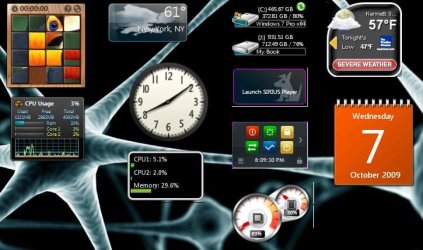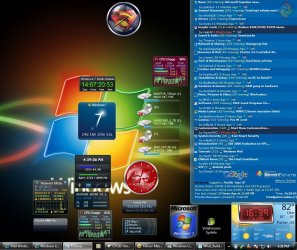
Problem with a few desktop gadgets - pink outline

avishking

New member
Local time
10:46 AM
Messages
3
Hi,
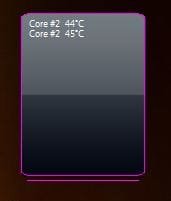
i have this annoying problem where some gadgets are not displayed properly.
there is an ugly pink outline around them, screenshot attached:

(im not using any special theme or anything,. just a default win 7 theme)
 

Attachments

  • Capture.JPG
    Capture.JPG
    10.1 KB · Views: 2,719

My Computer My Computer

OS
Windows 7
Hi,
i have this annoying problem where some gadgets are not displayed properly.
there is an ugly pink outline around them, screenshot attached:

(im not using any special theme or anything,. just a default win 7 theme)

Could be your gfx drivers, try different drivers see how it goes. ;)
 

My Computer My Computer

Computer type
PC/Desktop
Computer Manufacturer/Model Number
Self Build
OS
MS Windows 7 Professional 64-bit SP1
CPU
AMD FX(tm)-6100 Six-Core Processor Socket AM3+ (942)
Motherboard
ASUSTeK COMPUTER INC. SABERTOOTH 990FX (AM3r2)
Memory
8.00 GB Dual-Channel DDR3 @ 802MHz (11-11-11-36) 1.5Volts
Graphics Card(s)
NVIDIA GeForce GTX 560 Ti
Sound Card
Onboard Realtek HD
Monitor(s) Displays
shimian (1920x1080@60Hz)
Screen Resolution
1920*1080
Hard Drives
OCZ-AGIL ITY3 SATA Disk Device 120GB
PSU
Corsair TX 750
Case
Corsair
Cooling
WaterCooled
Keyboard
Microsoft Wired
Mouse
Logitech USB Optical TiltWheel Mouse
Internet Speed
Realtek PCIe GBE Family Controller 20MB*1MB
Antivirus
Avast
Browser
Firefox
Other Info
150GB Internal Hard Drive for Backing Up Important Files -
Hauppauge Nova-DT Dual DVB-T Tuner Device (+IR) -
USB PC Camera with Mic (SN9C105)
Hi,
i have this annoying problem where some gadgets are not displayed properly.
there is an ugly pink outline around them, screenshot attached:

(im not using any special theme or anything,. just a default win 7 theme)

Wow, so the default color is frost, yet you have a pink boarder, and there is no theme, well have to think about that some more.

cheers
xxrazor
 

My Computer My Computer

OS
Dual Boot 7600 RTM x64
Motherboard
Asus P5B
Memory
6GB
Graphics Card(s)
NVIDIA GeForce 9600GT
Monitor(s) Displays
Benq 24" x 2
Screen Resolution
1600 x 1024
Hard Drives
Seagate 160 GB Sata
Western Digital 1.5 TB Sata
Seagate 400 GB External
Case
Antec
Hmm this is a major possibility, cause when I was making a custom clock I left the BG a bit transparent well in the end the clock hands were surrounded by that same purple, so go ahead and check the bg image in photoshop or something and if it is transparent then try to add a similar color but at 100% opacity and see if that works it should.

Thanks,
Kukag

p.s -if you want me to do it just post the png or psd here and I'll see what I can do.
 

My Computer My Computer

Computer Manufacturer/Model Number
Custom
OS
Windows 7
CPU
AMD Phenom II X4 940 3.0 Stock
Motherboard
Gigabyte GA-MA78GM-S2H
Memory
G.SKILL DDR2 800 PI Black 4GB+Corsair XMS2 Xtrm Gaming 2GB
Graphics Card(s)
ASUS EN8800GT TOP (Fact OC)
Monitor(s) Displays
Optiquest 20" Flatscreen
Screen Resolution
1680x1050
Hard Drives
Seagate 3.5' 7200RPM 750GB HDD
PSU
Antec NeoHE 550W
Cooling
Stock AMD Phenom HSF
Keyboard
Logitech G15
Internet Speed
Charter HighSpeed 10 Down / 5 Up
Hmm this is a major possibility, cause when I was making a custom clock I left the BG a bit transparent well in the end the clock hands were surrounded by that same purple, so go ahead and check the bg image in photoshop or something and if it is transparent then try to add a similar color but at 100% opacity and see if that works it should.

Thanks,
Kukag

p.s -if you want me to do it just post the png or psd here and I'll see what I can do.

If there was something wrong with the background within inside the gadget then everyone that is using it would have the same pink coloured border. I'm not experiencing such issue so my guess is that the problem lies elsewere. It should look good right 'out-of-the-box'. Or maybe I didn't get your point...

PS:
Avishking, this may sound silly, or out of the topic, but are you using UAC, or have you disabled it? There is a possibility that the gadget needs admin priviliges to run correctly... but that's a wild guess... :confused: since you said that this is not the only gadget that has this issue... :huh:
 

My Computer My Computer

Computer Manufacturer/Model Number
My Own Build
OS
Windows 7 Ultimate x64
CPU
Intel Core 2 Duo E8200 @ 3.73 GHz
Motherboard
ASUS P5E
Memory
Kingston DDR2 HyperX PC2-8500 4x1GB CL5 @ 1117MHz
Graphics Card(s)
OC'ed Gainward GeForce 8800GT 512MB Golden Sample
Sound Card
SoundBlaster X-Fi Platinum Fatal1ty Edition
Monitor(s) Displays
LG Flatron W2252TQ 22"
Screen Resolution
1680x1050
Hard Drives
Seagate Barracuda 11 500GB & 750GB,
Total Capacity: 1.2TB
PSU
Corsair HX520W PSU
Case
AeroCool S9 Pro with 40cm Side Fan
Cooling
Scythe Mugen (Infinity) CPU Cooler, 4x Noctua NF-P12-1300
Keyboard
Logitech Media Keyboard 600
Mouse
Logitech MX1000
Internet Speed
ADSL Broadband - 1 Mbit Down / 256 Kbit Up
Other Info
Genius SW-HF5.1 5000 Speakers,
Roland RH-50 Headphones
Hmm this is a major possibility, cause when I was making a custom clock I left the BG a bit transparent well in the end the clock hands were surrounded by that same purple, so go ahead and check the bg image in photoshop or something and if it is transparent then try to add a similar color but at 100% opacity and see if that works it should.

Thanks,
Kukag

p.s -if you want me to do it just post the png or psd here and I'll see what I can do.

How do i extract the png from the gadget?

Majkel - the user im on is an admin ..

sigh, i cant even find any info about anyone else having this problem on google, weird :confused:
 

My Computer My Computer

OS
Windows 7
I get the same pink outline with certain gadgets and I think it is my graphics drivers since I have to use older ATI Cats since my x1900xt is now considered legacy hardware and is not being supported by any new drivers by ATI....I can live with the problem for the time being since I will be getting a new graphics card toward the end of the month anyway
 

My Computer My Computer

OS
Windows 8 Professional x64
CPU
Intel Core i7-3770K @4.5 GHz
Motherboard
Asus Sabertooth Z77
Memory
16GB G.Skill Ripjaws DDR3-1600
Graphics Card(s)
Gigabyte GeForce GTX 670 OC
Sound Card
Realtek
Monitor(s) Displays
HP 2711x 27" LED
Screen Resolution
1920 X 1080p
Hard Drives
Crucial m4 256GB SSD (system)
Seagate Barracuda XT 2TB 7200 RPM (storage)
PSU
Strider Gold Evolution ST1000-G
Case
Raven RV01
Cooling
Noctua NH-D14
Keyboard
Logitech K800
Mouse
Logitech Performance Mouse MX
Internet Speed
FIOS - 75/35 Mbps
Other Info
Pioneer black internal CD/DVD/BD read/write
Logitech Z506 5.1 speakers
--------------------------------------------------
Alienware X51/i7-3770/EVGA GTX 660ti FTW/16GB 1600/Blu-ray/2TB SATA III HD
I use the latest ATI drivers, 9.9 ... but both of us having ATI cards might have something to do with it, maybe some a drivers conflict with? i will try removing them and re-installing
 

My Computer My Computer

OS
Windows 7
I think it has to do with IE8, believe it or not, as all was fine with my gadgets in Vista before I upgraded, and when I upgraded to IE8, I got an white, pink"offset" effect on the calendar, with a white edge also on my ram/cpu gauge, with the gauge freezing up after about 10 minutes after system start up. I called Microsoft, as it was a beta version, and they said yes they had others give them feedback to, that some of the gadgets were acting a little goofy. I guess nothings totally resolved this, as the image below was taken today. I take it you have IE8 installed?

ieerror.png
 

My Computer My Computer

Computer Manufacturer/Model Number
Self Build
OS
Windows 7 Home Premium 64-bit, Windows 8 Pro 64-bit
CPU
Intel Q9650
Motherboard
Gigabyte X48-DS5
Memory
6GB Kingston HyperX Ram
Graphics Card(s)
EVGA GTX285
Sound Card
Creative Sound Blaster Xtreme Gamer
Monitor(s) Displays
2x19" Dell SE198WFP
Hard Drives
WD 300GB VelociRaptor
WD 700GB Caviar Green
PSU
Corsair TX850w
Case
Cooler Master HAF922
Cooling
6 Fans Noctua/Cooler Master
I have Win7 Technet RTM x64 & IE_8

Todays Snip >>>> NO Pink unless I'm color blind :huh:
 

Attachments

  • Oct_7th_2009_82d.JPG
    Oct_7th_2009_82d.JPG
    168.9 KB · Views: 530

My Computer My Computer

Computer type
PC/Desktop
Computer Manufacturer/Model Number
Built them myself, Science Experiments !
OS
Win7 Enterprise, Win7 x86 (Ult 7600), Win7 x64 Ult 7600, TechNet RTM on AMD x64 (2.8Ghz)
CPU
AMD fx8350 4ghz, AMD-32 2400mhz, AMD-64 3200mhz, AMDx64 2.8G
Motherboard
SIS 755, ECS-K8M890M-M (Ult 7600), GigaByte & others
Memory
2gb, 4gb on the Ult 7600, 4gb on Technet RTM, 32gb on FX8350
Graphics Card(s)
Draw my own Graphics, several nVidia cards
Sound Card
on motherboard
Monitor(s) Displays
19" flat scr, 28" I-Inc widescr,22" Emprex Widescr, 23" Acer
Screen Resolution
1280 x 1024, 1440 x 900, 1920 x 1080
Hard Drives
6 pata Ide HD's & 2 Sata HD's
added 80gb external on Ult 7600 computer,
numerous extra 1tb, 2TB, 3Tb SATA HD's
A collection of ext HD Docks w/ HDs
PSU
430w, 550w, 600w, 700, 800, etc
Case
All Generic Full Towers
Cooling
Open Air & a few fans, some w/ colored LEDs
Keyboard
Compaq & Dell recycled from GoodWill
Mouse
Made in China Optical Wired Mouse
Internet Speed
Fast Cable InterNet
Antivirus
AVG Free on 24 different Desktops, NO Problems!
Browser
IE 8 is preferred, but use FireFox sometimes
Other Info
Linksys Routers, switches, & Hubs
Too Many USB Flash Drives to count, Biggest is 64GB !
Eight computers in my home network.
Sixteen computers at my business network.
Linked via TeamViewer !
Lots of old used spare computer parts everywhere!
I run W7 x64, ATI Graphics & IE8 and I get some of the same "pink" effects on my vista x32 laptop with IE8 & Nvidia graphics....so IE8 is present on both computers and now seeing siramic's post I remember I did start to notice the pink outlines after I upgraded to IE8...It's not that big a problem since it seems to only effect a few gadgets but some of the gadgets it effects are some of my favorites :(

pink1.JPG
 

My Computer My Computer

OS
Windows 8 Professional x64
CPU
Intel Core i7-3770K @4.5 GHz
Motherboard
Asus Sabertooth Z77
Memory
16GB G.Skill Ripjaws DDR3-1600
Graphics Card(s)
Gigabyte GeForce GTX 670 OC
Sound Card
Realtek
Monitor(s) Displays
HP 2711x 27" LED
Screen Resolution
1920 X 1080p
Hard Drives
Crucial m4 256GB SSD (system)
Seagate Barracuda XT 2TB 7200 RPM (storage)
PSU
Strider Gold Evolution ST1000-G
Case
Raven RV01
Cooling
Noctua NH-D14
Keyboard
Logitech K800
Mouse
Logitech Performance Mouse MX
Internet Speed
FIOS - 75/35 Mbps
Other Info
Pioneer black internal CD/DVD/BD read/write
Logitech Z506 5.1 speakers
--------------------------------------------------
Alienware X51/i7-3770/EVGA GTX 660ti FTW/16GB 1600/Blu-ray/2TB SATA III HD
Hi SleeStack, just to make sure I wasn't "misremembering" I uninstalled IE8 and they cleared up. Also, when the ram/cpu gadget (the one shown) would freeze up, my cpu would stay at a pretty constant 50% even during idle, with only desktop running, that's also what prompted me to call Microsoft. Not all gadgets are affected, just some. :confused: Hope this helps. :)


Gadgets with IE8:
ieerror.png


IE8 uninstalled:
ie8fix.png
 

My Computer My Computer

Computer Manufacturer/Model Number
Self Build
OS
Windows 7 Home Premium 64-bit, Windows 8 Pro 64-bit
CPU
Intel Q9650
Motherboard
Gigabyte X48-DS5
Memory
6GB Kingston HyperX Ram
Graphics Card(s)
EVGA GTX285
Sound Card
Creative Sound Blaster Xtreme Gamer
Monitor(s) Displays
2x19" Dell SE198WFP
Hard Drives
WD 300GB VelociRaptor
WD 700GB Caviar Green
PSU
Corsair TX850w
Case
Cooler Master HAF922
Cooling
6 Fans Noctua/Cooler Master
DocBrown, like your desktop, looks like you could go anywhere from there. :)
 

My Computer My Computer

Computer Manufacturer/Model Number
Self Build
OS
Windows 7 Home Premium 64-bit, Windows 8 Pro 64-bit
CPU
Intel Q9650
Motherboard
Gigabyte X48-DS5
Memory
6GB Kingston HyperX Ram
Graphics Card(s)
EVGA GTX285
Sound Card
Creative Sound Blaster Xtreme Gamer
Monitor(s) Displays
2x19" Dell SE198WFP
Hard Drives
WD 300GB VelociRaptor
WD 700GB Caviar Green
PSU
Corsair TX850w
Case
Cooler Master HAF922
Cooling
6 Fans Noctua/Cooler Master
I use the latest ATI drivers, 9.9 ... but both of us having ATI cards might have something to do with it, maybe some a drivers conflict with? i will try removing them and re-installing

yes my roommate has this problem with ATI as well

But I have also had strange color shadows on Win7 gadgets with NVIDIA
 
I had the problem with a Radeon 4850 card, and my new GTX285, in both cases uninstalling IE8 worked :confused: I have reinstalled IE8 and have changed out some gadgets, using those that are more compatible. Try reinstalling the latest drivers as your thinking, you never know. :)
 

My Computer My Computer

Computer Manufacturer/Model Number
Self Build
OS
Windows 7 Home Premium 64-bit, Windows 8 Pro 64-bit
CPU
Intel Q9650
Motherboard
Gigabyte X48-DS5
Memory
6GB Kingston HyperX Ram
Graphics Card(s)
EVGA GTX285
Sound Card
Creative Sound Blaster Xtreme Gamer
Monitor(s) Displays
2x19" Dell SE198WFP
Hard Drives
WD 300GB VelociRaptor
WD 700GB Caviar Green
PSU
Corsair TX850w
Case
Cooler Master HAF922
Cooling
6 Fans Noctua/Cooler Master
<g:background id="background" src="spacer_highlights.png" align="center" style="z-index:-1;position:absolute;top:0;left:0;width:282px;height:172px;"/>
 

My Computer My Computer

OS
Windows 7
background.addImageObject("background.png",0,0)
 

My Computer My Computer

OS
Windows 7

My Computer My Computer

Computer type
PC/Desktop
OS
Windows 10 Home x64
CPU
INTEL Core i5-750 Quad-Core 3.37GHz
Motherboard
ASUS P7P55D
Memory
HyperX Fury Black Series 8GB (2 x 4GB) 1866Mhz
Graphics Card(s)
EVGA GeForce GTX 750 Superclocked 1GB 128-Bit GDDR5
Monitor(s) Displays
LG 32MA68HY 32" IPS
Screen Resolution
1920 x 1080
Hard Drives
Samsung 840 Evo 120GB, SEAGATE 500GB Barracuda® 7200.12, SATA 3 Gb/s, 7200 RPM, 16MB cache
PSU
ANTEC TruePower New TP-550, 80 PLUS, 550W
Case
ANTEC Three Hundred Illusion
Cooling
COOLER MASTER Hyper 212 Plus, 4 x 120mm 1 x 140mm Noctua's
Internet Speed
85 + Mbps
Antivirus
Avast
Browser
Vivaldi
Gadgets have a pink background

I changed from using 32bit color settings to using 16bit color settings and it got rid of the pink background on my Router Gadget. Right click Desktop\Personalize\Display\Change Display Settings\Advanced Settings\Monitor Tab\Colors at bottom. Change this to 16 bit. My Desktop seems to be displaying everything OK and using 16bit may even be faster. Haven't verified that. Hope this helps.
 

My Computer My Computer

OS
Windows 7 Home Premium 64bit
Back
Top