
How Do I Change Icons Using Restorator?

Klaw117

New member
Title says it all. I've always heard people say use Restorator (or another similar program) to manually change your icons, but not one ever mentions the specific steps about how to do it. Can someone please help me by giving the specific steps?

And yes, in case you're wondering, I am a total noob when it comes to manually editing system files.
 

My Computer

Computer Manufacturer/Model Number
Dell Inspiron 14R N4110
OS
Windows 7 Home Premium x64
CPU
Intel Core i5-2410M Quad Core CPU @ 2.30 GHz
Memory
8 GB Shared Channel DDR3 Memory
Graphics Card(s)
Intel HD Graphics 3000, AMD Radeon HD 6470M
Sound Card
Intel Display Audio, Realtek High Definition Audio
Monitor(s) Displays
14" HD 720p LED Display
Screen Resolution
1366x768
Hard Drives
500 GB 5400 RPM SATA Hard Drive
Mouse
Microsoft USB IntelliMouse Explorer 3.0
Hi Klaw117 :)

I'll assume you want to change the embedded icon in an application.
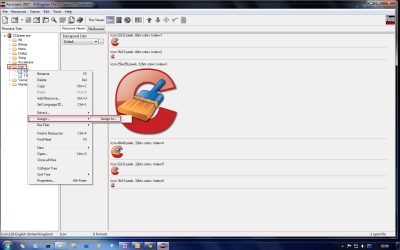
For example, if you wanted to change CCleaner's icon to something a bit nicer, you would navigate to %programfiles%\ccleaner, open CCleaner.exe with Restorator.
In the left hand pane, expand Icon, right click the icon you wish to change and choose Assign > Assign to...
Choose your prefered .ico image, save & close restorator.

rrrrr.png

Please note that sometimes the icons will not refresh straight away. Delete the thumbnail cache, and see here.
 

My Computer

Computer Manufacturer/Model Number
HP Touchsmart IQ771.uk
OS
Windows 7 Ultimate x64
CPU
AMD Turion(tm) 64 X2 Mobile Technology TL-56
Motherboard
ASUS Pheonix
Memory
3GB Nanya PC2-6400 DDR2-SDRAM SO-DIM (400MHz)
Graphics Card(s)
NVIDIA GeForce Go 7600 256MB GDDR3 SDRAM
Sound Card
High Definition Intergrated NVIDIA MCP51
Monitor(s) Displays
46" Sony Bravia HDTV
Screen Resolution
1600x1200
Hard Drives
1.5TB Samsug
320GB Seagate ST3320820AS - SATA 3Gb/s 8MB
500GB Maxtor Basics STM305003EHD301-RK
Internet Speed
↓6.32 Mb/s ↑0.35 Mb/s ↔26ms
Other Info
BIOS - American Megatrends Inc. 5.07
Ethernet Port - NVIDIA nForce 10/100/1000 Mbps
DVD Drive - TSSTcorp DVDR/RW TS-T632L
Well, actually I meant changing the default icons and replacing them with, for example, Mr. Grim's Black Glass icon pack.
 

My Computer

Computer Manufacturer/Model Number
Dell Inspiron 14R N4110
OS
Windows 7 Home Premium x64
CPU
Intel Core i5-2410M Quad Core CPU @ 2.30 GHz
Memory
8 GB Shared Channel DDR3 Memory
Graphics Card(s)
Intel HD Graphics 3000, AMD Radeon HD 6470M
Sound Card
Intel Display Audio, Realtek High Definition Audio
Monitor(s) Displays
14" HD 720p LED Display
Screen Resolution
1366x768
Hard Drives
500 GB 5400 RPM SATA Hard Drive
Mouse
Microsoft USB IntelliMouse Explorer 3.0
Well, in that case, open files like shell32.dll, imageres.dll and do the same thing i posted above.
I highly recommend creating backup copies of any files you intend on changing before you even consider opening them with restorator.
 

My Computer

Computer Manufacturer/Model Number
HP Touchsmart IQ771.uk
OS
Windows 7 Ultimate x64
CPU
AMD Turion(tm) 64 X2 Mobile Technology TL-56
Motherboard
ASUS Pheonix
Memory
3GB Nanya PC2-6400 DDR2-SDRAM SO-DIM (400MHz)
Graphics Card(s)
NVIDIA GeForce Go 7600 256MB GDDR3 SDRAM
Sound Card
High Definition Intergrated NVIDIA MCP51
Monitor(s) Displays
46" Sony Bravia HDTV
Screen Resolution
1600x1200
Hard Drives
1.5TB Samsug
320GB Seagate ST3320820AS - SATA 3Gb/s 8MB
500GB Maxtor Basics STM305003EHD301-RK
Internet Speed
↓6.32 Mb/s ↑0.35 Mb/s ↔26ms
Other Info
BIOS - American Megatrends Inc. 5.07
Ethernet Port - NVIDIA nForce 10/100/1000 Mbps
DVD Drive - TSSTcorp DVDR/RW TS-T632L
All right, thanks. I'm guessing this could take a while though, since I have to manually edit many files.

Since you helped, I'm giving you rep. :)
 

My Computer

Computer Manufacturer/Model Number
Dell Inspiron 14R N4110
OS
Windows 7 Home Premium x64
CPU
Intel Core i5-2410M Quad Core CPU @ 2.30 GHz
Memory
8 GB Shared Channel DDR3 Memory
Graphics Card(s)
Intel HD Graphics 3000, AMD Radeon HD 6470M
Sound Card
Intel Display Audio, Realtek High Definition Audio
Monitor(s) Displays
14" HD 720p LED Display
Screen Resolution
1366x768
Hard Drives
500 GB 5400 RPM SATA Hard Drive
Mouse
Microsoft USB IntelliMouse Explorer 3.0
Ok, problem here...

I opened Restorator as an admin, I opened imageres.dll and shell32.dll and did all the "assign to" stuff to the icons that had to be changed, but when I save and close it, nothing happens, even after restarting. If no one has a solution for this, then I'm giving up, since this is kind of becoming a pain.

By the way, if anyone's curious, I'm trying to replace the default icons with Mr. Grim's Blue Full Glass Icon Set.
 

My Computer

Computer Manufacturer/Model Number
Dell Inspiron 14R N4110
OS
Windows 7 Home Premium x64
CPU
Intel Core i5-2410M Quad Core CPU @ 2.30 GHz
Memory
8 GB Shared Channel DDR3 Memory
Graphics Card(s)
Intel HD Graphics 3000, AMD Radeon HD 6470M
Sound Card
Intel Display Audio, Realtek High Definition Audio
Monitor(s) Displays
14" HD 720p LED Display
Screen Resolution
1366x768
Hard Drives
500 GB 5400 RPM SATA Hard Drive
Mouse
Microsoft USB IntelliMouse Explorer 3.0
Hi Klaw117
You may need to temporarily disable UAC to be able to save those files.

As far as installing MR GRiM's icon pack goes. See the first post in this thread.
Hope this helps :)
 

My Computer

Computer Manufacturer/Model Number
HP Touchsmart IQ771.uk
OS
Windows 7 Ultimate x64
CPU
AMD Turion(tm) 64 X2 Mobile Technology TL-56
Motherboard
ASUS Pheonix
Memory
3GB Nanya PC2-6400 DDR2-SDRAM SO-DIM (400MHz)
Graphics Card(s)
NVIDIA GeForce Go 7600 256MB GDDR3 SDRAM
Sound Card
High Definition Intergrated NVIDIA MCP51
Monitor(s) Displays
46" Sony Bravia HDTV
Screen Resolution
1600x1200
Hard Drives
1.5TB Samsug
320GB Seagate ST3320820AS - SATA 3Gb/s 8MB
500GB Maxtor Basics STM305003EHD301-RK
Internet Speed
↓6.32 Mb/s ↑0.35 Mb/s ↔26ms
Other Info
BIOS - American Megatrends Inc. 5.07
Ethernet Port - NVIDIA nForce 10/100/1000 Mbps
DVD Drive - TSSTcorp DVDR/RW TS-T632L
I'll try that, thanks.

Plus, I saw that link already. The problem is, the set of icons I got are from his personal site, meaning it has no installer. I'm doing everything manually.
 

My Computer

Computer Manufacturer/Model Number
Dell Inspiron 14R N4110
OS
Windows 7 Home Premium x64
CPU
Intel Core i5-2410M Quad Core CPU @ 2.30 GHz
Memory
8 GB Shared Channel DDR3 Memory
Graphics Card(s)
Intel HD Graphics 3000, AMD Radeon HD 6470M
Sound Card
Intel Display Audio, Realtek High Definition Audio
Monitor(s) Displays
14" HD 720p LED Display
Screen Resolution
1366x768
Hard Drives
500 GB 5400 RPM SATA Hard Drive
Mouse
Microsoft USB IntelliMouse Explorer 3.0
Doing it manually can be difficult because for starters the dll's you are changing are already in use so when you save it will actually make a file and put a 1 on the end of it.

If you do manage to save the dll you will not see any changes straight away and you will need to clear the icon cache and do a restart before they will take effect.

The way I used to do all of my editing before Generator made the installer was to boot into a second OS and that way none of the files were in use and could easily be replaced and also delete the icon cache at the same time and boot back into Windows 7 and all the changes were aplied.

If you go to my site at Virtual Customs you can download all of my icons with installers which makes the job a lot less of a headache.

Link is in my sig.
 

My Computer

Computer Manufacturer/Model Number
Home Brew
OS
Windows 7 Ultimate Vista Ultimate x64
CPU
Core 2 Duo E8500 3.16Ghz @ 3.8Ghz
Motherboard
eVGA 750i FTW
Memory
2x2Gigs Patriot PC2-6400 LL
Graphics Card(s)
Inno3D GeForce GTX260 216 SP
Monitor(s) Displays
ASUS VW222U 22" 2ms Response time
Screen Resolution
1680x1050
Hard Drives
SATA 150GB
SATA II 250GB
USB IDE 750GB Ext.
PSU
HYTEC 600W & Thermaltake 650W Toughpower Power Exp
Case
Thermaltake Armor LCS (Liquid Cooling System)
Cooling
Liquid Cooling System
Keyboard
Logitech G15 Gaming Keyboard
Mouse
Logitech G9 Gaming Mouse
Thanks for the suggestion Mr. Grim, but those installers are for build 7600. I'm still on build 7100, since I'm not getting Windows 7 until Christmas from my brother. I think I'll just wait until I have the retail version (I'm guessing the build 7600 installers will work on the retail version).
 

My Computer

Computer Manufacturer/Model Number
Dell Inspiron 14R N4110
OS
Windows 7 Home Premium x64
CPU
Intel Core i5-2410M Quad Core CPU @ 2.30 GHz
Memory
8 GB Shared Channel DDR3 Memory
Graphics Card(s)
Intel HD Graphics 3000, AMD Radeon HD 6470M
Sound Card
Intel Display Audio, Realtek High Definition Audio
Monitor(s) Displays
14" HD 720p LED Display
Screen Resolution
1366x768
Hard Drives
500 GB 5400 RPM SATA Hard Drive
Mouse
Microsoft USB IntelliMouse Explorer 3.0
Thanks for the suggestion Mr. Grim, but those installers are for build 7600. I'm still on build 7100, since I'm not getting Windows 7 until Christmas from my brother. I think I'll just wait until I have the retail version (I'm guessing the build 7600 installers will work on the retail version).


Well the other solution would be to use the dll's from your build with the installer, just make copies of your dll's and place them in the installer folder replacing the ones in there and then do all your edits and then install them that way using the script.
 

My Computer

Computer Manufacturer/Model Number
Home Brew
OS
Windows 7 Ultimate Vista Ultimate x64
CPU
Core 2 Duo E8500 3.16Ghz @ 3.8Ghz
Motherboard
eVGA 750i FTW
Memory
2x2Gigs Patriot PC2-6400 LL
Graphics Card(s)
Inno3D GeForce GTX260 216 SP
Monitor(s) Displays
ASUS VW222U 22" 2ms Response time
Screen Resolution
1680x1050
Hard Drives
SATA 150GB
SATA II 250GB
USB IDE 750GB Ext.
PSU
HYTEC 600W & Thermaltake 650W Toughpower Power Exp
Case
Thermaltake Armor LCS (Liquid Cooling System)
Cooling
Liquid Cooling System
Keyboard
Logitech G15 Gaming Keyboard
Mouse
Logitech G9 Gaming Mouse
Ok, problem here...

I opened Restorator as an admin, I opened imageres.dll and shell32.dll and did all the "assign to" stuff to the icons that had to be changed, but when I save and close it, nothing happens, even after restarting. If no one has a solution for this, then I'm giving up, since this is kind of becoming a pain.

By the way, if anyone's curious, I'm trying to replace the default icons with Mr. Grim's Blue Full Glass Icon Set.


u HAVE TO choose " save as..." and then save it on your desktop or another folder, best leave the name the same. AND THEN take ownership of the old one and replace it with your newly created file.

If u choose save, and save it in thesame file, it won't actually save anything. Had the same issue, so just take my word for it. Choose "save as" and save as a seperate file before replacing.

cheers
 

My Computer

OS
Windows 7 Ultimate 32bit RTM
Thanks for the suggestions, but I think I'll just wait until I get the retail version and then using the 7600 installers. I don't want to go through the whole editing thing just to potentially have it blow up in my face again. I always get nervous when manually editing my system files.
 

My Computer

Computer Manufacturer/Model Number
Dell Inspiron 14R N4110
OS
Windows 7 Home Premium x64
CPU
Intel Core i5-2410M Quad Core CPU @ 2.30 GHz
Memory
8 GB Shared Channel DDR3 Memory
Graphics Card(s)
Intel HD Graphics 3000, AMD Radeon HD 6470M
Sound Card
Intel Display Audio, Realtek High Definition Audio
Monitor(s) Displays
14" HD 720p LED Display
Screen Resolution
1366x768
Hard Drives
500 GB 5400 RPM SATA Hard Drive
Mouse
Microsoft USB IntelliMouse Explorer 3.0
Thanks for the suggestions, but I think I'll just wait until I get the retail version and then using the 7600 installers. I don't want to go through the whole editing thing just to potentially have it blow up in my face again. I always get nervous when manually editing my system files.


no need to worry. I had the EXACT same thing, first time i did it. Wouldn't save, cause i clicked save instead of save AS...

just save as...and save the file in another location, so that u have a copy. THEN replace it with the old. Can't be easier...
 

My Computer

OS
Windows 7 Ultimate 32bit RTM
I too am trying to replace the main icons for programs (such as Firefox, Word etc...). I've used Restorator 2007 to assign new icons for Firefox, and it works perfectly, however Word and Staxrip to take 2 examples, don't - I still get the old icon, even though it's showing up in Restorator to have the new ones assigned to it.

And yes, I've rebuilt the icon cache, restarted many times, etc... It just still seems to use the old icon for some reason! Where is it getting the icons from, if not from the .exe ?? I've changed ALL the possible icons in Word to the same one, but it's still using the default Microsoft one!

Any help would be greatly appreciated. Thanks!! :0)
 

My Computer

OS
Windows 7 64-bit
Screen Resolution
Big!!
Internet Speed
Fast!!
The reason why some of the icons aren't changing is probably because you have them pinned to the start menu. Pinned shortcuts retain their icon if it's a customized one, you can either right click the shortcut and change the icon by pointing back to the exe or unpin the icon and then re-pin it. To see all of your user pined shortcuts paste this into the address bar and click enter and go into the folder StartMenu Or TaskBar.
%APPDATA%\Microsoft\Internet Explorer\Quick Launch\User Pinned
 

My Computer

Computer Manufacturer/Model Number
Acer/ASE380/AST180/APM8
OS
Microsoft Windows 7 Home Premium 6.1.7600 Build 7600
CPU
AMD Athlon 64 X2 Dual Core Processor 6000+, 3000 Mhz
Motherboard
Foxconn EM61SM/EM61PM
Memory
2 GB
Graphics Card(s)
NVIDIA GeForce 7950 GT
Sound Card
Realtek ALC888/1200
Monitor(s) Displays
Insignia 42" LCD HDTV NS-L42Q-10A
Screen Resolution
1920 x 1080
Hard Drives
1 Internal
4 External Hard Drives
1 New Unconnected Seagate Barracuda, 1.5 TB, 3.5", SATA
PSU
Codegen Model:300X1
Case
Systemax
Cooling
Foxconn DC Brushless Fan D80SH-12
Back
Top