Change folder background color for free

nabilalk

New member
Power User
Local time
10:56 AM
Messages
299
I know Folder Marker Pro will do this, but I dont want to pay to change the color of my folders. Anyone have a color folder icon set or icon maker app that they use for this?
 

My Computer

Computer Manufacturer/Model Number
Gateway M6827
OS
Win 7 Professional 32-bit
CPU
Intel Core 2 Duo CPU T5750 @ 2.00 GHz
Memory
3GB
Monitor(s) Displays
ViewSonic Vx900
Screen Resolution
1280x1024
Hard Drives
150GB Hard Drive

My Computer

Computer Manufacturer/Model Number
tw33k
OS
Windows 7 Ultimate (x64) SP1
CPU
Intel 3770k 4.6GHz
Motherboard
ASUS Maximus V Formula
Memory
8GB (2x 4GB) Crucial Ballistix
Graphics Card(s)
Sapphire 7950 (1060/1600)
Sound Card
On Board Realtek HD Audio
Monitor(s) Displays
27" Acer B273HU (via HDMI)
Screen Resolution
2048 x 1152
Hard Drives
Crucial M4 128GB
2TB WD Black
1TB Samsung F3 SATA
1TB WD Elite External
2TB WD USB 3.0
PSU
Corsair AX750 Gold
Case
Corsair Obsidian 800DW
Cooling
Corsair H100 (2x AP-121/2x UK-3000 push/pull)
Keyboard
Microsoft Wireless 5000
Mouse
Microsoft Wireless 5000
Internet Speed
5mb/s
Other Info
Logitech z-2300 2.1 speakers
Lamptron FC-5 v2
Thanks for the link. What I am looking for is a way to colorize the default folder icon so that I can use the same icon with multiple colors. I'm trying to keep track of different types of medical schools that I am applying to, based on my chances of getting accepted at each school, by color. For example yellow represents a high chance, whereas red is a long shot.

I took a screenshot of a folder icon, and used an iconmaker to colorize it, but the results look shotty. It would be nice if the free version of FolderMarker worked in 7, but it doesn't. I can use the blue and black, but also need green, yellow, white, grey, and purple colored folders.
 

My Computer

Computer Manufacturer/Model Number
Gateway M6827
OS
Win 7 Professional 32-bit
CPU
Intel Core 2 Duo CPU T5750 @ 2.00 GHz
Memory
3GB
Monitor(s) Displays
ViewSonic Vx900
Screen Resolution
1280x1024
Hard Drives
150GB Hard Drive
Thanks for the link. What I am looking for is a way to colorize the default folder icon so that I can use the same icon with multiple colors. I'm trying to keep track of different types of medical schools that I am applying to, based on my chances of getting accepted at each school, by color. For example yellow represents a high chance, whereas red is a long shot.

I took a screenshot of a folder icon, and used an iconmaker to colorize it, but the results look shotty. It would be nice if the free version of FolderMarker worked in 7, but it doesn't. I can use the blue and black, but also need green, yellow, white, grey, and purple colored folders.


Use iconFX, it's free and works great. I have changed many icons with it, also colours :

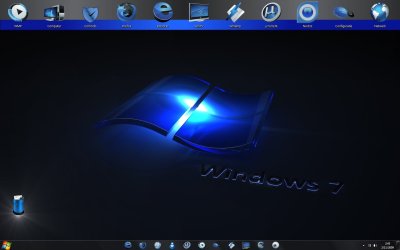
desktop1.jpg


Watch the top of the desktop. 5 of the original icons were a different colour. All changed to blue successfully with iconFX.

tip : use colourtools, especially hue/saturation and colorisation...

You can find it easily through google.
 

My Computer

OS
Windows 7 Ultimate 32bit RTM
Thanks for the link. What I am looking for is a way to colorize the default folder icon so that I can use the same icon with multiple colors. I'm trying to keep track of different types of medical schools that I am applying to, based on my chances of getting accepted at each school, by color. For example yellow represents a high chance, whereas red is a long shot.

I took a screenshot of a folder icon, and used an iconmaker to colorize it, but the results look shotty. It would be nice if the free version of FolderMarker worked in 7, but it doesn't. I can use the blue and black, but also need green, yellow, white, grey, and purple colored folders.


Use iconFX, it's free and works great. I have changed many icons with it, also colours :

View attachment 34801


Watch the top of the desktop. 5 of the original icons were a different colour. All changed to blue successfully with iconFX.

tip : use colourtools, especially hue/saturation and colorisation...

You can find it easily through google.
Thanks for the tips. Anyone know where I can find a link to the default win 7 folder icon?
 

My Computer

Computer Manufacturer/Model Number
Gateway M6827
OS
Win 7 Professional 32-bit
CPU
Intel Core 2 Duo CPU T5750 @ 2.00 GHz
Memory
3GB
Monitor(s) Displays
ViewSonic Vx900
Screen Resolution
1280x1024
Hard Drives
150GB Hard Drive
Thanks for the link. What I am looking for is a way to colorize the default folder icon so that I can use the same icon with multiple colors. I'm trying to keep track of different types of medical schools that I am applying to, based on my chances of getting accepted at each school, by color. For example yellow represents a high chance, whereas red is a long shot.

I took a screenshot of a folder icon, and used an iconmaker to colorize it, but the results look shotty. It would be nice if the free version of FolderMarker worked in 7, but it doesn't. I can use the blue and black, but also need green, yellow, white, grey, and purple colored folders.


Use iconFX, it's free and works great. I have changed many icons with it, also colours :

View attachment 34801


Watch the top of the desktop. 5 of the original icons were a different colour. All changed to blue successfully with iconFX.

tip : use colourtools, especially hue/saturation and colorisation...

You can find it easily through google.
Thanks for the tips. Anyone know where I can find a link to the default win 7 folder icon?

I colorized the default win 7 icon in black, blue, red, green, yellow, purple, and grey. For anyone interested I uploaded the archive here

There is a large pack of Win 7 icons in png format here, and you can use IcoFx to colorize them as well.

If the link is down, PM me.
 

My Computer

Computer Manufacturer/Model Number
Gateway M6827
OS
Win 7 Professional 32-bit
CPU
Intel Core 2 Duo CPU T5750 @ 2.00 GHz
Memory
3GB
Monitor(s) Displays
ViewSonic Vx900
Screen Resolution
1280x1024
Hard Drives
150GB Hard Drive

My Computers

System One System Two

  • Computer type
    PC/Desktop
    Computer Manufacturer/Model Number
    ChillBlast - Custom to my design
    OS
    Windows 11 Pro x64 [Latest Release and Release Preview]
    CPU
    Ryzen 9 5950X, 3.8 - 5.2 MHz
    Motherboard
    Asus Prime X570-Pro
    Memory
    64GB [2 x 32GB] DDR4 3200MHz
    Graphics Card(s)
    4GB NVIDIA GEFORCE GTX 1650 Ti
    Sound Card
    On-board SPDIF to 5.1 System + HDMI [5.1 system]
    Monitor(s) Displays
    32" UHD 32 Bit HDR Monitor + 43" UHD 4K 32Bit HDR TV
    Screen Resolution
    2 x 3840 x 2160 @60Hz
    Hard Drives
    1TB M2 SSD OS, 500GB Fast Access SSD, 2 x 8TB Data + Various Externals from 1TB to 4TB, 10TB NAS
    PSU
    NZXT C750 80 PLUS Gold 750W Modular PSU
    Case
    Workstation Case [Matt Black]
    Cooling
    NZXT Kraken X63 280mm CPU Cooler +2x Quiet Case fans
    Keyboard
    Logitech Wireless MX Keys & K400 + others
    Mouse
    Logitech Wireless MX Master 3S
    Internet Speed
    920 MB Down 50 MB Up
    Antivirus
    BitDefender Total Security Pro
    Browser
    Chrome (always run latest Non-Beta)
    Other Info
    Also run ...
    Laptop - Quad 8GB - Windows 10 Pro x64
    Nexus 7 Android tablet x2
    Samsung 10.2" tablet
    Blackview TAB 8 4G Android Tablet c/w Keyboard
    Wacom Intuos Pro Medium Pen Pad
    Wacom Intuos Pro Small Pen Pad
    Wacom Expresskeys Remote
    Loopdeck+ Graphics Controller
    Shuttle Pro v2 Control
  • Computer type
    Laptop
    System Manufacturer/Model Number
    Dell XPS 17 10750H
    OS
    Windows 11 Pro x64 Latest RP
    CPU
    Intel I7 10750H 5.0GHz
    Motherboard
    Dell XPS
    Memory
    32GB [2x16GB] DDR4 2933 MHz
    Graphics Card(s)
    nVidia GTX1650Ti 4 GB GDDR6
    Sound Card
    Stock [Realtek] 4 Speaker
    Monitor(s) Displays
    17" IPS UHD+ Infinity Edge Touchscreen
    Screen Resolution
    3840 x 2400
    Hard Drives
    2TB M2 NVMe, 4TB External + various 500GB & 1TB External NVMe (also have access to spinner HDD from
    PSU
    Stock
    Case
    Stock XPS Aluminium & Carbon Fibre
    Cooling
    Stock - Active Fan Control
    Keyboard
    Backlit + Various Logitech
    Mouse
    Stock Track Pad + Logitech MX Trackball
    Internet Speed
    72 MB Down 18MB Up
    Browser
    Chrome
    Other Info
    Also run ...
    Laptop - Quad 8GB - Windows 10 Pro x64
    Nexus 7 Android tablet x2
    10.2" tablet
    Sony Z3 Android Smartphone
    Wacom Intuos Pro Medium Pen Pad
    Wacom Intuos Pro Small Pen Pad
    Wacom Expresskeys Remote
    Loopdeck+ Graphics Controller
    Shuttle Pro v2 Control Pad
    10TB NAS

My Computer

Computer Manufacturer/Model Number
Gateway M6827
OS
Win 7 Professional 32-bit
CPU
Intel Core 2 Duo CPU T5750 @ 2.00 GHz
Memory
3GB
Monitor(s) Displays
ViewSonic Vx900
Screen Resolution
1280x1024
Hard Drives
150GB Hard Drive
Whatever you do, don't waste time with FolderMarker Pro V3.x. It absoolutely does not work with Windows 7 32-bit, despite what the company says. The program was great with Vista and XP.:(

I'm still looking for a free or paid download of a program that will, like FolderMarker Pro, let me change colors of file folders in Windows 7 32-bit.

If anyone knows of such a program, please e-mail [email protected]
 

My Computer

OS
Windows 7 Home Premium
IcoFx rocks and is so easy to use. If you want to change the color of the icon or folder icon, just adjust the hue. IcoFX - The Free Icon Editor
 

My Computer

Computer Manufacturer/Model Number
Gateway M6827
OS
Win 7 Professional 32-bit
CPU
Intel Core 2 Duo CPU T5750 @ 2.00 GHz
Memory
3GB
Monitor(s) Displays
ViewSonic Vx900
Screen Resolution
1280x1024
Hard Drives
150GB Hard Drive
Thanks, I will try IcoFx. Nice that it's free.
 

My Computer

OS
Windows 7 Home Premium

My Computer

Computer Manufacturer/Model Number
Gateway M6827
OS
Win 7 Professional 32-bit
CPU
Intel Core 2 Duo CPU T5750 @ 2.00 GHz
Memory
3GB
Monitor(s) Displays
ViewSonic Vx900
Screen Resolution
1280x1024
Hard Drives
150GB Hard Drive
Okay, I tried IcoFx and found it too complicated for my needs. Folder Marker Pro, which, unfortunately, does NOT work with Windows 7, was a perfect program for me. I used it happily with XP and Vista. I guess I will just have to wait for the W7 version of Folder Mark Pro. Dang!:(
 

My Computer

OS
Windows 7 Home Premium
Okay, I tried IcoFx and found it too complicated for my needs. Folder Marker Pro, which, unfortunately, does NOT work with Windows 7, was a perfect program for me. I used it happily with XP and Vista. I guess I will just have to wait for the W7 version of Folder Mark Pro. Dang!:(

Ok, if you just looking for different colored folder icons, I have made the standard win 7 folder in blue, green, red, purple, yellow, gray, and black. Will those colors sort out your needs? If so, download the attached zip folder. No virus or malware, I promise.
 

Attachments

Last edited:

My Computer

Computer Manufacturer/Model Number
Gateway M6827
OS
Win 7 Professional 32-bit
CPU
Intel Core 2 Duo CPU T5750 @ 2.00 GHz
Memory
3GB
Monitor(s) Displays
ViewSonic Vx900
Screen Resolution
1280x1024
Hard Drives
150GB Hard Drive
Okay, I tried IcoFx and found it too complicated for my needs. Folder Marker Pro, which, unfortunately, does NOT work with Windows 7, was a perfect program for me. I used it happily with XP and Vista. I guess I will just have to wait for the W7 version of Folder Mark Pro. Dang!:(

Ok, if you just looking for different colored folder icons, I have made the standard win 7 folder in blue, green, red, purple, yellow, gray, and black. Will those colors sort out your needs? If so, download the attached zip folder. No virus or malware, I promise.

Can we add these Icons to the Default Folder options

so we can choose from there than have a Extra folder to choose from ?

Please
 

My Computer

Computer Manufacturer/Model Number
Alienware m17
OS
Windows 7 Ultimate
CPU
Core 2 Extreme CPU Q9300 @ 2.53GHz
Memory
4 GB
Graphics Card(s)
2x3870 Ati
Hard Drives
2x500 GB Samsung 7200rpm
Okay, I tried IcoFx and found it too complicated for my needs. Folder Marker Pro, which, unfortunately, does NOT work with Windows 7, was a perfect program for me. I used it happily with XP and Vista. I guess I will just have to wait for the W7 version of Folder Mark Pro. Dang!:(

Ok, if you just looking for different colored folder icons, I have made the standard win 7 folder in blue, green, red, purple, yellow, gray, and black. Will those colors sort out your needs? If so, download the attached zip folder. No virus or malware, I promise.

Can we add these Icons to the Default Folder options

so we can choose from there than have a Extra folder to choose from ?

Please
I believe the "Default Folder options" that you are speaking of are located within %SystemRoot%\system32\SHELL32.dll

I don't know if there is a way to modify the DLL to include custom folder icons. Does anyone know if this is possible, and if so, how to do it?
 

My Computer

Computer Manufacturer/Model Number
Gateway M6827
OS
Win 7 Professional 32-bit
CPU
Intel Core 2 Duo CPU T5750 @ 2.00 GHz
Memory
3GB
Monitor(s) Displays
ViewSonic Vx900
Screen Resolution
1280x1024
Hard Drives
150GB Hard Drive
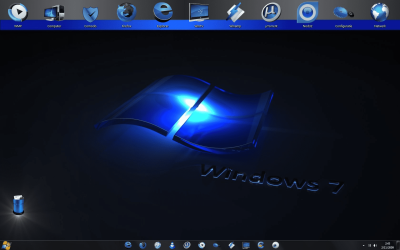
Make My Computer Background Like The Photo Below

Thanks for the link. What I am looking for is a way to colorize the default folder icon so that I can use the same icon with multiple colors. I'm trying to keep track of different types of medical schools that I am applying to, based on my chances of getting accepted at each school, by color. For example yellow represents a high chance, whereas red is a long shot.

I took a screenshot of a folder icon, and used an iconmaker to colorize it, but the results look shotty. It would be nice if the free version of FolderMarker worked in 7, but it doesn't. I can use the blue and black, but also need green, yellow, white, grey, and purple colored folders.


Use iconFX, it's free and works great. I have changed many icons with it, also colours :

View attachment 34801


Watch the top of the desktop. 5 of the original icons were a different colour. All changed to blue successfully with iconFX.

tip : use colourtools, especially hue/saturation and colorisation...

You can find it easily through google.[Hey MallRat, Please Can You Tell Me Every Step I Have To Do, To Have My Windows 7 Looks Like This Photo Below And All The Stuffs In That Picture Including The Effects ... And If There Are A Links That I Have Download Some Files From It Please Write It To Me
I Like It So Much It's Awesome !
And Thanks For You
Regards
biggrin.gif
]
 

Attachments

  • Windows 7 Backgrond.png
    Windows 7 Backgrond.png
    846.6 KB · Views: 57

My Computer

Computer Manufacturer/Model Number
Intel
OS
Windows 7 Ultimate 32bit
CPU
3.30ghz Core 2 Duo
Memory
4.00gb Ram(3.00 Usable)
Graphics Card(s)
Geforce 9600 GT DDR3 1GB Dedicated
Sound Card
Realtek
Hard Drives
Local Disk (C:): 97.5 GB
Local Disk (D:): 368 GB
Local Disk (G:): 232 GB
Case
Vogells
Back
Top