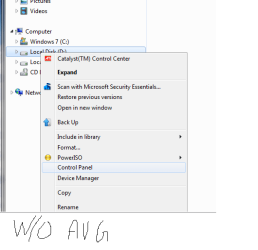
Right click menu turned to old style

Mikaka

New member
Member
Local time
10:37 AM
Messages
65
It happened today.
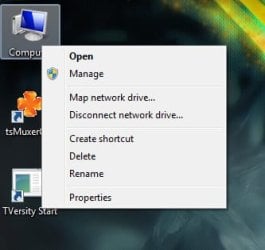
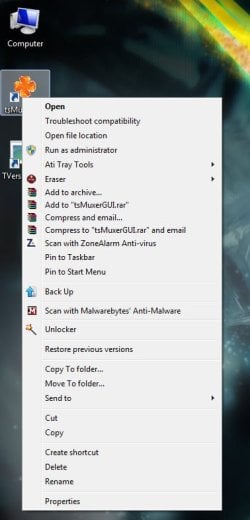
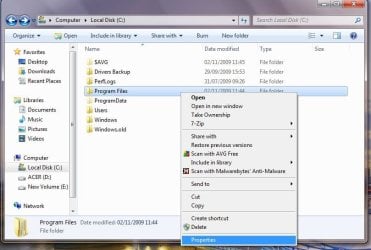
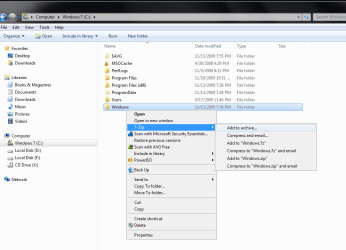
The menu that you get when you right click on something turned to old style menu (like the one found in XP). However not all of them. The old one pops up only when I right click on something not from Microsoft.
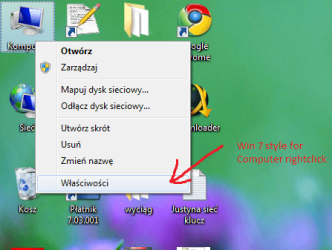
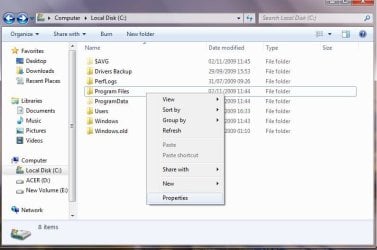
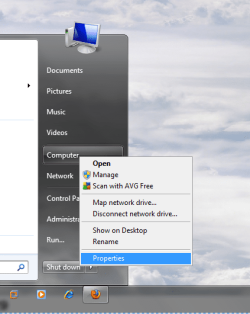
So when I right click on the Computer, or Recycle bin, or a folder the menu has modern look. But files, even files from Windows folder, get old look.

How could this have happened? What can I do to restore the modern look??

Two right click menus, for items next to each other:
Modern: http://i34.tinypic.com/11aao2g.png
Old style: http://i34.tinypic.com/29pant2.png
 

My Computer

OS
Windows 7 build 7600 64 bit
CPU
Intel Core2Quad Q8200 2.33 GHz @ 2.33 GHz
Motherboard
Gigabyte GA-P35-S3 rev. 1
Memory
GoodRAM DDR2 3 x 1 GB 800 MHz
Graphics Card(s)
HIS ATI Radeon HD 4850 512 MB VRAM
Sound Card
Creative X-FI Gamer
PSU
400 W
They're the same, just for different shortcuts. Computer has a different menu than others.
 

My Computer

Computer Manufacturer/Model Number
self built
OS
7600.20510 x86
CPU
P4 550 3.4 GHz HT running at 3.5 GHz
Motherboard
MSI PM8M3-V (MS-7211 v1.x) Micro-ATX mainboard
Memory
OCZ 2 GB(2x1GB) DDR400mHz running @ 414 mHz
Graphics Card(s)
HIS Radeon HD 3850 IceQ 3 Turbo HDMI Dual DL-DVI AGP
Sound Card
MOTU Traveler firewire studio interface 192 kHz 24 bit
Monitor(s) Displays
22" widescreen Acer X223W LCD, 17" Compaq P75 CRT
Screen Resolution
1680x1050 and 1280x1024
Hard Drives
SATA I x2 WD, 400 GB and 120 GB, SATA 2 WD Caviar Black 1 TB
PSU
350W generic
Case
Cybertronpc, it glows blue
Cooling
stock cpu fan, Ice-Q 3 gpu and system, many case fans
Keyboard
Logitch Classical Keyboard 200
Mouse
Logitech Mediaplay cordless
Internet Speed
1792/448 kbits/sec
Other Info
SATA II PCI fake RAID adapter, 1 GB Readyboost, original ATI Remote Wonder (even works with WMC perfectly), Logitech Rumblepad 2 game controller x2
No, they're not. Look again. This time in pictures, I'm hovering over the last item. In windows 7 normally it has this faint blue transparent overlay. But in second picture when I'm right clicking shortcut to program, look at the last item as I hover my mouse over it.
It turns to white text with blue background (as it did in Windows XP).

Modern: http://i37.tinypic.com/118krrb.png
Old style: http://i35.tinypic.com/311th1u.png

Old style menu shows up for everything, but Windows shortcuts on desktop (My computer, Recycle bin etc.), and folders.
 

My Computer

OS
Windows 7 build 7600 64 bit
CPU
Intel Core2Quad Q8200 2.33 GHz @ 2.33 GHz
Motherboard
Gigabyte GA-P35-S3 rev. 1
Memory
GoodRAM DDR2 3 x 1 GB 800 MHz
Graphics Card(s)
HIS ATI Radeon HD 4850 512 MB VRAM
Sound Card
Creative X-FI Gamer
PSU
400 W
You have the same thing as I do. Nothing wrong.
 

Attachments

  • a.jpg
    a.jpg
    35.3 KB · Views: 28
  • 2.jpg
    2.jpg
    52.5 KB · Views: 30

My Computer

Computer Manufacturer/Model Number
self built
OS
7600.20510 x86
CPU
P4 550 3.4 GHz HT running at 3.5 GHz
Motherboard
MSI PM8M3-V (MS-7211 v1.x) Micro-ATX mainboard
Memory
OCZ 2 GB(2x1GB) DDR400mHz running @ 414 mHz
Graphics Card(s)
HIS Radeon HD 3850 IceQ 3 Turbo HDMI Dual DL-DVI AGP
Sound Card
MOTU Traveler firewire studio interface 192 kHz 24 bit
Monitor(s) Displays
22" widescreen Acer X223W LCD, 17" Compaq P75 CRT
Screen Resolution
1680x1050 and 1280x1024
Hard Drives
SATA I x2 WD, 400 GB and 120 GB, SATA 2 WD Caviar Black 1 TB
PSU
350W generic
Case
Cybertronpc, it glows blue
Cooling
stock cpu fan, Ice-Q 3 gpu and system, many case fans
Keyboard
Logitch Classical Keyboard 200
Mouse
Logitech Mediaplay cordless
Internet Speed
1792/448 kbits/sec
Other Info
SATA II PCI fake RAID adapter, 1 GB Readyboost, original ATI Remote Wonder (even works with WMC perfectly), Logitech Rumblepad 2 game controller x2
Its not right, because it doesn't happen like that in two of my computers (only one, and only for couple of days).

I'm clearly marking for you in my pictures what I mean. Its the color and style of highlight (for some items, it looks like it is Windows XP menu).

modern.png

oldstyle.png


Now, the System Restore has no points, I have no System Image, Repair install didn't work, is it Clean Install for me, or is there some magic file, that could fix this??
 

My Computer

OS
Windows 7 build 7600 64 bit
CPU
Intel Core2Quad Q8200 2.33 GHz @ 2.33 GHz
Motherboard
Gigabyte GA-P35-S3 rev. 1
Memory
GoodRAM DDR2 3 x 1 GB 800 MHz
Graphics Card(s)
HIS ATI Radeon HD 4850 512 MB VRAM
Sound Card
Creative X-FI Gamer
PSU
400 W
If you right click without highlighting the item you'll get the transparent style, if you highlight and right click the item you'll get the old style(blue background and white letters).
 

Attachments

  • Capture50.JPG
    Capture50.JPG
    52.3 KB · Views: 23
  • Capture51.JPG
    Capture51.JPG
    63.6 KB · Views: 19

My Computer

Computer Manufacturer/Model Number
Acer Aspire 5750
OS
Windows 7 Home Premium 64bit
CPU
Intel Core i3-2310M
Motherboard
Acer OEM
Memory
8GB
Graphics Card(s)
Intel HD3000
Screen Resolution
1366x768
Hard Drives
320GB Toshiba
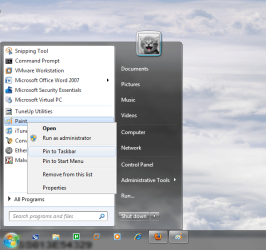
The same thing happens to me as the OP. I noticed it started to happen after I installed AVG 9.0 free version. And it only seems to go to the blue highlighted context menu when AVG is in there, like when I click on a file/folder that can be scanned.

But even in the start menu it changes when I click on different things. See attachments.

Also as mentioned above, it doesn't matter whether I click and highlight the item first or just right click
 

Attachments

  • rightclick4.PNG
    rightclick4.PNG
    84.4 KB · Views: 22
  • rightclick3.PNG
    rightclick3.PNG
    52.7 KB · Views: 21
  • rightclick2.PNG
    rightclick2.PNG
    103 KB · Views: 23
  • rightclick1.PNG
    rightclick1.PNG
    33.5 KB · Views: 15

My Computer

Computer Manufacturer/Model Number
Custom Built
OS
Windows 7 Pro 64-bit
CPU
AMD Phenom II X2 550 BE
Motherboard
ASUS M4A79XTD EVO
Memory
A-Data DDR3 1600 4gb
Graphics Card(s)
HIS Radeon HD 4670
Sound Card
VIA VT1708S (8 channel onboard)
Monitor(s) Displays
Dell 23" S2309W
Screen Resolution
1920 x 1080
Hard Drives
WD 320,750gb, Seagate 500gb External Backup
PSU
Rosewill Green Series 430W
Case
Coolermaster
Cooling
Scythe SCKTN-3000
If you right click without highlighting the item you'll get the transparent style, if you highlight and right click the item you'll get the old style(blue background and white letters).

I get nothing but transparent style regardless of the methodology - so that is not the answer.

Furthermore, I have never gotten an old XP style set of menus - unless the computer shuts Aero off for whatever reason.

I just tried it again - regardless of whether the item in question is highlighted or not, I get the same visual style on my context menu - the number of items is different, but the visual style is the same.

I think the OP has a point here - something is going weird with his system.

The same thing happens to me as the OP. I noticed it started to happen after I installed AVG 9.0 free version. And it only seems to go to the blue highlighted context menu when AVG is in there, like when I click on a file/folder that can be scanned.

But even in the start menu it changes when I click on different things. See attachments.

Also as mentioned above, it doesn't matter whether I click and highlight the item first or just right click


You may be onto something there - if you have a context menu item that is using older system calls, then the menu is forced to revert to the old system in order to be compatible with that one context menu item. So, it makes sense that, for the context menu item for certain things, where that particular entry exists, the system acts like aero has been turned off, whereas in reality it is only turned off for that particular context menu item.

Mikaka - perhaps it is the context menu item for ESET causing this to occur? Because I have WinRAR and Notepad++ so I know it is not either of those two, unless you happen to be running older versions....
 

My Computers

System One System Two

  • Computer type
    PC/Desktop
    Computer Manufacturer/Model Number
    The Beast Model A (homebrew)
    OS
    Windows 11 21H2 Current build
    CPU
    AMD Ryzen 9 3950X
    Motherboard
    MSI MEG X570 GODLIKE
    Memory
    4 * 32 GB - Corsair Vengeance 3600 MHz
    Graphics Card(s)
    EVGA GeForce RTX 3080 Ti XC3 ULTRA GAMING (12G-P5-3955-KR)
    Sound Card
    Realtek® ALC1220 Codec
    Monitor(s) Displays
    2x Eve Spectrum ES07D03 4K Gaming Monitor (Matte) | Eve Spec
    Screen Resolution
    3x 3840 x 2160
    Hard Drives
    3x Samsung 980 Pro NVMe PCIe 4 M.2 2 TB SSD (MZ-V8P2T0B/AM) } 3x Sabrent Rocket NVMe 4.0 1 TB SSD
    PSU
    PC Power & Cooling’s Silencer Series 1050 Watt, 80 Plus Plat
    Case
    Fractal Design Define 7 XL Dark ATX Full Tower Case
    Cooling
    SteelSeries Apex Pro Wired Gaming Keyboard
    Keyboard
    SteelSeries Apex Pro
    Mouse
    Logitech MX Master 3S | MX Master 3 for business
    Internet Speed
    AT&T LightSpeed Gigabit Duplex Ftth
    Antivirus
    Windows Defender + MB 3
    Browser
    Nightly (default) + Firefox (stable),Chrome, Edge
  • Computer type
    PC/Desktop
    System Manufacturer/Model Number
    Dell Latitude E5470
    OS
    ChromeOS Flex Dev Channel (current)
    CPU
    Intel(R) Core(TM) i5-6300U CPU @ 2.40GHz, 2501 Mhz, 2 Core(s), 4 Logical Processor(s)
    Motherboard
    Dell
    Memory
    16 GB
    Graphics Card(s)
    Intel(R) HD Graphics 520
    Sound Card
    Intel(R) HD Graphics 520 + RealTek Audio
    Monitor(s) Displays
    Dell laptop display 15"
    Screen Resolution
    1920 * 1080
    Hard Drives
    Toshiba 128GB M.2 22300 drive
    INTEL Cherryville 520 Series SSDSC2CW180A 180 GB SATA III SSD
    PSU
    Dell
    Case
    Dell
    Cooling
    Dell
    Keyboard
    Dell
    Mouse
    Logitech MX Master 3S (shared w. Sys 1) | Dell TouchPad
    Internet Speed
    AT&T LightSpeed Gigabit Duplex Ftth
The same thing happens to me as the OP. I noticed it started to happen after I installed AVG 9.0 free version. And it only seems to go to the blue highlighted context menu when AVG is in there, like when I click on a file/folder that can be scanned.

But even in the start menu it changes when I click on different things. See attachments.

Also as mentioned above, it doesn't matter whether I click and highlight the item first or just right click


You may be onto something there - if you have a context menu item that is using older system calls, then the menu is forced to revert to the old system in order to be compatible with that one context menu item. So, it makes sense that, for the context menu item for certain things, where that particular entry exists, the system acts like aero has been turned off, whereas in reality it is only turned off for that particular context menu item.

Mikaka - perhaps it is the context menu item for ESET causing this to occur? Because I have WinRAR and Notepad++ so I know it is not either of those two, unless you happen to be running older versions....


Good explanation John

And to further that explanation, I uninstalled AVG and my context menus went back to the new style without the blue highlighted.

So I would say the context menu will change depending on what programs you install.

I attached new pictures to show the difference
 

Attachments

  • before.PNG
    before.PNG
    10.6 KB · Views: 27
  • after.PNG
    after.PNG
    10.1 KB · Views: 27

My Computer

Computer Manufacturer/Model Number
Custom Built
OS
Windows 7 Pro 64-bit
CPU
AMD Phenom II X2 550 BE
Motherboard
ASUS M4A79XTD EVO
Memory
A-Data DDR3 1600 4gb
Graphics Card(s)
HIS Radeon HD 4670
Sound Card
VIA VT1708S (8 channel onboard)
Monitor(s) Displays
Dell 23" S2309W
Screen Resolution
1920 x 1080
Hard Drives
WD 320,750gb, Seagate 500gb External Backup
PSU
Rosewill Green Series 430W
Case
Coolermaster
Cooling
Scythe SCKTN-3000
Yup - you get some rep for pointing out the difference with AVG installed.

In retrospect, it should have been obvious - but it was an easy enough mistake to say that it occurred in certain areas or with a certain methodology, whereas it is actually the context menu items themselves causing this.

EDIT - added the following

lol - my single instance of rep gave you three boxes - congrats!
 
Last edited:

My Computers

System One System Two

  • Computer type
    PC/Desktop
    Computer Manufacturer/Model Number
    The Beast Model A (homebrew)
    OS
    Windows 11 21H2 Current build
    CPU
    AMD Ryzen 9 3950X
    Motherboard
    MSI MEG X570 GODLIKE
    Memory
    4 * 32 GB - Corsair Vengeance 3600 MHz
    Graphics Card(s)
    EVGA GeForce RTX 3080 Ti XC3 ULTRA GAMING (12G-P5-3955-KR)
    Sound Card
    Realtek® ALC1220 Codec
    Monitor(s) Displays
    2x Eve Spectrum ES07D03 4K Gaming Monitor (Matte) | Eve Spec
    Screen Resolution
    3x 3840 x 2160
    Hard Drives
    3x Samsung 980 Pro NVMe PCIe 4 M.2 2 TB SSD (MZ-V8P2T0B/AM) } 3x Sabrent Rocket NVMe 4.0 1 TB SSD
    PSU
    PC Power & Cooling’s Silencer Series 1050 Watt, 80 Plus Plat
    Case
    Fractal Design Define 7 XL Dark ATX Full Tower Case
    Cooling
    SteelSeries Apex Pro Wired Gaming Keyboard
    Keyboard
    SteelSeries Apex Pro
    Mouse
    Logitech MX Master 3S | MX Master 3 for business
    Internet Speed
    AT&T LightSpeed Gigabit Duplex Ftth
    Antivirus
    Windows Defender + MB 3
    Browser
    Nightly (default) + Firefox (stable),Chrome, Edge
  • Computer type
    PC/Desktop
    System Manufacturer/Model Number
    Dell Latitude E5470
    OS
    ChromeOS Flex Dev Channel (current)
    CPU
    Intel(R) Core(TM) i5-6300U CPU @ 2.40GHz, 2501 Mhz, 2 Core(s), 4 Logical Processor(s)
    Motherboard
    Dell
    Memory
    16 GB
    Graphics Card(s)
    Intel(R) HD Graphics 520
    Sound Card
    Intel(R) HD Graphics 520 + RealTek Audio
    Monitor(s) Displays
    Dell laptop display 15"
    Screen Resolution
    1920 * 1080
    Hard Drives
    Toshiba 128GB M.2 22300 drive
    INTEL Cherryville 520 Series SSDSC2CW180A 180 GB SATA III SSD
    PSU
    Dell
    Case
    Dell
    Cooling
    Dell
    Keyboard
    Dell
    Mouse
    Logitech MX Master 3S (shared w. Sys 1) | Dell TouchPad
    Internet Speed
    AT&T LightSpeed Gigabit Duplex Ftth
Yup - you get some rep for pointing out the difference with AVG installed.

In retrospect, it should have been obvious - but it was an easy enough mistake to say that it occurred in certain areas or with a certain methodology, whereas it is actually the context menu items themselves causing this.

EDIT - added the following

lol - my single instance of rep gave you three boxes - congrats!


haha thanks, i seem to be on a roll lately since I just got the badge yesterday

Im wondering what other programs will cause the context menu change, whether it's just AV software or maybe since we're running 64 bit OS, and the programs are actually 32 bit
 

My Computer

Computer Manufacturer/Model Number
Custom Built
OS
Windows 7 Pro 64-bit
CPU
AMD Phenom II X2 550 BE
Motherboard
ASUS M4A79XTD EVO
Memory
A-Data DDR3 1600 4gb
Graphics Card(s)
HIS Radeon HD 4670
Sound Card
VIA VT1708S (8 channel onboard)
Monitor(s) Displays
Dell 23" S2309W
Screen Resolution
1920 x 1080
Hard Drives
WD 320,750gb, Seagate 500gb External Backup
PSU
Rosewill Green Series 430W
Case
Coolermaster
Cooling
Scythe SCKTN-3000
From my understanding of it, 32bit shell extensions don't work in 64bit OSs - I had a bit of trouble using more than a couple of them when I was first on Vista x64, then when I started testing Windows 7 64bit. In that time, many have come out with 64bit shell extensions, so I am able to use them - but a few have not, and I am stuck without them.
 

My Computers

System One System Two

  • Computer type
    PC/Desktop
    Computer Manufacturer/Model Number
    The Beast Model A (homebrew)
    OS
    Windows 11 21H2 Current build
    CPU
    AMD Ryzen 9 3950X
    Motherboard
    MSI MEG X570 GODLIKE
    Memory
    4 * 32 GB - Corsair Vengeance 3600 MHz
    Graphics Card(s)
    EVGA GeForce RTX 3080 Ti XC3 ULTRA GAMING (12G-P5-3955-KR)
    Sound Card
    Realtek® ALC1220 Codec
    Monitor(s) Displays
    2x Eve Spectrum ES07D03 4K Gaming Monitor (Matte) | Eve Spec
    Screen Resolution
    3x 3840 x 2160
    Hard Drives
    3x Samsung 980 Pro NVMe PCIe 4 M.2 2 TB SSD (MZ-V8P2T0B/AM) } 3x Sabrent Rocket NVMe 4.0 1 TB SSD
    PSU
    PC Power & Cooling’s Silencer Series 1050 Watt, 80 Plus Plat
    Case
    Fractal Design Define 7 XL Dark ATX Full Tower Case
    Cooling
    SteelSeries Apex Pro Wired Gaming Keyboard
    Keyboard
    SteelSeries Apex Pro
    Mouse
    Logitech MX Master 3S | MX Master 3 for business
    Internet Speed
    AT&T LightSpeed Gigabit Duplex Ftth
    Antivirus
    Windows Defender + MB 3
    Browser
    Nightly (default) + Firefox (stable),Chrome, Edge
  • Computer type
    PC/Desktop
    System Manufacturer/Model Number
    Dell Latitude E5470
    OS
    ChromeOS Flex Dev Channel (current)
    CPU
    Intel(R) Core(TM) i5-6300U CPU @ 2.40GHz, 2501 Mhz, 2 Core(s), 4 Logical Processor(s)
    Motherboard
    Dell
    Memory
    16 GB
    Graphics Card(s)
    Intel(R) HD Graphics 520
    Sound Card
    Intel(R) HD Graphics 520 + RealTek Audio
    Monitor(s) Displays
    Dell laptop display 15"
    Screen Resolution
    1920 * 1080
    Hard Drives
    Toshiba 128GB M.2 22300 drive
    INTEL Cherryville 520 Series SSDSC2CW180A 180 GB SATA III SSD
    PSU
    Dell
    Case
    Dell
    Cooling
    Dell
    Keyboard
    Dell
    Mouse
    Logitech MX Master 3S (shared w. Sys 1) | Dell TouchPad
    Internet Speed
    AT&T LightSpeed Gigabit Duplex Ftth
Ok its fixed, you were right, it was some application. I removed few of them so I don't know which one exacly was causing it.

Adobe AIR
Adobe Media Player
Notepad++

Thanks everyone.
 
Last edited:

My Computer

OS
Windows 7 build 7600 64 bit
CPU
Intel Core2Quad Q8200 2.33 GHz @ 2.33 GHz
Motherboard
Gigabyte GA-P35-S3 rev. 1
Memory
GoodRAM DDR2 3 x 1 GB 800 MHz
Graphics Card(s)
HIS ATI Radeon HD 4850 512 MB VRAM
Sound Card
Creative X-FI Gamer
PSU
400 W
Thanks green98ls,
Replacing AVG with Avira did the trick for me.
 

My Computer

Computer Manufacturer/Model Number
Acer Aspire 5750
OS
Windows 7 Home Premium 64bit
CPU
Intel Core i3-2310M
Motherboard
Acer OEM
Memory
8GB
Graphics Card(s)
Intel HD3000
Screen Resolution
1366x768
Hard Drives
320GB Toshiba

My Computer

OS
Windows 7 Pro x64
CPU
C2D E6550
Motherboard
Asus P5K-SE
Memory
DDR2 PC2-5300 4x1GB
Graphics Card(s)
Asus ENGT430 (NVidia 430GT)
Sound Card
Xonar DX
Monitor(s) Displays
LG W2241T
Screen Resolution
1680x1050
Hard Drives
80GB and 1TB from WD
250GB from Seagate
PSU
CM eXtreme Power 430W
Case
elite 330
Cooling
Stock
Keyboard
Powerlogic ZEN Z200
Mouse
MS Basic Optical Mouse 2.0

My Computer

Computer Manufacturer/Model Number
self built
OS
7600.20510 x86
CPU
P4 550 3.4 GHz HT running at 3.5 GHz
Motherboard
MSI PM8M3-V (MS-7211 v1.x) Micro-ATX mainboard
Memory
OCZ 2 GB(2x1GB) DDR400mHz running @ 414 mHz
Graphics Card(s)
HIS Radeon HD 3850 IceQ 3 Turbo HDMI Dual DL-DVI AGP
Sound Card
MOTU Traveler firewire studio interface 192 kHz 24 bit
Monitor(s) Displays
22" widescreen Acer X223W LCD, 17" Compaq P75 CRT
Screen Resolution
1680x1050 and 1280x1024
Hard Drives
SATA I x2 WD, 400 GB and 120 GB, SATA 2 WD Caviar Black 1 TB
PSU
350W generic
Case
Cybertronpc, it glows blue
Cooling
stock cpu fan, Ice-Q 3 gpu and system, many case fans
Keyboard
Logitch Classical Keyboard 200
Mouse
Logitech Mediaplay cordless
Internet Speed
1792/448 kbits/sec
Other Info
SATA II PCI fake RAID adapter, 1 GB Readyboost, original ATI Remote Wonder (even works with WMC perfectly), Logitech Rumblepad 2 game controller x2
DAP's (Download Accelerator Plus) "Shred File" context menu item also causes the old style menu problem.
 

My Computer

Computer Manufacturer/Model Number
DELL Inspiron 1545
OS
Windows 7 Ultimate 32bit
Memory
3GB
Back
Top