How to make Control Panel's text bigger without using DPI settings?

Rookie2

New member
Member
Local time
5:47 AM
Messages
44
Hi.
I want to make the text on my whole screen and system readable by making it bigger. Only the text.

Windows has a DPI setting but it affects everything including icons and window sizes, which results in some windows and dialogs not fitting on the screen.

The options in personalize don't affect the Control Panel and and system window's text.

Using magnifier is the closest thing to what I want I've seen at the moment but it's not very nice. Since it's zomming in and not actually making things bigger, text looks pixelated or blurry and it's really ugly.

There must be a real solution to making all the text bigger including control panel's but I haven't found it yet. Does anyone know?
Thanks

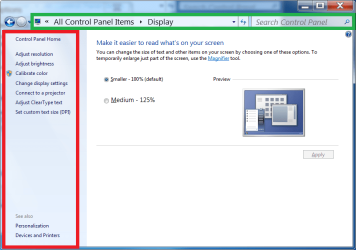
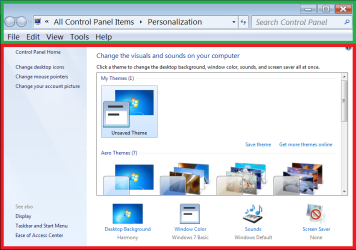
Edit: Here are some pictures to show the parts that don't increase font size...
...
...
Given up trying to embed the images. I have attached them. Can they be downloaded/seen?
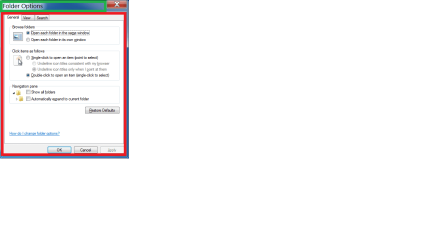
Green means can be changed
Red means cannot be changed

1MaFq8eF.png
 

Attachments

  • dpi.png
    dpi.png
    122.1 KB · Views: 3
  • explorer.png
    explorer.png
    100.8 KB · Views: 1
  • folder.png
    folder.png
    55.7 KB · Views: 1
  • startmenu.png
    startmenu.png
    290 KB · Views: 1
  • themes.png
    themes.png
    157.4 KB · Views: 1
Last edited:

My Computer

Computer Manufacturer/Model Number
Toshiba Satellite® L755D-S5348 15.6" widescreen Laptop
OS
Windows 7 Home Premium x64
CPU
AMD Dual-Core A4-3300M Accelerated Processor
Motherboard
AMD Torpedo
Memory
DDR3 6144 MBytes
Graphics Card(s)
AMD Radeon™ HD 6480G
Monitor(s) Displays
15.6" Widescreen, 1366x768 (HD), 16:9 aspect ratio
Hard Drives
Hitachi HTS547550A9E384 500 GB
Hi,
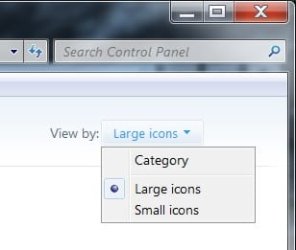
Besides using View by large icons ?
cp large icons.jpg
 

My Computer

Computer type
PC/Desktop
Computer Manufacturer/Model Number
Custom assembled by me :}
OS
Win-7-Pro64bit 7-H-Prem-64bit
CPU
i7-5930K 2nd i9-9940x both water blocked VRM's too
Motherboard
ASUS SABERTOOTH X99 2nd ASUS x299 Apex
Memory
Trident-z 3200C14 2nd Trident-z 3600C16
Graphics Card(s)
EVGA 1080ti ftw3 2nd Titan Xp both water blocked
Sound Card
Built-in Realtek
Monitor(s) Displays
1-AOC G2460PG 24"G-Sync 144Hz/ 2nd 1-ASUS VG248QE 24" 144Hz
Screen Resolution
1920 x 1080 144Hz
Hard Drives
2-Samsung M.2 Evo & Evo Plus
2-Samsung 850 EVO 500GB SSD's/ 3-2.5 W.D. Black 1tb-&3-1tb/3-3.5 WD Black 1tb hdd's
PSU
EVGA SuperNOVA 1000-P2 2nd 1200-P2
Case
2-Corsair Obsidian Series 450D Black ATX Mid Tower
Cooling
Custom water loops
Keyboard
Logitech G710+/ 2nd Logitech G910
Mouse
2-RedDragon M901 Perdition 16400 dpi Gaming mouse = wired
Internet Speed
Comcast Ping 19ms 89.31mbps download speed 6.12mbps upload
Antivirus
Malwarebytes Pro/ Superantispyware Pro
Browser
FireFox & Pale moon
Other Info
2nd ASUS X299 Apex/Intel i9-9940x with Custom water loop/7H-Prem-x64/Corsair 450D case/Ram Trident-z 3600C16 4x8gb / Samsung970Evo plus 500gb SSD/Dual ssd EZ swap evo/PSU EVGA SuperNova 1200w-P2 80+Platinum/GPU Titan Xp /8-ML-140 on push-pull on 2-280GTX rads
That only affects the icons, and even if it did affect the text as well, it wouldn't change anything outside that area, e.g. the side categories, each panel applet's options, systtem windows, etc
 

My Computer

Computer Manufacturer/Model Number
Toshiba Satellite® L755D-S5348 15.6" widescreen Laptop
OS
Windows 7 Home Premium x64
CPU
AMD Dual-Core A4-3300M Accelerated Processor
Motherboard
AMD Torpedo
Memory
DDR3 6144 MBytes
Graphics Card(s)
AMD Radeon™ HD 6480G
Monitor(s) Displays
15.6" Widescreen, 1366x768 (HD), 16:9 aspect ratio
Hard Drives
Hitachi HTS547550A9E384 500 GB
Other than what ThrashZone has suggested I don't think what you want is possible. There is a fundamental problem here. You can't arbitrarily make text bigger without also making the containing elements, such as dialog boxes, push buttons, etc, larger as well. Outside of very constrained limits this would result in clipped text. The only way to avoid this is to make everything larger, by setting a larger DPI.
 

My Computer

Computer type
PC/Desktop
Computer Manufacturer/Model Number
HP
OS
Windows 7 Pro 64 bit
CPU
Xeon W3520
Memory
8 GB
Graphics Card(s)
Nvidia Geforce 210
@LMiller7 are you saying windows control panel's text is hard coded or something like that? is this a limitation by design? If what you say is the case, then how do you prevent DPI settings from affecting window sizes?

EDIT: I think I've seen clipped text in other situations before but I would like to see how it looks in the control panel
 

My Computer

Computer Manufacturer/Model Number
Toshiba Satellite® L755D-S5348 15.6" widescreen Laptop
OS
Windows 7 Home Premium x64
CPU
AMD Dual-Core A4-3300M Accelerated Processor
Motherboard
AMD Torpedo
Memory
DDR3 6144 MBytes
Graphics Card(s)
AMD Radeon™ HD 6480G
Monitor(s) Displays
15.6" Widescreen, 1366x768 (HD), 16:9 aspect ratio
Hard Drives
Hitachi HTS547550A9E384 500 GB
LMiller7 are you saying windows control panel's text is hard coded or something like that?

Not at all. But concepts of text size are complex and I will not try to explain them here.

As for preventing DPI settings from changing windows sizes, no way. That is one of the primary reasons why DPI settings were provided for.

The bottom line is as I explained. Increasing text size without also increasing the size of other elements will result in clipped text. There is no way to avoid this.
 

My Computer

Computer type
PC/Desktop
Computer Manufacturer/Model Number
HP
OS
Windows 7 Pro 64 bit
CPU
Xeon W3520
Memory
8 GB
Graphics Card(s)
Nvidia Geforce 210
As for preventing DPI settings from changing windows sizes, no way. That is one of the primary reasons why DPI settings were provided for.
Besides very small unresizable windows or windows that don't save the last size used, what benefit is there in making windows bigger by default if they can be resized and the new size is saved?

Anyway, it's very dissappointing that there's no solution for such a common problem. Maybe Windows just wasn't designed to be used by people with bad eyesight on screens with 768 vertical pixels or less without having a degrading experience.
Or maybe this is because they added this sort of accessibility/customization options in later versions like WIn8 or Win10. Do you (or anyone else) by chance know if on Windows 8 or 10 it is possible to do what I asked about here? If so, I might upgrade
 

My Computer

Computer Manufacturer/Model Number
Toshiba Satellite® L755D-S5348 15.6" widescreen Laptop
OS
Windows 7 Home Premium x64
CPU
AMD Dual-Core A4-3300M Accelerated Processor
Motherboard
AMD Torpedo
Memory
DDR3 6144 MBytes
Graphics Card(s)
AMD Radeon™ HD 6480G
Monitor(s) Displays
15.6" Widescreen, 1366x768 (HD), 16:9 aspect ratio
Hard Drives
Hitachi HTS547550A9E384 500 GB

My Computer

Computer type
PC/Desktop
Computer Manufacturer/Model Number
Custom assembled by me :}
OS
Win-7-Pro64bit 7-H-Prem-64bit
CPU
i7-5930K 2nd i9-9940x both water blocked VRM's too
Motherboard
ASUS SABERTOOTH X99 2nd ASUS x299 Apex
Memory
Trident-z 3200C14 2nd Trident-z 3600C16
Graphics Card(s)
EVGA 1080ti ftw3 2nd Titan Xp both water blocked
Sound Card
Built-in Realtek
Monitor(s) Displays
1-AOC G2460PG 24"G-Sync 144Hz/ 2nd 1-ASUS VG248QE 24" 144Hz
Screen Resolution
1920 x 1080 144Hz
Hard Drives
2-Samsung M.2 Evo & Evo Plus
2-Samsung 850 EVO 500GB SSD's/ 3-2.5 W.D. Black 1tb-&3-1tb/3-3.5 WD Black 1tb hdd's
PSU
EVGA SuperNOVA 1000-P2 2nd 1200-P2
Case
2-Corsair Obsidian Series 450D Black ATX Mid Tower
Cooling
Custom water loops
Keyboard
Logitech G710+/ 2nd Logitech G910
Mouse
2-RedDragon M901 Perdition 16400 dpi Gaming mouse = wired
Internet Speed
Comcast Ping 19ms 89.31mbps download speed 6.12mbps upload
Antivirus
Malwarebytes Pro/ Superantispyware Pro
Browser
FireFox & Pale moon
Other Info
2nd ASUS X299 Apex/Intel i9-9940x with Custom water loop/7H-Prem-x64/Corsair 450D case/Ram Trident-z 3600C16 4x8gb / Samsung970Evo plus 500gb SSD/Dual ssd EZ swap evo/PSU EVGA SuperNova 1200w-P2 80+Platinum/GPU Titan Xp /8-ML-140 on push-pull on 2-280GTX rads
I think I'm gonna ask Brink about this. Maybe he knows of a hidden trick to achieve my goal.

I think 118% DPI setting is enough for some windows like VLC settings to not fit on the screen
 

My Computer

Computer Manufacturer/Model Number
Toshiba Satellite® L755D-S5348 15.6" widescreen Laptop
OS
Windows 7 Home Premium x64
CPU
AMD Dual-Core A4-3300M Accelerated Processor
Motherboard
AMD Torpedo
Memory
DDR3 6144 MBytes
Graphics Card(s)
AMD Radeon™ HD 6480G
Monitor(s) Displays
15.6" Widescreen, 1366x768 (HD), 16:9 aspect ratio
Hard Drives
Hitachi HTS547550A9E384 500 GB
Hi,
I don't believe vlc has ever had a very good interface experience
But you should be able to resize the window/ close and reopen and it should remember the new size.
 

My Computer

Computer type
PC/Desktop
Computer Manufacturer/Model Number
Custom assembled by me :}
OS
Win-7-Pro64bit 7-H-Prem-64bit
CPU
i7-5930K 2nd i9-9940x both water blocked VRM's too
Motherboard
ASUS SABERTOOTH X99 2nd ASUS x299 Apex
Memory
Trident-z 3200C14 2nd Trident-z 3600C16
Graphics Card(s)
EVGA 1080ti ftw3 2nd Titan Xp both water blocked
Sound Card
Built-in Realtek
Monitor(s) Displays
1-AOC G2460PG 24"G-Sync 144Hz/ 2nd 1-ASUS VG248QE 24" 144Hz
Screen Resolution
1920 x 1080 144Hz
Hard Drives
2-Samsung M.2 Evo & Evo Plus
2-Samsung 850 EVO 500GB SSD's/ 3-2.5 W.D. Black 1tb-&3-1tb/3-3.5 WD Black 1tb hdd's
PSU
EVGA SuperNOVA 1000-P2 2nd 1200-P2
Case
2-Corsair Obsidian Series 450D Black ATX Mid Tower
Cooling
Custom water loops
Keyboard
Logitech G710+/ 2nd Logitech G910
Mouse
2-RedDragon M901 Perdition 16400 dpi Gaming mouse = wired
Internet Speed
Comcast Ping 19ms 89.31mbps download speed 6.12mbps upload
Antivirus
Malwarebytes Pro/ Superantispyware Pro
Browser
FireFox & Pale moon
Other Info
2nd ASUS X299 Apex/Intel i9-9940x with Custom water loop/7H-Prem-x64/Corsair 450D case/Ram Trident-z 3600C16 4x8gb / Samsung970Evo plus 500gb SSD/Dual ssd EZ swap evo/PSU EVGA SuperNova 1200w-P2 80+Platinum/GPU Titan Xp /8-ML-140 on push-pull on 2-280GTX rads
Yeah, but the minimum window size is still too big for the screen. Same with several other applications.
 

My Computer

Computer Manufacturer/Model Number
Toshiba Satellite® L755D-S5348 15.6" widescreen Laptop
OS
Windows 7 Home Premium x64
CPU
AMD Dual-Core A4-3300M Accelerated Processor
Motherboard
AMD Torpedo
Memory
DDR3 6144 MBytes
Graphics Card(s)
AMD Radeon™ HD 6480G
Monitor(s) Displays
15.6" Widescreen, 1366x768 (HD), 16:9 aspect ratio
Hard Drives
Hitachi HTS547550A9E384 500 GB

My Computer

Computer type
Laptop
Computer Manufacturer/Model Number
Sager NP9170
OS
Win 7 Pro x64 / Win 10 Pro
CPU
Intel(R) Core(TM) i7-3630QM CPU @ 2.40GHz
Motherboard
CLEVO P170EM
Memory
12 GB
Graphics Card(s)
(1) Intel(R) HD Graphics 4000 (2) NVIDIA GeForce GTX 675M
Sound Card
(1) Realtek High Definition Audio (2) Intel(R) Display Aud
Monitor(s) Displays
17.3
Screen Resolution
1920x1080
Hard Drives
(1) Samsung 860 EVO 500GB(OS) (1) Samsung 860 EVO 500GB(Data)
Keyboard
Backlite
Antivirus
MSE, Malwarebytes Pro
Browser
Firefox
Other Info
DESKTOP: Custom-built.
OS: Win 10 Pro x64.
CASE: Rosewill R5.
CPU: Intel I5 4670K CPU @ 3.40GHz.
CPU COOLER: Cool Master Hyper 212 EVO.
MOTHERBOARD: Asus Z87-A.
MEMORY: Kingston HyperX 2x4 GB.
GPU: Nvidia Geforce 650 TI.
PSU: Corsair TX750.
DRIVES: (1) Samsung 840 120 GB SSD (2) Western Digital blue 500 GB 7200 RPM.
Hey, Thanks Bongo. I will try those methods.
In the green areas of my screenshots the font is Segoe UI 14 but I think I'd go for size 16 if nothing gets messed up.
 

My Computer

Computer Manufacturer/Model Number
Toshiba Satellite® L755D-S5348 15.6" widescreen Laptop
OS
Windows 7 Home Premium x64
CPU
AMD Dual-Core A4-3300M Accelerated Processor
Motherboard
AMD Torpedo
Memory
DDR3 6144 MBytes
Graphics Card(s)
AMD Radeon™ HD 6480G
Monitor(s) Displays
15.6" Widescreen, 1366x768 (HD), 16:9 aspect ratio
Hard Drives
Hitachi HTS547550A9E384 500 GB
Give this a try, if it's to big let me know. Some Properties and Personalization text cannot be changed.

Download and extract the zip folder at the bottom of this post to your Desktop.

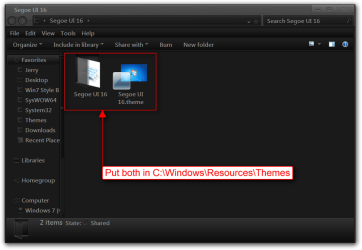
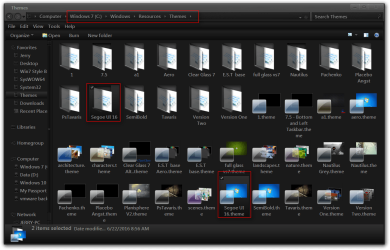
Put both the Segoe UI 16 theme folder and the Segoe UI 16.theme file in C:\Windows\Resources\Themes
Segoe UI 16.pngThemes.png

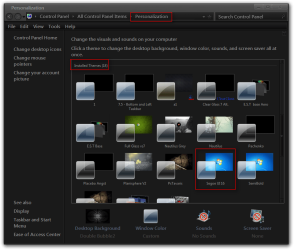
It will show up under Installed Themes as Segoe UI 16 in Personalization.
Personalization.png

Jerry
 

Attachments

My Computer

Computer type
Laptop
Computer Manufacturer/Model Number
Sager NP9170
OS
Win 7 Pro x64 / Win 10 Pro
CPU
Intel(R) Core(TM) i7-3630QM CPU @ 2.40GHz
Motherboard
CLEVO P170EM
Memory
12 GB
Graphics Card(s)
(1) Intel(R) HD Graphics 4000 (2) NVIDIA GeForce GTX 675M
Sound Card
(1) Realtek High Definition Audio (2) Intel(R) Display Aud
Monitor(s) Displays
17.3
Screen Resolution
1920x1080
Hard Drives
(1) Samsung 860 EVO 500GB(OS) (1) Samsung 860 EVO 500GB(Data)
Keyboard
Backlite
Antivirus
MSE, Malwarebytes Pro
Browser
Firefox
Other Info
DESKTOP: Custom-built.
OS: Win 10 Pro x64.
CASE: Rosewill R5.
CPU: Intel I5 4670K CPU @ 3.40GHz.
CPU COOLER: Cool Master Hyper 212 EVO.
MOTHERBOARD: Asus Z87-A.
MEMORY: Kingston HyperX 2x4 GB.
GPU: Nvidia Geforce 650 TI.
PSU: Corsair TX750.
DRIVES: (1) Samsung 840 120 GB SSD (2) Western Digital blue 500 GB 7200 RPM.
Well, it's pretty good. I noticed this uses some sort of retro grey theme. I don't mind it, but is it necessary?

Only in some parts does it seem to be too big:
- In the "address bar" of explorer and control panel windows (first screenshot green box)
- When you are on Computer on explorer, the system info that displays at the bottom (second screenshot bottom red box)
- On the taskbar when there are combined windows as in several explorer windows, when you click on the icon to see the list of opened windows.

There may be more more places where the text doesn't fit well but I've only noticed the above ones so far. We could try a size of 14 to see if things start to fit. If you want new screenshots, including a screenshot for the last item let me know

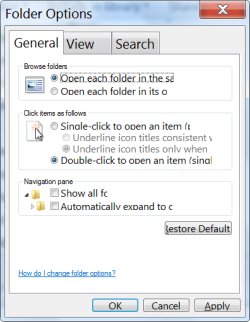
Additionally, control panel applets/dialogs don't get changed at all (e.g. still tiny text), like Folder Options dialog (third screenshot). Are these the properties you say cannot be changed?

Also, which method did you use to create this theme? The first link or the second link (see your second previous post) or some other method?

In any case, this is much better than what I was able to achieve on my own. Thank you.
I haven't used Universal Theme Patcher nor UxStyle Core Beta yet but they both seem to be for using already created themes. Can I not use these applications to make my custom themes from scratch or modify existing themes?
 
Last edited:

My Computer

Computer Manufacturer/Model Number
Toshiba Satellite® L755D-S5348 15.6" widescreen Laptop
OS
Windows 7 Home Premium x64
CPU
AMD Dual-Core A4-3300M Accelerated Processor
Motherboard
AMD Torpedo
Memory
DDR3 6144 MBytes
Graphics Card(s)
AMD Radeon™ HD 6480G
Monitor(s) Displays
15.6" Widescreen, 1366x768 (HD), 16:9 aspect ratio
Hard Drives
Hitachi HTS547550A9E384 500 GB
I haven't used Universal Theme Patcher nor UxStyle Core Beta yet but they both seem to be for using already created themes. Can I not use these applications to make my custom themes from scratch or modify existing themes?

You need to do 1 of them so the theme will work right, that's why it's retro grey now. They are used just to be able to use custom themes.

I use https://www.vistastylebuilder.com/windows7.html to edit the .msstyles.

Jerry
 

My Computer

Computer type
Laptop
Computer Manufacturer/Model Number
Sager NP9170
OS
Win 7 Pro x64 / Win 10 Pro
CPU
Intel(R) Core(TM) i7-3630QM CPU @ 2.40GHz
Motherboard
CLEVO P170EM
Memory
12 GB
Graphics Card(s)
(1) Intel(R) HD Graphics 4000 (2) NVIDIA GeForce GTX 675M
Sound Card
(1) Realtek High Definition Audio (2) Intel(R) Display Aud
Monitor(s) Displays
17.3
Screen Resolution
1920x1080
Hard Drives
(1) Samsung 860 EVO 500GB(OS) (1) Samsung 860 EVO 500GB(Data)
Keyboard
Backlite
Antivirus
MSE, Malwarebytes Pro
Browser
Firefox
Other Info
DESKTOP: Custom-built.
OS: Win 10 Pro x64.
CASE: Rosewill R5.
CPU: Intel I5 4670K CPU @ 3.40GHz.
CPU COOLER: Cool Master Hyper 212 EVO.
MOTHERBOARD: Asus Z87-A.
MEMORY: Kingston HyperX 2x4 GB.
GPU: Nvidia Geforce 650 TI.
PSU: Corsair TX750.
DRIVES: (1) Samsung 840 120 GB SSD (2) Western Digital blue 500 GB 7200 RPM.
Still too big

I installed universal theme patcher and some things got partly better but some of the problems I saw before installing UTP still persist. I'll attach a screenshot of Folder Options and another one of Paint Save Dialog.

Notice that in folder options some lines don't fit horizontally including the "Restore defaults" button
And in Paint save dialog the name box in front of "File name" can't bee seen completely.

It's a bummer that the app you used to make this theme isn't free. Isn't there any alternative? if not, would you mind making the same theme with font size 14? also, can I modify the Segoe UI 16 theme you sent? as in disabling aero, disabling event sounds, etc and then re-saving it as Segoe UI 16?
 

Attachments

  • folder_options.png
    folder_options.png
    52.8 KB · Views: 59
  • save_dialog.png
    save_dialog.png
    154.4 KB · Views: 17

My Computer

Computer Manufacturer/Model Number
Toshiba Satellite® L755D-S5348 15.6" widescreen Laptop
OS
Windows 7 Home Premium x64
CPU
AMD Dual-Core A4-3300M Accelerated Processor
Motherboard
AMD Torpedo
Memory
DDR3 6144 MBytes
Graphics Card(s)
AMD Radeon™ HD 6480G
Monitor(s) Displays
15.6" Widescreen, 1366x768 (HD), 16:9 aspect ratio
Hard Drives
Hitachi HTS547550A9E384 500 GB
It's a bummer that the app you used to make this theme isn't free. Isn't there any alternative? if not, would you mind making the same theme with font size 14? also, can I modify the Segoe UI 16 theme you sent? as in disabling aero, disabling event sounds, etc and then re-saving it as Segoe UI 16?

Sure I will make 1 with size 14.

Yes you modify Segoe UI 16, then save it in Personalization.

Will post the theme later today.

Jerry
 

My Computer

Computer type
Laptop
Computer Manufacturer/Model Number
Sager NP9170
OS
Win 7 Pro x64 / Win 10 Pro
CPU
Intel(R) Core(TM) i7-3630QM CPU @ 2.40GHz
Motherboard
CLEVO P170EM
Memory
12 GB
Graphics Card(s)
(1) Intel(R) HD Graphics 4000 (2) NVIDIA GeForce GTX 675M
Sound Card
(1) Realtek High Definition Audio (2) Intel(R) Display Aud
Monitor(s) Displays
17.3
Screen Resolution
1920x1080
Hard Drives
(1) Samsung 860 EVO 500GB(OS) (1) Samsung 860 EVO 500GB(Data)
Keyboard
Backlite
Antivirus
MSE, Malwarebytes Pro
Browser
Firefox
Other Info
DESKTOP: Custom-built.
OS: Win 10 Pro x64.
CASE: Rosewill R5.
CPU: Intel I5 4670K CPU @ 3.40GHz.
CPU COOLER: Cool Master Hyper 212 EVO.
MOTHERBOARD: Asus Z87-A.
MEMORY: Kingston HyperX 2x4 GB.
GPU: Nvidia Geforce 650 TI.
PSU: Corsair TX750.
DRIVES: (1) Samsung 840 120 GB SSD (2) Western Digital blue 500 GB 7200 RPM.
Give both of these a try, 1 is Segoe UI 14 and 1 is Segoe UI Semibold 12, 12 looks very good.

Jerry
 

Attachments

My Computer

Computer type
Laptop
Computer Manufacturer/Model Number
Sager NP9170
OS
Win 7 Pro x64 / Win 10 Pro
CPU
Intel(R) Core(TM) i7-3630QM CPU @ 2.40GHz
Motherboard
CLEVO P170EM
Memory
12 GB
Graphics Card(s)
(1) Intel(R) HD Graphics 4000 (2) NVIDIA GeForce GTX 675M
Sound Card
(1) Realtek High Definition Audio (2) Intel(R) Display Aud
Monitor(s) Displays
17.3
Screen Resolution
1920x1080
Hard Drives
(1) Samsung 860 EVO 500GB(OS) (1) Samsung 860 EVO 500GB(Data)
Keyboard
Backlite
Antivirus
MSE, Malwarebytes Pro
Browser
Firefox
Other Info
DESKTOP: Custom-built.
OS: Win 10 Pro x64.
CASE: Rosewill R5.
CPU: Intel I5 4670K CPU @ 3.40GHz.
CPU COOLER: Cool Master Hyper 212 EVO.
MOTHERBOARD: Asus Z87-A.
MEMORY: Kingston HyperX 2x4 GB.
GPU: Nvidia Geforce 650 TI.
PSU: Corsair TX750.
DRIVES: (1) Samsung 840 120 GB SSD (2) Western Digital blue 500 GB 7200 RPM.
Not perfect but better regarding the way it fits. You're right, the semibold text looks so nice! It's the way text should look like on windows by default instead of thin, tiny text. Thank you

Edit: I used a combination of the Semibold theme and a DPI setting of 115% and almost everything looks perfect now. I really feel so lucky I was able to get windows looking this way! It looks so nice it's almost comparable to using gdipp-like software. I will upload a before/after picture later...

...here is the comparison screenshots:
 

Attachments

  • before.png
    before.png
    644.4 KB · Views: 3
  • after.png
    after.png
    460 KB · Views: 3
Last edited:

My Computer

Computer Manufacturer/Model Number
Toshiba Satellite® L755D-S5348 15.6" widescreen Laptop
OS
Windows 7 Home Premium x64
CPU
AMD Dual-Core A4-3300M Accelerated Processor
Motherboard
AMD Torpedo
Memory
DDR3 6144 MBytes
Graphics Card(s)
AMD Radeon™ HD 6480G
Monitor(s) Displays
15.6" Widescreen, 1366x768 (HD), 16:9 aspect ratio
Hard Drives
Hitachi HTS547550A9E384 500 GB
Back
Top