ANN: Classic Shell - start menu and other features

Ivo

New member
Local time
2:38 PM
Messages
398
Location
Washington
Hello, everybody


For the past month I've been working in my spare time on this Classic Shell project. It has:
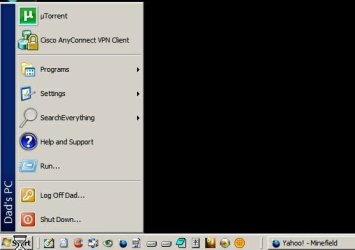
  • full-featured start menu (keyboard and mouse support, drag and drop, recent documents list, localized in 35 languages)
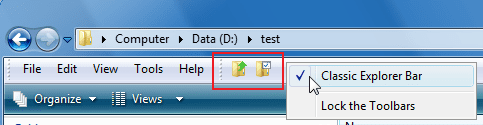
  • Up button for Explorer
  • and other features
Check out the screenshots.

It is free and open source. I just added it to Source Forge: http://classicshell.sourceforge.net/
and Code Project: http://www.codeproject.com/KB/shell/classicshell.aspx

The project is still in beta, so glitches and compatibility problems are expected.

Please, give it a try. If you find a problem you can report it here or on the Source Forge help forum.

Regards
Ivo Beltchev
 

Attachments

  • screenshot.png
    screenshot.png
    52.9 KB · Views: 263
  • toolbar.png
    toolbar.png
    10.1 KB · Views: 119

My Computer

Computer Manufacturer/Model Number
Me :) I build all my PCs
OS
Windows 7 Home 64, Vista Ultimate 64
Ivo, Welcome to the Seven Forum.

That looks good. Not into the old looks, however, there are quite a few on the forum that are always looking for the style format.

Still will give it a shot just to see how it is working. :D
 

My Computer

Computer Manufacturer/Model Number
HP Pavilion a4302f
OS
Win 7 Pro x64, VM Win XP, Win7 Pro Sandbox, Kubuntu 11
CPU
AMD Athlon(tm) II X4 640 @ 3.0 Gbz
Memory
12GB 1066MHz DDR3 SDRAM - 2x4GB, 2x2GB
Graphics Card(s)
ATI Radeon HD 4350 HD Graphics/Audio with 512MB
Sound Card
Realtek High Definition Audio
Monitor(s) Displays
1. Dell 23" SP2307, 2. Mitsublishi 40" HDTV, Hannspree 25"
Screen Resolution
1. 2048x1152, 2. 1920-1080, 3. 1920x1200
Hard Drives
Int: 1 120 Gig SSD i
1 - 2.5" 500 USB External HDD
1 -1 Tb USB External HDD
Case
Mid Tower
Cooling
Standard Fans - 5 fans (very quiet)
Keyboard
Microsoft Wireless 2000
Mouse
Microsoft Wireless Mouse 5000
Internet Speed
10 Mbit (realistically 500 Kbit - 1.2 Mbit)
Other Info
Speakers - Bose Desktop (Excellent Sound)
1 external CD|DVD\Blue-ray Recorders/Players (Sony)
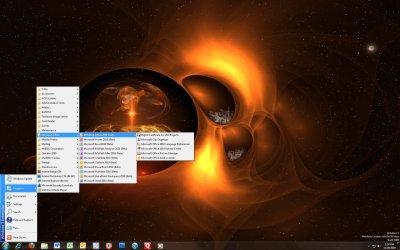
Downloaded your little classic shell and put it to a couple of test (Screen, running programs, and using it while other programs were running), and thus far no problems. It seems strange seeing a Win 2000 Start Menu on Win 7. Sure you will have quite a few testing and trying it out. Good Luck. :D
Untitled-1.jpg
 

My Computer

Computer Manufacturer/Model Number
HP Pavilion a4302f
OS
Win 7 Pro x64, VM Win XP, Win7 Pro Sandbox, Kubuntu 11
CPU
AMD Athlon(tm) II X4 640 @ 3.0 Gbz
Memory
12GB 1066MHz DDR3 SDRAM - 2x4GB, 2x2GB
Graphics Card(s)
ATI Radeon HD 4350 HD Graphics/Audio with 512MB
Sound Card
Realtek High Definition Audio
Monitor(s) Displays
1. Dell 23" SP2307, 2. Mitsublishi 40" HDTV, Hannspree 25"
Screen Resolution
1. 2048x1152, 2. 1920-1080, 3. 1920x1200
Hard Drives
Int: 1 120 Gig SSD i
1 - 2.5" 500 USB External HDD
1 -1 Tb USB External HDD
Case
Mid Tower
Cooling
Standard Fans - 5 fans (very quiet)
Keyboard
Microsoft Wireless 2000
Mouse
Microsoft Wireless Mouse 5000
Internet Speed
10 Mbit (realistically 500 Kbit - 1.2 Mbit)
Other Info
Speakers - Bose Desktop (Excellent Sound)
1 external CD|DVD\Blue-ray Recorders/Players (Sony)
Thanks for giving it a test. As for the looks, I'm a big fan of "form follows function". I'm trying to nail down the functionality first, and then I will make the pretty :).
 

My Computer

Computer Manufacturer/Model Number
Me :) I build all my PCs
OS
Windows 7 Home 64, Vista Ultimate 64
Help with Standard Toolbar Buttons. like this one
21mcetj.jpg


I want the: File Edit View Favorite Tools And Help. Please help.
 

My Computer

Computer Manufacturer/Model Number
Compal CL51-15
OS
WIN 7
CPU
Intel Centrino
Motherboard
Intel 82852/82855
Memory
2 GB
Graphics Card(s)
Intel Graphics
Sound Card
realtek AC'97
Go to Tools (Alt+T), Folder Options, the View tab, and make sure “Always show menus” is checked. You'll get File, Edit, View, Tools and Help.
I don't think there is a Favorites menu in Windows Explorer on Vista or Win7. Sorry.
 

My Computer

Computer Manufacturer/Model Number
Me :) I build all my PCs
OS
Windows 7 Home 64, Vista Ultimate 64
Ivo. You are an angel. I got this running before the 1st crash, then I couldnt map my route to how I got it the 1st time... Then came YOU..Thank you
 

My Computer

Computer Manufacturer/Model Number
Compal CL51-15
OS
WIN 7
CPU
Intel Centrino
Motherboard
Intel 82852/82855
Memory
2 GB
Graphics Card(s)
Intel Graphics
Sound Card
realtek AC'97
Also in the default view - the menu may be displayed by holding down the ALT key - without having to set the default to always show ;)
 

My Computers

System One System Two

  • Computer type
    PC/Desktop
    Computer Manufacturer/Model Number
    ChillBlast - Custom to my design
    OS
    Windows 11 Pro x64 [Latest Release and Release Preview]
    CPU
    Ryzen 9 5950X, 3.8 - 5.2 MHz
    Motherboard
    Asus Prime X570-Pro
    Memory
    64GB [2 x 32GB] DDR4 3200MHz
    Graphics Card(s)
    4GB NVIDIA GEFORCE GTX 1650 Ti
    Sound Card
    On-board SPDIF to 5.1 System + HDMI [5.1 system]
    Monitor(s) Displays
    32" UHD 32 Bit HDR Monitor + 43" UHD 4K 32Bit HDR TV
    Screen Resolution
    2 x 3840 x 2160 @60Hz
    Hard Drives
    1TB M2 SSD OS, 500GB Fast Access SSD, 2 x 8TB Data + Various Externals from 1TB to 4TB, 10TB NAS
    PSU
    NZXT C750 80 PLUS Gold 750W Modular PSU
    Case
    Workstation Case [Matt Black]
    Cooling
    NZXT Kraken X63 280mm CPU Cooler +2x Quiet Case fans
    Keyboard
    Logitech Wireless MX Keys & K400 + others
    Mouse
    Logitech Wireless MX Master 3S
    Internet Speed
    920 MB Down 50 MB Up
    Antivirus
    BitDefender Total Security Pro
    Browser
    Chrome (always run latest Non-Beta)
    Other Info
    Also run ...
    Laptop - Quad 8GB - Windows 10 Pro x64
    Nexus 7 Android tablet x2
    Samsung 10.2" tablet
    Blackview TAB 8 4G Android Tablet c/w Keyboard
    Wacom Intuos Pro Medium Pen Pad
    Wacom Intuos Pro Small Pen Pad
    Wacom Expresskeys Remote
    Loopdeck+ Graphics Controller
    Shuttle Pro v2 Control
  • Computer type
    Laptop
    System Manufacturer/Model Number
    Dell XPS 17 10750H
    OS
    Windows 11 Pro x64 Latest RP
    CPU
    Intel I7 10750H 5.0GHz
    Motherboard
    Dell XPS
    Memory
    32GB [2x16GB] DDR4 2933 MHz
    Graphics Card(s)
    nVidia GTX1650Ti 4 GB GDDR6
    Sound Card
    Stock [Realtek] 4 Speaker
    Monitor(s) Displays
    17" IPS UHD+ Infinity Edge Touchscreen
    Screen Resolution
    3840 x 2400
    Hard Drives
    2TB M2 NVMe, 4TB External + various 500GB & 1TB External NVMe (also have access to spinner HDD from
    PSU
    Stock
    Case
    Stock XPS Aluminium & Carbon Fibre
    Cooling
    Stock - Active Fan Control
    Keyboard
    Backlit + Various Logitech
    Mouse
    Stock Track Pad + Logitech MX Trackball
    Internet Speed
    72 MB Down 18MB Up
    Browser
    Chrome
    Other Info
    Also run ...
    Laptop - Quad 8GB - Windows 10 Pro x64
    Nexus 7 Android tablet x2
    10.2" tablet
    Sony Z3 Android Smartphone
    Wacom Intuos Pro Medium Pen Pad
    Wacom Intuos Pro Small Pen Pad
    Wacom Expresskeys Remote
    Loopdeck+ Graphics Controller
    Shuttle Pro v2 Control Pad
    10TB NAS
New version 0.9.5

Hello again

There is a new version of Classic Shell on Source Forge - version 0.9.5. It fixes some bugs and addresses some of the requests from the early users:
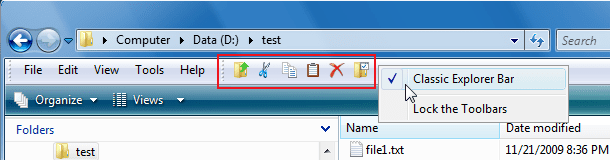
-There are more buttons in the Windows Explorer toolbar - Copy, Cut, Paste, Delete. There is also an option to show bigger buttons
- The Documents folder in the start menu can be hidden
- The Search command can be customized to start a 3rd party search utility
- The start menu uses a few Aero theme elements

You can get the latest version from Source Forge: http://classicshell.sourceforge.net/
 

Attachments

  • screenshot.png
    screenshot.png
    167.3 KB · Views: 53
  • toolbar.png
    toolbar.png
    39.1 KB · Views: 41

My Computer

Computer Manufacturer/Model Number
Me :) I build all my PCs
OS
Windows 7 Home 64, Vista Ultimate 64
Your effort on this project is very very highly appreciated by me. Bravo. Please visit:
1. List of features removed in Windows Vista - Wikipedia, the free encyclopedia
2. List of features removed in Windows 7 - Wikipedia, the free encyclopedia
3. DumbWin
Consider these feature requests from me. :)

Btw, the Classic Start menu needs some fixes:
. Ability to launch multiple apps without the Start menu disappearing when Shift is held down
- A Confirmation for "Log off" like XP or bring the usual Shutdown screen with Log off selected.
- For non-Active Directory connected computers, the ability to hide "Search -> For Printers" and "For Computers".
- Ability to hide Help & Support.
- Ability to invoke both Start menus such as Classic by Win key but new by button or vice versa (Classic by button but new by Win key)

Standard toolbar in Explorer needs Properties button, buttons to toggle Navigation/folders/left pane, details pane, Preview pane (Preview pane for Vista only).
 
Last edited:

My Computer

Computer Manufacturer/Model Number
Custom built
OS
Windows XP Media Center Edition 2005
CPU
Intel Core i9
Memory
DDR3 6GB Triple Channel
Graphics Card(s)
ATI HD 5970
Sound Card
SoundBlaster X-Fi HomeTheater HD
Monitor(s) Displays
LG Monitor TV
Screen Resolution
1920 x 1080
Hard Drives
Intel X-25 E in RAID 1+0
PSU
750 Watts
Case
HomeTheater HD
Cooling
Liquid cooling
Keyboard
Microsoft
Mouse
Microsoft
Internet Speed
1 Mbps
Other Info
In love with Windows.
Consider these feature requests from me. :)

Btw, the Classic Start menu needs some fixes:
. Ability to launch multiple apps without the Start menu disappearing when Shift is held down
- A Confirmation for "Log off" like XP or bring the usual Shutdown screen with Log off selected.
- For non-Active Directory connected computers, the ability to hide "Search -> For Printers" and "For Computers".
- Ability to hide Help & Support.
- Ability to invoke both Start menus such as Classic by Win key but new by button or vice versa (Classic by button but new by Win key)

Standard toolbar in Explorer needs Properties button, buttons to toggle Navigation/folders/left pane, details pane, Preview pane (Preview pane for Vista only).

Can you elaborate on the Shift feature? I'm not sure I understand.

I don't remember having to confirm Log off on XP. At least on Vista (which is currently the basis of my start menu) there is no confirmation. Can you post a screenshot of the confirmation?

About active directory - I was looking for API to detect if it is present but couldn't find any. Do you know how to check if it is available?

Hiding help - there is a group policy for that, and it is on my list to check for policies that affect the start menu.

I can look into adding a separate hotkey for the classic menu. It can't be Win+something though - those are reserved by the system and every new version of Windows uses more of them. For now use Shift+click to bring the new menu.
 

My Computer

Computer Manufacturer/Model Number
Me :) I build all my PCs
OS
Windows 7 Home 64, Vista Ultimate 64
Hi Ivo, I have another request regarding ClassicShell. In a future build, is it possible to include tabs in Windows Explorer? A lot of people that used QTTabBar in the past but are now frustrated at the lack of updates and opening the source code would be very interested.
 

My Computer

OS
Vista
Hi Ivo, I have another request regarding ClassicShell. In a future build, is it possible to include tabs in Windows Explorer? A lot of people that used QTTabBar in the past but are now frustrated at the lack of updates and opening the source code would be very interested.

No, adding tabs to Explorer is not on my list for the foreseeable future. It sounds like a huge task that requires a lot of knowledge about the shell's internals. I'm struggling even with the simple stuff like how to update the window to show "ghosted" files after a Cut operation :)

What you're asking looks more of a full-scale Explorer replacement. Have you tried this: xplorer² tour: introduction to empowered file browsing? The screenshots look promising - it has tabs, toolbars, all the nice stuff you want.
 

My Computer

Computer Manufacturer/Model Number
Me :) I build all my PCs
OS
Windows 7 Home 64, Vista Ultimate 64
Ivo - this is GREAT! Exactly what I was looking for! Consider this a big smooch from me!
kissing.gif


notworthy.gif


Thank you!

Ariel
 

My Computer

Computer Manufacturer/Model Number
HP G60
OS
Windows 7
Ivo. Gotcha about the tab. I figured that feature wouldn't be trivial to add. I like the program so far. It makes Vista and 7 explorer a little more like XP explorer.
 

My Computer

OS
Vista
The Classic Explorer is godsend. You are a hero for that.

The Classic Start Menu use to be what I was looking for, but I realized the importance and usefulness of 7's search box, although I still cannot deal with the scrolling of programs.

My biggest request would be to see 7's search box in your start menu. Would this be possible? You don't necessarily have to integrate it by default, but to have an "option" to show/hide it would prove extremely useful. The best of both worlds.

You should also add the "option" to show/hide Documents and Help and Support.
 
Last edited:

My Computer

OS
Windows 7 Pro
The Classic Explorer is godsend. You are a hero for that.

The Classic Start Menu use to be what I was looking for, but I realized the importance and usefulness of 7's search box, although I still cannot deal with the scrolling of programs.

My biggest request would be to see 7's search box in your start menu. Would this be possible? You don't necessarily have to integrate it by default, but to have an "option" to show/hide it would prove extremely useful. The best of both worlds.

You should also add the "option" to show/hide Documents and Help and Support.

Implementing a search box is difficult. It relies on the indexing service and I'm not sure if I can access it from my code. Also the start menu has some knowledge of the recently used programs, and that is also not documented and difficult to access. That's why I have both - click to access the classic start menu, and shift+click for the searchable menu for the rare cases when I need it.

There IS an option for hiding Documents and Favorites. Right-click on the orb and pick Settings. A future version will check the group policy setting for Help and Support.
 

My Computer

Computer Manufacturer/Model Number
Me :) I build all my PCs
OS
Windows 7 Home 64, Vista Ultimate 64
thanks to Ivo for this latest release' ability to replace windows search with Everything Search.
 

Attachments

  • 1.jpg
    1.jpg
    17.8 KB · Views: 35

My Computer

Computer type
PC/Desktop
Computer Manufacturer/Model Number
diy
OS
Win7 pro x64
CPU
stock i7 7700k
Motherboard
Gigabyte Z270N-WIFI mini-ITX
Memory
Corsair Vengeance LPX 16GB (2x8GB) DDR4 @ 3200MHz
Graphics Card(s)
integrated Intel HD 630
Sound Card
onboard Realtek ALC1220
Monitor(s) Displays
two vertically mounted samsung 55" 4k un55mu8000
Screen Resolution
1920x1280
Hard Drives
256GB Samsung EVO 960 M.2 pci-e NVMe SSD
PSU
SilverStone Nightjar ST45NF 450Watt Fanless
Case
No case. Motherboard is mounted directly onto power supply
Cooling
Evercool low profile 815EP with Panaflow 12L fan at 7v
Keyboard
Ortek MCK-86 mini
Mouse
Belkin 5-button USB
Internet Speed
spectrum 400mbps
"Classic Start Menu" is perfect - haven't found any error. Good job.

But: Is it possible to integrate a switch so that "Classic Start Menu" don't substitute the start orb but stays as separate icon in the taskbar?

Because: I also like the Windows 7 default menu with "recent open programs", jump lists, search bar, right pane links, etc. And I don't want always need to use "Shift" key to switch between the two menu views. I want to place "Classic Start Menu" direct next the start orb - perhaps with the similar icon.
 

My Computer

OS
Windows 7
The next version will have a customizable hotkey. When it's set the Win key will no longer be overriden. So you can have the classic menu on Ctrl+Alt+C (for example), and the new menu on the Win key. Is that a good alternative to what you are asking?
 

My Computer

Computer Manufacturer/Model Number
Me :) I build all my PCs
OS
Windows 7 Home 64, Vista Ultimate 64
Back
Top