
thewindows7nerd
New member
hello, so im working on building a copy of windows 7 professional 64bit and transforming it into the look and functionality of windows xp 64bit.
So what im trying to accomplish and need help with. I am needing help with the file explorer and classic shell converting the start menu to xp.
so im trying to get the xp side bar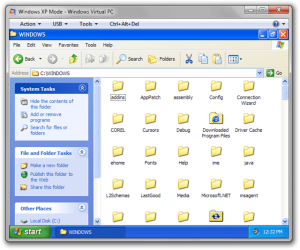 the blue column, with functional interactive buttons that actully take you to places that there Supposed to go. im also trying to get the xp command bar as well. im stuck on this part. i did it before a few years ago but took a break from windows modding and forgot how to do this. i dont even remember how to do it in windows 10... so if someone could help me out id be greatly appreciative. proper credit will be given once this product is completed.
So what im trying to accomplish and need help with. I am needing help with the file explorer and classic shell converting the start menu to xp.
so im trying to get the xp side bar
the blue column, with functional interactive buttons that actully take you to places that there Supposed to go. im also trying to get the xp command bar as well. im stuck on this part. i did it before a few years ago but took a break from windows modding and forgot how to do this. i dont even remember how to do it in windows 10... so if someone could help me out id be greatly appreciative. proper credit will be given once this product is completed.My Computers
System One System Two
-
- Computer type
- PC/Desktop
- Computer Manufacturer/Model Number
- Custom Build
- OS
- Windows 10 IOT LTSC 64Bit
- CPU
- Dual Intel Xeon E5-2440v2 1.90ghz
- Motherboard
- Asus Z9NA-D6
- Memory
- 32gb DDR3 SKhynix
- Graphics Card(s)
- Sapphire Pulse OC Rx 570 8gb
- Hard Drives
- 960gb crucial SATA SSD
- Antivirus
- None - Do not use for my work load
- Browser
- Firefox - 115ESR 64bit
-
- Computer type
- PC/Desktop
- Antivirus
- None
