
You are using an out of date browser. It may not display this or other websites correctly.
You should upgrade or use an alternative browser.
You should upgrade or use an alternative browser.
how set a background image of Windows 7 folders
- Thread starter xoce
- Start date


- Local time
- 11:58 AM
- Messages
- 1,299
Hi there,
If you can get VistaStyleBuilder or Explorer Background Changer to work in Windows 7 (try a few Compatibility modes) then that's probably the easiest way. Otherwise, the last post in this thread has a few hacks that might do the trick, but as always make sure to back up all your data before editing any system files.
Let us know if anything works out for you!
Cheers,
Walker
Windows Outreach Team
If you can get VistaStyleBuilder or Explorer Background Changer to work in Windows 7 (try a few Compatibility modes) then that's probably the easiest way. Otherwise, the last post in this thread has a few hacks that might do the trick, but as always make sure to back up all your data before editing any system files.
Let us know if anything works out for you!
Cheers,
Walker
Windows Outreach Team
My Computer
- Computer Manufacturer/Model Number
- HP Pavilion dm3 (netbook) *** 27" iMac (Dual-Boot)
- OS
- Windows 7 Home Premium (64-bit) *** Windows XP SP3 (32-bit), OSX 10.6
- CPU
- AMD Athlon Neo X2 1.6GHz *** Intel Core i7 Quad Core 2.8GHz
- Memory
- 4.00 GB *** 4.00 GB
- Graphics Card(s)
- ATI Radeon HD 3200, 384MB *** ATI Radeon HD 4850, 1GB
- Sound Card
- ATI High Definition Audio *** ATI High Definition Audio
- Monitor(s) Displays
- LG Flatron W2053TX
- Screen Resolution
- 1600 x 900 (monitor), 1266 x 768 (laptop) *** 2560 x 1440
- Hard Drives
- 300 GB SATA (internal), 500 GB HP SimpleSave (external) *** 1 TB SATA (internal), 160 GB LaCie (external)
- Mouse
- Logitech Cordless Optical Mouse for Notebooks
- Internet Speed
- Broadband

- Local time
- 12:28 AM
- Messages
- 35,002
Hi there,
If you can get VistaStyleBuilder or Explorer Background Changer to work in Windows 7 (try a few Compatibility modes) then that's probably the easiest way. Otherwise, the last post in this thread has a few hacks that might do the trick, but as always make sure to back up all your data before editing any system files.
Let us know if anything works out for you!
Cheers,
Walker
Windows Outreach Team
Hi Walker,
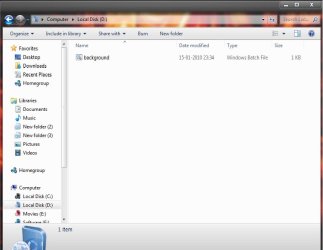
Explorer background changer Didnt change explorer background for me. It just put a batch file in the target folder.
Attachments
My Computer
- Computer type
- PC/Desktop
- Computer Manufacturer/Model Number
- Self Assembled
- OS
- Microsoft Windows 10 Pro Insider Preview 64-bit
- CPU
- Intel(R) Core(TM) i3-4130 CPU @ 3.40GHz
- Motherboard
- Gigabyte Technology Co., Ltd. B85M-D3H
- Memory
- Corsair Vengence 4GB x2 (8.00GB Dual-Channel DDR3 @ 798MHz)
- Graphics Card(s)
- 2047MB GeForce GTS 450 (ZOTAC International)
- Sound Card
- Onboard (Realtek High Definition Audio)
- Monitor(s) Displays
- LG Flatron E2040T
- Screen Resolution
- 1600x900
- Hard Drives
- Western Digital 1 TB
Seagate 500 GB
- PSU
- Corsair VS550
- Case
- Cooler Master K380
- Cooling
- Cooler Master Seidon 120V Plus
- Keyboard
- Logitech MK260r
- Mouse
- Logitech MK260r
- Internet Speed
- PMPL Broadband
- Antivirus
- Windows Defender + MBAM
- Browser
- Firefox
- Other Info
- Dell Studio 15" Laptop
- Local time
- 11:58 AM
- Messages
- 1,299
Yeah neither of those progs are designed with Windows 7 in mind... this is an issue that has seen very little attention since RTM. I'm interested to see who will come up with a fix first!Explorer background changer Didnt change explorer background for me. It just put a batch file in the target folder.
Did you try either of the other methods I mentioned?
Cheers,
Walker
Windows Outreach Team
My Computer
- Computer Manufacturer/Model Number
- HP Pavilion dm3 (netbook) *** 27" iMac (Dual-Boot)
- OS
- Windows 7 Home Premium (64-bit) *** Windows XP SP3 (32-bit), OSX 10.6
- CPU
- AMD Athlon Neo X2 1.6GHz *** Intel Core i7 Quad Core 2.8GHz
- Memory
- 4.00 GB *** 4.00 GB
- Graphics Card(s)
- ATI Radeon HD 3200, 384MB *** ATI Radeon HD 4850, 1GB
- Sound Card
- ATI High Definition Audio *** ATI High Definition Audio
- Monitor(s) Displays
- LG Flatron W2053TX
- Screen Resolution
- 1600 x 900 (monitor), 1266 x 768 (laptop) *** 2560 x 1440
- Hard Drives
- 300 GB SATA (internal), 500 GB HP SimpleSave (external) *** 1 TB SATA (internal), 160 GB LaCie (external)
- Mouse
- Logitech Cordless Optical Mouse for Notebooks
- Internet Speed
- Broadband
divinegoat
New member
- Local time
- 7:58 PM
- Messages
- 3
Solved Finally
There is software now. Works with 64bit, and with aero enabled!
Customize & change explorer backgrounds with Windows 7 Folder Background Changer | The Windows Club
There is software now. Works with 64bit, and with aero enabled!
Customize & change explorer backgrounds with Windows 7 Folder Background Changer | The Windows Club
My Computer
- OS
- windows 7

There is software now. Works with 64bit, and with aero enabled!
Customize & change explorer backgrounds with Windows 7 Folder Background Changer | The Windows Club
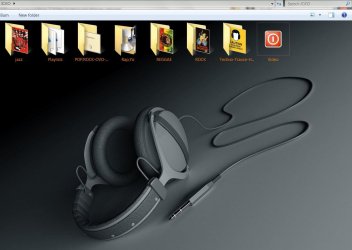
I tried that program just from curiosity, works fine
My Computer
- Computer Manufacturer/Model Number
- Micro-Star International/MS-7529
- OS
- Windows 7 Ultimate x32
- CPU
- DualCore Intel Pentium E2200, 2218 MHz (11 x 202)
- Motherboard
- MSI G31M3 V2 (MS-7529) (2 PCI, 1 PCI-E x16,2 DDR2 DIMM)
- Memory
- 2 GB DDR2-800 DDR2 SDRAM
- Graphics Card(s)
- nVIDIA GeForce 9500GT 1GB
- Sound Card
- Realtek ALC888/1200 @ Intel 82801GB ICH7
- Monitor(s) Displays
- Samsung SyncMaster 2253BW (Digital) 22'' LCD
- Screen Resolution
- 1680x1050
- Hard Drives
- SAMSUNG HD322IJ ATA Device (298 GB , IDE)
- Local time
- 11:58 AM
- Messages
- 1,299
Sweet, thanks for posting this divinegoat! I'll flag the thread to be marked Solved.
Cheers,
Walker
Windows Outreach Team
Cheers,
Walker
Windows Outreach Team
My Computer
- Computer Manufacturer/Model Number
- HP Pavilion dm3 (netbook) *** 27" iMac (Dual-Boot)
- OS
- Windows 7 Home Premium (64-bit) *** Windows XP SP3 (32-bit), OSX 10.6
- CPU
- AMD Athlon Neo X2 1.6GHz *** Intel Core i7 Quad Core 2.8GHz
- Memory
- 4.00 GB *** 4.00 GB
- Graphics Card(s)
- ATI Radeon HD 3200, 384MB *** ATI Radeon HD 4850, 1GB
- Sound Card
- ATI High Definition Audio *** ATI High Definition Audio
- Monitor(s) Displays
- LG Flatron W2053TX
- Screen Resolution
- 1600 x 900 (monitor), 1266 x 768 (laptop) *** 2560 x 1440
- Hard Drives
- 300 GB SATA (internal), 500 GB HP SimpleSave (external) *** 1 TB SATA (internal), 160 GB LaCie (external)
- Mouse
- Logitech Cordless Optical Mouse for Notebooks
- Internet Speed
- Broadband

For some reason I can't get it to work. Is there something special I have to do?
Edit: I extracted the program, ran it as admin, and logged out and back in after change. Nothing happened. In case anyone was wondering.
Edit: I extracted the program, ran it as admin, and logged out and back in after change. Nothing happened. In case anyone was wondering.
My Computer
- Computer type
- Laptop
- Computer Manufacturer/Model Number
- Toshiba P775-S7100
- OS
- Windows 7 Professional SP1 64-bit
- CPU
- Intel Core i5-2450M @2.5 GHz
- Memory
- 6 GB DDR3 1333MHz
- Graphics Card(s)
- Intel HD 3000
- Monitor(s) Displays
- Built-in 17.3" LED; 22" Insignia NS-L22Q-10A
- Screen Resolution
- 1600x900; 1360x768
- Hard Drives
- 750 GB Hitachi
1TB Seagate FreeAgent External
- Internet Speed
- Verizon DSL Speed(Down/Up): 3360 Kbps / 800 Kbps
- Antivirus
- MSE and MBAM Pro
- Browser
- IE10
Don't now, run the program, choose a pic and that should be it. There was a thread about this, http://www.sevenforums.com/customization/89930-windows-7-folder-background-changer-released.html Another member had same problem that you have, don't now did he solve it or not.
My Computer
- Computer Manufacturer/Model Number
- Micro-Star International/MS-7529
- OS
- Windows 7 Ultimate x32
- CPU
- DualCore Intel Pentium E2200, 2218 MHz (11 x 202)
- Motherboard
- MSI G31M3 V2 (MS-7529) (2 PCI, 1 PCI-E x16,2 DDR2 DIMM)
- Memory
- 2 GB DDR2-800 DDR2 SDRAM
- Graphics Card(s)
- nVIDIA GeForce 9500GT 1GB
- Sound Card
- Realtek ALC888/1200 @ Intel 82801GB ICH7
- Monitor(s) Displays
- Samsung SyncMaster 2253BW (Digital) 22'' LCD
- Screen Resolution
- 1680x1050
- Hard Drives
- SAMSUNG HD322IJ ATA Device (298 GB , IDE)
I remember when changing the background image that appears at the log in screen, it had to be .jpg and a relatively small file size. I'll try changing the file format of the picture I want to use and try again.
My Computer
- Computer type
- Laptop
- Computer Manufacturer/Model Number
- Toshiba P775-S7100
- OS
- Windows 7 Professional SP1 64-bit
- CPU
- Intel Core i5-2450M @2.5 GHz
- Memory
- 6 GB DDR3 1333MHz
- Graphics Card(s)
- Intel HD 3000
- Monitor(s) Displays
- Built-in 17.3" LED; 22" Insignia NS-L22Q-10A
- Screen Resolution
- 1600x900; 1360x768
- Hard Drives
- 750 GB Hitachi
1TB Seagate FreeAgent External
- Internet Speed
- Verizon DSL Speed(Down/Up): 3360 Kbps / 800 Kbps
- Antivirus
- MSE and MBAM Pro
- Browser
- IE10
divinegoat
New member
- Local time
- 7:58 PM
- Messages
- 3
Here's to fully enjoying windows 7
How sweet it is! This OS allows us, with a good machine, to do whatever we want...
How sweet it is! This OS allows us, with a good machine, to do whatever we want...
My Computer
- OS
- windows 7
I got it to work but had to restart my computer after words. Now I just need to change a couple other things to get the folders looking how I want 
My Computer
- Computer type
- Laptop
- Computer Manufacturer/Model Number
- Toshiba P775-S7100
- OS
- Windows 7 Professional SP1 64-bit
- CPU
- Intel Core i5-2450M @2.5 GHz
- Memory
- 6 GB DDR3 1333MHz
- Graphics Card(s)
- Intel HD 3000
- Monitor(s) Displays
- Built-in 17.3" LED; 22" Insignia NS-L22Q-10A
- Screen Resolution
- 1600x900; 1360x768
- Hard Drives
- 750 GB Hitachi
1TB Seagate FreeAgent External
- Internet Speed
- Verizon DSL Speed(Down/Up): 3360 Kbps / 800 Kbps
- Antivirus
- MSE and MBAM Pro
- Browser
- IE10
hackerboyessar
New member
- Local time
- 1:58 PM
- Messages
- 3
Is this the same one you tried?it doesn't work for me..
http://www.sevenforums.com/tutorials/91330-folder-background-change.html?filter
My Computer
- Computer Manufacturer/Model Number
- Averatec 6130HS-20
- OS
- Windows 7 Professional 32-bit (6.1, Build 7600)
- CPU
- Intel(R) Pentium(R) 4 3.00 GHz HT
- Memory
- 2.0 GB
- Graphics Card(s)
- ATI Mobility Radeon 9600 64MB
- Sound Card
- Realtek AC'97 Audio
- Screen Resolution
- 1280 x 800
- Hard Drives
- Seagate 96023A 60GB 7200RPM -
Seagate FreeAgentDesktop 250GB
- Cooling
- 20 Inch Box Fan
- Mouse
- Targus PAWM10 Wireless Optical Laptop Mouse

AntiMac
New member
- Local time
- 1:58 PM
- Messages
- 8
I've tried several programs. NONE work. They do nothing what so ever.
My Computer
- Computer Manufacturer/Model Number
- Dell o.o
- OS
- Windows 7 Basic
- CPU
- what?
- Memory
- 3 gig of RAM
- Graphics Card(s)
- none Dx
- Sound Card
- somthing uber old
- Monitor(s) Displays
- Envision
- Hard Drives
- what about it?
- PSU
- what?
- Case
- hard plastic?
- Cooling
- I got 1 fan...which came with the system
msa1000cc
New member
There is software now. Works with 64bit, and with aero enabled!
Customize & change explorer backgrounds with Windows 7 Folder Background Changer | The Windows Club
I tried that program just from curiosity, works fine
View attachment 85428
yup
use this prog. it woooooooork fine

this is the 1st Post

My Computer
- OS
- Windows 7 Ultimate x32 & Windows xp sp3 x32