JavaScript is disabled. For a better experience, please enable JavaScript in your browser before proceeding.
You are using an out of date browser. It may not display this or other websites correctly.
You should upgrade or use an
alternative browser .
Change Drive Icon sizes in Explorer
Hi Guys
Hi dostm,
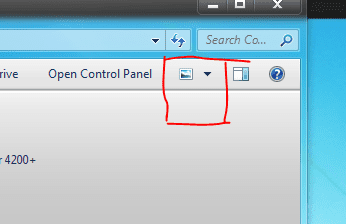
Click the button in the explorer bar (red bordered in pic 1) and then move the slider upward ( as in pic 2) upto the extent you like.
Hope it helps
image 1.PNG
8.8 KB
· Views: 12
Image 2.png
9.9 KB
· Views: 449
Computer type PC/Desktop Computer Manufacturer/Model Number Self Assembled OS Microsoft Windows 10 Pro Insider Preview 64-bit CPU Intel(R) Core(TM) i3-4130 CPU @ 3.40GHz Motherboard Gigabyte Technology Co., Ltd. B85M-D3H Memory Corsair Vengence 4GB x2 (8.00GB Dual-Channel DDR3 @ 798MHz) Graphics Card(s) 2047MB GeForce GTS 450 (ZOTAC International) Sound Card Onboard (Realtek High Definition Audio) Monitor(s) Displays LG Flatron E2040T Screen Resolution 1600x900 Hard Drives Western Digital 1 TB PSU Corsair VS550 Case Cooler Master K380 Cooling Cooler Master Seidon 120V Plus Keyboard Logitech MK260r Mouse Logitech MK260r Internet Speed PMPL Broadband Antivirus Windows Defender + MBAM Browser Firefox Other Info Dell Studio 15" Laptop
New member
Thread Starter
Hi Archard drive icons which are in the left hand side pane
Just quietly lurking
Guru
Gold Member
VIP
Easy, open up notepad put the following code in:
Code:
[autorun]
icon = /icon.ico
Save it as Autorun.inf
and make sure where it says 'save as file type' change it to * All Files.
Put you icon on the same drive, and name it icon.ico
Restart your PC, and it should have the icon you put on the drive.
Computer Manufacturer/Model Number Custom Build OS W7 RTM Ultimate x64 CPU Intel Q8400 @ 2.66GHZ Motherboard Gigabyte GA-EG45M-UD2H Memory 4GB DDR2-800 Graphics Card(s) Gainward GTS 450 GLH 1GB Edition Sound Card Integrated 8 Channel Monitor(s) Displays AOC 23.6 Inch Widescreen LCD Screen Resolution 1920x1080 Hard Drives Seagate 500GB Internal PSU Apevia Java Power 500W Case Cooler Master HAF 922 Black Cooling Stock Intel CPU Fan Keyboard HP SK-2960 Multimedia Keyboard Mouse Logitech M350 Wireless Gaming Mouse Internet Speed 1.5MB
New member
Thread Starter
Hi Uber
I can remember when it was XP, once I enlarged them; not with any system tweak, but applying a program called
FinderXer . Dont know if it warks with 7 or not
Computer type PC/Desktop Computer Manufacturer/Model Number Self Assembled OS Microsoft Windows 10 Pro Insider Preview 64-bit CPU Intel(R) Core(TM) i3-4130 CPU @ 3.40GHz Motherboard Gigabyte Technology Co., Ltd. B85M-D3H Memory Corsair Vengence 4GB x2 (8.00GB Dual-Channel DDR3 @ 798MHz) Graphics Card(s) 2047MB GeForce GTS 450 (ZOTAC International) Sound Card Onboard (Realtek High Definition Audio) Monitor(s) Displays LG Flatron E2040T Screen Resolution 1600x900 Hard Drives Western Digital 1 TB PSU Corsair VS550 Case Cooler Master K380 Cooling Cooler Master Seidon 120V Plus Keyboard Logitech MK260r Mouse Logitech MK260r Internet Speed PMPL Broadband Antivirus Windows Defender + MBAM Browser Firefox Other Info Dell Studio 15" Laptop