My Local Disk Icon Already Changed

newbie87

New member
Local time
11:35 PM
Messages
17
HI guys...
I'm a new one on this forum :D...
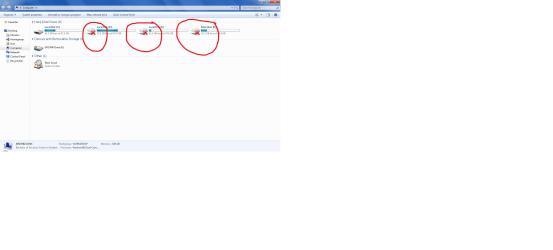
I got a problem with my local disk icon. Previously, I installed AllienGUI Theme to my windows 7 Ultimate 32-bit after i installed it some of my programs can not run (can't open my computer icon, ect) then i decided to uninstall this theme. after uninstall already finished i reboot my laptop and then i check my local disk,so weird :(, i then got my local disk icon already changed and also there is a red cross on it but i can still open my local disk like previously.
I want my local disk icon back to the original. Any idea to solve this....!!!
I really appreciate you guys want to solve this...
Thanks.
 
Last edited:

My Computer

OS
windows 7 Ultimate 32-bit
Did you tried right click it, go to properties, customize, restore default?
 

My Computer

Computer Manufacturer/Model Number
Micro-Star International/MS-7529
OS
Windows 7 Ultimate x32
CPU
DualCore Intel Pentium E2200, 2218 MHz (11 x 202)
Motherboard
MSI G31M3 V2 (MS-7529) (2 PCI, 1 PCI-E x16,2 DDR2 DIMM)
Memory
2 GB DDR2-800 DDR2 SDRAM
Graphics Card(s)
nVIDIA GeForce 9500GT 1GB
Sound Card
Realtek ALC888/1200 @ Intel 82801GB ICH7
Monitor(s) Displays
Samsung SyncMaster 2253BW (Digital) 22'' LCD
Screen Resolution
1680x1050
Hard Drives
SAMSUNG HD322IJ ATA Device (298 GB , IDE)
Just do a system restore around the problem - system restore is continually setting up restore points on a regular basis and also when you get updates, so find one that suits (date wise) -you might need to reinstall some updates thats all. Click show more restore points if need be after starting system restore - start - all programs -accessories - system tools or just type system restore in search and select result.
 

My Computer

OS
XP, Vista, W7 64bit Home Premium
CPU
Intel Core Duo 6850 3.0 ghz @ 3.7 ghz
Motherboard
Asus P5E
Memory
4GB Corsair DDR 2 PC-6400
Graphics Card(s)
Ati 4870 1ghz
Sound Card
Supreme FX 11
Monitor(s) Displays
View Sonic VX1962wm
Screen Resolution
1680 X1050
Hard Drives
3 Seagate Sata Drives 160gb 250gb 500gb
PSU
Thermaltake 600 watt
Case
NZXT Alpha
Cooling
3X120cm Fans
Keyboard
Microsoft Digital Media Pro Keyboard
Mouse
Microsoft Wheel Mouse Optical
Internet Speed
1.5Mb to 8Mb/384k

My Computer

Computer Manufacturer/Model Number
Micro-Star International/MS-7529
OS
Windows 7 Ultimate x32
CPU
DualCore Intel Pentium E2200, 2218 MHz (11 x 202)
Motherboard
MSI G31M3 V2 (MS-7529) (2 PCI, 1 PCI-E x16,2 DDR2 DIMM)
Memory
2 GB DDR2-800 DDR2 SDRAM
Graphics Card(s)
nVIDIA GeForce 9500GT 1GB
Sound Card
Realtek ALC888/1200 @ Intel 82801GB ICH7
Monitor(s) Displays
Samsung SyncMaster 2253BW (Digital) 22'' LCD
Screen Resolution
1680x1050
Hard Drives
SAMSUNG HD322IJ ATA Device (298 GB , IDE)
Hello Newbie, and welcome to Seven Forums.

You might also see if using one of the options in the tutorial below with this C:\Windows\System32\imageres.dll,-36 icon location may restore your default C drive icon for you. Be sure to check for a autorun.inf file as described in the yellow TIP box first.


http://www.sevenforums.com/tutorials/65828-drive-icon-change.html

Hope this helps,
Shawn​
 

My Computer

Computer type
PC/Desktop
Computer Manufacturer/Model Number
Self built custom
OS
64-bit Windows 11 Pro for Workstations
CPU
Intel i7-8700K OC'd to 5 GHz
Motherboard
ASUS ROG Maximus XI Formula Z390
Memory
64 GB (4x16GB) G.SKILL TridentZ RGB DDR4 3600 MHz
Graphics Card(s)
ASUS ROG-STRIX-GTX1080TI-O11G-GAMING
Sound Card
Integrated
Monitor(s) Displays
2 x Samsung Odyssey G7 27"
Screen Resolution
2560x1440
Hard Drives
1TB Samsung 990 PRO M.2,
4TB Samsung 990 PRO PRO M.2,
TerraMaster F8 SSD Plus NAS
PSU
Seasonic Prime Titanium 850W
Case
Thermaltake Core P3
Cooling
Corsair Hydro H115i
Keyboard
Logitech wireless K800
Mouse
Logitech MX Master 4
Internet Speed
2 Gb/s Download and 100 Mb/s Upload
Antivirus
Malwarebyte Anti-Malware Premium
Browser
Google Chrome
Other Info
Logitech Z625 speaker system,
Logitech BRIO 4K Pro webcam,
HP Color LaserJet Pro MFP M477fdn,
APC SMART-UPS RT 1000 XL - SURT1000XLI,
Galaxy S23 Plus phone
sorry for my information is not complete but now i want to show you guys that screen of my local disk....
 

Attachments

  • screen.png
    screen.png
    216.9 KB · Views: 590
Last edited:

My Computer

OS
windows 7 Ultimate 32-bit
Hi all...
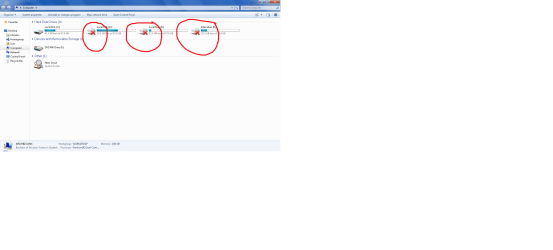
I have tried to do a system restore but still can not back my local disk icon to the original.

What should i do next?
 

Attachments

  • screen1.png
    screen1.png
    216.9 KB · Views: 89

My Computer

OS
windows 7 Ultimate 32-bit
try with other two suggestions provided above, icon cache rebuild and Drive Icon change tutorial
 

My Computer

Computer Manufacturer/Model Number
Micro-Star International/MS-7529
OS
Windows 7 Ultimate x32
CPU
DualCore Intel Pentium E2200, 2218 MHz (11 x 202)
Motherboard
MSI G31M3 V2 (MS-7529) (2 PCI, 1 PCI-E x16,2 DDR2 DIMM)
Memory
2 GB DDR2-800 DDR2 SDRAM
Graphics Card(s)
nVIDIA GeForce 9500GT 1GB
Sound Card
Realtek ALC888/1200 @ Intel 82801GB ICH7
Monitor(s) Displays
Samsung SyncMaster 2253BW (Digital) 22'' LCD
Screen Resolution
1680x1050
Hard Drives
SAMSUNG HD322IJ ATA Device (298 GB , IDE)
Hi newbie!
Hope you you have got it fixed as per the suggestions given by Brink and Grimmjow. I looked from your screenshot that allthe drive icons have changed. Technically I may say that icon #36 is replaced by icon #35 ; #32 is replaced by #31 and #37 is replaced by #36. So I fear that your entire icon cache may be one step advanced (just assumption, I am not sure). Look for your file tyoe icons and folder icons. If they are appropriate, and after Icon cache repair everything is just the same, you may try Resource Hacker .

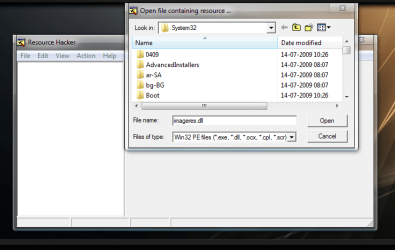
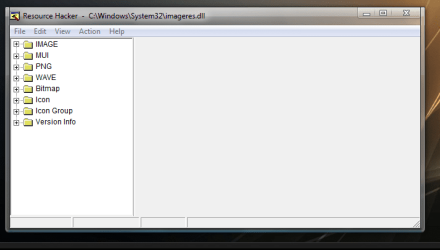
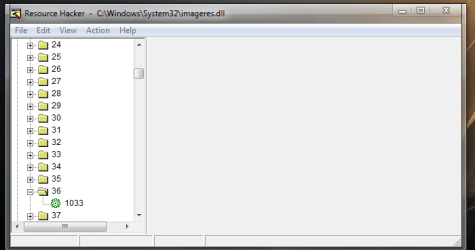
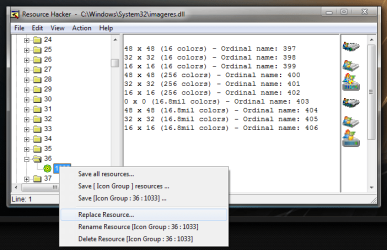
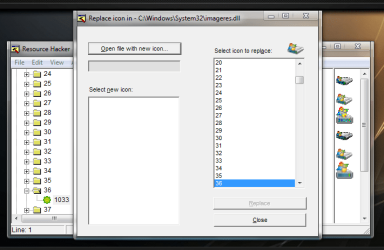
Download it and start it. In the opening window, File > Open (a box like pic 1 will appear, in filename box, type imageres.dll and press 'open'), pic 2 will appear. In pic 2, click the plus sign in front of "Icon Group", again on 36, pic 3 will appear, displaying 1033. Click on 1033, if it says that "out of system resources", click ok. Then right click on 1033 and then on replace resource. A new window will appear like pic 5. Click on open file with new icon ( I provide them for you , just remember the numbers to replace). Browse for it and select.

Repeat the process for 32 and 37. Save the result as imageres.dll on your desktop, and replace the original (C:\Windows\System32\imageres.dll ) by it.

Icons (originals extracted from my machine) are in the zip. Change them carefully.
 

Attachments

  • pic 1.PNG
    pic 1.PNG
    127.5 KB · Views: 178
  • pic 2.PNG
    pic 2.PNG
    87 KB · Views: 113
  • pic 3.PNG
    pic 3.PNG
    65.9 KB · Views: 108
  • pic 4.png
    pic 4.png
    88.8 KB · Views: 109
  • pic 5.PNG
    pic 5.PNG
    121.7 KB · Views: 120
  • New folder (2).zip
    New folder (2).zip
    150.7 KB · Views: 324

My Computer

Computer type
PC/Desktop
Computer Manufacturer/Model Number
Self Assembled
OS
Microsoft Windows 10 Pro Insider Preview 64-bit
CPU
Intel(R) Core(TM) i3-4130 CPU @ 3.40GHz
Motherboard
Gigabyte Technology Co., Ltd. B85M-D3H
Memory
Corsair Vengence 4GB x2 (8.00GB Dual-Channel DDR3 @ 798MHz)
Graphics Card(s)
2047MB GeForce GTS 450 (ZOTAC International)
Sound Card
Onboard (Realtek High Definition Audio)
Monitor(s) Displays
LG Flatron E2040T
Screen Resolution
1600x900
Hard Drives
Western Digital 1 TB
Seagate 500 GB
PSU
Corsair VS550
Case
Cooler Master K380
Cooling
Cooler Master Seidon 120V Plus
Keyboard
Logitech MK260r
Mouse
Logitech MK260r
Internet Speed
PMPL Broadband
Antivirus
Windows Defender + MBAM
Browser
Firefox
Other Info
Dell Studio 15" Laptop
Thank you so much all...
I really appreciated that you want to help me to solve my problem.
I should be proud can joined to this forum
 

My Computer

OS
windows 7 Ultimate 32-bit
Thank you so much all...
I really appreciated that you want to help me to solve my problem.
I should be proud can joined to this forum

Nice to hear that it is solved. :)
 

My Computer

Computer type
PC/Desktop
Computer Manufacturer/Model Number
Self Assembled
OS
Microsoft Windows 10 Pro Insider Preview 64-bit
CPU
Intel(R) Core(TM) i3-4130 CPU @ 3.40GHz
Motherboard
Gigabyte Technology Co., Ltd. B85M-D3H
Memory
Corsair Vengence 4GB x2 (8.00GB Dual-Channel DDR3 @ 798MHz)
Graphics Card(s)
2047MB GeForce GTS 450 (ZOTAC International)
Sound Card
Onboard (Realtek High Definition Audio)
Monitor(s) Displays
LG Flatron E2040T
Screen Resolution
1600x900
Hard Drives
Western Digital 1 TB
Seagate 500 GB
PSU
Corsair VS550
Case
Cooler Master K380
Cooling
Cooler Master Seidon 120V Plus
Keyboard
Logitech MK260r
Mouse
Logitech MK260r
Internet Speed
PMPL Broadband
Antivirus
Windows Defender + MBAM
Browser
Firefox
Other Info
Dell Studio 15" Laptop
You're welcome Newbie. I'm happy to hear that you got it sorted. :)
 

My Computer

Computer type
PC/Desktop
Computer Manufacturer/Model Number
Self built custom
OS
64-bit Windows 11 Pro for Workstations
CPU
Intel i7-8700K OC'd to 5 GHz
Motherboard
ASUS ROG Maximus XI Formula Z390
Memory
64 GB (4x16GB) G.SKILL TridentZ RGB DDR4 3600 MHz
Graphics Card(s)
ASUS ROG-STRIX-GTX1080TI-O11G-GAMING
Sound Card
Integrated
Monitor(s) Displays
2 x Samsung Odyssey G7 27"
Screen Resolution
2560x1440
Hard Drives
1TB Samsung 990 PRO M.2,
4TB Samsung 990 PRO PRO M.2,
TerraMaster F8 SSD Plus NAS
PSU
Seasonic Prime Titanium 850W
Case
Thermaltake Core P3
Cooling
Corsair Hydro H115i
Keyboard
Logitech wireless K800
Mouse
Logitech MX Master 4
Internet Speed
2 Gb/s Download and 100 Mb/s Upload
Antivirus
Malwarebyte Anti-Malware Premium
Browser
Google Chrome
Other Info
Logitech Z625 speaker system,
Logitech BRIO 4K Pro webcam,
HP Color LaserJet Pro MFP M477fdn,
APC SMART-UPS RT 1000 XL - SURT1000XLI,
Galaxy S23 Plus phone
Back
Top