How do I change icons using restorator????

neeraj

New member
How do I change icons using restorator????:(

I've always heard people say use Restorator to manually change your icons, but not one ever mentions the specific steps about how to do it. Can someone please help me by giving the specific steps?
 

My Computer

Computer Manufacturer/Model Number
Custom Built (by me)
OS
Windows 8 CP x64
CPU
Intel(R) Core(TM) i7 CPU 920 @ 2.97GHz
Motherboard
DX58SO
Memory
Corsair 6GB DDR3 (1333Mhz)
Graphics Card(s)
Nvidia GeForce 9800GT (1GB)
Sound Card
Creative Sound Blaster Audigy Value (24bit internal)
Monitor(s) Displays
22" Samsung SyncMaster B2230 (1920*1080)
Screen Resolution
1920*1080
Hard Drives
Seagate Barracuda 500gb
PSU
i ball 450W
Case
i ball (Work Horse)
Keyboard
Microsoft Wireless Keyboard 700 v2.0
Mouse
Microsoft Wireless Mouse 700 v2.0
Internet Speed
1MB
How do I change icons using resorator????:(

I've always heard people say use Restorator to manually change your icons, but not one ever mentions the specific steps about how to do it. Can someone please help me by giving the specific steps?

There's a thread here http://www.sevenforums.com/customization/34640-how-do-i-change-icons-using-restorator.html on using Restorator (64 bit) and some other threads on changing icons for various programs. A search (at the top of the page) for "change icon" will get you a list of various tutorials and threads.
 

My Computer

Computer Manufacturer/Model Number
Gateway, Toshiba Laptop, and Home Brew
OS
Windows 7 x64 HP, Windows 7 HP, Windows 7 Ult
CPU
Intel I3, Cerelon, Pentium 4 @ 3Ghz
Motherboard
Intel, Intel, Asus
Memory
8G, 3G, 3G
Graphics Card(s)
On-board Intel, On-board nVidia, nVIDIA card
Sound Card
on-board, on-board, SoundBlaster
Monitor(s) Displays
Hannspree HF237, Toshiba, SyncMaster 931B
Screen Resolution
default (all)
Hard Drives
1T internal, 320G internal, 160G internal, 1T networked
PSU
300w, unk, 650w
Case
black, black, grey
Cooling
air (all)
Keyboard
standard wired (all)
Mouse
standard wired (all)
Internet Speed
6M down, 768K up
Other Info
Home LAN through Linksys hub to 4 port and wireless switch/router. Networked HP 2600n. Wife's computer running Windows 7, and spare laptop running Ubuntu "Karmic Kola" (9.10).
How do I change icons using resorator????:(

I've always heard people say use Restorator to manually change your icons, but not one ever mentions the specific steps about how to do it. Can someone please help me by giving the specific steps?

I dont use restorator ... I use Resource hacker. If it is ok to you ... I may try to help you to change icons using it :)
 

My Computer

Computer type
PC/Desktop
Computer Manufacturer/Model Number
Self Assembled
OS
Microsoft Windows 10 Pro Insider Preview 64-bit
CPU
Intel(R) Core(TM) i3-4130 CPU @ 3.40GHz
Motherboard
Gigabyte Technology Co., Ltd. B85M-D3H
Memory
Corsair Vengence 4GB x2 (8.00GB Dual-Channel DDR3 @ 798MHz)
Graphics Card(s)
2047MB GeForce GTS 450 (ZOTAC International)
Sound Card
Onboard (Realtek High Definition Audio)
Monitor(s) Displays
LG Flatron E2040T
Screen Resolution
1600x900
Hard Drives
Western Digital 1 TB
Seagate 500 GB
PSU
Corsair VS550
Case
Cooler Master K380
Cooling
Cooler Master Seidon 120V Plus
Keyboard
Logitech MK260r
Mouse
Logitech MK260r
Internet Speed
PMPL Broadband
Antivirus
Windows Defender + MBAM
Browser
Firefox
Other Info
Dell Studio 15" Laptop
How do I change icons using resorator????:(

I've always heard people say use Restorator to manually change your icons, but not one ever mentions the specific steps about how to do it. Can someone please help me by giving the specific steps?

I dont use restorator ... I use Resource hacker. If it is ok to you ... I may try to help you to change icons using it :)

yes plzz help using resource hacker...!!
 

My Computer

Computer Manufacturer/Model Number
Custom Built (by me)
OS
Windows 8 CP x64
CPU
Intel(R) Core(TM) i7 CPU 920 @ 2.97GHz
Motherboard
DX58SO
Memory
Corsair 6GB DDR3 (1333Mhz)
Graphics Card(s)
Nvidia GeForce 9800GT (1GB)
Sound Card
Creative Sound Blaster Audigy Value (24bit internal)
Monitor(s) Displays
22" Samsung SyncMaster B2230 (1920*1080)
Screen Resolution
1920*1080
Hard Drives
Seagate Barracuda 500gb
PSU
i ball 450W
Case
i ball (Work Horse)
Keyboard
Microsoft Wireless Keyboard 700 v2.0
Mouse
Microsoft Wireless Mouse 700 v2.0
Internet Speed
1MB
yes plzz help using resource hacker...!!

In this task, you will need two software (both are free) Resource Hacker and IcoFX.

Ico FX for a ready reference to know which resource number is to be changed, and Res Hacker is to implement the actual change. So first you download these two , and then the task will be started.

Inform here when downloads and installations are completed :)
 

My Computer

Computer type
PC/Desktop
Computer Manufacturer/Model Number
Self Assembled
OS
Microsoft Windows 10 Pro Insider Preview 64-bit
CPU
Intel(R) Core(TM) i3-4130 CPU @ 3.40GHz
Motherboard
Gigabyte Technology Co., Ltd. B85M-D3H
Memory
Corsair Vengence 4GB x2 (8.00GB Dual-Channel DDR3 @ 798MHz)
Graphics Card(s)
2047MB GeForce GTS 450 (ZOTAC International)
Sound Card
Onboard (Realtek High Definition Audio)
Monitor(s) Displays
LG Flatron E2040T
Screen Resolution
1600x900
Hard Drives
Western Digital 1 TB
Seagate 500 GB
PSU
Corsair VS550
Case
Cooler Master K380
Cooling
Cooler Master Seidon 120V Plus
Keyboard
Logitech MK260r
Mouse
Logitech MK260r
Internet Speed
PMPL Broadband
Antivirus
Windows Defender + MBAM
Browser
Firefox
Other Info
Dell Studio 15" Laptop
resource hacker says it's for 32bit...but my windows is 64bit???
 

My Computer

Computer Manufacturer/Model Number
Custom Built (by me)
OS
Windows 8 CP x64
CPU
Intel(R) Core(TM) i7 CPU 920 @ 2.97GHz
Motherboard
DX58SO
Memory
Corsair 6GB DDR3 (1333Mhz)
Graphics Card(s)
Nvidia GeForce 9800GT (1GB)
Sound Card
Creative Sound Blaster Audigy Value (24bit internal)
Monitor(s) Displays
22" Samsung SyncMaster B2230 (1920*1080)
Screen Resolution
1920*1080
Hard Drives
Seagate Barracuda 500gb
PSU
i ball 450W
Case
i ball (Work Horse)
Keyboard
Microsoft Wireless Keyboard 700 v2.0
Mouse
Microsoft Wireless Mouse 700 v2.0
Internet Speed
1MB

My Computer

Computer type
PC/Desktop
Computer Manufacturer/Model Number
Self Assembled
OS
Microsoft Windows 10 Pro Insider Preview 64-bit
CPU
Intel(R) Core(TM) i3-4130 CPU @ 3.40GHz
Motherboard
Gigabyte Technology Co., Ltd. B85M-D3H
Memory
Corsair Vengence 4GB x2 (8.00GB Dual-Channel DDR3 @ 798MHz)
Graphics Card(s)
2047MB GeForce GTS 450 (ZOTAC International)
Sound Card
Onboard (Realtek High Definition Audio)
Monitor(s) Displays
LG Flatron E2040T
Screen Resolution
1600x900
Hard Drives
Western Digital 1 TB
Seagate 500 GB
PSU
Corsair VS550
Case
Cooler Master K380
Cooling
Cooler Master Seidon 120V Plus
Keyboard
Logitech MK260r
Mouse
Logitech MK260r
Internet Speed
PMPL Broadband
Antivirus
Windows Defender + MBAM
Browser
Firefox
Other Info
Dell Studio 15" Laptop
At first, it is to take a backup (copy and paste in a secured place) of your imageres.dll (the location is C:\windows\system32\imageres.dll) , and also Take Ownership of imageres.dll.

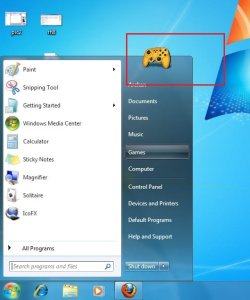
Suppose we will change the games icon :)

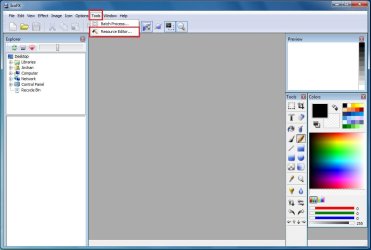
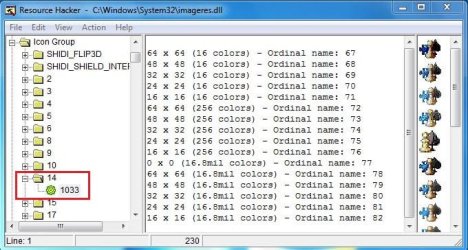
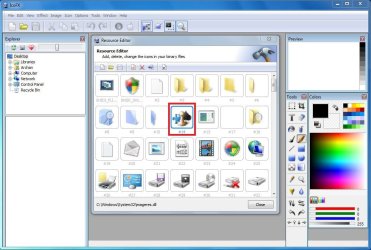
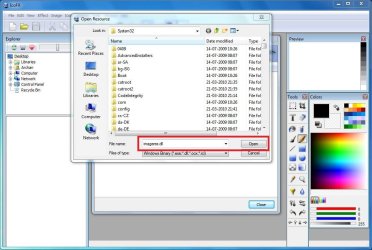
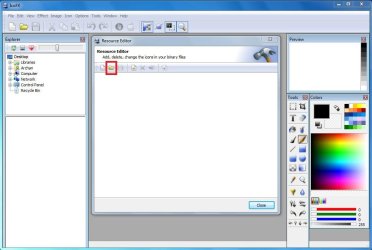
Now open IcoFX. Go to "Tools" tab, and click on "Resource Editor" (as in pic1) . In the Resource editor window, click the Folder icon (as in pic2). It will open in system32 , just type "imageres.dll" in the file file name box and click "open" (as in pic3). So now all the windows system icon is open in front of us along-with the relevent resource number. Our games icon is #14 (as per pic4), which is to be replaced/hacked . So we may say bye - bye to IcoFX now.

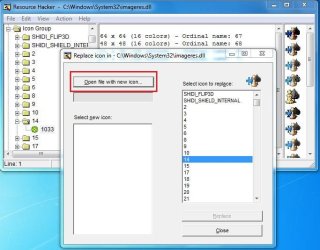
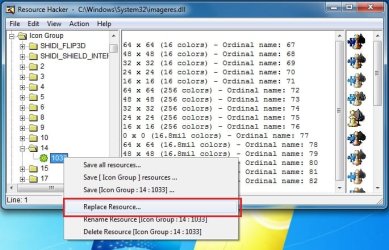
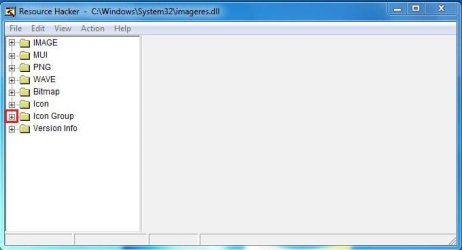
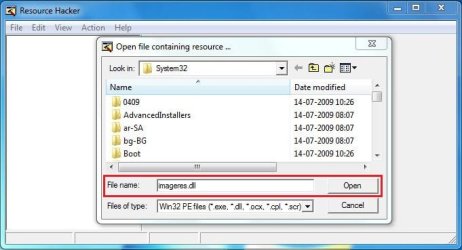
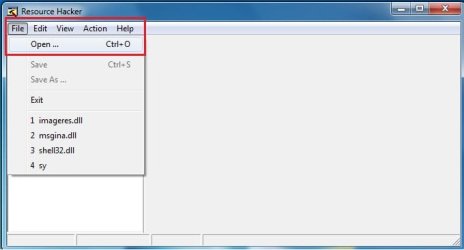
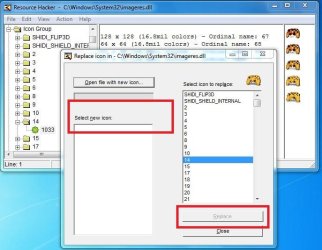
Now open Resource hacker. Click on File > Open ( as in pic 5). It will automatically open in system32. You just put imageres.dll in the file name box and click open (as in pic 6). In pic 7, click on the "+" sign in front of "icon group". So icon group will expand as pic 8. Click on th e"+" sign in front of 14, it will show *1033; click on it. Notice now the game icon in the right side pane. Now right click on *1033 and click on "replace resources" (as in pic 9). in pic 10 window, click on "open file with new icon" and browse for it. when you browsed, pic 11 window will appear. Just "select new icon" and "replace".

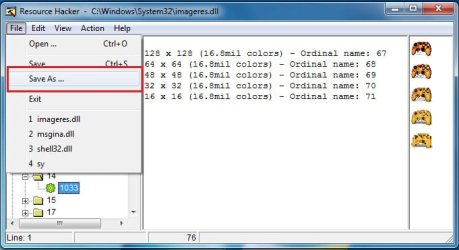
Now again file > save as > imageres.dll (in desktop, to found it easily) as per pic 12. We have taken ownership of the original imageres.dll earlier, rename it to imageresOLD.dll, and paste the new imageres.dll created by us in that location. You may either restart windows or restart explorer using task manager now. After restart, see the game icon in startmenu as fimal :)
 

Attachments

  • Pic1.jpg
    Pic1.jpg
    120.4 KB · Views: 65
  • pic10.JPG
    pic10.JPG
    106.3 KB · Views: 41
  • pic9.jpg
    pic9.jpg
    143.9 KB · Views: 46
  • pic8.JPG
    pic8.JPG
    129.5 KB · Views: 50
  • pic7.JPG
    pic7.JPG
    42.5 KB · Views: 38
  • pic6.JPG
    pic6.JPG
    74 KB · Views: 40
  • pic5.jpg
    pic5.jpg
    37.5 KB · Views: 34
  • pic4.JPG
    pic4.JPG
    189.6 KB · Views: 48
  • pic3.JPG
    pic3.JPG
    186.8 KB · Views: 39
  • pic2.JPG
    pic2.JPG
    134.6 KB · Views: 44

My Computer

Computer type
PC/Desktop
Computer Manufacturer/Model Number
Self Assembled
OS
Microsoft Windows 10 Pro Insider Preview 64-bit
CPU
Intel(R) Core(TM) i3-4130 CPU @ 3.40GHz
Motherboard
Gigabyte Technology Co., Ltd. B85M-D3H
Memory
Corsair Vengence 4GB x2 (8.00GB Dual-Channel DDR3 @ 798MHz)
Graphics Card(s)
2047MB GeForce GTS 450 (ZOTAC International)
Sound Card
Onboard (Realtek High Definition Audio)
Monitor(s) Displays
LG Flatron E2040T
Screen Resolution
1600x900
Hard Drives
Western Digital 1 TB
Seagate 500 GB
PSU
Corsair VS550
Case
Cooler Master K380
Cooling
Cooler Master Seidon 120V Plus
Keyboard
Logitech MK260r
Mouse
Logitech MK260r
Internet Speed
PMPL Broadband
Antivirus
Windows Defender + MBAM
Browser
Firefox
Other Info
Dell Studio 15" Laptop
Sorry for the rest pictures, I am posting them here

Got very tired ..... need to take rest.........

btw Neeraj,
Let me know whether it worked or not.
 

Attachments

  • pic11.JPG
    pic11.JPG
    107.2 KB · Views: 40
  • pic12.jpg
    pic12.jpg
    80.7 KB · Views: 32
  • final.jpg
    final.jpg
    81 KB · Views: 29

My Computer

Computer type
PC/Desktop
Computer Manufacturer/Model Number
Self Assembled
OS
Microsoft Windows 10 Pro Insider Preview 64-bit
CPU
Intel(R) Core(TM) i3-4130 CPU @ 3.40GHz
Motherboard
Gigabyte Technology Co., Ltd. B85M-D3H
Memory
Corsair Vengence 4GB x2 (8.00GB Dual-Channel DDR3 @ 798MHz)
Graphics Card(s)
2047MB GeForce GTS 450 (ZOTAC International)
Sound Card
Onboard (Realtek High Definition Audio)
Monitor(s) Displays
LG Flatron E2040T
Screen Resolution
1600x900
Hard Drives
Western Digital 1 TB
Seagate 500 GB
PSU
Corsair VS550
Case
Cooler Master K380
Cooling
Cooler Master Seidon 120V Plus
Keyboard
Logitech MK260r
Mouse
Logitech MK260r
Internet Speed
PMPL Broadband
Antivirus
Windows Defender + MBAM
Browser
Firefox
Other Info
Dell Studio 15" Laptop
thanx buddy...:D


when i'll be free... i'll try this...!
 

My Computer

Computer Manufacturer/Model Number
Custom Built (by me)
OS
Windows 8 CP x64
CPU
Intel(R) Core(TM) i7 CPU 920 @ 2.97GHz
Motherboard
DX58SO
Memory
Corsair 6GB DDR3 (1333Mhz)
Graphics Card(s)
Nvidia GeForce 9800GT (1GB)
Sound Card
Creative Sound Blaster Audigy Value (24bit internal)
Monitor(s) Displays
22" Samsung SyncMaster B2230 (1920*1080)
Screen Resolution
1920*1080
Hard Drives
Seagate Barracuda 500gb
PSU
i ball 450W
Case
i ball (Work Horse)
Keyboard
Microsoft Wireless Keyboard 700 v2.0
Mouse
Microsoft Wireless Mouse 700 v2.0
Internet Speed
1MB
Back
Top