Make Windows 7 remember window positions and size!

Wutsigu

New member
Hi!

Since the first public beta of Windows 7, I found it very annoying, that MS removed the option to remember each folders view settings for explorer windows. Now explorer windows didn't even remember their position and size, which completely destroyed my work routine.

After a lot of research and many failed attempts to fix the issue, I found a solution to this problem:
This small utility remembers and restores the position and size of all top-level windows. You can even lock certain windows to always open them at the same spot, and there are other cool features. I tried it and it does the job!

Best regards!
 
Last edited by a moderator:

My Computer

OS
Win7
The problem is the same as vista and XP usually. The BagMRU size isn't big enough to accomodate all the folders, When it runs out of space, it loses folder settings. The following registry file ups the MRU size to 20,000 folders:

Windows Registry Editor Version 5.00
[HKEY_CURRENT_USER\Software\Classes\Local Settings\Software\Microsoft\Windows\Shell]
"BagMRU Size"=dword:00004e20
 

My Computer

Computer Manufacturer/Model Number
Custom by me.
OS
Windows 7 64bit RTM
CPU
Intel Core i7 920 Nehalem Over clocked to 3.5 Ghz
Motherboard
EVGA 132-BL-E758-A1 LGA 1366 Intel X58
Memory
CORSAIR DOMINATOR 6GB (3 x 2GB) 240-Pin DDR3 SDRAM DDR3 1600
Graphics Card(s)
EVGA 01G-P3-1280-AR GeForce GTX 280 1GB
Sound Card
Soundblaster X-Fi Fatal1ty
Monitor(s) Displays
2 x 20in Dell Flatpanels 3200x1200
Screen Resolution
3200x1200
Hard Drives
150GB WD Velociraptor(C:), WD 750GB (D:Games), WD 1TB Black (E:Data1), WD 1TB Green (F:Data2)
PSU
CORSAIR HX1000 1000 watt
Case
Desktop
Cooling
Air
Keyboard
Logitech G15
Mouse
Logitech Revolution MX
Internet Speed
25 MB/s
You should mention that this is a 30 day trial and you will need to pay $10 to continue using it.

Looks like a good program though.
 

My Computer

Computer Manufacturer/Model Number
Home Brew
OS
Windows 7 Ultimate Vista Ultimate x64
CPU
Core 2 Duo E8500 3.16Ghz @ 3.8Ghz
Motherboard
eVGA 750i FTW
Memory
2x2Gigs Patriot PC2-6400 LL
Graphics Card(s)
Inno3D GeForce GTX260 216 SP
Monitor(s) Displays
ASUS VW222U 22" 2ms Response time
Screen Resolution
1680x1050
Hard Drives
SATA 150GB
SATA II 250GB
USB IDE 750GB Ext.
PSU
HYTEC 600W & Thermaltake 650W Toughpower Power Exp
Case
Thermaltake Armor LCS (Liquid Cooling System)
Cooling
Liquid Cooling System
Keyboard
Logitech G15 Gaming Keyboard
Mouse
Logitech G9 Gaming Mouse
The problem is the same as vista and XP usually. The BagMRU size isn't big enough to accomodate all the folders, When it runs out of space, it loses folder settings. The following registry file ups the MRU size to 20,000 folders:

Windows Registry Editor Version 5.00
[HKEY_CURRENT_USER\Software\Classes\Local Settings\Software\Microsoft\Windows\Shell]
"BagMRU Size"=dword:00004e20

No, this didn't work for me. Win7 never remembered a single window position. So increasing the BagMRU Size didn't help.

Regards!
 

My Computer

OS
Win7
The problem is the same as vista and XP usually. The BagMRU size isn't big enough to accomodate all the folders, When it runs out of space, it loses folder settings. The following registry file ups the MRU size to 20,000 folders:

Windows Registry Editor Version 5.00
[HKEY_CURRENT_USER\Software\Classes\Local Settings\Software\Microsoft\Windows\Shell]
"BagMRU Size"=dword:00004e20

I have no BagMRU Size to change to =dword:00004e20.

And Sorry, this never did work in XP.
(neither did Kellys corner).

Why do you think this reg change resolves the problem.
 

My Computer

OS
Dual boot XP Pro and Seven/7127
For Vista I always use XDN Tweaker. Until finding this program I was ready to chuck Vista and go back to XP. A life saver.
I've not needed it yet in 7.
 

My Computer

Computer Manufacturer/Model Number
Self Build
OS
Windows RC 7100 x64, Vista Ultimate x64,
CPU
Intel Q6700
Motherboard
Asus P5Q3 Deluxe wi-fi
Memory
Corsair DDR3 4gb
Graphics Card(s)
ATI X1650
Monitor(s) Displays
LCD
Hard Drives
WD 1500gb 10k
WD 320gb 7.5k
WD 320gb 7.5k
Samsung 750gb 7.5k
PSU
Enermax 500w
Case
Lian-Li PC-7B Plus
Cooling
Scythe Infinity
Keyboard
Logitech cordless
Mouse
Logitech cordless
Internet Speed
20meg Cable
Bag size won't help. It does it on a clean install. RTM better not have this bug.
 

My Computer

Computer type
PC/Desktop
Computer Manufacturer/Model Number
Made by Dixon Butz
OS
Win7 Win 10, Win 8.1
CPU
AMD FX-8350, Corsair H100i
Motherboard
ASUS Crosshair V Formula-Z
Memory
16GB G.SKILL Ripjaws DDR3
Graphics Card(s)
EVGA GTX 980, EVGA GTX 860
Sound Card
Denon x4200 Dolby AMOS!
Monitor(s) Displays
65" Samsung 4K, +3 27inch
Screen Resolution
4K, 1080x3
Hard Drives
2TB Samsung hd204ui

1X Samsung 850 SSD
PSU
1000w EVGA, 2000VA UPS, 1000VA UPS and many others
Case
Lian Li
Cooling
Corsair H100i
Keyboard
Logitech K800
Mouse
Logitech Couch Mouse
Internet Speed
Gigabit!
Antivirus
Defender
Browser
Slimjet Chrome
Better you send lots of feedback to them about it then.

Feedback Link in my Sig. ;)
 

My Computer

Computer Manufacturer/Model Number
Home Brew
OS
Windows 7 Ultimate Vista Ultimate x64
CPU
Core 2 Duo E8500 3.16Ghz @ 3.8Ghz
Motherboard
eVGA 750i FTW
Memory
2x2Gigs Patriot PC2-6400 LL
Graphics Card(s)
Inno3D GeForce GTX260 216 SP
Monitor(s) Displays
ASUS VW222U 22" 2ms Response time
Screen Resolution
1680x1050
Hard Drives
SATA 150GB
SATA II 250GB
USB IDE 750GB Ext.
PSU
HYTEC 600W & Thermaltake 650W Toughpower Power Exp
Case
Thermaltake Armor LCS (Liquid Cooling System)
Cooling
Liquid Cooling System
Keyboard
Logitech G15 Gaming Keyboard
Mouse
Logitech G9 Gaming Mouse
Better you send lots of feedback to them about it then.

Feedback Link in my Sig. ;)

Sent. Should I spam them? Really want this fixed.

WindowManager works nice. I shouldnt have to use software to do this.
 

My Computer

Computer type
PC/Desktop
Computer Manufacturer/Model Number
Made by Dixon Butz
OS
Win7 Win 10, Win 8.1
CPU
AMD FX-8350, Corsair H100i
Motherboard
ASUS Crosshair V Formula-Z
Memory
16GB G.SKILL Ripjaws DDR3
Graphics Card(s)
EVGA GTX 980, EVGA GTX 860
Sound Card
Denon x4200 Dolby AMOS!
Monitor(s) Displays
65" Samsung 4K, +3 27inch
Screen Resolution
4K, 1080x3
Hard Drives
2TB Samsung hd204ui

1X Samsung 850 SSD
PSU
1000w EVGA, 2000VA UPS, 1000VA UPS and many others
Case
Lian Li
Cooling
Corsair H100i
Keyboard
Logitech K800
Mouse
Logitech Couch Mouse
Internet Speed
Gigabit!
Antivirus
Defender
Browser
Slimjet Chrome
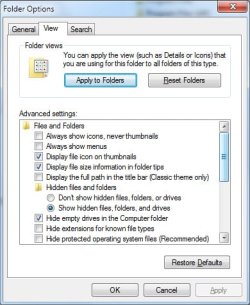
Anyone know a way to set all folders as a specific view.

I like medium icons but i can only set it for one folder at a time, when i click a subfolder, it uses the default..

Sorry bout the thread hijack
 

My Computer

OS
Windows 7, RTM x64
CPU
Core 2 Duo 1.8GHz
Motherboard
Gigabyte P35-PS3R
Memory
2GB
Graphics Card(s)
Radeon 4870
Hard Drives
Over 1TB over 5 drives lol...
Other Info
It radiates BLUE lighting!!

My Computer

Computer type
PC/Desktop
Computer Manufacturer/Model Number
Made by Dixon Butz
OS
Win7 Win 10, Win 8.1
CPU
AMD FX-8350, Corsair H100i
Motherboard
ASUS Crosshair V Formula-Z
Memory
16GB G.SKILL Ripjaws DDR3
Graphics Card(s)
EVGA GTX 980, EVGA GTX 860
Sound Card
Denon x4200 Dolby AMOS!
Monitor(s) Displays
65" Samsung 4K, +3 27inch
Screen Resolution
4K, 1080x3
Hard Drives
2TB Samsung hd204ui

1X Samsung 850 SSD
PSU
1000w EVGA, 2000VA UPS, 1000VA UPS and many others
Case
Lian Li
Cooling
Corsair H100i
Keyboard
Logitech K800
Mouse
Logitech Couch Mouse
Internet Speed
Gigabit!
Antivirus
Defender
Browser
Slimjet Chrome

Attachments

  • folders.jpg
    folders.jpg
    146.1 KB · Views: 344
Last edited by a moderator:

My Computer

OS
7264x64/7260x86
So thats where the setting went! Thank a ton :-D

( i cant rep you cause apparently you were the last one i reped lol sorry)
 

My Computer

OS
Windows 7, RTM x64
CPU
Core 2 Duo 1.8GHz
Motherboard
Gigabyte P35-PS3R
Memory
2GB
Graphics Card(s)
Radeon 4870
Hard Drives
Over 1TB over 5 drives lol...
Other Info
It radiates BLUE lighting!!
Old Windows Trick!

I am running Windows 7, 7100 x64 and have been using an old windows trick to make window's remember location and size of opened windows...

When you get the window the size and location you want and are ready to close it, Use the red Close (X) button in the upper right corner while holding down the shift key! This has always worked for me!

Marvin!
 

My Computer

Computer type
PC/Desktop
Computer Manufacturer/Model Number
Custom by Charbroil57
OS
Windows 7 Home Premium x64 (clean install 8/05/2015)
CPU
AMD Phenom II X2 550 Black Edition 3.1GHz
Motherboard
Gigabyte GA-MA790X-UD4P AM3/AM2+/AM2 AMD 790X ATX AMD
Memory
8 GB (4 x 2 GB) Corsair 6400C5 800 MHz
Graphics Card(s)
BFG 512MB GDDR3 9600GT OC
Sound Card
Realtec HD Audio 5.1
Monitor(s) Displays
DVI Viewsonic VA2231
Screen Resolution
1920 x 1080 (1080p)
Hard Drives
1 TB SATA 6G Seagate Barracuda (Boot drive, limited to 3G due to Mobo)
500 GB SATA 3G Seagate Barracuda
500 GB USB Seagate Desktop Drive
PSU
Ultra X4 750w Modular(upgraded)
Case
Antec Sonata
Cooling
Stock (80w CPU)
Keyboard
Microsoft Wireless Desktop Elite
Mouse
Wirless Intellimouse Explorer 2.0
Internet Speed
Xfinity Broadband (Home 75 MB Download)
Antivirus
Norton Internet Security
Browser
Firefox 39 (default) and IE 11
Other Info
SATA HP Lightscribe DVD RW
SATA Samsung Lightscribe DVD RW
I am running Windows 7, 7100 x64 and have been using an old windows trick to make window's remember location and size of opened windows...

When you get the window the size and location you want and are ready to close it, Use the red Close (X) button in the upper right corner while holding down the shift key! This has always worked for me!

Marvin!

Doesn't work.
 

My Computer

Computer type
PC/Desktop
Computer Manufacturer/Model Number
Made by Dixon Butz
OS
Win7 Win 10, Win 8.1
CPU
AMD FX-8350, Corsair H100i
Motherboard
ASUS Crosshair V Formula-Z
Memory
16GB G.SKILL Ripjaws DDR3
Graphics Card(s)
EVGA GTX 980, EVGA GTX 860
Sound Card
Denon x4200 Dolby AMOS!
Monitor(s) Displays
65" Samsung 4K, +3 27inch
Screen Resolution
4K, 1080x3
Hard Drives
2TB Samsung hd204ui

1X Samsung 850 SSD
PSU
1000w EVGA, 2000VA UPS, 1000VA UPS and many others
Case
Lian Li
Cooling
Corsair H100i
Keyboard
Logitech K800
Mouse
Logitech Couch Mouse
Internet Speed
Gigabit!
Antivirus
Defender
Browser
Slimjet Chrome
Doesn't work.

Doesn't work on what, I just resized and relocated ie8 browser along with the computer folder and other Windows 7 folders 5 times each and if I used the close button while holding down the shift key to close them when they opened up again they opened to the last closed size and location without fail.

Marvin
 

My Computer

Computer type
PC/Desktop
Computer Manufacturer/Model Number
Custom by Charbroil57
OS
Windows 7 Home Premium x64 (clean install 8/05/2015)
CPU
AMD Phenom II X2 550 Black Edition 3.1GHz
Motherboard
Gigabyte GA-MA790X-UD4P AM3/AM2+/AM2 AMD 790X ATX AMD
Memory
8 GB (4 x 2 GB) Corsair 6400C5 800 MHz
Graphics Card(s)
BFG 512MB GDDR3 9600GT OC
Sound Card
Realtec HD Audio 5.1
Monitor(s) Displays
DVI Viewsonic VA2231
Screen Resolution
1920 x 1080 (1080p)
Hard Drives
1 TB SATA 6G Seagate Barracuda (Boot drive, limited to 3G due to Mobo)
500 GB SATA 3G Seagate Barracuda
500 GB USB Seagate Desktop Drive
PSU
Ultra X4 750w Modular(upgraded)
Case
Antec Sonata
Cooling
Stock (80w CPU)
Keyboard
Microsoft Wireless Desktop Elite
Mouse
Wirless Intellimouse Explorer 2.0
Internet Speed
Xfinity Broadband (Home 75 MB Download)
Antivirus
Norton Internet Security
Browser
Firefox 39 (default) and IE 11
Other Info
SATA HP Lightscribe DVD RW
SATA Samsung Lightscribe DVD RW
In at least one instance it doesn't work for me either. I have a dual monitor set-up with Firefox maximised on my right monitor (not "primary"). Shift -> X or whatever, FF refuses to open other than on the LH monitor. At least some of my other programs remember their place appropriately!
 

My Computer

Computer Manufacturer/Model Number
AMD Athlon 64 3200+, Lenovo G560 i3
OS
Windows 7 Ultimate, Ubuntu
Motherboard
Gigabyte K8T8000
Memory
DDR 2Gb (!)
Graphics Card(s)
6600GT
Monitor(s) Displays
MultiMonitor (2) LCD
Hard Drives
Old Seagate 75
Big Western Digital
Samsung 500Gb pulled out of an external drive and installed
Ext: Maxtor (Firewire), 1Gb Lacie (Samsung)
Mouse
Logitech MX620 Cordless
Doesn't work.
Doesn't work for me either.
Like you, Charbroil57, I used this trick in XP and in 98 (and in WfW3.11) before that. Sorry to say on my Seven/7127 x32 setup it doesn't want to behave. I even tried Ctrl+Shift+F4, ha ha. Doesn't work. Grrhh :confused:
 

My Computer

OS
Dual boot XP Pro and Seven/7127
Alot of the Vista tweaks on How-to Geek work on `7
 

My Computer

Computer Manufacturer/Model Number
Home Grown
OS
vista 64 Win7
CPU
Q6600
Motherboard
Gigabyte EP45-UD3P
Memory
8gigs
Graphics Card(s)
MSI 260 GTX OC'ed
Sound Card
on board
Monitor(s) Displays
ACER P243W
Screen Resolution
all da way
Hard Drives
2 Maxtor 320s, and an external 320 on the floor
PSU
680 antec
Case
real old, real big Enlight
Cooling
Zalman
Keyboard
G15
Mouse
G7
Internet Speed
Cable
This is the Vista How Tos page on the How to Geek but unless my search skills have failed, I can't find any reference to Windows remembering their positions there.
 

My Computer

Computer Manufacturer/Model Number
AMD Athlon 64 3200+, Lenovo G560 i3
OS
Windows 7 Ultimate, Ubuntu
Motherboard
Gigabyte K8T8000
Memory
DDR 2Gb (!)
Graphics Card(s)
6600GT
Monitor(s) Displays
MultiMonitor (2) LCD
Hard Drives
Old Seagate 75
Big Western Digital
Samsung 500Gb pulled out of an external drive and installed
Ext: Maxtor (Firewire), 1Gb Lacie (Samsung)
Mouse
Logitech MX620 Cordless
Back
Top