Epson Status Monitor - Can't Check Ink Levels

URTHJ

New member
Local time
7:53 AM
Messages
24
I'm running Windows 7 RC x 64. Everything about the Epson Photo R1800 seems perfect, except it doesn't show the remaining ink levels when printing or when checking via Status Monitor. (Rather, on the latter, it just sits there saying "searching....") All the other, somewhat complex, features of the R1800 work fine, including selecting paper profiles, etc.

I'm pretty certain that everyting worked with 7 (7000) x64. I've reinstalled the Epson drivers, running it in Vista compatability mode, to no avail.

Since the printer has 8 separate ink cartridges, waiting for the "low ink" light on the printer (which won't tell me which cartridge) isn't a very appealing alternative. Any ideas?
 

My Computer My Computer

At a glance

Windows 7 Build 7229Athlon 64 x2 5200+4 GB DDR2On board
OS
Windows 7 Build 7229
CPU
Athlon 64 x2 5200+
Motherboard
Gigabyte GA-MA78GM-S2H
Memory
4 GB DDR2
Graphics Card(s)
On board
Sound Card
On board
You could try running the Status Monitor app in compatability mode & see if that helps. I used to have an epson printer & that ran status monitor so i'm only presuming that it's still the same.

Hope it helps :)


Jeff
 

My Computer My Computer

At a glance

Windows 7 Ultimate x64AMD Sempron Dual Core3GBNVIDIA GeForce 6150SE nForce 430
Computer Manufacturer/Model Number
Compaq Desktop
OS
Windows 7 Ultimate x64
CPU
AMD Sempron Dual Core
Memory
3GB
Graphics Card(s)
NVIDIA GeForce 6150SE nForce 430
Screen Resolution
1024x768
Hard Drives
150GB Sata
Just a note: If you are using refils the levels tend not to show, my Stylus Photo R300 acts this way unfortunately.
 

My Computer My Computer

At a glance

XP Pro SP3 x86/Vista SP2 x64/Win7 x64 Triple-...AMD64 X2 AM2 5000+Corsair TWX 2Gb (2x1Gb) DDR2 800MhzPCI-X 2.0 Inno3D (NVidia) 9500GT 1Gb DDR2
Computer Manufacturer/Model Number
Self Built
OS
XP Pro SP3 x86/Vista SP2 x64/Win7 x64 Triple-boot
CPU
AMD64 X2 AM2 5000+
Motherboard
Asus MSN-X Plus
Memory
Corsair TWX 2Gb (2x1Gb) DDR2 800Mhz
Graphics Card(s)
PCI-X 2.0 Inno3D (NVidia) 9500GT 1Gb DDR2
Sound Card
Onboard Realtec ALC662-GR
Monitor(s) Displays
Relisys 17' CRT (model unknown)
Screen Resolution
1024x768
Hard Drives
750Gb Samsung 7200-3Gb/s 32Mb Cache SATA
PSU
500W
Cooling
Standard AMD CPU Fan, One side, front and rear case fan.
Keyboard
Microsoft Multimedia Keyboard
Mouse
Samsung Optical
Internet Speed
10M
Just a note: If you are using refils the levels tend not to show, my Stylus Photo R300 acts this way unfortunately.

That's a very good point Generator. +1

If it's a chipped cartridge (which most now are) then the readings could be wrong. There are tools available that you can connect to your print cartridge and Zap the chip to reset it.
 

My Computer My Computer

At a glance

Windows 7 Ultimate x64AMD Sempron Dual Core3GBNVIDIA GeForce 6150SE nForce 430
Computer Manufacturer/Model Number
Compaq Desktop
OS
Windows 7 Ultimate x64
CPU
AMD Sempron Dual Core
Memory
3GB
Graphics Card(s)
NVIDIA GeForce 6150SE nForce 430
Screen Resolution
1024x768
Hard Drives
150GB Sata
No; they are original cartridges, not refilled. And, at least for the R1800, "status monitor" is a part of the driver, not separate, so I've been reluctant to try to load Epson's Status Monitor as a separate thing--and Vista compatability mode for the whole driver doesn't fix the problem.

At the same time, I've found I third-party program that will report on all eight cartridges, even when Epson's own Status Monitor won't. While the software is (I think) designed to allow you to refill and "reset" the ink level monitors on the printer, it does have a reporting function--which is all I need. See SSC Service Utility for Epson Stylus Printer.. And, for that, it seems to work just fine.

Still, I may try, at some point, installing the Epson software in XP SP3 compatability mode, or trying to install the Status Monitor separately. I just don't really want to mess too much with something that, except for reporting the ink levels, seems to be working so well.
 

My Computer My Computer

At a glance

Windows 7 Build 7229Athlon 64 x2 5200+4 GB DDR2On board
OS
Windows 7 Build 7229
CPU
Athlon 64 x2 5200+
Motherboard
Gigabyte GA-MA78GM-S2H
Memory
4 GB DDR2
Graphics Card(s)
On board
Sound Card
On board
I have the same issue with Windows 7 64 bit and an Epson Artisan 800 (using genuine Epson cartridges). No ink levels shown in the status monitor. Oddly enough, if I check the info shown at the printer when I access it through the router IP, it shows the correct levels.
 

My Computer My Computer

At a glance

Windows 7 64 bitIntel Core 2 E6600 @ 2.4ghz4GB
OS
Windows 7 64 bit
CPU
Intel Core 2 E6600 @ 2.4ghz
Motherboard
Asus P5N32-SLI SE Deluxe
Memory
4GB
Sound Card
Creative Xi-Fi Elite
Monitor(s) Displays
Dell 24" LCD
Hard Drives
Lots
DonC, I'm in the exact same boat. I'm running Windows 7 64-bit and have an Epson Artisan 800. When I first got my printer I was still using Vista, and the print driver DID work properly in showing the ink levels. When I installed Win7, that particular option did not work any longer. I'm guessing we're going to have to wait for Epson to provide us with an updated driver so that function "functions" again.

Thank you for mentioning how you get the correct ink levels to show by going through the router IP. For the life of me I could NOT remember how I was able to see the correct levels in Win 7, and that was how I did it. At least now I remember how to check the levels until Epson provides us with an updated driver, and lets hope they don't blow us off as some manufacturers do when it comes to updating drivers.
 

My Computer My Computer

At a glance

Windows 7 Professional 64-bitIntel Core 2 T7200 @ 2.00 GHz4.00 GBNVIDIA GeForce Go 7900 GS
Computer Manufacturer/Model Number
Toshiba Satellite P105-S9339
OS
Windows 7 Professional 64-bit
CPU
Intel Core 2 T7200 @ 2.00 GHz
Memory
4.00 GB
Graphics Card(s)
NVIDIA GeForce Go 7900 GS
A candidate solution

I've got a Epson Stylus Photo TX700W and upgraded to Windows 7 32bit recently. I uninstalled all epson drivers and downloaded the driver from the web.
After installations I noticed system monitor does not display ink levels. Usually when there's no network access, ink levels , on the Printing preference window, stay white for some moments and then gray out. However they grayed out immediately in my situation.
So I turned off firewall and Anti virus, it didn't solve anything.

So finally I reinstalled the driver from the provided CD ROM and noticed that the setup installs a module called "Epson Network Utility" along with other stuff. That was the key to resolving the status monitor issue. So I again uninstalled the rather old drivers which were installed by the CD ROM. But this time I didn't uninstall "Epson Network Utility" (when uninstalling the driver there's a check box asking you so)
Now after installing the web drivers my status monitor 3 works fine.

Hope it helps.
 

My Computer My Computer

At a glance

Windows 7 32 bit
OS
Windows 7 32 bit
Got it! :-)

Okay, I'm sure I'll get chewed out for this, but I need to admit that I did NOT install the updated Epson Artisan 800 printer driver correctly when I installed it the first time. I took popen's advice and used my original Epson CD to install the driver package and I followed the instructions "correctly", and the ink levels were correctly displayed. However, the "update driver" function did NOT work and displayed, "Current OS not supported."

I went to the Epson site and downloaded the updated driver package for my needs (Epson Artisan 800 Windows 7 64-bit Network driver), and ran that installation package and followed the directions EXACTLY as stated and sure enough - it updated all the drivers and the ink levels appear correctly.

I'll admit my stupidity so others don't have to. :p I believe the problem I had was that when I installed the updated driver before this time, I did NOT connect my printer to my router with an ethernet cable. I was able to get it to see and communicate with the printer (at least it appeared to), but even in the setup process it says that connecting wirelessly like I did is NOT supported. Of course I tried anyway and was able to get the printer to print, but without having physically connected the printer to the router with an ethernet cable, the driver installation program was NOT able to actually push the necessary information through the router to the printer and back to my computer to COMPLETELY finish installing all the software.

The "network utility" that popen mentioned doesn't get installed unless the printer is physically connected to the router with an ethernet cable. Once I actually followed the instructions as stated for a "wireless network" connection for the printer, ALL the software was correctly installed and functions properly. :party:

So, there you go - I fully admit in this public space that this problem was due to ME just NOT correctly following instructions. At least now I know that everything works correctly, and I (hopefully!) learned my lesson to "FOLLOW DIRECTIONS!!!!" :geek:

Of course, this was for connecting and printing wirelessly through a router, but I would guess that this would apply if you are printing wirelessly or through a direct connection. Happy printing, everyone! :D
 

My Computer My Computer

At a glance

Windows 7 Professional 64-bitIntel Core 2 T7200 @ 2.00 GHz4.00 GBNVIDIA GeForce Go 7900 GS
Computer Manufacturer/Model Number
Toshiba Satellite P105-S9339
OS
Windows 7 Professional 64-bit
CPU
Intel Core 2 T7200 @ 2.00 GHz
Memory
4.00 GB
Graphics Card(s)
NVIDIA GeForce Go 7900 GS
No; they are original cartridges, not refilled. And, at least for the R1800, "status monitor" is a part of the driver, not separate, so I've been reluctant to try to load Epson's Status Monitor as a separate thing--and Vista compatability mode for the whole driver doesn't fix the problem.

At the same time, I've found I third-party program that will report on all eight cartridges, even when Epson's own Status Monitor won't. While the software is (I think) designed to allow you to refill and "reset" the ink level monitors on the printer, it does have a reporting function--which is all I need. See SSC Service Utility for Epson Stylus Printer.. And, for that, it seems to work just fine.

Still, I may try, at some point, installing the Epson software in XP SP3 compatability mode, or trying to install the Status Monitor separately. I just don't really want to mess too much with something that, except for reporting the ink levels, seems to be working so well.

This program doesn't see my old Epson 1270 in Win 7 x64. I installed it as Administrator and tried running it in XP SP3 compatibility as Admin. Couldn't read back the ink levels. Siad something about not being able to do it with the printer in it's current state (which is normal).
 

My Computer My Computer

At a glance

Windows 7 Ultimate x64 SP1E8400 E0 stepping @ 4.05GHz2x2GB + 2x1GB MushkineVGA GTS 250SC
Computer Manufacturer/Model Number
Custom
OS
Windows 7 Ultimate x64 SP1
CPU
E8400 E0 stepping @ 4.05GHz
Motherboard
Abit IP35-E, BIOS v.18b1
Memory
2x2GB + 2x1GB Mushkin
Graphics Card(s)
eVGA GTS 250SC
Sound Card
Onboard
Monitor(s) Displays
Sony FW900
Screen Resolution
1600x1024
Hard Drives
WD Black 1TB SATA
PSU
Corsair 550W
Case
CM Scout
Cooling
Scythe Mugen2
Keyboard
PS2
Mouse
PS2
Internet Speed
FiOS
I have an Epson RX680 AIO and it's working OK in Win 7 64 bit, with the 64 bit Vista drivers. The Printing screen that pops up does not automatically show the ink levels like some of the older models, but there is an option to check to show the ink levels.
 

My Computer My Computer

At a glance

Windows 10 64 bitIntel i7 6700K16GB Corsair DominatorIntel CPU Graphics
Computer type
PC/Desktop
Computer Manufacturer/Model Number
My Own Build
OS
Windows 10 64 bit
CPU
Intel i7 6700K
Motherboard
ASUS ROG Maximus VIII Hero
Memory
16GB Corsair Dominator
Graphics Card(s)
Intel CPU Graphics
Sound Card
RealTek
Monitor(s) Displays
27" Dell S2719dgf
Screen Resolution
2560X1440
Hard Drives
1 TB Samsung 850 EVO SSD for Win 10 Pro
500GB Samsung 850 EVO SSD for Win 10 Insider
2 TB drive for backup
PSU
EVGA Supernova 750G2
Case
BeQuiet Silent Base 600
Cooling
Deepcool Captain 120EX
Keyboard
Microsoft Wireless 2000
Mouse
Microsoft wireless
Internet Speed
100 MB/sec (Cable)
Antivirus
Microsoft Defender and Malwarebytes
Browser
Edge/Firefox
Other Info
Cakewalk (Sonar) by BandLab and Studio One 4.1 Pro recording studio software. MOTU 896Mk3 Hybrid recording interface, Frontier Tranzport wireless control unit, Behringer X-Touch Control Surface.
Five USB connected optical drives for CD Audio production using Nero BurningROM
epson ink monitor for Windows Seven

Hi All
I am running windows seven and have an epson R200 stylus photo, Epson were unable to help with a compatible ink monitor but I found one which works well and enables you to reset the counter when the printer thinks it has died. It is something called ssc service utility and it is a free download directly from them.
it works with most epson printers hope this is of use to you all
regards
Charlie
 

My Computer My Computer

At a glance

windows seven ultimateamd phenom 965 quad core 3.4 ghz4 gb ddr3 1333nvidea 9600gt pcie
Computer Manufacturer/Model Number
own make
OS
windows seven ultimate
CPU
amd phenom 965 quad core 3.4 ghz
Motherboard
ecs mcp61m-m3
Memory
4 gb ddr3 1333
Graphics Card(s)
nvidea 9600gt pcie
Sound Card
creative labs 5:1
Monitor(s) Displays
Acer AL 1913 19" 4:3 and Acer V243HQ 24" Widescreen
Screen Resolution
1280 x1024 and 1920 x 1080
Hard Drives
500 gb sata 2 internal
iomega 500gb external x2
PSU
850w
Case
coolermaster
Cooling
standard
Keyboard
logitech cordless
Mouse
logitech optical cordless
Internet Speed
6mbs
Other Info
acer laptop 5920g running windows seven ultimate
own make desktop running xp pro and dual boot to windows seven ultimate.
medion desktop running xp home.
apple imac 27" screen.
home network connecting all to the internet and each other.
bamboo pen and touch.
R200/R300 Ink Level monitor

Folks,

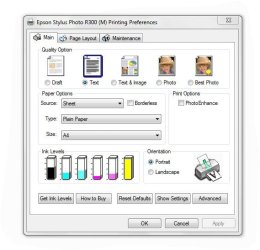
Within the printers and device list if you right click and select printer preferences you get this screen whic as you can see has a check ink level button.


Cheers

qwiksand
:)
 

Attachments

  • R300InkLevels.JPG
    R300InkLevels.JPG
    46.3 KB · Views: 140

My Computer My Computer

At a glance

Windows 7 32 bit
OS
Windows 7 32 bit
check ink level

Hi Qwiksand
on the r200/300 printer properties the check ink level button is greyed out and not useable the only way to check ink levels is to use third party software as mentioned previously
 

My Computer My Computer

At a glance

windows seven ultimateamd phenom 965 quad core 3.4 ghz4 gb ddr3 1333nvidea 9600gt pcie
Computer Manufacturer/Model Number
own make
OS
windows seven ultimate
CPU
amd phenom 965 quad core 3.4 ghz
Motherboard
ecs mcp61m-m3
Memory
4 gb ddr3 1333
Graphics Card(s)
nvidea 9600gt pcie
Sound Card
creative labs 5:1
Monitor(s) Displays
Acer AL 1913 19" 4:3 and Acer V243HQ 24" Widescreen
Screen Resolution
1280 x1024 and 1920 x 1080
Hard Drives
500 gb sata 2 internal
iomega 500gb external x2
PSU
850w
Case
coolermaster
Cooling
standard
Keyboard
logitech cordless
Mouse
logitech optical cordless
Internet Speed
6mbs
Other Info
acer laptop 5920g running windows seven ultimate
own make desktop running xp pro and dual boot to windows seven ultimate.
medion desktop running xp home.
apple imac 27" screen.
home network connecting all to the internet and each other.
bamboo pen and touch.
Windows 7 Epson R300

Hello Oldibbs,

My original post may not make it clear enough what I am trying to say. The screen snip I attached is actually from Windows 7 with an Epson R300 printer showing the ink levels. There is no third party software involved in it.

When the preferences screen first appears the ink level icons are greyed out but the check ink level button is not. When I click the ink level button the ink level icons are then filled in with the levels of the corresponding colours.

Whether there is any difference between my Windows 7 Professional 32 Bit and your Windows 7 Ultimate in respect of printer support I don't know . Perhaps folks with other versions of Windows 7 can comment.

But for the avoidance of doubt no third party software was necessary to give me the required information. :D

Cheers :party:
 

My Computer My Computer

At a glance

Windows 7 32 bit
OS
Windows 7 32 bit
In our household, we have two Epson printers. I have an R1800 directly connected to my desktop PC and my wife has her RX680 directly connected to her desktop PC. We are running W7 Ultimate and are networked; sharing each other's printer. I also made sure we are running the Windows 7 drivers:

Epson America, Inc. - Support: Microsoft Windows 7 Support for the Epson Stylus Photo R1800

Both printers work well from either desktop PC. However, I have found a great way to damage the drivers to the point where a system restore is the only way I could find to fix it. I made the mistake of following the update dialog from the driver of the shared RX680. What happened was I wanted to use the shared RX680 from my desktop PC. When I selected it and said to print, I got a dialog asking me if I wanted to update the printer driver I was about to use. I said yes - BIG MISTAKE! :devil: It ended up killing both the R1800 and RX680 drivers. They shows no ink (greyed out) and were always off-line. I struggled for over an hour recovering from that.

So, is that why you show no ink? Did you do an update from the suggestion of the driver? As far as I'm concerned, Epson should be ashamed of this W7 bug. Only install the W7 driver manually that you download yourself. :D

Bye. :cool:
 
Last edited:

My Computer My Computer

At a glance

Windows 7 Ultimate x64i7 9709 GB9600GT
Computer Manufacturer/Model Number
Home Brew
OS
Windows 7 Ultimate x64
CPU
i7 970
Motherboard
ASUS Rampage III GENE
Memory
9 GB
Graphics Card(s)
9600GT
Monitor(s) Displays
dual 24" Samsung
Screen Resolution
1920x1200
Hard Drives
VelociRaptor and 4TB of Hitachi RAID 0
PSU
Thermaltake toughpower W0104RU 650W
Case
Thermaltake LANBOX Lite
Internet Speed
30 Mbps Download 1 Mbps Upload (Speedtest.com)
Hi All
the printer works perfectly and will print from all four pcs attached to the network. I have enquired to epson and they have replied that the ink level monitor is not available for windows seven but they are working on a fix. The ink levels and the get ink levels button are greyed out and unusable before and after installing the latest drivers from the epson site! which is why i got fed up and installed third party software ( which will also reset the counter to make the printer think it is serviceable, or thats what i have been told)
regards
 

My Computer My Computer

At a glance

windows seven ultimateamd phenom 965 quad core 3.4 ghz4 gb ddr3 1333nvidea 9600gt pcie
Computer Manufacturer/Model Number
own make
OS
windows seven ultimate
CPU
amd phenom 965 quad core 3.4 ghz
Motherboard
ecs mcp61m-m3
Memory
4 gb ddr3 1333
Graphics Card(s)
nvidea 9600gt pcie
Sound Card
creative labs 5:1
Monitor(s) Displays
Acer AL 1913 19" 4:3 and Acer V243HQ 24" Widescreen
Screen Resolution
1280 x1024 and 1920 x 1080
Hard Drives
500 gb sata 2 internal
iomega 500gb external x2
PSU
850w
Case
coolermaster
Cooling
standard
Keyboard
logitech cordless
Mouse
logitech optical cordless
Internet Speed
6mbs
Other Info
acer laptop 5920g running windows seven ultimate
own make desktop running xp pro and dual boot to windows seven ultimate.
medion desktop running xp home.
apple imac 27" screen.
home network connecting all to the internet and each other.
bamboo pen and touch.
Whomever you asked at Epson about W7 compatibility of their drivers has been sniffing too much glue. :devil: I am running W7 and can see the ink levels of my Epson R1800 just fine. I can also see the ink levels on my wife's shared RX680. So look at my previous posting and follow the link to Epson W7 drivers. :D

Bye. :cool:

Hi All
the printer works perfectly and will print from all four pcs attached to the network. I have enquired to epson and they have replied that the ink level monitor is not available for windows seven but they are working on a fix. The ink levels and the get ink levels button are greyed out and unusable before and after installing the latest drivers from the epson site! which is why i got fed up and installed third party software ( which will also reset the counter to make the printer think it is serviceable, or thats what i have been told)
regards
 

My Computer My Computer

At a glance

Windows 7 Ultimate x64i7 9709 GB9600GT
Computer Manufacturer/Model Number
Home Brew
OS
Windows 7 Ultimate x64
CPU
i7 970
Motherboard
ASUS Rampage III GENE
Memory
9 GB
Graphics Card(s)
9600GT
Monitor(s) Displays
dual 24" Samsung
Screen Resolution
1920x1200
Hard Drives
VelociRaptor and 4TB of Hitachi RAID 0
PSU
Thermaltake toughpower W0104RU 650W
Case
Thermaltake LANBOX Lite
Internet Speed
30 Mbps Download 1 Mbps Upload (Speedtest.com)
Crunchy Doodle;729967sniffing too much glue. :devil:[/QUOTE said:
It seems to be a common problem among printer manufacturers.
 

My Computer My Computer

At a glance

El Capitan / Windows 10i7-4980HQ16GBIris 5200
Computer type
Laptop
Computer Manufacturer/Model Number
Apple
OS
El Capitan / Windows 10
CPU
i7-4980HQ
Memory
16GB
Graphics Card(s)
Iris 5200
what about "print preview" that in XP was enabled and in seven doesn't appair?
I've a styluscolor 880

thanks
 

My Computer My Computer

At a glance

seven 32 bit
OS
seven 32 bit
Back
Top