
How to know what is the best driver for my laptop

adriansam

New member
Member
Local time
1:52 AM
Messages
69
Location
Tanza, Cavite
Hey Guys
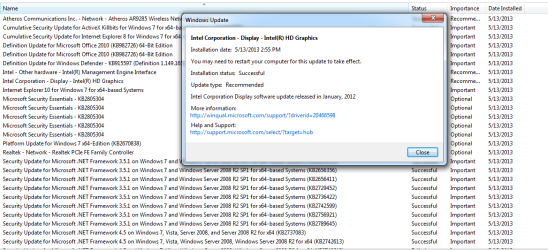
I just installed windows earlier then I do windows update


Intel(R) HD Graphics is included on windows update
267875-how-know-what-best-driver-my-laptop-2013-05-13_221501.png
after installing all of the updates I run Intel Driver Utility
and I NOTICE THAT theres NEW update
I forgot to screenshot before installing the Intel(R) HD Graphics from intel website but it looks like this.
267876-how-know-what-best-driver-my-laptop-2013-05-13_221708.png
So now I dont know where to find best drivers for my laptop

Before, my laptop has Intel Rapid Storage Technology, Elantech TouchPad Driver, Intel Control Center etc
I dont know how to retrieve them. I also noticed that the transfer rate from DVD to Local Disk was just hundred KB per second unlike before it was 4.XXMB per second.


Please help me, sorry for my bad english
 

Attachments
  • 2013-05-13_221501.png
    2013-05-13_221501.png
    27.8 KB · Views: 55
  • 2013-05-13_221708.png
    2013-05-13_221708.png
    9.8 KB · Views: 55

My Computer My Computer

At a glance

Microsoft Windows 7 Ultimate 64-bitIntel(R) Core(TM) i3 CPU M 370 @ 2.40GHz465.76 GBIntel(R) HD Graphics
Computer type
Laptop
Computer Manufacturer/Model Number
Lenovo
OS
Microsoft Windows 7 Ultimate 64-bit
CPU
Intel(R) Core(TM) i3 CPU M 370 @ 2.40GHz
Motherboard
LENOVO Base Board Product Name
Memory
465.76 GB
Graphics Card(s)
Intel(R) HD Graphics
Sound Card
(1) High Definition Audio Device (2) High Definition Audio
Hard Drives
(1) ST9500325AS
Hi adriansam,

Go to your Laptop manufacturer's support site as most have their own drivers to download.
 

My Computer My Computer

At a glance

Win7 H.Prem. 32bit+SP1
Computer Manufacturer/Model Number
Look in my Signature.
OS
Win7 H.Prem. 32bit+SP1

My Computer My Computer

At a glance

Windows 7 Ultimate Retail Box (64-bit install...AMD FX-8350 CPU v1.15 (or 1.0F) BIOS was requ...8G CAS-7 G-Skill DDR3 @1333 (2 fours) [mobo n...Radeon HD 7950 [3 gigs of GDDR5] MSI Twin Fro...
Computer type
PC/Desktop
Computer Manufacturer/Model Number
Self Built Custom
OS
Windows 7 Ultimate Retail Box (64-bit installed) + Service Pack 1
CPU
AMD FX-8350 CPU v1.15 (or 1.0F) BIOS was required!
Motherboard
MSI 890FXA-GD70
Memory
8G CAS-7 G-Skill DDR3 @1333 (2 fours) [mobo nonOC max rec'd]
Graphics Card(s)
Radeon HD 7950 [3 gigs of GDDR5] MSI Twin Frozr model
Sound Card
Realtek High Definition Audio (onboard mobo, ALC-889 chip)
Monitor(s) Displays
2 WS LED Monitors: One LG One Viewsonic
Screen Resolution
1920 by 1080
Hard Drives
SSD for OS: Samsung 840 Pro
SSD for VM and utilities: Adata SX900
7200 RPM SATA HDs for the rest: Hitachi and Seagate
PSU
Corsair TX850 - 850W max, in service since August 2010.
Case
Thermaltake Armor A90
Cooling
Thermaltake Spin Q CPU Cooler, in service since August 2010
Keyboard
Logitech G11
Mouse
Logitech M310 Wireless
Internet Speed
100 Megabit broadband supposedly upgraded from 50 (Cable)
Antivirus
Bitdefender Internet Security 2014 suite
Browser
Pale Moon 64-bit main, also IceDragon, Opera, and Maxthon.
Other Info
CompTIA A+ certified (220-800 series) in July 2013.
Theoretically, Windows 7 should have generated automatically restore points before driver installation, so you can revert back to when you had just done the Windows Update but BEFORE you ran the Intel update utilities. Or at most BEFORE the Windows Update, so you'll have to download that updates again. follow the System restore tutorial

Then, it is usually better to stick to what comes from Windows Update. It gives you stuff a bit after the time when it is still fresh of the press but it's less likely to give you potentially unstable/bugged drivers like the installers from the device manufacturer (like Intel) or the outdated drivers from the laptop manufacturer's page.
Assuming Windows Update does have those drivers, but for most laptops it's the case.
 

My Computer My Computer

At a glance

Win 7 Pro 64-bit 7601AMD Phenom 9650 QuadCore, revision DR-B35 GB yes I run 2x 2GB and 1x 1GB, different b...NVIDIA GeForce 9800 GT 512 Mb, unknown manufa...
Computer type
PC/Desktop
Computer Manufacturer/Model Number
custom built
OS
Win 7 Pro 64-bit 7601
CPU
AMD Phenom 9650 QuadCore, revision DR-B3
Motherboard
ASUS M4A78
Memory
5 GB yes I run 2x 2GB and 1x 1GB, different brand, spank me.
Graphics Card(s)
NVIDIA GeForce 9800 GT 512 Mb, unknown manufacturer.
Sound Card
Crappy Realtek Integrated Audio
Monitor(s) Displays
Fujitsu Siemens P19-3P
Screen Resolution
1280 x 1024 x 32 bits @ 60 Hz Oh yeah, 4:3 rocks!
Hard Drives
(1) MAXTOR S TM3320613AS SATA Disk Device (2) STM35004 18AS SATA Disk Device (3) TOSHIBA USB 2.5"-HDD
PSU
whatever, around 450w
Case
Scavenged from old company PC, 10+ years old
Cooling
CPU fan, GPU fan, case fan, nothing fancy
Keyboard
Microsoft, PS/2, white.
Mouse
Optical, logitec.
Internet Speed
effective max speeds: 70-ish kB/s down 30-ish kB/s up
Antivirus
Avira, free edition.
Browser
Firefox with FXChrome to make it look like Google Chrome :P
Other Info
Was discarded by previous owner due to "horrible performance".
Was running Win Xp from a IDE drive. Yeah. Was a pain.
SATA II drive and Win7 and it zips away! Yay!
Back
Top